

















TranscribeAudio
What is TranscribeAudio?
Turning a long recording into useful text can take far more time than the recording itself. TranscribeAudio makes that process considerably easier by converting audio, video, and YouTube content into searchable, editable text with AI. It is designed for everyday recordings such as meetings, interviews, lectures, podcasts, conversations, and online videos.
The service supports more than 100 languages and can produce timestamped transcripts, identify different speakers, and transform finished transcripts into summaries, notes, mind maps, translations, and other useful outputs. A particularly useful advantage is that users can get started without registration, making it convenient when a quick transcription is all that is needed.
Key Features
- AI-powered transcription for audio and video recordings
- Support for YouTube links as a transcription source
- More than 100 supported languages
- Timestamped transcripts for easier navigation
- Speaker identification for conversations and meetings
- Automatic subtitle generation
- Transcript editing, searching, and review
- AI-generated summaries and structured notes
- AI mind maps for organizing information visually
- AI chat for asking questions about transcript content
- Multilingual transcript and subtitle translation
- Export options for text, documents, and subtitles
User Interface
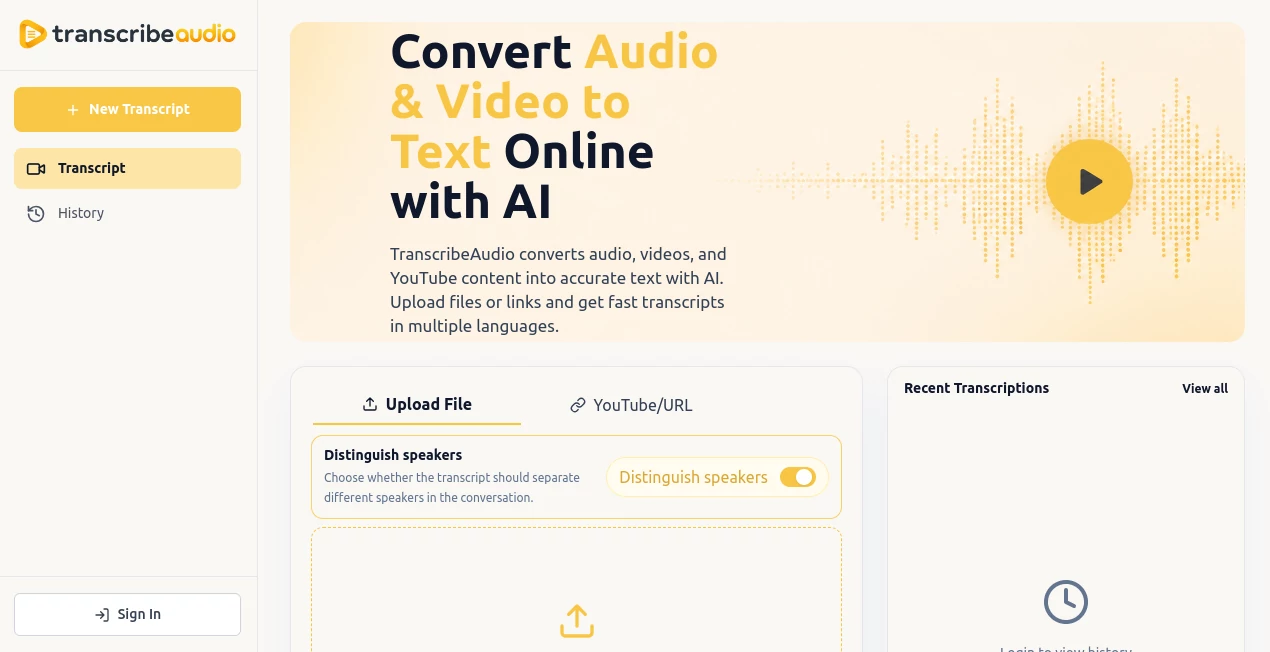
The interface is built around a straightforward transcription workflow. Users can upload a recording, paste a YouTube link, or record audio, then let the service process the content. The upload area supports common audio formats up to 250MB, while speaker detection can be enabled when a recording contains several people.
Once processing is complete, the transcript can be reviewed alongside timestamps. This makes it practical to jump back to a particular moment instead of manually searching through an entire recording. The overall experience is focused on getting from raw media to usable information without unnecessary steps.
Accuracy & Performance
Transcription quality naturally depends on factors such as recording quality, background noise, speaker clarity, and the language being spoken. Clear recordings generally provide better results, while noisy environments or overlapping conversations may require some manual corrections.
Timestamped output and speaker labels add another useful layer to the results. Instead of receiving a large block of text, users can work with a more organized transcript that is easier to verify, edit, and reuse. For a researcher reviewing an interview or a manager checking a meeting recording, that difference can save a surprising amount of time.
Capabilities
The platform goes beyond basic speech-to-text conversion. After creating a transcript, users can summarize long recordings, generate notes, build mind maps, translate the content, and interact with the transcript through AI chat.
This is especially useful for lengthy material. For example, a student can turn a lecture into structured notes and a mind map, while a content creator can transcribe a podcast and use the resulting text as a starting point for captions or other content. Teams can also turn meeting recordings into searchable documentation and follow-up material.
Security & Privacy
Privacy is an important consideration when working with recordings, particularly when they contain meetings, interviews, or other sensitive conversations. According to the service, uploaded files and transcripts are not public or shared with other users. Users can also manage and delete saved transcription history.
As with any online transcription service, users should still consider the sensitivity of their recordings and make sure their use of the service fits their own privacy and organizational requirements.
Use Cases
There are many situations where converting spoken content into searchable text is more useful than repeatedly listening to the original recording.
- Meetings: Create searchable transcripts, review decisions, identify action points, and revisit important parts of team discussions.
- Interviews: Turn recorded conversations into editable text that can be searched for quotes, insights, and key responses.
- Podcasts: Convert episodes into transcripts that can support summaries, captions, notes, and content repurposing.
- Education: Transcribe lectures and study material, then create summaries, notes, and visual mind maps.
- YouTube research: Convert online videos into text so important information can be searched and reviewed more quickly.
- Content creation: Extract spoken content from recordings and reuse it for written material, captions, or other publishing workflows.
- Research: Analyze long recordings without having to replay the entire source whenever a particular detail is needed.
Pros and Cons
Pros:
- Free to start with no registration required
- Supports audio, video, and YouTube sources
- Works with more than 100 languages
- Timestamped transcripts make long recordings easier to navigate
- Speaker identification helps organize conversations
- Includes summaries, notes, mind maps, and AI chat
- Supports translation and subtitle workflows
- Transcripts can be exported for later use
Cons:
- Transcription quality can vary with audio quality, noise, accents, and overlapping speakers
- More advanced analysis can be unnecessary for users who only need basic transcription
- Large or particularly complex recordings may still require manual review
Pricing Plans
The service is presented as a free online AI transcription tool, allowing users to start transcribing without creating an account. This makes it particularly appealing for occasional users who do not want to commit to a subscription simply to convert a recording into text.
For users with more demanding requirements, it is worth checking the current service interface for any usage limits or future paid options, as pricing and availability can change over time.
How to Use TranscribeAudio
- Open the transcription service and choose to start a new transcript.
- Upload an audio or video file, paste a YouTube link, or use the available recording option.
- Enable speaker identification if the recording contains multiple speakers.
- Choose the appropriate language when required and start the transcription.
- Review the generated transcript and use timestamps to check specific sections of the original recording.
- Edit speaker names or transcript text where necessary.
- Use AI tools to create summaries, notes, mind maps, translations, or ask questions about the transcript.
- Export the finished transcript or subtitles for use in another project.
Comparison with Similar Tools
Many transcription services focus primarily on converting speech into text. What makes this solution more interesting is the workflow that follows transcription. Instead of treating the transcript as the final result, it provides additional ways to analyze and reuse the information.
For example, a basic transcription service may give you the text from a one-hour interview and leave you to organize it yourself. Here, you can use timestamps, speaker labels, summaries, AI questions, translation, and mind maps to continue working with the same material. That broader workflow can be valuable for students, researchers, creators, and teams dealing with large amounts of recorded information.
It is also useful that audio, video, and YouTube content can be handled from the same general workflow. For someone who regularly works with different types of recordings, avoiding separate tools for each source can make the process much simpler.
Conclusion
Transcription becomes much more useful when the resulting text can actually be searched, analyzed, organized, and reused. This service takes that approach by combining AI transcription with timestamps, speaker identification, summaries, mind maps, translation, subtitles, and transcript-based AI chat.
Whether you are reviewing a team meeting, researching an interview, studying a lecture, working with podcast recordings, or extracting information from a YouTube video, the workflow can turn spoken content into something far easier to work with. Its free starting point and no-registration entry make it an especially practical option for anyone who occasionally needs fast audio or video transcription.
Frequently Asked Questions (FAQ)
Can I transcribe audio files into text?
Yes. Audio recordings can be uploaded and converted into editable, searchable text using AI transcription.
Can I transcribe a YouTube video?
Yes. You can provide a YouTube link and generate a transcript from the video's spoken content.
Does it support video transcription?
Yes. Video files can be processed and converted into timestamped transcripts, with additional options for subtitles and transcript analysis.
How many languages are supported?
The service supports more than 100 languages, making it suitable for multilingual transcription and international content.
Can it identify different speakers?
Yes. Speaker identification can distinguish between people in a conversation, which is particularly helpful for meetings, interviews, and discussions.
Can I summarize a transcript?
Yes. AI-powered tools can turn a transcript into a shorter summary or structured notes, making long recordings easier to understand.
Can I create a mind map from a transcript?
Yes. The AI tools can generate mind maps that organize major topics and connections found in transcript content.
Can I ask questions about a transcript?
Yes. The built-in AI chat allows users to ask questions about the transcript and locate specific information without manually reading or replaying the entire recording.
Can I generate subtitles?
Yes. Transcripts can be used to create subtitles and captions, which can then be reviewed, edited, and exported.
Is the service free?
The service currently offers free online transcription and lets users start without registration.
Are uploaded files private?
According to the service, uploaded files and transcripts are not public or shared with other users. Saved history can also be managed and deleted.
Can I use it on a mobile phone?
Yes. The service works through a web browser on desktop and mobile devices, allowing users to upload recordings, create transcripts, and review results from different devices.
AI Summarizer , AI Mind Mapping , AI Transcription , AI Speech to Text .
These classifications represent its core capabilities and areas of application. For related tools, explore the linked categories above.
TranscribeAudio details
Website unavailable — View Alternatives
Pricing
- Freemium
Apps
- Web App
Categories

TranscribeAudio Alternatives Product

Maestra

EasyVC
Mp3ToMidi

TurboScribe

FluentDictat…
AudioScribe

MyMap.AI

SuperAI

YTVidHub-you…
