
Transcript Video
What is Transcript Video?
Long videos, interviews, lectures, podcasts, and recorded meetings often contain useful information that is difficult to revisit. Finding one sentence in a one-hour recording can mean scrolling through a timeline, listening to the same sections repeatedly, and taking notes along the way. Transcript Video offers a more practical approach by turning video and audio recordings into searchable, timestamped text that can be developed into useful study and production material.
The platform supports YouTube videos, YouTube playlists, uploaded video files, and audio files. Once the source has been processed, users can work with the resulting transcript rather than constantly replaying the original recording. This makes it particularly useful for researchers, students, content creators, podcast producers, educators, and anyone who regularly works with spoken information.
What makes the workflow especially interesting is that transcription is only the starting point. A single recording can be transformed into summaries, mind maps, chapters, flashcards, quizzes, visual briefs, and translated transcripts. Instead of treating a transcript as a final document, the platform turns it into a working source for further tasks.
Key Features
- Transcription of YouTube videos
- Support for YouTube playlists
- Video and audio file transcription
- Timestamped transcript passages
- Searchable transcript content
- Speaker separation option
- AI-generated transcript summaries
- Mind map generation
- Study flashcard creation
- Knowledge quiz generation
- Timestamped chapter creation
- Visual brief generation
- Transcript translation
- Connected workflows for studying, research, and content production
User Interface
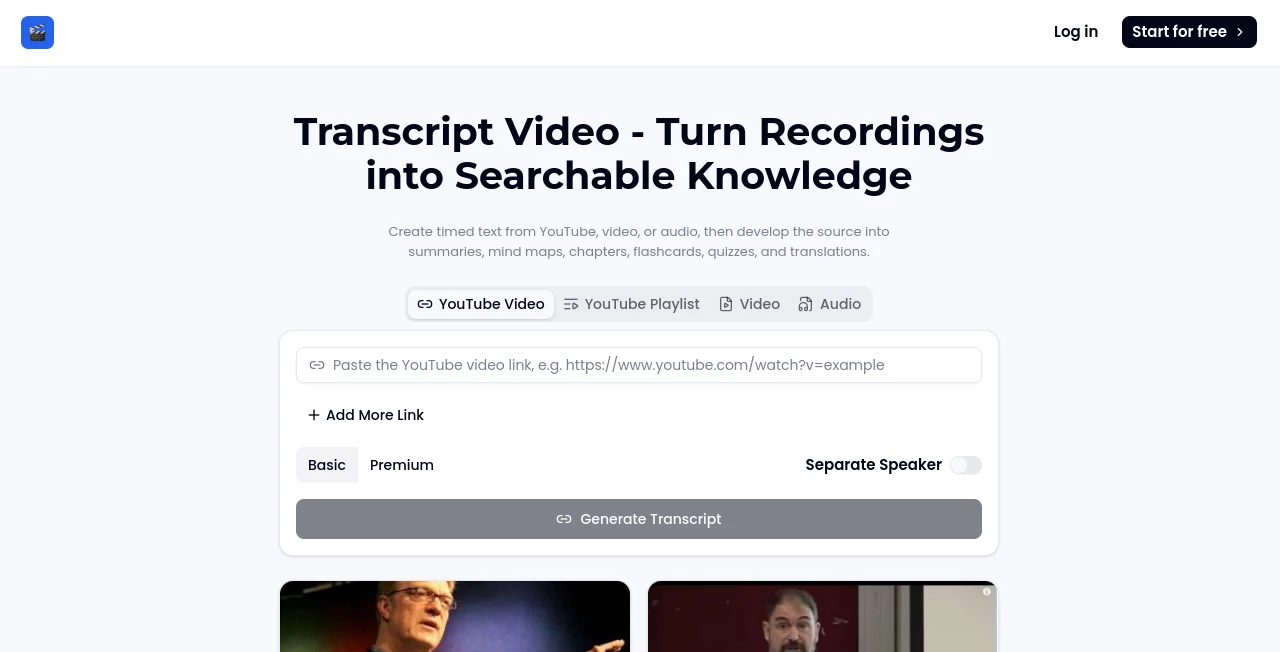
The interface follows a straightforward workflow. Users can select a YouTube video, YouTube playlist, video, or audio source and provide the relevant input before generating a transcript. The main interaction is intentionally simple, which helps users get from a recording to readable text without navigating through a complicated setup.
After transcription, the searchable workspace becomes more useful. Instead of manually moving through a timeline, users can look for specific words or ideas in the transcript and use timestamps to return to the relevant part of the recording. For interviews and discussions, the speaker separation option can also make the resulting text easier to follow.
Accuracy & Performance
Timestamped transcription is valuable because it keeps the generated text connected to the original recording. When a particular statement needs to be checked, users can return to the relevant point instead of searching through the entire video again.
As with any automated speech-to-text system, the quality of a transcript can depend on factors such as audio clarity, background noise, accents, overlapping speakers, and recording quality. For professional publication, quotations, or research where wording matters, reviewing the original recording alongside the transcript remains a sensible step.
Capabilities
The strongest part of the workflow is what happens after transcription. A lecture can become a set of flashcards and a knowledge quiz. An interview can be condensed into a summary and organized into timestamped chapters. A research call can be searched for specific statements and transformed into a concise visual brief.
Mind maps provide another useful way to explore the relationships between ideas in a recording. Translation can also make the generated text accessible to people who need to work with the material in another language while keeping the original recording available for context.
Security & Privacy
Privacy is an important consideration whenever recordings are uploaded or processed. The service provides dedicated Privacy Policy and Terms of Service pages, giving users a place to review the platform's policies before submitting material.
Users working with confidential meetings, private interviews, customer research, or internal company recordings should always review the current privacy terms and consider the sensitivity of their material before uploading it. Generated transcripts should also be treated with the same care as the original recordings when they contain private information.
Use Cases
Students and researchers: Recorded lectures and seminars can be converted into searchable study material. Summaries, mind maps, flashcards, and quizzes provide several ways to review the same source.
Podcast producers: Long interviews can be transcribed before an editorial meeting, making it easier to locate quotes, identify important sections, and plan chapters without repeatedly scrubbing through the recording.
Content creators: A recorded discussion or video can become a structured source for summaries, chapters, notes, and other content assets.
Product and user researchers: Recorded research calls can be searched for specific phrases or topics, allowing teams to return to the relevant timestamp and prepare evidence-based notes.
Educators: Teachers and course creators can turn recorded lessons into revision material, questions, flashcards, and structured chapters.
Anyone working with long recordings: If you regularly need to remember what was said in a video or audio file, having searchable text connected to timestamps can save considerable time.
Pros and Cons
- Pros: Supports YouTube videos, playlists, video and audio files.
- Pros: Creates timestamped and searchable transcripts.
- Pros: Includes a speaker separation option.
- Pros: Goes beyond transcription with summaries, mind maps, flashcards, quizzes, chapters, visual briefs, and translation.
- Pros: Useful for both study and professional content workflows.
- Cons: Automated transcripts may still require manual review when exact wording is important.
- Cons: Results can vary depending on recording quality, background noise, accents, and multiple speakers.
- Cons: Users handling sensitive recordings should review the privacy terms before uploading material.
Pricing Plans
The platform currently presents Basic and Premium options within its transcription workflow. However, the publicly accessible page does not provide enough confirmed pricing information to state specific subscription amounts or usage limits accurately. Users should check the current plan information inside the service before choosing an option.
For someone who only occasionally needs a transcript, the available starting option may be enough to evaluate the workflow. Users processing recordings regularly or relying on the additional AI-powered features may find the higher-tier option more relevant.
How to Use Transcript Video
Start by choosing the type of source you want to process. You can paste a YouTube video link, submit a YouTube playlist, or select a video or audio file from your device.
Next, generate the transcript. The system processes the spoken content and organizes it into readable passages connected to timestamps. If the recording contains multiple speakers, the speaker separation option can be used where appropriate.
Once the transcript is ready, search through the text to find specific information or return to important moments in the recording. From there, you can develop the material further by creating summaries, mind maps, chapters, flashcards, quizzes, visual briefs, or a translated version of the transcript.
This workflow is particularly useful when the original recording is long. Rather than treating transcription as the end of the process, users can turn the same source into several different forms of useful information.
Comparison with Similar Tools
Many transcription services focus primarily on converting speech into text. This platform takes a broader approach by connecting transcription with study, research, and content-development features.
For example, a conventional transcription workflow may finish after producing a text file. Here, the transcript can become the foundation for a summary, mind map, quiz, flashcards, or timestamped chapters. That distinction can be valuable for users who need to do more than simply read a transcript.
It is also particularly suited to people who work from existing video and audio sources. Support for YouTube videos and playlists makes it convenient for processing online educational content, interviews, talks, and other recordings.
Conclusion
Turning a recording into text is useful, but turning that text into something people can actually work with is even more valuable. This platform combines timestamped transcription with tools designed for studying, research, content production, and knowledge organization.
Its ability to move from a YouTube video, playlist, video, or audio file to searchable text and then into summaries, mind maps, chapters, flashcards, quizzes, visual briefs, and translations gives the workflow a practical advantage. For students, researchers, educators, podcast producers, and content teams dealing with long recordings, it can make previously difficult-to-search material considerably easier to use.
Frequently Asked Questions (FAQ)
Can I transcribe a YouTube video?
Yes. You can provide a YouTube video link and generate a transcript with timestamps.
Does it support YouTube playlists?
Yes. YouTube playlists are supported as one of the available source types.
Can I transcribe audio files?
Yes. The service supports audio as well as video sources for transcription.
Does the transcript include timestamps?
Yes. Generated text is organized with timestamps so users can connect transcript passages with the corresponding moments in the original recording.
Can different speakers be separated?
A speaker separation option is available when generating a transcript, which can be useful for interviews, discussions, and other multi-speaker recordings.
Can I create study material from a transcript?
Yes. A transcript can be developed into study flashcards, knowledge quizzes, summaries, and mind maps.
Can I translate the transcript?
Yes. Transcript translation is available for users who need to work with the generated text in another language.
Should I review an automatically generated transcript?
For important quotations, academic work, professional publications, or sensitive information, reviewing the transcript against the original recording is recommended.
What types of recordings are useful for this workflow?
Lectures, interviews, podcasts, research calls, educational videos, seminars, meetings, and other spoken recordings can all benefit from searchable, timestamped transcription.
AI Transcriber , AI Education Assistant , AI Transcription , AI Speech to Text .
These classifications represent its core capabilities and areas of application. For related tools, explore the linked categories above.
Transcript Video details
Website unavailable — View Alternatives
Pricing
- Free
Apps
- Web App
Categories

Transcript Video Alternatives Product

Sourcetable

Fine Voice

Dialogues wi…

Whisper AI

Maestra

Zeemo AI
Video To Text
TuCanChat

Transpocket