TranslateImage AI
What is TranslateImage AI?
In a world where visual content dominates communication, understanding text inside images has become more important than ever. From travel photos and scanned documents to social media graphics and product labels, language should no longer be a barrier. This platform offers a seamless way to translate text embedded within images while preserving the original layout and design.
Instead of manually retyping or using separate OCR and translation tools, everything is handled in a single workflow. The result feels smooth, fast, and surprisingly natural—almost like the image was originally created in your language.
Key Features
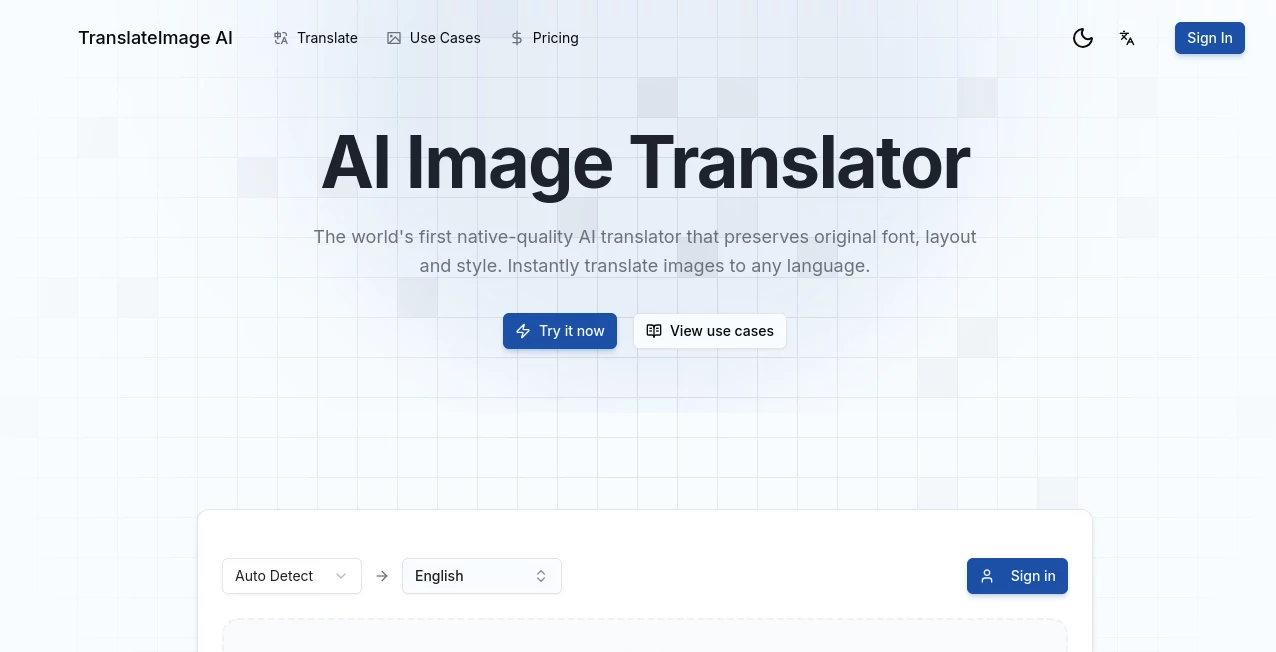
User Interface
The interface is intentionally simple, designed so that even first-time users can upload an image and get results within seconds. Drag-and-drop functionality and clean navigation remove unnecessary friction from the process.
Accuracy & Performance
Text recognition is highly precise, even when dealing with curved, stylized, or partially blurred text. The translation engine adapts well to context, ensuring that meaning is preserved rather than producing word-for-word conversions.
Capabilities
- Detects and extracts text from multiple image formats
- Supports multilingual translation across common languages
- Maintains original image layout and structure
- Handles both printed and digital text styles
- Processes images quickly without noticeable delay
Security & Privacy
User uploads are treated with care, and processed images are not exposed publicly. The system focuses on maintaining confidentiality, making it suitable for both personal and professional use cases.
Use Cases
- Translating travel signs, menus, and street information
- Understanding foreign-language product packaging
- Converting scanned documents into readable translated text
- Localizing marketing visuals for global audiences
- Assisting students with foreign study materials
Pros and Cons
Pros
- Fast and intuitive workflow
- High accuracy in text detection
- Preserves original image formatting
- No need for multiple separate tools
Cons
- Complex artistic fonts may reduce accuracy
- Large batch processing may require optimization
- Internet connection required for full functionality
Pricing Plans
The platform typically follows a flexible pricing structure that may include free usage with limited features and premium tiers for higher usage limits, faster processing, and advanced translation capabilities. This makes it accessible for casual users while still powerful enough for professionals.
How to Use TranslateImage.ai
- Upload the image containing text
- Select the source and target languages
- Let the system process and detect text automatically
- Review translated output on the same image layout
- Download or share the final result
Comparison with Similar Tools
Unlike traditional OCR tools that require manual translation afterward, this solution combines both recognition and translation in a single step. Compared to standard translation apps, it offers the advantage of preserving visual context, which is especially important for design-heavy images and real-world signage.
Conclusion
This tool stands out as a practical bridge between visual content and language understanding. It removes friction from cross-language communication and makes global content more accessible without requiring technical skills. For anyone working with images containing foreign text, it offers a smooth and efficient solution that feels both modern and reliable.
Frequently Asked Questions (FAQ)
Can it translate handwritten text?
Yes, but accuracy depends on handwriting clarity. Printed text generally produces the best results.
Does it keep the original image layout?
Yes, the system is designed to preserve formatting and visual structure as much as possible.
What image formats are supported?
Most common formats such as JPG, PNG, and similar types are supported.
Is it suitable for professional use?
Yes, it can be used for business documents, marketing materials, and localization tasks.
Do I need technical skills to use it?
No, the process is designed to be simple and user-friendly for everyone.
AI Image Recognition , AI Translate , AI Document Extraction , AI Image Scanning .
These classifications represent its core capabilities and areas of application. For related tools, explore the linked categories above.
TranslateImage AI details
Website unavailable — View Alternatives
Pricing
- Free
Apps
- Web App
Categories

TranslateImage AI Alternatives Product
TimedSubs

Sourcetable

PDF to MD

Where Is Thi…

TopPDF
labgen

UPDF AI

FacialHarmon…

deck cleaner