
















Hylo | AI Jewelry Photography
What is Hylo | AI Jewelry Photography?
Hylo is an AI-powered visual creation platform built specifically for jewelry brands and sellers who need professional product photography without organizing a traditional studio shoot. Instead of relying on expensive photographers, models, lighting equipment, and lengthy retouching sessions, users can start with a single jewelry photo and turn it into polished product, lifestyle, model, and video content.
The workflow is particularly appealing to e-commerce sellers. A phone photo of a ring, necklace, bracelet, or pair of earrings can become a collection of marketplace-ready visuals in minutes. The platform is designed around the difficult details of jewelry photography, including metal reflections, gemstone appearance, delicate chains, shadows, and product proportions.
For a small jewelry business preparing a new collection, this can make a noticeable difference. Instead of waiting for a photographer to become available, the seller can create the initial visual assets from a simple product photograph and move much faster toward publishing products on an online store or social platform.
Key Features
- AI Product Photoshoot: Generate styled jewelry product images with professional lighting, backgrounds, reflections, and compositions.
- AI Video Shoot: Turn a single product image into cinematic jewelry videos suitable for product pages and social media.
- AI Retouch: Remove backgrounds, correct white balance, improve shadows, and clean unwanted imperfections.
- Inspiration Recreation: Upload a reference image or provide a link and recreate its visual direction around your own jewelry.
- Jewelry-focused AI: The platform is designed around jewelry rather than generic consumer products, making details such as chains, gemstone settings, and polished metal particularly important.
- Brand consistency: Brand Kit features help businesses maintain a consistent visual identity across generated assets.
- Multiple output formats: Assets can be prepared for different marketplaces, websites, and social media placements.
User Interface
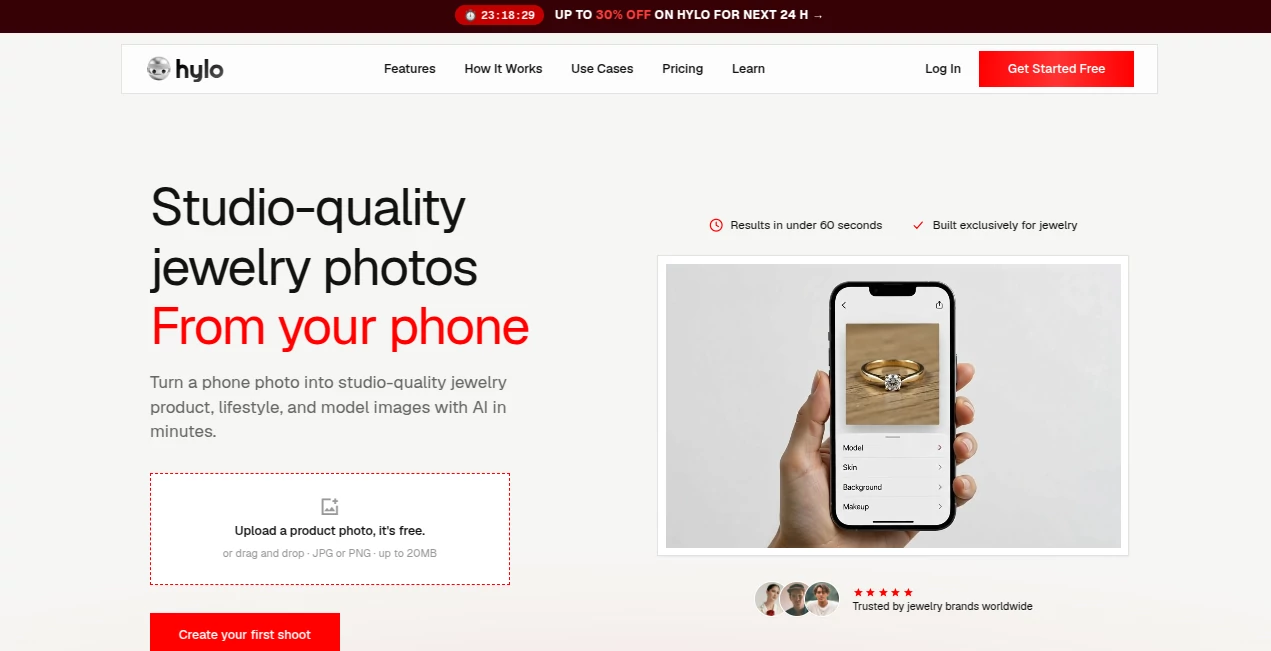
The workflow is intentionally straightforward. Users begin by uploading a product photograph, either by dragging and dropping a JPG or PNG file or by providing a product image URL. From there, they can select a visual direction such as luxury studio, lifestyle, or editorial, or describe the desired style themselves.
This simplicity is one of the strongest parts of the experience. A jewelry seller does not need to understand complicated layers, masking techniques, or professional lighting setups just to produce a usable product image. The process is built around moving from an existing product photograph to a finished visual with as few steps as possible.
Accuracy & Performance
Jewelry is one of the harder product categories for image generation because small structural mistakes can immediately become noticeable. A ring with an altered setting, a distorted chain, or an incorrectly shaped gemstone can make an otherwise attractive image unusable.
The platform takes a specialized approach to this problem. Its website states that its models are tuned specifically for jewelry imagery, with attention to details such as fine chains, claw settings, transparent stones, metal reflections, and gemstone appearance. The main workflow is also designed to deliver results quickly, with the platform advertising initial results in under 60 seconds and a complete workflow in under five minutes.
Capabilities
The capabilities go beyond simple background removal. A single source photograph can be transformed into clean e-commerce packshots, editorial compositions, lifestyle scenes, and model-oriented visuals. This makes it useful when one physical product needs several different types of marketing content.
The video feature adds another useful layer. Product images can be turned into short cinematic clips with movements such as orbiting, tilting, close-up reveals, and parallax-style motion. Different aspect ratios can also be used for destinations such as Instagram, TikTok, product pages, and advertising placements.
For businesses managing many products, the ability to maintain a recognizable visual style is equally important. Brand-focused controls can help keep colors, lighting preferences, and recurring visual elements more consistent across a larger catalog.
Security & Privacy
The platform provides dedicated legal and policy pages covering privacy, terms of service, cookies, acceptable use, refunds, and copyright. However, businesses handling commercially sensitive product photography should still review the current privacy policy and terms before uploading proprietary campaign material or unreleased collections.
For normal e-commerce workflows, it is also sensible to understand how uploaded images are stored, processed, and retained before using the service at scale.
Use Cases
Independent jewelry designers can use the platform to create professional-looking visuals without maintaining their own photography setup. A founder launching a new ring collection, for example, can photograph the products with a phone and generate clean product images as well as more creative lifestyle variations.
Shopify and other e-commerce sellers can create consistent imagery across large catalogs. Marketplace sellers on platforms such as Etsy and Amazon can also benefit from having both clean product photography and lifestyle imagery available from the same source photograph.
Social media teams have another practical use case. Instead of creating a completely separate production workflow for every Reel, TikTok, or promotional campaign, they can turn existing product photography into short-form visual content.
Wholesale businesses can also use generated imagery for catalogs, linesheets, collection launches, and promotional materials. This is particularly useful when dozens or hundreds of SKUs need fresh visual assets without arranging a separate photoshoot for every product.
Pros and Cons
- Pros: Designed specifically for jewelry, supports product and lifestyle photography, includes AI retouching, can generate video from product imagery, supports reference-based creative direction, and offers a fast workflow suitable for e-commerce.
- Pros: A phone photograph can be enough to get started, reducing the equipment barrier for smaller jewelry businesses.
- Cons: Results still depend on the quality and clarity of the original product photograph.
- Cons: Businesses requiring highly customized campaign photography may still want a professional photographer and art director for major advertising projects.
- Cons: AI-generated visuals should be checked carefully to ensure that the jewelry remains an accurate representation of the physical product.
Pricing Plans
The service currently offers a free starting option with 15 credits and does not require a credit card to begin. The pricing page states that these credits do not expire, allowing users to test the workflow at their own pace.
When the free credits are exhausted, users can upgrade to a paid plan for additional credits. Existing images and Brand Kit information remain accessible after upgrading, and subscriptions can be cancelled through account settings. The exact paid-plan pricing and available credit quantities can change, so checking the current pricing page before subscribing is recommended.
How to Use Hylo
Start with a clear photograph of the jewelry you want to feature. A smartphone image can work, provided the product is in focus and has reasonably good lighting. JPG and PNG uploads are supported.
Upload the image and choose the visual direction you want. You can select a curated style such as luxury studio, lifestyle, or editorial, or describe your own creative idea.
Generate the visual and review the available result. If the original photograph needs cleanup, the AI Retouch tools can help with background removal, white balance, shadows, and other imperfections.
For a more distinctive campaign, use an inspiration image or link to communicate the desired mood, composition, and lighting direction. The generated scene can then be adapted around the jewelry being promoted.
Once the image looks right, export the finished asset in the format needed for your website, marketplace, social network, or advertising campaign. For video campaigns, the AI video workflow can turn the product image into a short promotional clip.
Comparison with Similar Tools
General-purpose image editors can be excellent for ordinary product photography, but jewelry introduces challenges that are less common with products such as clothing, furniture, or packaged goods. Highly reflective metals, transparent gemstones, delicate chains, and small settings require careful handling.
The main distinction here is specialization. Rather than positioning itself as a general image editor, the platform focuses its workflow around jewelry photography. That makes it particularly interesting for jewelry sellers who repeatedly encounter the same photography problems across rings, necklaces, earrings, bracelets, and other pieces.
Traditional photography still has an important place, especially for major campaigns where creative direction, physical styling, and complete control over lighting are essential. For everyday e-commerce production, however, an AI-first workflow can be considerably faster and easier to scale.
Conclusion
For jewelry businesses, photography can quickly become a bottleneck. Every new SKU needs attractive visuals, yet arranging photographers, models, studios, props, and retouching for every product is difficult to justify, particularly for smaller collections or frequently changing catalogs.
This platform takes a practical alternative: start with the product photograph you already have and build the surrounding visual campaign digitally. The combination of jewelry-specific image generation, retouching, lifestyle scenes, model imagery, and video makes it more than a simple background remover.
The strongest reason to try it is its focus. Jewelry has very specific visual requirements, and a tool built around those requirements can be much more useful than forcing a generic image generator into an e-commerce photography workflow. The free credits also provide an easy way for sellers to test their own products before committing to a paid plan.
Frequently Asked Questions (FAQ)
What is this tool designed for?
It is designed primarily for jewelry businesses that need product photography, lifestyle imagery, model visuals, retouching, and short promotional videos.
Can I use a smartphone photo?
Yes. The platform is specifically designed to turn phone photographs into more polished jewelry visuals. A clear, focused source image will generally provide a better starting point.
Can it create jewelry images with models?
Yes. Its AI photoshoot workflow includes model-oriented imagery designed to show jewelry in context and help customers understand how pieces look when worn.
Can it generate videos?
Yes. A single jewelry image can be used to generate short product videos suitable for social media, product pages, and advertising content.
Does it remove backgrounds?
Yes. The AI Retouch feature includes background removal alongside adjustments such as white-balance correction, shadow enhancement, and image cleanup.
Can I use a reference image?
Yes. You can upload an inspiration image or provide a link and use it as a creative reference for the desired lighting, mood, composition, and overall visual direction.
Is there a free trial?
Yes. The current pricing page provides 15 free credits without requiring a credit card, and the credits do not expire.
Is it suitable for large jewelry catalogs?
It can be particularly useful for catalog-heavy businesses because the workflow starts from existing product photographs and can produce multiple visual variations without arranging a new physical photoshoot for every SKU.
Should AI-generated jewelry images be checked before publishing?
Yes. Product accuracy matters in e-commerce. Before publishing an AI-generated image, sellers should compare the generated jewelry with the real product and make sure important details such as gemstone shape, setting, metal structure, and proportions are represented correctly.