
















Forge GUI
What is Forge GUI?
Creating game visuals can take far longer than building the idea itself. A developer may have a great concept for a Roblox horror game, Minecraft adventure, or indie project, but turning that concept into an eye-catching thumbnail or usable interface often requires additional design skills and software. ForgeGUI brings that part of the workflow into a simpler AI-powered workspace.
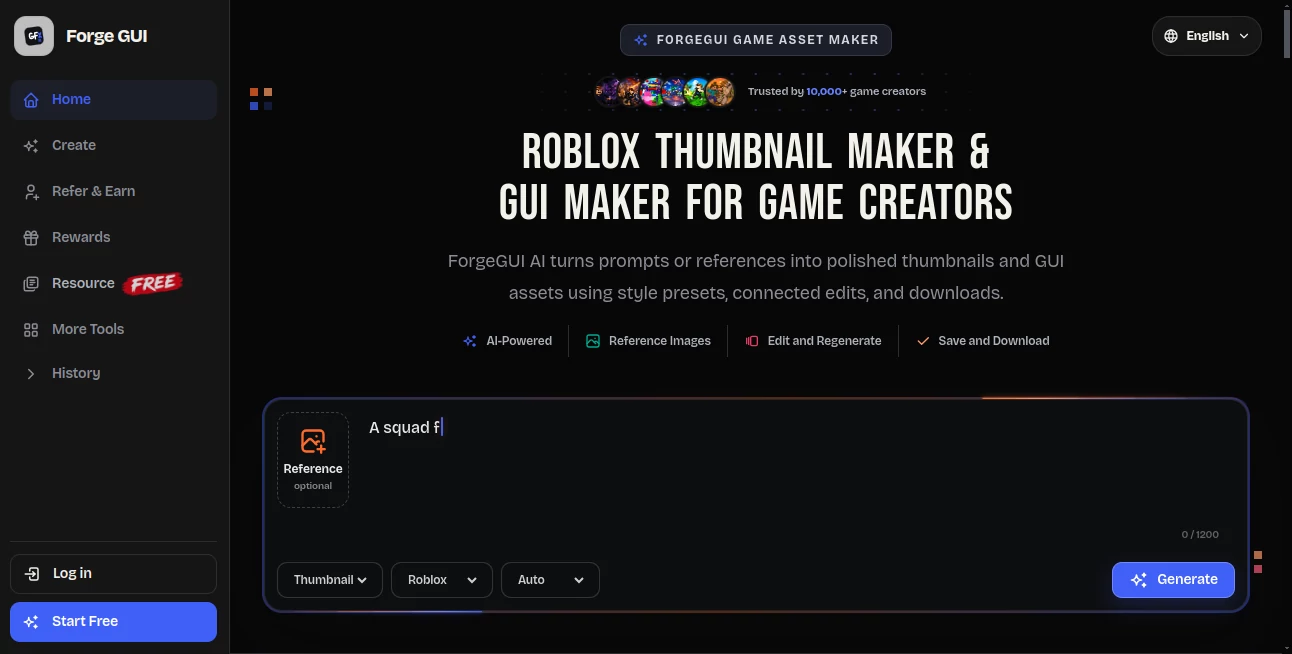
The platform turns written prompts and reference images into game-focused thumbnails and GUI assets. Instead of starting with a blank canvas, creators can describe a scene, select a visual direction, and refine the generated result. This makes it particularly useful for solo developers, small teams, and creators who need to test several visual ideas without commissioning custom artwork for every concept.
Its focus on game creation is one of its strongest advantages. The available styles cover Roblox, Minecraft, Unity, and Fortnite-inspired visuals, while the workflow is designed around readable compositions that work well on game pages and smaller screens.
Key Features
- AI generation for game thumbnails and GUI assets
- Reference-image support for guiding visual style and composition
- Platform presets for Roblox, Minecraft, Unity, and Fortnite-style projects
- Prompt enhancement for turning simple ideas into more developed visual concepts
- Connected editing that allows creators to refine previous results
- Saved generation history for keeping useful concepts available
- High-resolution downloads for use in game and promotional workflows
- Mobile-friendly 16:9 thumbnail composition
- Multiple visual themes including horror, fantasy, anime, pet games, and tycoon concepts
User Interface
The interface is built around a straightforward creation process rather than a traditional professional design suite. A creator can choose a platform and style, describe the desired scene, and generate an image without having to work through layers, complex menus, or advanced editing panels.
Reference images can also be introduced when a particular look needs to be maintained. This is useful when a developer already has artwork and wants new assets to feel like part of the same game rather than unrelated AI-generated images.
The workflow feels especially suitable for quick experimentation. For example, a Roblox developer working on a horror game could test a dark laboratory scene, a monster chase, and a character-focused composition before deciding which direction best communicates the game.
Accuracy & Performance
Performance is closely tied to the type of asset being generated, but the platform is designed around relatively quick visual iteration. The important advantage is not simply producing one image; it is being able to generate an idea, inspect it, refine it, and continue working from the previous result.
Platform-specific presets also help give the generated artwork a more appropriate visual direction. Roblox-inspired, voxel, low-poly, and cinematic styles can produce very different results, which is helpful when the same basic concept needs to fit different game environments.
Capabilities
The main capabilities center on game thumbnails and GUI creation. Thumbnail generation can be used for game pages, updates, events, prototypes, and promotional material, while GUI generation can help with elements such as inventory interfaces, settings screens, buttons, and other in-game visual components.
The platform also supports reference-guided creation. This gives users more control when an existing image, color palette, or visual direction needs to influence the next generation. Rather than repeatedly starting from scratch, creators can use previous work as a foundation for further experimentation.
For developers who regularly create new game concepts, this can turn visual production into a much faster part of the development cycle.
Security & Privacy
Privacy depends on the plan and generation workflow being used. The paid plans advertise private commercial-use workflows, while the platform also provides saved generation history and downloads. Users working on commercial projects should review the current terms and privacy documentation before uploading confidential or unreleased material.
Creators should also pay attention to the platform's free-generation publication settings. Free or trial generations may be eligible for inclusion in a public asset catalog when the relevant publication option is accepted, while paid-plan generations are private by default unless the user chooses otherwise.
Use Cases
There are several practical situations where this type of tool can save a game creator considerable time.
- Roblox game thumbnails: Create visual concepts for horror games, simulators, obbies, tycoons, anime battlers, and other Roblox experiences.
- Minecraft projects: Produce voxel-style artwork for servers, maps, survival stories, and mini-games.
- Indie game development: Explore visual directions for Unity-style games, prototypes, and early marketing materials.
- Game interfaces: Develop concepts for inventory screens, settings menus, buttons, health displays, and other GUI elements.
- Game launches and updates: Quickly prepare new visual assets for seasonal events, content updates, and promotional campaigns.
- Concept testing: Generate several possible visual directions before investing heavily in custom design.
- Solo development: Give independent creators access to a faster visual workflow without requiring a separate designer for every asset.
Pros and Cons
Pros
- Designed specifically around game creators rather than general-purpose image generation
- Supports both thumbnails and GUI assets
- Reference images provide additional creative control
- Platform-specific visual presets simplify the creation process
- Useful for rapid visual experimentation
- Offers a free way to begin exploring the workflow
- Paid plans include commercial-use workflows and private generation
Cons
- Creators looking for broad-purpose graphic design may need a more general design platform
- Generation uses credits, so frequent users need to choose a plan according to their production volume
- Results can still require iteration when a very specific visual composition is needed
- Users handling confidential concepts should pay attention to the publication and privacy settings associated with their plan
Pricing Plans
The platform currently offers a free starting option as well as three paid monthly plans. The Starter plan costs $15.99 per month and includes 1,600 credits, thumbnail and GUI generation, a private commercial-use workflow, and a regular generation queue.
The Pro plan costs $50 per month and provides 5,000 credits, along with the same core thumbnail and GUI creation capabilities and a faster generation queue. For creators producing assets at a larger scale, the Studio plan costs $200 per month and includes 20,000 credits, faster generation, and dedicated email support.
Each generation currently uses 10 credits, while annual billing is available with savings of up to 27%. The free option also gives newcomers an opportunity to test the workflow before committing to a paid subscription.
How to Use the Tool
Getting started is relatively simple:
- Open the creation workspace and select the type of game visual you want to produce.
- Choose a platform style such as Roblox, Minecraft, Unity, or Fortnite-inspired visuals.
- Select a suitable theme or visual direction for your project.
- Describe the scene or interface you want in a clear prompt.
- Add a reference image when you want the generated result to follow an existing visual direction.
- Generate the asset and review the result.
- Refine the concept using additional instructions or references.
- Save or download the finished asset for use in your game workflow.
A simple prompt can be enough to begin. For instance, instead of describing every visual detail manually, a developer might start with an idea such as a dragon chasing a player and then refine the composition after seeing the first result.
Comparison with Similar Tools
General-purpose image generators can be excellent for creating artwork, but game developers often need more than an attractive picture. The asset needs to communicate a game concept quickly, match a recognizable visual style, and fit the way players encounter game artwork on platforms such as Roblox or Minecraft.
This platform takes a more specialized approach. Its platform presets, thumbnail-focused composition, GUI generation, reference editing, and game-oriented workflow make it more targeted than a general image generator. That specialization can be particularly valuable when the goal is not simply to create an image, but to create an image that belongs in a game production pipeline.
For a professional illustrator who needs unrestricted control over every pixel, a traditional design application may still be the better choice. For a developer who wants to move from an idea to several usable visual directions quickly, the focused workflow is much more appealing.
Conclusion
Game development often involves dozens of small creative tasks that can slow down an otherwise productive project. Thumbnails, interfaces, promotional images, and visual concepts are important, but they do not always justify spending hours in a conventional design workflow.
This AI-powered approach gives game creators a practical shortcut. Its combination of prompt-based generation, platform styles, reference images, connected editing, saved results, and game-focused assets makes it particularly useful for Roblox developers and indie creators who need to produce visual material at a faster pace.
It is not a replacement for every professional design workflow, but that is not really the point. Its strength lies in helping developers move quickly from a rough idea to something concrete that they can evaluate, refine, and use.
Frequently Asked Questions (FAQ)
What is this tool used for?
It is an AI-powered creation platform focused on game thumbnails and GUI assets. It can turn prompts or reference images into visual material for game projects.
Which platforms are supported?
The available platform styles include Roblox, Minecraft, Unity, and Fortnite-inspired visuals. The resulting assets can be used within broader game development workflows.
Can I use a reference image?
Yes. Reference images can guide the visual direction of a generation and help maintain a particular style, composition, or aesthetic across related assets.
Can I create GUI assets?
Yes. The platform supports GUI generation alongside thumbnails, allowing developers to explore interfaces and other game-related visual elements.
Is there a free option?
Yes. New users can start with the free option and test the creation workflow before choosing a paid plan.
How much do the paid plans cost?
The current monthly plans are Starter at $15.99, Pro at $50, and Studio at $200. Each plan provides a different monthly credit allowance and generation features.
Can generated assets be used commercially?
Paid plans advertise private commercial-use workflows. Creators should still review the current terms and licensing conditions for their specific use case.
How does the credit system work?
Credits are consumed when assets are generated. The current pricing page states that each generation uses 10 credits, while different subscription tiers provide different monthly credit allowances.