Reglyph
What is Reglyph?
Reglyph is built for a very specific problem that many PDF users discover the hard way: translating a scanned document without destroying the original page layout. Instead of treating a scanned PDF like an ordinary text file, it uses OCR to recognize the words inside the document, translates them, and rebuilds the translated text in its original position.
This makes it particularly useful for image-only PDFs, scanned books, certificates, contracts, forms, reports, and other documents where the visual structure matters as much as the words. You can upload a PDF and start with five free pages without entering a credit card.
Key Features
- Scanned PDF translation: Designed specifically for PDFs that contain images rather than a selectable text layer.
- OCR before translation: The service recognizes text from scanned pages before translating it, avoiding the blank or garbled results common with standard PDF translators.
- Layout preservation: Translated words are placed back into their original positions instead of being converted into a plain block of text.
- Tables and columns: Page structures such as tables, columns, headings, figures, and numbers can remain in their original arrangement.
- Multiple languages: The service supports translation pairs including English, Japanese, Spanish, Chinese, Arabic, French, and German.
- Multi-page documents: Documents are processed page by page, making the service suitable for longer scanned files.
- Large file support: Depending on the plan, uploaded files can be as large as 100 MB or 300 MB.
- No separate OCR step: Users do not need to convert a scanned document into editable text before translating it.
User Interface
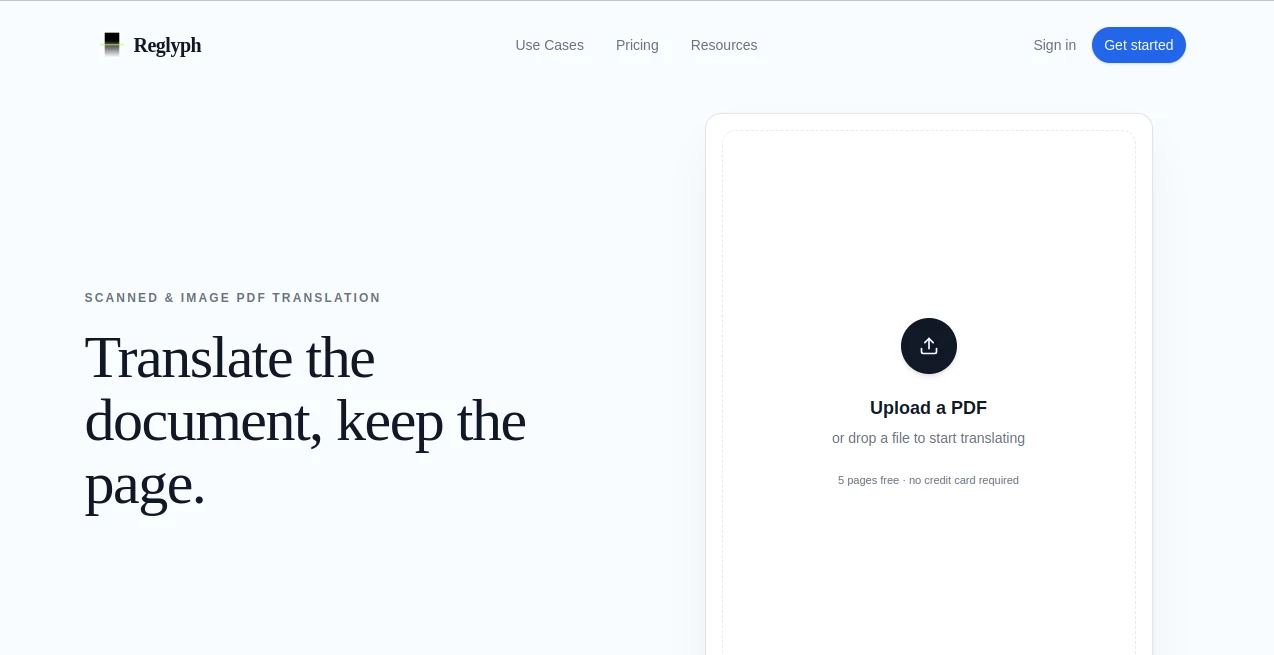
The interface is intentionally simple. The main workflow starts with uploading a PDF or dropping a file into the upload area. There is no complicated document-conversion process sitting between the user and the translation.
A useful touch is the before-and-after comparison on the website. It demonstrates the central idea clearly: the language changes while the page structure stays recognizable. For someone who has previously translated a PDF and then spent time fixing tables, headings, or spacing, that difference is immediately understandable.
Accuracy & Performance
The system combines OCR and machine translation, which is important because scanned PDFs do not normally contain an editable text layer. OCR first identifies the words contained in the page image, after which the translation process can work with that recognized content.
The result is much more practical than simply extracting text and placing the translation into a new document. The original positioning of translated text is maintained, while stamps, signatures, figures, and numeric values are designed to remain in their existing locations.
That said, machine translation is not a substitute for professional human translation. The service itself advises users to verify important translations, particularly when documents are legal, financial, medical, or otherwise sensitive.
Capabilities
The strongest capability is its focus on image-only documents. A conventional translator may report that a scanned PDF contains no readable text because it only sees a collection of page images. Here, OCR is part of the workflow rather than something the user has to arrange separately.
The service can also work with photographs of pages, which expands its usefulness beyond traditional PDF files. Multi-page scanned documents are processed page by page, allowing the layout-preservation approach to continue throughout a longer document.
This is especially valuable when the appearance of the original document needs to remain recognizable. A translated certificate, form, scanned report, or historical document can be considerably more useful when its tables, columns, figures, and other visual elements remain where readers expect them.
Security & Privacy
Document ownership remains with the user. The service states that uploaded documents and translated results are retained only for a limited period and that uploaded content is not used to train AI models.
Documents may be stored, processed, and transmitted to third-party processing providers when required to deliver the translation. Users are also responsible for making sure they have permission to upload and translate the documents they submit.
For highly sensitive material, it is still sensible to review the privacy terms and consider whether an online processing service is appropriate for the document.
Use Cases
- Scanned books: Translate pages from books without first converting every page into editable text.
- Business documents: Translate scanned reports, forms, invoices, and internal paperwork while retaining their visual structure.
- Contracts: Create a translated working copy while keeping clauses, tables, signatures, and page positioning recognizable. Important legal translations should still be reviewed by a qualified professional.
- Certificates and official records: Preserve stamps, seals, signatures, figures, and numbers while translating the surrounding text.
- Historical documents: Work with older scanned material where the original file consists entirely of page images.
- Academic research: Translate scanned papers, reports, archival documents, and other research material without manually reformatting each page.
- Photographed pages: Translate a photo of a document without running a separate OCR application first.
Pros and Cons
Pros
- Specialized for scanned and image-only PDFs.
- Combines OCR, translation, and layout reconstruction in one workflow.
- Preserves the visual structure of translated pages.
- Supports tables, columns, figures, stamps, signatures, and numbers.
- Offers five free pages for new users without requiring a credit card.
- Supports both individual documents and larger multi-page scans.
- Simple upload-first workflow with little setup.
Cons
- Machine translation can still contain errors and should not be treated as certified translation.
- The service is primarily focused on scanned documents rather than being a general-purpose document editor.
- Free usage is limited to the initial allowance.
- Users handling confidential documents should review the privacy implications of online processing.
Pricing Plans
The pricing is based on pages rather than complicated document multipliers. New users receive five free pages to try the service before committing to a paid plan.
- Pay-as-you-go: $5 one-time payment, providing 10 scanned pages at $0.50 per page. Pages do not expire, and files can be up to 100 MB.
- Lite: $15 per month for 120 pages, equivalent to $0.13 per page. Unused monthly pages reset, with files supported up to 100 MB.
- Pro: $39 per month for 700 pages at $0.06 per page. Unused pages can roll over up to 2,100 pages, and files can be up to 300 MB.
The structure makes the choice fairly straightforward. Occasional users can pay only when they need a few pages, while people translating scanned documents regularly have monthly options with substantially lower per-page costs.
How to Use This Tool
- Open the service and select the PDF upload option.
- Upload a scanned PDF or a supported image of a page.
- Choose the source and target language combination.
- Let the OCR process identify the text contained in the scanned pages.
- The translation process converts the recognized text into the selected language.
- The translated content is rebuilt into the page while preserving the original layout.
- Review the finished document, particularly if it contains important legal, financial, medical, or official information.
Comparison with Similar Tools
The main difference is the type of PDF the service is designed to handle. Many mainstream translation products work best when a PDF already contains a digital text layer. Scanned documents can therefore produce missing text, recognition errors, or unusable output unless they are OCR-processed first.
A separate OCR tool followed by a conventional translator can solve part of the problem, but it introduces extra steps and can make it harder to preserve the original page design. This service combines those stages into one workflow and puts particular emphasis on reconstructing the translated text in its original position.
That makes it less of a general document translator and more of a focused solution for people whose main frustration is translating scanned pages without having to rebuild the document afterward.
Conclusion
For scanned PDF translation, preserving the page can be just as important as translating the words. A technically correct translation becomes far less useful when tables collapse, columns merge, headings move, or the original document has to be rebuilt manually.
This service addresses that specific frustration with a straightforward combination of OCR, machine translation, and layout reconstruction. Its free five-page allowance also makes it easy to test the workflow on a real document before choosing a paid plan.
It is best suited to students, researchers, businesses, translators, and anyone who regularly works with image-based documents in different languages. As with any automated translation system, important documents should receive human verification before being used for official or high-stakes purposes.
Frequently Asked Questions (FAQ)
Can I translate a scanned PDF without OCR?
Yes. OCR is integrated into the workflow, so you do not need to run a separate OCR application before uploading a scanned document.
Will the original PDF layout be preserved?
The service is specifically designed to preserve the original page structure. Translated text is placed back into the page rather than simply being delivered as a plain text document.
Can it translate image-only PDFs?
Yes. Image-only and scanned PDFs are the primary use case, including documents without an underlying selectable text layer.
Can I translate a photo of a document?
Yes. The service can process a photo of a page, allowing recognition and translation without a separate manual OCR step.
Are stamps and signatures translated?
Stamps, seals, signatures, figures, and numeric values are designed to remain in their original positions while the text being translated is replaced.
How many pages can I try for free?
New users can try five pages for free without providing a credit card.
What is the largest supported file size?
File-size limits depend on the plan. The smaller plans support files up to 100 MB, while the Pro plan supports files up to 300 MB.
Is the translation suitable for legal or medical documents?
The automated output should not be treated as a certified professional translation. Important legal, medical, financial, or official documents should be reviewed by a qualified human before being relied upon.
Are uploaded documents used to train AI models?
The service states that uploaded content is not used to train AI models. It also states that documents and translated results are deleted on a short retention schedule.
AI PDF , AI Translate , AI Documents Assistant , AI Document Extraction .
These classifications represent its core capabilities and areas of application. For related tools, explore the linked categories above.

Reglyph Alternatives Product

Certificate …

VideoText

Clearterms

Referent

TopPDF
TranAI

AutoDub

TranslateAI

ReportMaker.…