
Ultra Humanizer
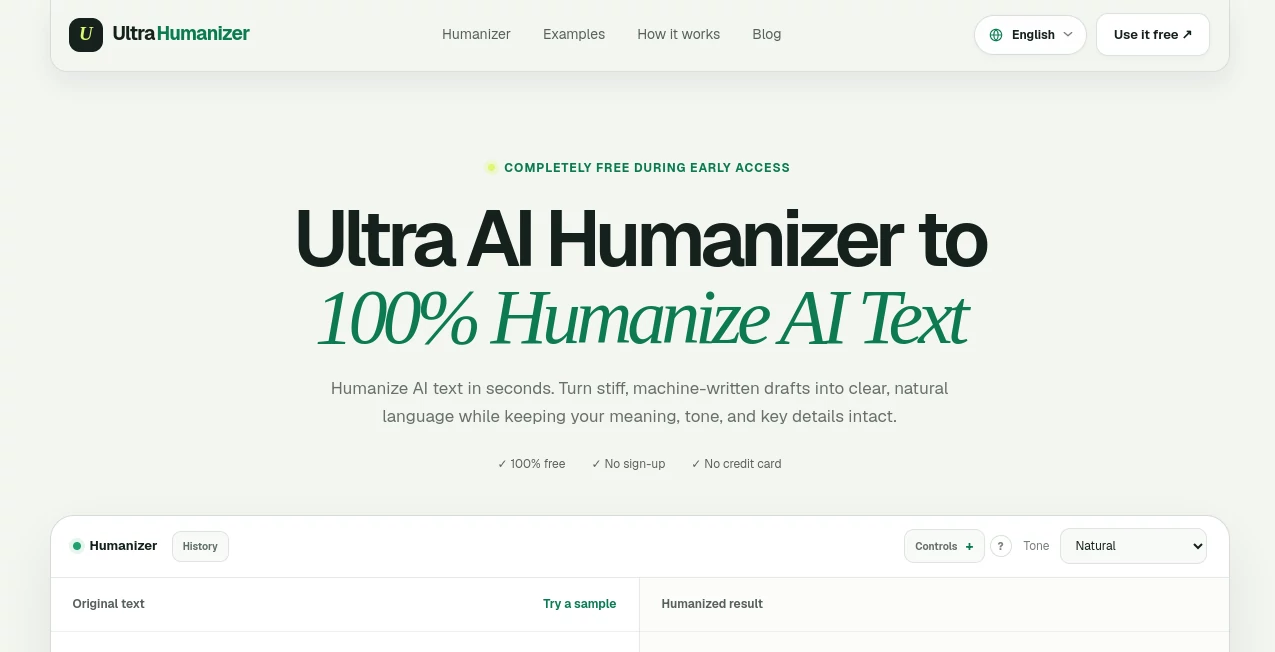
What is Ultra Humanizer?
AI-generated drafts can be useful, but they often need another pass before they are ready for a real reader. Sentences may feel too predictable, transitions can sound mechanical, and the overall rhythm may not match the person or brand behind the words. UltraHumanizer is designed for exactly this stage of the writing process, helping turn stiff AI-assisted drafts into clearer, more natural prose while keeping the original idea, facts, and intent in place.
The service is currently available for free during early access and does not require an account, payment details, or a credit card. That makes it particularly convenient for writers, marketers, students, educators, and professionals who want to test the workflow without committing to another subscription.
Rather than simply changing a few words, the platform focuses on sentence rhythm, phrasing, readability, and tone. A good example is a formal-sounding business paragraph that needs to become warmer and easier to read without losing its message. The result can feel much closer to something a person would naturally write and edit themselves.
Key Features
- AI text humanization focused on natural phrasing, rhythm, clarity, and readability.
- Three tone options: Natural, Conversational, and Professional.
- Support for documents including DOCX, PDF, PPTX, ODT, RTF, TXT, Markdown, and LaTeX.
- Up to 12,000 words can be processed within the current editor.
- Document uploads can be up to 20 MB.
- Support for more than 30 languages.
- SEO-aware rewriting designed to retain important search terms naturally.
- Original text remains available for comparison with the rewritten version.
- No sign-up is required during the current early-access period.
- The output remains editable so users can make their own final changes.
User Interface
The interface keeps the process pleasantly simple. Users can paste text directly into the editor or upload a supported document, select the tone they want, and start the rewriting process. The original text remains visible, making it easier to compare the source with the new version.
This straightforward approach is useful when speed matters. For example, someone working on a blog article can paste an AI-generated introduction, select a conversational tone, review the revised paragraph, and copy the finished version without moving through a complicated sequence of settings.
The editor also shows the word count and provides a clear area for the humanized result. There is little unnecessary clutter, which makes the tool approachable even for people who do not regularly work with AI writing software.
Accuracy & Performance
The main strength of the rewriting process is its focus on preserving meaning while improving how the text reads. The system is designed to keep names, facts, context, keywords, and the original point consistent while varying sentence structure and removing predictable filler.
Its tone controls add another useful layer. Natural works well as a general-purpose option, Conversational is better suited to blogs, captions, and friendly emails, while Professional can be useful for reports, proposals, and business communication.
The service also makes an important distinction about AI detection. It does not promise that every piece of rewritten text will bypass every detector, since detection systems can change and may produce inconsistent results. That is a sensible position for anyone using AI-assisted writing: the final text should always be reviewed rather than treated as automatically perfect.
Capabilities
The platform is useful for much more than ordinary blog rewriting. It can help refine articles, essays, study notes, reports, product descriptions, emails, scripts, marketing copy, release notes, proposals, and other forms of written communication.
Its multilingual support is another practical advantage. Writers working with audiences in different countries can refine text in more than 30 languages while aiming to preserve local phrasing and nuance.
For SEO-focused content, the system is designed to retain meaningful search terms instead of removing important keywords simply to make sentences sound different. This can be helpful when editing an existing article where both readability and search intent matter.
Security & Privacy
Privacy is an important consideration whenever text is processed through an online writing service. The platform states that submitted drafts are processed to provide the requested result and are not publicly displayed.
At the same time, users should still use common sense when working with online writing tools. Passwords, financial information, medical records, private client information, and other confidential material should not be pasted into an online editor unless the appropriate safeguards are in place.
The service also recommends reviewing important information after rewriting. Names, numbers, citations, dates, statistics, and other critical details should be checked against the original material because humanization is not the same thing as fact-checking.
Use Cases
Content teams can use the service to turn rough AI-assisted drafts into articles that have a more consistent brand voice. It can be particularly helpful when a first draft contains the right information but feels repetitive or overly formal.
Marketers can use it for campaign copy, landing pages, promotional emails, and social media content. A short paragraph that sounds like generic marketing copy can often benefit from a more conversational structure and a clearer point of view.
Students and educators can use it to improve clarity and readability in notes and drafts, while still following the academic integrity rules of their institution. The tool should support editing and learning rather than being used to misrepresent work or bypass academic requirements.
Professionals can also use it for reports, proposals, customer communications, release notes, and everyday business writing. This is especially useful when the information is already correct but the wording feels too rigid.
E-commerce teams may find it useful for product descriptions as well. Instead of leaving every product page with the same formulaic language, writers can refine descriptions so they sound more specific and natural while retaining important product information.
Pros and Cons
- Pros: Free during early access, no account required, simple workflow, multiple writing tones, support for large drafts, document uploads, multilingual support, SEO-aware rewriting, and an emphasis on preserving meaning.
- Pros: The ability to compare the original and rewritten versions makes the editing process more transparent and gives users control over the final copy.
- Cons: Rewriting quality can vary depending on the original material, so important content still needs human review.
- Cons: The service does not fact-check claims or citations, meaning users remain responsible for verifying factual information.
- Cons: AI detector results are not guaranteed, so it should not be treated as a guaranteed detector-bypass solution.
Pricing Plans
The service is currently completely free during its early-access period. Users can work with the humanizer without creating an account and without entering payment or credit-card information.
The current editor supports up to 12,000 words, while supported document uploads can be as large as 20 MB. This is generous enough for many articles, reports, essays, and business documents without requiring users to split their work into tiny sections.
Because the product is still presented as being in early access, users should check the service directly for any future changes to pricing, limits, or available features.
How to Use It
- Paste the AI-assisted draft into the editor or upload a supported document.
- Choose the writing tone that fits the intended audience: Natural, Conversational, or Professional.
- Start the humanization process and wait for the revised version to appear.
- Compare the result with the original text to make sure important details and the intended message remain intact.
- Edit the output where necessary, especially around names, figures, citations, technical information, and claims.
- Copy the finished text and use it in your article, email, report, campaign, or other writing project.
Comparison with Similar Tools
Many AI writing tools focus on generating new content from a prompt, while this service is more specifically aimed at improving an existing draft. That distinction can make a noticeable difference for users who already have the information they need but dislike the way the first version sounds.
Compared with a traditional paraphrasing tool, the approach is also more focused on tone and writing rhythm. Instead of simply replacing words with alternatives, it aims to create more varied sentence structures and a more natural reading experience.
Another advantage is the combination of direct text input and document uploads. Someone working on a short email can paste it directly, while a writer with a longer report can upload the document and work with the extracted text.
It is still worth remembering that no humanization service can guarantee identical results across every AI detector. The strongest use case is therefore not chasing a particular detection score, but producing clearer writing that a person can review and genuinely make their own.
Conclusion
For anyone who regularly starts with AI-assisted drafts but wants the final writing to feel less mechanical, this service offers a practical editing layer between generation and publication. Its simple interface, tone controls, multilingual support, document uploads, and generous current word limit make it easy to experiment with different types of content.
The biggest appeal is its focus on the quality of the writing itself. Instead of treating humanization as nothing more than changing words, it looks at rhythm, clarity, tone, transitions, and readability while attempting to preserve the original meaning.
It will not replace a thoughtful human editor, and users should still verify important facts and citations. But for everyday articles, emails, marketing copy, reports, study notes, and other drafts that feel too stiff, it can be a useful final editing step before the words reach a real audience.
Frequently Asked Questions (FAQ)
Is it free to use?
Yes. The service is currently free during early access, with no sign-up, payment, or credit card required.
How many words can be processed?
The current editor supports up to 12,000 words. Longer drafts are handled in logical sections and combined in their original order.
Do I need an account?
No. The current workflow can be used without creating an account.
Which file formats are supported?
Users can upload DOCX, PDF, PPTX, ODT, RTF, TXT, Markdown, and LaTeX documents. The current upload limit is 20 MB.
Can it preserve the original meaning?
The system is designed to preserve facts, context, and intent while improving phrasing and sentence structure. However, users should always review important details before publishing or submitting the final text.
Does it guarantee that AI detectors will not detect the text?
No. AI detection systems can behave differently and may change over time. The service itself does not guarantee a specific detector score.
Does it support multiple languages?
Yes. The service supports writing refinement across more than 30 languages, with an emphasis on local phrasing and nuance.
Can it check facts and citations?
No. Its purpose is to improve wording, rhythm, tone, and readability. Users should independently verify facts, dates, statistics, quotations, links, and citations.
Which tone should I choose?
Natural is a good general-purpose choice. Conversational works well for blogs, captions, and friendly emails, while Professional is more appropriate for reports, proposals, and workplace communication.
What type of content can I improve?
You can refine many forms of prose, including articles, essays, study notes, reports, emails, scripts, product descriptions, marketing content, proposals, and business communication.
Text & Writing , AI Rewriter , AI General Writing , AI Writing Assistants .
These classifications represent its core capabilities and areas of application. For related tools, explore the linked categories above.
Ultra Humanizer details
Website unavailable — View Alternatives
Pricing
- Freemium
Apps
- Web App
Categories

Ultra Humanizer Alternatives Product

Ryne AI

Ornold

AI Bypass Hub

Jasper

Quikauthor

MachineTrans…

DocReplacer

justmarkdown

Klyra AI