
Ungrind
What is Ungrind?
Managing sales conversations, updating CRM records, tracking follow-ups, and remembering every action item can quickly become overwhelming for freelancers, consultants, founders, and independent professionals. Many sales tools promise productivity, yet they often require users to spend hours entering data manually after every meeting.
This platform takes a different approach. Instead of expecting users to maintain their CRM, it automates the entire process by joining meetings, capturing conversations, generating summaries, identifying action items, and updating sales pipelines automatically. The result is a smoother workflow where professionals can focus on building relationships and closing deals rather than handling administrative work.
Designed specifically for solopreneurs and independent sellers, the solution transforms everyday meetings into structured sales data without disrupting existing routines. By integrating directly with calendars and online meeting platforms, it creates a seamless experience that feels almost invisible while delivering substantial productivity gains.
Key Features
User Interface
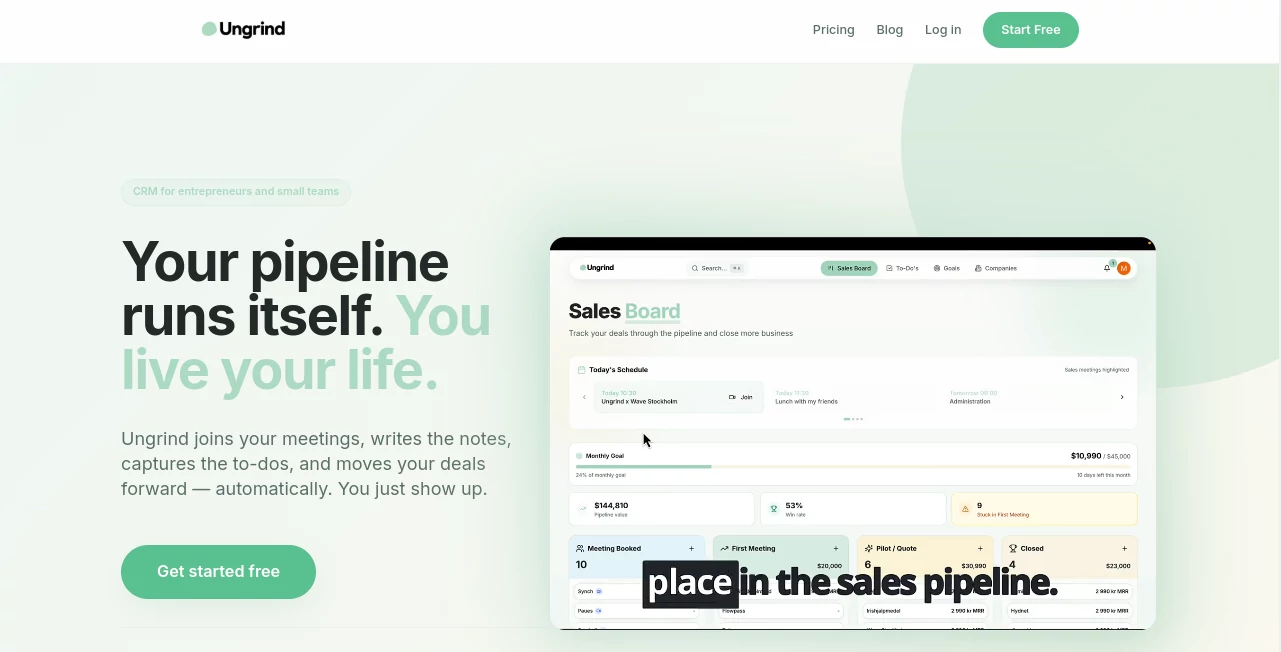
The platform offers a clean and straightforward dashboard that prioritizes simplicity. New users can connect their calendar within minutes and immediately begin automating meeting management tasks. Information is organized logically, making it easy to review conversations, action items, prospects, and pipeline stages without unnecessary complexity.
Rather than overwhelming users with dozens of menus and settings, the interface focuses on the information that matters most for sales success. This approach is especially valuable for busy professionals who want results without a lengthy learning curve.
Accuracy & Performance
One of the most impressive aspects of the platform is its ability to capture meeting details accurately and convert conversations into actionable business information. Meeting transcripts, summaries, tasks, and deal updates are generated automatically, reducing the risk of forgotten commitments or missed opportunities.
By processing discussions shortly after meetings conclude, users receive organized insights while conversations are still fresh. This helps improve consistency across sales activities and minimizes human error associated with manual CRM updates.
Capabilities
- Automatic meeting transcription and analysis.
- AI-generated meeting summaries.
- Action item and task extraction.
- Automatic CRM and pipeline updates.
- Calendar synchronization.
- Prospect and deal management.
- Sales coaching insights.
- Follow-up tracking and organization.
- Support for major online meeting platforms.
These capabilities work together to create a sales workflow that requires significantly less manual effort while maintaining organized customer records.
Security & Privacy
Privacy remains an important concern for professionals handling client information. The platform emphasizes responsible data management and provides users with control over their information. Data ownership remains with the customer, and records can be exported or removed when needed.
For businesses operating in privacy-conscious regions, the platform's commitment to compliance and secure infrastructure provides additional confidence when handling sensitive sales conversations.
Use Cases
The platform serves a variety of professionals who need an efficient way to manage client interactions and sales activities.
- Freelancers managing multiple client meetings every week.
- Consultants tracking opportunities and follow-up actions.
- Startup founders balancing sales and operational responsibilities.
- Independent sales professionals seeking automation.
- Business coaches handling discovery calls and client onboarding.
- Agencies coordinating conversations with prospects and customers.
For example, a freelance consultant conducting several meetings each day can finish calls and immediately access organized summaries, action items, and updated sales records without spending additional hours on administrative work.
Pros and Cons
Pros
- Reduces time spent on CRM administration.
- Automatically captures important meeting details.
- Simple setup process.
- Built specifically for solopreneurs and independent sellers.
- Improves consistency of follow-up activities.
- Provides valuable sales insights and coaching.
- Supports popular meeting platforms.
Cons
- May offer fewer enterprise-level features than large CRM platforms.
- Advanced functionality is available in higher-tier plans.
- Organizations with large sales teams may require additional customization.
Pricing Plans
The platform offers multiple pricing options designed to accommodate different sales volumes and business needs.
- Free Plan: Suitable for getting started with basic meeting automation and CRM functionality.
- Light Plan: Designed for professionals handling a moderate number of client meetings each month.
- Pro Plan: Includes expanded meeting capacity and AI coaching features.
- Max Plan: Built for high-volume users who require greater automation capacity and advanced support.
The availability of a free plan makes it easy for new users to evaluate the platform before committing to a paid subscription.
How to Use Ungrind
Getting started is intentionally simple.
- Connect your calendar account.
- Allow meeting access for supported platforms.
- Schedule or attend meetings as usual.
- Let the AI assistant join conversations automatically.
- Review generated summaries and action items.
- Monitor updated pipeline stages and prospect records.
- Act on recommended follow-ups and coaching suggestions.
Most users can begin benefiting from automation within minutes, making the onboarding experience remarkably smooth.
Comparison with Similar Tools
Many CRM solutions focus primarily on storing customer information and require extensive manual input. Meeting note applications often handle transcription but stop short of updating sales pipelines or organizing customer data.
This platform stands out by combining meeting intelligence, CRM automation, task generation, and sales workflow management into a single experience. Instead of treating meeting notes and CRM updates as separate processes, it connects them directly and automatically.
For solopreneurs who value simplicity and efficiency, this integrated approach can provide a significant advantage over traditional systems that depend heavily on manual data entry.
Conclusion
Sales success often depends on consistent follow-ups, accurate records, and effective time management. Unfortunately, administrative tasks can consume valuable hours that could otherwise be spent building relationships and generating revenue.
This platform addresses that challenge by automating many of the repetitive tasks associated with sales management. From meeting transcription and action item extraction to pipeline updates and coaching insights, it creates a streamlined experience tailored for independent professionals.
For freelancers, consultants, founders, and solopreneurs looking to reduce administrative overhead while maintaining an organized sales process, it represents a practical and highly effective solution.
Frequently Asked Questions (FAQ)
Who is this platform designed for?
It is primarily designed for solopreneurs, freelancers, consultants, startup founders, and independent sales professionals.
Can it automatically join meetings?
Yes. The platform can join supported online meetings, capture conversations, and generate summaries automatically.
Does it update CRM records automatically?
Yes. Meeting information, action items, and deal updates can be added to the sales pipeline without manual entry.
Is there a free plan available?
Yes. Users can start with a free plan and upgrade as their needs grow.
What are the biggest benefits?
The main advantages include time savings, improved organization, automated CRM updates, better follow-up management, and reduced administrative workload.
AI Sales Assistant , AI Productivity Tools , AI Meeting Assistant , AI CRM Assistant .
These classifications represent its core capabilities and areas of application. For related tools, explore the linked categories above.

Ungrind Alternatives Product

Automaited

TranAI

Monkey Eatin…

Debate Tello…

Flitz AI

Read

Meet-Ting

WhatIsThisMo…

PineBill