UnrealUGC
What is UnrealUGC?
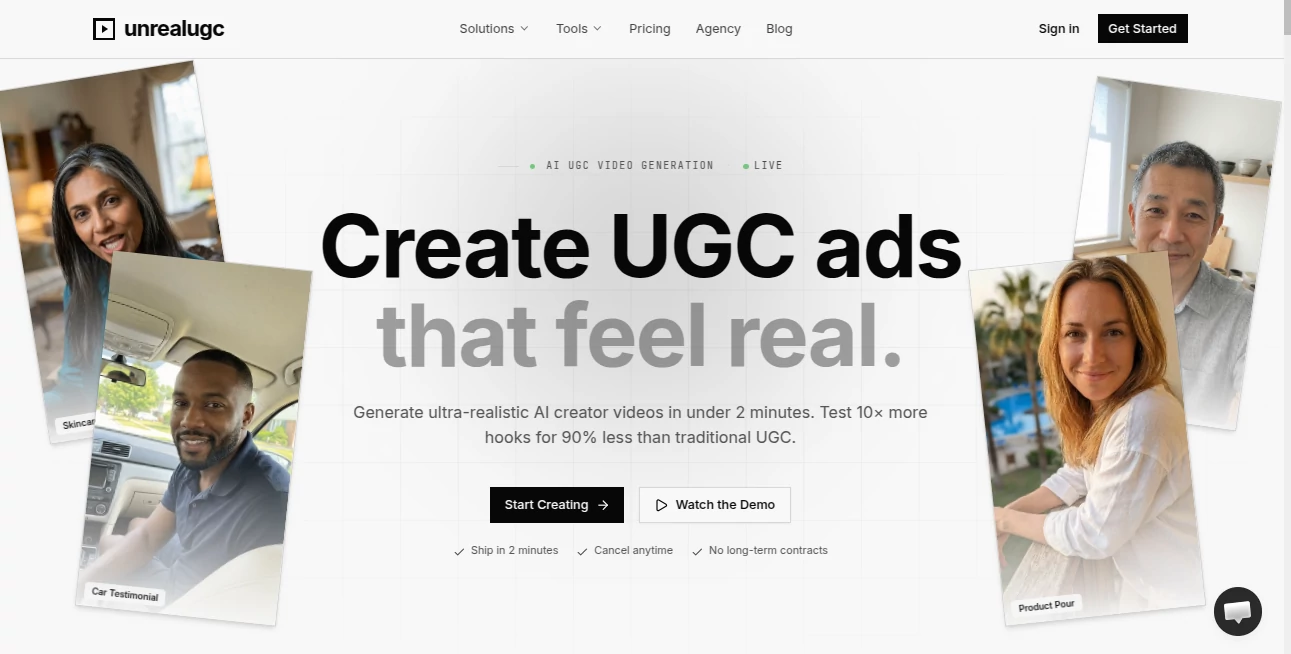
Creating scroll-stopping video ads used to mean expensive shoots, tight schedules, and crossed fingers hoping the creator nailed the vibe. This platform changes the entire game. You pick from a diverse library of AI creators, write or generate a script, and get a polished, native lip-synced UGC-style video that looks like someone filmed it on their phone — but with pro-level consistency and speed. I’ve seen DTC brands test ten different hooks in a single morning and pick winners that actually moved the needle on ROAS. It feels less like using AI and more like having an entire creative team on demand.
Introduction
Traditional UGC shoots are powerful but slow and costly. UnrealUGC brings that authentic, relatable feel without the logistics. With over 200 AI creators spanning ages, ethnicities, and personalities, plus native audio in dozens of languages, you can generate ad-ready videos in under two minutes. Marketers and founders love how it lets them test far more creative variations than they ever could with real creators. The results look real enough to fool skeptical scrollers, yet the process is so fast you can iterate until you find what converts. It’s not just faster — it’s smarter creative testing at scale.
Key Features
User Interface
The workflow is refreshingly linear and intuitive. Choose a creator from a well-organized library (with filters and previews), write or AI-generate your script, pick duration and aspect ratio, then hit generate. Everything happens in one clean canvas. Previews load quickly, and you can regenerate specific parts or create variants without starting over. It’s built for speed — you stay in the zone instead of jumping between tabs or waiting on deliverables.
Accuracy & Performance
The lip-sync is impressively natural, and character consistency holds strong across takes. Motion feels authentic rather than robotic, and the videos look like genuine phone footage rather than obvious AI. Generation is fast enough to support real creative iteration — many users report testing 10+ hooks in the time it used to take to brief one creator. The quality holds up well even on longer scripts, making it reliable for actual ad campaigns.
Capabilities
You get access to 200+ diverse AI creators, native lip-sync audio in 99+ languages, multi-model support (Kling, Veo, etc.), script generation, first/last frame control, and commercial licensing on paid plans. It supports vertical, horizontal, and square formats, making it perfect for Meta, TikTok, YouTube, and more. You can also upload your own face and voice for fully branded creator videos. The combination turns it into a complete UGC ad studio in your browser.
Security & Privacy
Your scripts, reference materials, and generated videos are handled securely. The platform focuses on delivering fast results while respecting creator and brand data. Paid plans give additional control and peace of mind for sensitive campaigns.
Use Cases
DTC skincare brands generate dozens of testimonial-style videos to test messaging angles. SaaS companies create relatable explainer clips with diverse spokespeople. Fitness brands produce before-and-after style ads without scheduling real athletes. International teams localize ads quickly with native audio in multiple languages. Agencies pitch concepts to clients same-day instead of waiting weeks for shoots. Wherever authentic-looking video can drive results, this tool accelerates the entire process.
Pros and Cons
Pros:
- Ultra-realistic UGC-style videos that actually convert.
- Fast iteration — test many more creatives than traditional methods.
- Diverse creator library with natural lip-sync and motion.
- Significant cost and time savings compared to real shoots.
- Easy workflow that marketers and founders actually enjoy using.
Cons:
- Best results still come from well-written scripts and clear direction.
- Longer or highly complex videos may require multiple generations.
- Full power and unlimited usage require a paid plan.
Pricing Plans
It’s designed to be accessible from day one with pay-as-you-go credits and subscription options that scale with your needs. You can start small and grow as your campaigns expand. Many users report the cost per video is dramatically lower than traditional UGC shoots while delivering faster testing and better results. Flexible plans mean you only pay for what you actually use.
How to Use UnrealUGC
Pick a creator whose vibe matches your brand. Write or generate a script (the built-in AI helper is surprisingly good at hooks). Choose duration and format, then generate. Review the video, create variants with different hooks or styles, and download the MP4 when you’re happy. For your own face and voice, upload a photo and short voice sample once, then use that creator across all future videos. The whole process is fast enough to fit into real marketing workflows.
Comparison with Similar Tools
Many AI video tools produce generic or robotic-looking content. This one stands out by focusing specifically on UGC-style authenticity with strong lip-sync, diverse creators, and marketing-friendly outputs. Where others feel experimental, the videos here look like they could have been shot by real creators — but without the scheduling headaches or high costs. For performance marketers and DTC brands, that realism combined with speed is a major advantage.
Conclusion
Great advertising is about testing fast and finding what resonates. This platform gives marketers and creators superpowers in that department — realistic UGC videos at a fraction of the usual time and cost. It doesn’t just save money; it multiplies creative possibilities and shortens the path from idea to launched campaign. If you’re tired of slow traditional shoots or generic AI output, this tool feels like the future of video advertising has arrived — and it’s ready to ship today.
Frequently Asked Questions (FAQ)
How realistic do the videos look?
Extremely — many users report they pass as real phone footage, especially in ad platforms.
Can I use my own face and voice?
Yes — upload once and use your consistent AI avatar across all videos.
How fast can I get a finished video?
Usually under 2 minutes from script to downloadable MP4.
Is it suitable for Meta and TikTok ads?
Absolutely — native aspect ratios, lip-sync, and UGC style perform well on those platforms.
Do I need video editing skills?
No — videos come ad-ready. You can still edit further if you want.
AI Image to Video , AI Video Generator , AI Text to Video , AI UGC Video Generator .
These classifications represent its core capabilities and areas of application. For related tools, explore the linked categories above.

UnrealUGC Alternatives Product

seedance 2.0

Veo 3.2

gpt video

Kling 3.0 – …

Gemini AI vi…

Free Sora Ge…

Veo 3 Flow

Sora-2.co
GenVideo AI