


















Build Press
What is Build Press?
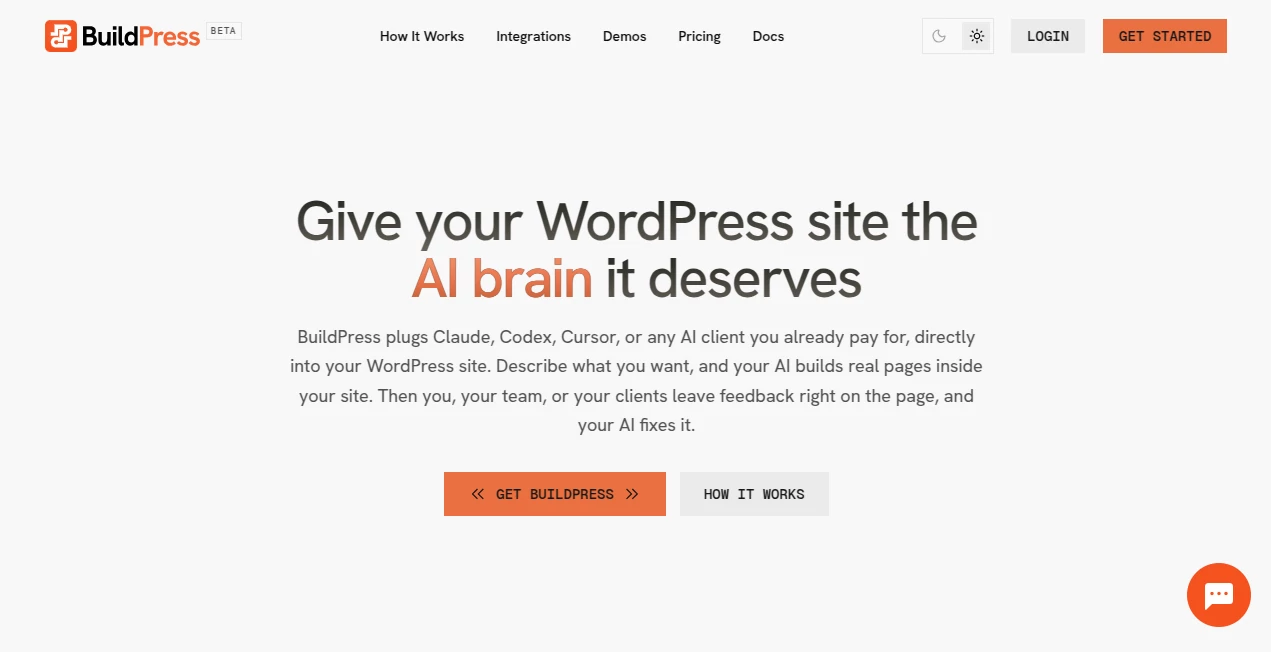
Modern websites need to evolve quickly, yet traditional WordPress workflows often slow teams down with endless revisions, manual page building, and scattered feedback. BuildPress changes that experience by connecting popular AI coding assistants directly to WordPress, allowing users to describe the page they want and receive a fully editable result inside their own website.
Instead of forcing users to learn a completely new editor or migrate content to another platform, the solution works with familiar AI assistants that many professionals already subscribe to. Designers, marketers, developers, agencies, and business owners can collaborate within WordPress while keeping complete control over their content, structure, and publishing workflow.
The platform is especially valuable for organizations that regularly build landing pages, marketing campaigns, client websites, documentation, or product pages. Rather than switching between multiple applications, everything happens where the website already lives. AI becomes an active contributor instead of a disconnected writing assistant.
One of the biggest advantages is the collaborative workflow. After a page is generated, teammates or clients can leave comments directly on the page. Those comments become actionable instructions that help AI refine layouts, improve copy, adjust sections, or implement requested changes without repeating the entire creation process.
This approach makes website creation feel less like coding and more like having a highly capable digital teammate that understands both design requests and content improvements while working inside an existing WordPress environment.
Key Features
User Interface
The interface is designed around simplicity. Instead of introducing another complex website builder, users communicate naturally with their preferred AI assistant. Pages appear directly inside WordPress where they can be reviewed, edited, and published using familiar workflows.
Comments are integrated into the editing experience, allowing teams to point at specific sections of a page instead of writing long emails or collecting screenshots. This dramatically reduces misunderstandings during revisions.
- Native WordPress workflow
- Natural language page creation
- In-context feedback and comments
- Minimal learning curve
- Collaborative editing experience
Accuracy & Performance
By connecting with established AI coding assistants such as Claude, Codex, and Cursor, the platform benefits from powerful language understanding and coding capabilities without requiring users to adopt another proprietary AI model.
Generated pages are created directly inside the website, reducing unnecessary exporting or copying between tools. Teams can iterate rapidly because each revision builds upon previous work instead of starting over.
Performance is particularly noticeable during repetitive website production, where multiple pages can be generated and refined much faster than traditional manual development.
Capabilities
The platform goes beyond simple text generation. It can assist with building actual WordPress pages based on plain language instructions, helping transform ideas into structured layouts that can continue evolving through collaborative feedback.
- Create complete website pages
- Generate landing pages
- Produce marketing content
- Build product pages
- Iterate from client comments
- Collaborate with entire teams
- Support existing AI subscriptions
- Work directly inside WordPress
Because the workflow focuses on continuous improvement rather than one-time generation, users can gradually refine pages until they meet business or client expectations.
Security & Privacy
Many organizations prefer using AI services they already trust rather than uploading website content into unfamiliar platforms. Since the solution connects with AI providers chosen by the user, businesses retain greater flexibility over how their workflows operate.
Keeping content creation within WordPress also reduces unnecessary movement of website assets between multiple services, making project management more organized and easier to monitor.
Use Cases
- Building marketing landing pages for campaigns.
- Creating new business websites more efficiently.
- Helping agencies deliver client projects faster.
- Generating product pages for online businesses.
- Collaborating on website revisions with clients.
- Rapid prototyping of website ideas.
- Producing internal documentation pages.
- Launching startup websites with limited development resources.
- Supporting content teams that publish frequently.
- Reducing repetitive page-building tasks.
Imagine an agency receiving feedback from a client requesting changes to a homepage. Instead of manually interpreting every revision, the client leaves comments directly on the page. Those comments become new instructions for AI, allowing updated layouts and content to be generated within minutes. This creates a smoother collaboration process and significantly shortens project timelines.
Pros and Cons
Pros
- Works inside WordPress.
- Supports popular AI assistants.
- Natural language page creation.
- Collaborative feedback workflow.
- Reduces repetitive development work.
- Useful for agencies and marketing teams.
- Keeps projects centralized.
- Simple onboarding process.
- Encourages rapid iteration.
Cons
- Requires a WordPress website.
- Best experience depends on compatible AI assistants.
- Complex custom projects may still require developer review.
- Users unfamiliar with AI prompting may need some experimentation.
Pricing Plans
Pricing information may change over time. Users should consult the official website for the latest subscription options, available plans, supported integrations, and licensing details before making a purchasing decision.
How to Use BuildPress
Begin by connecting the platform to your existing WordPress website. After setup, connect your preferred AI assistant that you already use for development or content creation.
Describe the page you want using plain English. The AI generates a complete page inside WordPress rather than creating content in an external editor.
Review the generated result, make manual edits if needed, and invite colleagues or clients to leave comments directly on the page.
The AI can then interpret those comments and produce improved versions without rebuilding everything from scratch. Continue this collaborative cycle until the page is ready for publication.
Comparison with Similar Tools
Traditional AI writing tools primarily focus on producing text, leaving layout creation and implementation to the user. Website builders may simplify design but often require manual editing and repeated configuration.
This solution combines AI-assisted page generation with an integrated WordPress workflow, allowing content, structure, collaboration, and revisions to happen in one environment.
Compared with standalone page generators, the collaborative commenting system provides an additional layer of efficiency that is particularly attractive for agencies and distributed teams managing multiple stakeholders.
Organizations already investing in AI assistants like Claude, Cursor, or Codex can extend the value of those subscriptions by using them directly for website production instead of purchasing another isolated AI platform.
Conclusion
Website creation is gradually shifting from manual assembly toward intelligent collaboration. Instead of replacing human creativity, this platform enhances it by turning natural language into real WordPress pages and making revisions significantly easier through integrated feedback.
For freelancers, agencies, startups, marketing departments, and businesses managing multiple websites, the workflow offers a practical way to reduce repetitive tasks while maintaining full control over published content.
The combination of AI-powered page generation, collaborative commenting, familiar WordPress editing, and compatibility with widely used AI assistants creates a streamlined experience that fits naturally into existing development processes. Teams can spend less time rebuilding pages and more time improving user experience, messaging, and business outcomes.
Frequently Asked Questions (FAQ)
Can beginners use this platform?
Yes. Users interact with AI using natural language, making the learning curve much easier than traditional website development.
Does it replace WordPress?
No. It enhances WordPress by adding AI-assisted page creation and collaborative workflows.
Which AI assistants are supported?
The platform is designed to work with popular assistants including Claude, Codex, Cursor, and compatible AI clients.
Can clients review pages before publishing?
Yes. Clients and team members can leave feedback directly on pages, allowing AI to make revisions based on real comments.
Who benefits most from this solution?
Agencies, freelancers, marketers, startups, developers, and businesses that frequently build or update WordPress websites will gain the greatest productivity improvements.
AI Website Builder , AI Productivity Tools , AI Team Collaboration , AI Developer Tools .
These classifications represent its core capabilities and areas of application. For related tools, explore the linked categories above.

Build Press Alternatives Product

Bolt AI
Unix Timesta…

DocReplacer

GetVivix
Vurge
TutuoAI
tanship

Toolquix

ShipBoost
