


















Kineo
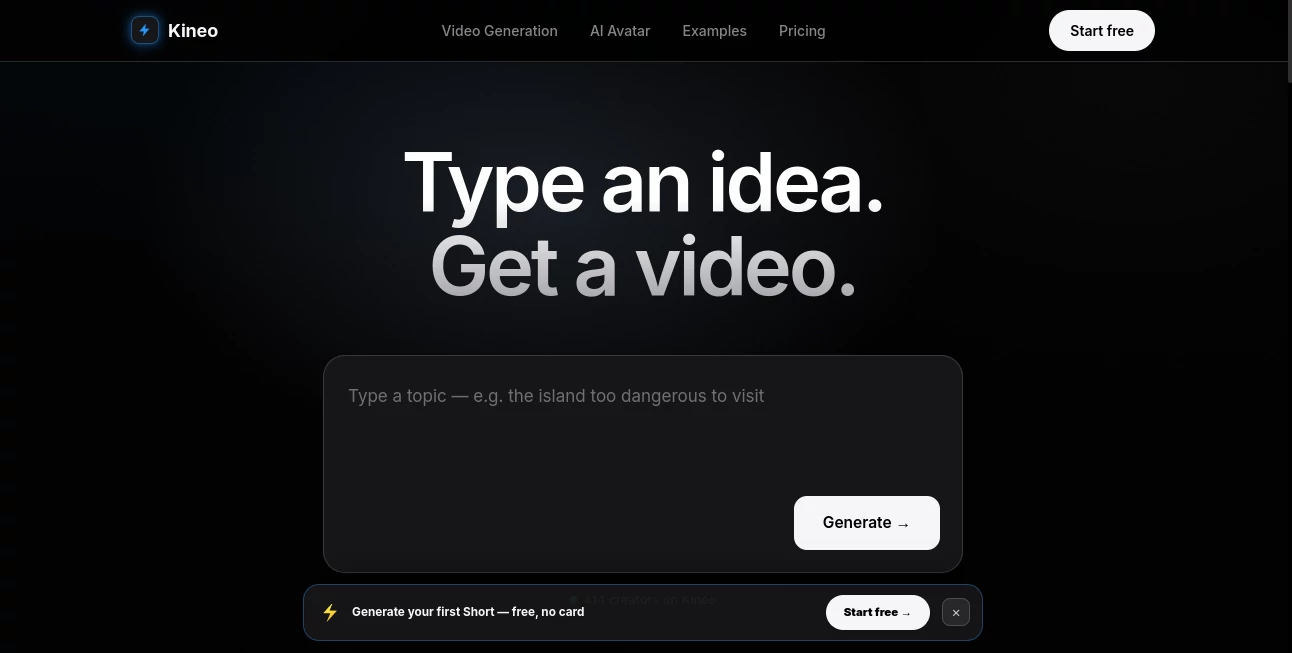
What is Kineo?
Creating engaging videos used to require time, editing skills, and multiple creative tools. Today, modern AI technology has transformed that process into something much faster and more accessible. This platform allows users to turn a simple written idea into a polished video in just a few moments, making professional-quality content creation available to businesses, marketers, educators, and creators of all experience levels.
Instead of spending hours writing scripts, searching for visuals, recording voiceovers, and editing timelines, users can simply describe what they want to create. The AI automatically generates scenes, selects appropriate visuals, adds animations, creates natural-sounding narration, and organizes everything into a cohesive video. This streamlined workflow dramatically reduces production time while maintaining impressive visual quality.
Whether the goal is creating marketing campaigns, educational explainers, social media content, product showcases, internal presentations, or promotional videos, the platform offers an efficient solution that helps ideas become engaging visual stories without technical complexity.
Key Features
User Interface
The interface is designed with simplicity in mind. Users are welcomed with a clean workspace where they can immediately describe their project using natural language. Instead of overwhelming dashboards or complicated editing panels, every step follows an intuitive workflow that guides users from idea to finished video.
Templates, editing options, and generation tools remain organized and easy to locate, making the platform approachable for beginners while still providing enough flexibility for experienced content creators.
Accuracy & Performance
The AI understands prompts with impressive context awareness, transforming written descriptions into coherent visual sequences. Scene transitions, narration flow, and media selection work together naturally, producing videos that often require only minor adjustments before publishing.
Fast processing allows projects to be generated within minutes rather than hours, enabling creators to experiment with multiple concepts without slowing down their production schedule.
Capabilities
- Generate videos from simple text prompts.
- Create complete storyboards automatically.
- Produce AI-generated voice narration.
- Generate marketing videos.
- Create educational presentations.
- Produce product demonstrations.
- Build social media videos.
- Generate promotional content.
- Customize scenes after generation.
- Edit generated scripts.
- Add visual effects and transitions.
- Support multiple content styles.
- Create professional-looking videos quickly.
- Reduce manual editing work.
- Speed up content production for teams.
Security & Privacy
Content creators often work with confidential marketing plans, internal documentation, and unpublished campaigns. A cloud-based AI platform should therefore provide secure account management, encrypted communication, and responsible handling of user-generated content. These practices help businesses confidently create videos while protecting valuable creative assets.
Use Cases
- Creating social media marketing campaigns.
- Producing YouTube content faster.
- Generating startup pitch videos.
- Building product launch presentations.
- Designing educational explainers.
- Creating employee onboarding materials.
- Producing online course videos.
- Making promotional advertisements.
- Generating business presentations.
- Creating customer onboarding videos.
- Building brand awareness campaigns.
- Developing content for digital agencies.
- Creating event promotion videos.
- Producing short-form video content.
Pros and Cons
Pros
- Very fast video creation process.
- Easy for beginners to use.
- No professional editing skills required.
- Automates scripting and video production.
- Produces polished visual content.
- Suitable for businesses and creators alike.
- Helps save significant production time.
Cons
- Creative control may be lower than manual editing.
- Advanced customization can still require post-editing.
- Generated output depends on prompt quality.
- Internet access is required for cloud generation.
Pricing Plans
The platform typically offers subscription-based pricing designed for individual creators, professionals, and business teams. Depending on the selected plan, users may receive different limits for video generation, premium features, export quality, and collaboration capabilities. Checking the official pricing page is recommended for the latest information.
How to Use Kineo
Start by creating an account and opening a new project. Describe your video idea using a natural language prompt that explains the subject, audience, and preferred style. The AI analyzes the request and automatically generates a complete video structure including scenes, visuals, narration, and transitions.
Review the generated content and make any desired edits. You can modify the script, replace visuals, adjust timing, or personalize elements to better match your brand identity. Once satisfied with the final result, export the video and publish it across websites, social media platforms, presentations, or marketing campaigns.
Comparison with Similar Tools
Many AI video generators focus on either templates or manual editing assistance. This platform distinguishes itself by emphasizing a remarkably simple workflow that begins with nothing more than an idea. Rather than asking users to build scenes individually, it automatically transforms text into a structured video, reducing creative friction and allowing projects to move from concept to completion much more quickly.
Its combination of AI storytelling, automated visual generation, and accessible editing makes it especially attractive for creators who value speed without sacrificing professional presentation.
Conclusion
AI-powered video creation is rapidly changing how digital content is produced, making high-quality storytelling accessible to everyone. By transforming simple text prompts into complete videos, this platform removes many of the traditional barriers associated with video production while maintaining an impressive level of quality and efficiency.
For marketers, educators, startups, agencies, entrepreneurs, and content creators who need professional videos on a regular basis, it offers a practical solution that significantly shortens production time and encourages creative experimentation. Instead of focusing on technical editing, users can concentrate on developing better ideas and communicating their message more effectively.
Frequently Asked Questions (FAQ)
Can beginners create videos without editing experience?
Yes. The platform is designed to simplify the entire production process, allowing users with little or no editing knowledge to generate professional-looking videos.
Can I edit the generated video?
Yes. Generated videos can be reviewed and customized before exporting to better match your branding and creative preferences.
Is it suitable for business marketing?
Absolutely. Marketing campaigns, product launches, promotional videos, advertisements, and social media content are among its strongest applications.
Can educators use it for online learning?
Yes. It is well suited for creating educational lessons, tutorials, explainers, and presentation videos.
Does the quality depend on the prompt?
Yes. Clear, descriptive prompts generally produce more accurate visuals, stronger storytelling, and better overall video quality.
AI Marketing Plan Generator , AI Video Generator , AI Short Clips Generator , AI Text to Video .
These classifications represent its core capabilities and areas of application. For related tools, explore the linked categories above.

Kineo Alternatives Product

Sora-2.co

Meigen AI

seedance 2

TokTools

UniVideo

Supawazap

Zilivo AI

AI Pixel Ani…

Blinkly AI
