
VibeKnow
What is VibeKnow?
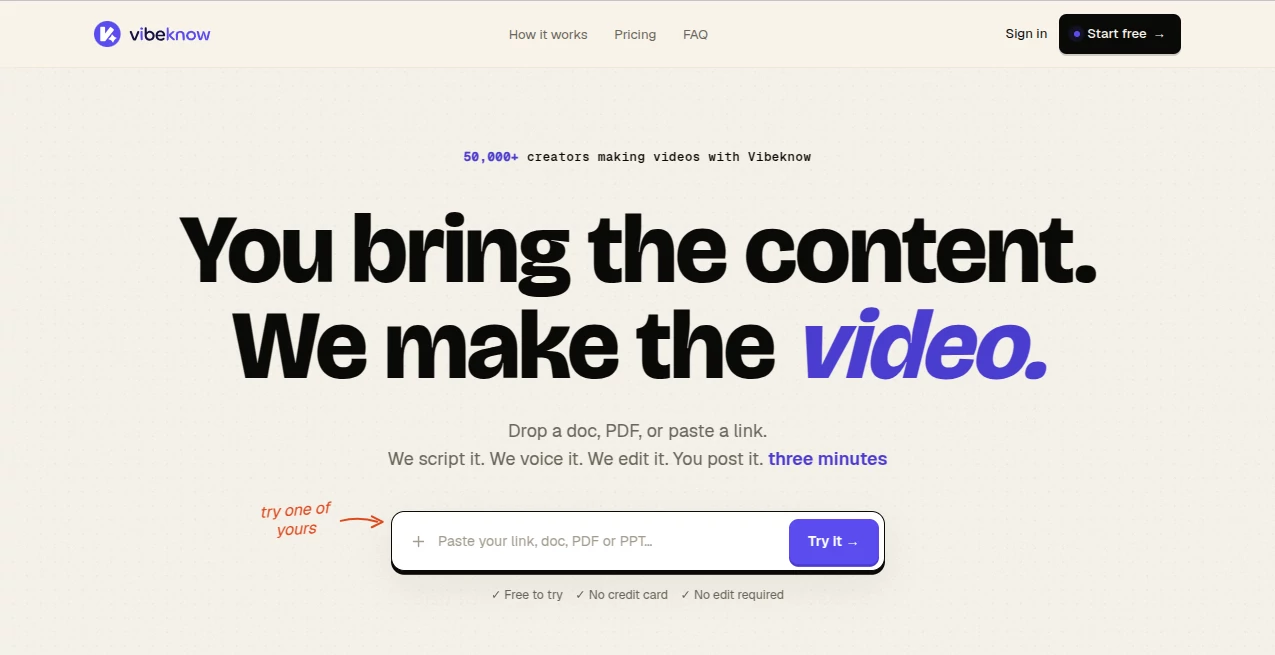
Creating professional videos from existing content has traditionally required a combination of scriptwriters, voice artists, designers, and video editors. VibeKnow changes this workflow by transforming documents, articles, presentations, and web content into complete explainer videos with AI-powered scripting, narration, visuals, and editing.
Designed for creators, educators, marketers, and businesses, this AI video creation platform helps turn ideas that already exist into engaging visual experiences. Instead of spending hours learning complex editing software, users can provide their source material and receive a structured video ready for review and publishing.
The platform focuses especially on knowledge-based videos, making it useful for training materials, educational content, product demonstrations, onboarding videos, and social media adaptations. It combines automation with creative control, allowing users to focus on their message while the production process is handled automatically.
Key Features
User Interface
The interface is designed around simplicity. Users can start by uploading content such as PDFs, documents, presentations, URLs, Notion pages, blog posts, or text files. The workflow follows a clear process: provide the source, allow the AI to create the video structure, review the result, and export the final version.
The clean workflow removes unnecessary complexity commonly found in traditional video editing platforms. Even users without previous video production experience can quickly move from written content to a finished visual presentation.
Accuracy & Performance
The platform analyzes the structure and meaning of uploaded content before creating a video. Instead of simply placing text on slides, it builds a narrative flow with scenes, visuals, voice narration, and supporting elements that match the topic.
Video generation is designed to be fast, with typical explainer videos created within minutes rather than the days or weeks often required for traditional production. Users can also update their source material and regenerate content when information changes.
Capabilities
The platform provides a complete AI video production workflow, including:
- AI script generation from documents and online content
- Automatic scene planning and visual design
- AI voice narration with natural-sounding voices
- Support for multiple languages
- Background music integration
- Automatic subtitle generation
- Landscape and vertical video formats
- Templates for different video styles
- Video creation from PDFs, PPT files, URLs, and written content
- Content updates with easy video regeneration
Security & Privacy
For businesses and teams, protecting internal information is an important consideration. The platform is built with business workflows in mind, offering features designed for professional environments, including team-focused options and enterprise-ready capabilities.
Organizations can use it for internal training, documentation, and onboarding materials while maintaining a structured content creation process.
Use Cases
This tool is suitable for a wide range of users who already have valuable information but want to communicate it through video.
- Educators: Convert course materials, textbooks, and lessons into engaging video content.
- Content Creators: Transform articles, newsletters, and written ideas into videos for YouTube Shorts, TikTok, and social platforms.
- Businesses: Create onboarding guides, product walkthroughs, and employee training videos.
- Marketing Teams: Repurpose existing campaigns, reports, and product information into visual presentations.
- Publishers: Create video summaries and companion content from books or long-form publications.
Pros and Cons
Pros:
- Transforms existing content into videos quickly
- No advanced video editing skills required
- Supports many content input formats
- Useful for education, marketing, and business training
- Creates narration, visuals, and structure automatically
- Supports multiple video formats and languages
Cons:
- Advanced editors may want more manual creative controls
- Complex cinematic projects may still require professional editing software
- Large-scale video production may require higher-tier plans
Pricing Plans
The platform offers multiple pricing options designed for different content creation needs.
- Free Plan: A free option for trying the platform with limited generation credits, watermark exports, and basic features.
- Plus Plan: Designed for regular creators who need more video generation capacity and watermark-free exports.
- Pro Plan: Suitable for frequent creators and teams requiring higher limits, faster generation, and additional voice options.
- Max Plan: Built for agencies and organizations producing videos at scale with larger credit limits and advanced workflows.
How to Use VibeKnow
Creating a video follows a simple three-step process:
- Step 1: Upload your source material, such as a document, PDF, presentation, webpage, or written content.
- Step 2: Let the AI analyze the information and create the script, scenes, narration, and visual structure.
- Step 3: Review the generated video, make adjustments if needed, and export it for publishing.
Comparison with Similar Tools
Many AI video platforms focus mainly on avatars, templates, or simple text-to-video generation. This solution takes a different approach by concentrating on transforming existing knowledge into structured explainer videos.
Compared with traditional editing software, it reduces the amount of manual work required. Compared with basic AI video generators, it places more emphasis on understanding the source material and creating a complete storytelling flow.
For users who already have valuable written content but lack the time or skills to produce videos, this approach provides a practical middle ground between automated creation and professional production.
Conclusion
Turning written knowledge into engaging video content is becoming increasingly important across education, marketing, and business communication. This AI-powered video creation platform makes that transition easier by handling the complex parts of production while keeping the user's original ideas at the center.
Whether you are converting a course, promoting a product, sharing research, or creating internal training materials, this tool offers a faster way to transform information into content people can watch and understand.
Frequently Asked Questions (FAQ)
What type of content can be converted into videos?
Users can create videos from documents, PDFs, presentations, web pages, articles, Notion pages, and other written materials.
Do I need video editing experience?
No. The platform is designed for users who want to create professional-looking videos without learning complicated editing tools.
Can the generated videos be used for education and training?
Yes. It is suitable for educational courses, employee onboarding, product training, and knowledge-sharing projects.
Does it support different video formats?
Yes. It supports formats suitable for different platforms, including landscape and vertical videos for social media channels.
Can businesses use it for large-scale content production?
Yes. Higher-tier plans are designed for teams and organizations that need repeated video creation workflows.
AI Video Generator , AI Education Assistant , AI Text to Video , AI Presentation Generator .
These classifications represent its core capabilities and areas of application. For related tools, explore the linked categories above.

VibeKnow Alternatives Product

ai seedance …

ModelsLab

VIGGLE
Kling 3.0

Seedance 2.5

KlingVideo

Veo 3.2

Seedance 2 V…

Seedance 3.0