VideoAny
What is VideoAny?
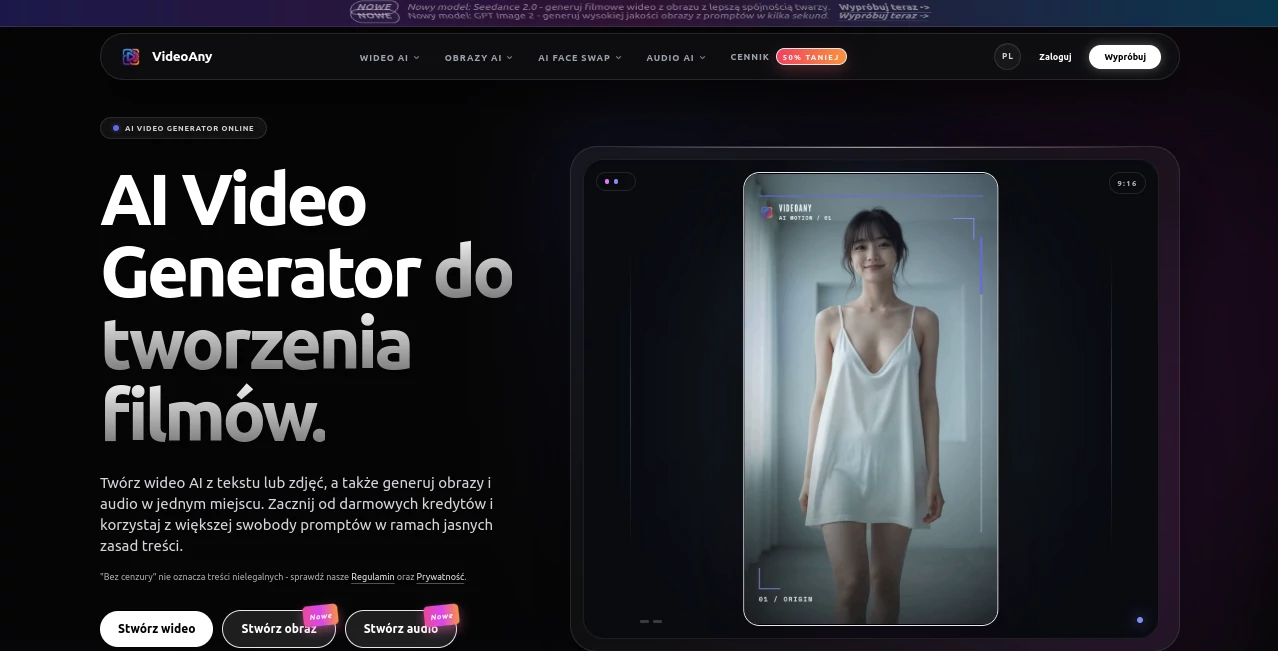
VideoAny is an AI creation studio designed for people who want to turn ideas, images, and prompts into visual and audio content without jumping between several different platforms. It brings AI video generation, image creation, image editing, avatars, audio generation, and creative effects into one workflow.
The platform supports both text-to-video and image-to-video creation, making it useful for everything from short social media clips and promotional concepts to character animations and visual experiments. It also provides access to multiple AI models, giving creators more flexibility when a particular style, motion, or level of realism is needed.
One of its most appealing qualities is the way different media formats fit together. A creator can start with an image, animate it, add audio, experiment with an avatar or lip-sync effect, and continue refining the result rather than rebuilding the project somewhere else.
Key Features
- Text-to-video generation for turning written prompts into short AI videos.
- Image-to-video generation for animating existing images and characters.
- AI image generation from text prompts and visual references.
- Image editing and variation tools for refining creative assets.
- AI avatars and talking-image experiences for character-based content.
- Lip-sync generation that synchronizes facial and mouth movement with audio.
- Face-swap tools for selected image and video workflows.
- AI audio features including text-to-music, voice-related tools, and sound effects.
- A selection of AI models for different video and image generation tasks.
- Prompt-based motion control for image-to-video projects.
- Creative effects for producing short-form and experimental content.
- Free starting credits so new users can test the workflow before committing to a paid plan.
User Interface
The interface is organized around creation rather than technical configuration. Video, image, audio, models, and effects are separated into clear areas, which makes it easier to decide what to work on next.
For a first-time user, the workflow is relatively straightforward: choose a generation method, provide a prompt or source file, select the desired model or effect, and start generating. The ability to move between different media types also makes the platform feel more like a creative workspace than a collection of unrelated AI tools.
Accuracy & Performance
Generation speed depends on the selected model, output length, queue, and account plan. Images can generally be produced within seconds, audio generation can take less than a minute, while video generation may require several minutes.
Results are also strongly influenced by the quality of the prompt and source material. A clear description covering the subject, movement, environment, composition, and visual style usually gives the model more useful direction than a long and unfocused prompt.
Capabilities
The platform covers a surprisingly broad creative workflow. Text can become video, a still image can be animated, generated images can be edited into new variations, and audio can be incorporated into visual projects.
Its model selection is another practical advantage. Available options include models such as Seedance, Kling, Vidu, Wan, Grok Imagine, Flux, and other generation systems, depending on the current platform offering. This gives creators room to compare different approaches instead of relying on one generation engine.
For social media creators, the combination of vertical video support, avatars, lip sync, image animation, and short creative effects is particularly useful. Someone producing several short clips can develop a visual concept once and then create multiple variations around it.
Security & Privacy
Privacy matters more when users upload personal photographs, voices, faces, or other original material. The platform states that uploaded files are protected during transmission and provides dedicated privacy and terms documentation for its data-handling practices.
Users should still take responsibility for the material they upload. If an image contains another real person, appropriate permission should be obtained before using their likeness. The same principle applies to voices, copyrighted material, and other assets.
The service also makes an important distinction around unrestricted creative generation: greater prompt flexibility does not mean illegal or non-consensual content is permitted. Users remain responsible for following applicable laws and the platform's content rules.
Use Cases
- Social Media Content: Create short vertical clips, animated images, avatars, and attention-grabbing visual experiments for social platforms.
- Marketing: Turn product ideas, campaign concepts, and promotional images into short video assets without traditional video production.
- Character Creation: Develop recurring fictional characters and animate them across different scenes and formats.
- Talking Avatars: Combine portraits and audio to produce speaking characters for presentations, entertainment, or social content.
- Creative Storytelling: Turn a written scene into an image and then animate that visual into a short cinematic sequence.
- Image Animation: Give movement to artwork, portraits, illustrations, and other still images.
- Concept Development: Quickly explore several visual directions before investing time in traditional production.
- Audio-Visual Projects: Combine generated imagery, video, music, voice, and sound effects within a connected workflow.
Pros and Cons
Pros
- Combines video, image, and audio creation in one platform.
- Supports both text-based and image-based video generation.
- Offers access to multiple AI models and creative workflows.
- Useful selection of avatar, lip-sync, face-swap, and visual effects.
- Free starting credits make it possible to test the service before paying.
- Suitable for both quick experiments and recurring content production.
Cons
- Generation speed can vary considerably depending on the model and queue.
- Credit consumption can become important for frequent or high-volume generation.
- Different models may produce noticeably different results from the same prompt.
- Commercial usage depends on the selected plan, input rights, and applicable terms.
Pricing Plans
The service uses a credit-based approach. New users can start with free credits, allowing them to explore the main creation workflow without immediately purchasing a plan.
Paid options provide larger generation limits and additional benefits such as higher quality, faster queues, and more generations. The amount of credit consumed depends on factors such as the selected model, generation type, length, and production requirements.
For occasional users, the free credits can be a convenient way to test several workflows. Frequent creators should compare credit consumption with their expected monthly output before choosing a paid option.
How to Use the Platform
- Choose whether you want to create a video, image, or audio asset.
- Select a workflow such as text-to-video or image-to-video.
- Write a focused prompt describing the subject, action, setting, camera direction, and visual style.
- If using image-to-video, upload a suitable source image with a clear subject.
- Select an available AI model or effect that matches the desired result.
- Generate the first version and review the movement, composition, and overall consistency.
- Adjust one or two elements at a time rather than completely rewriting the prompt.
- Generate additional variations until you find a version worth exporting or sharing.
A practical approach is to start simple. For example, instead of asking for a complicated cinematic sequence in one prompt, first create the character image, then animate it with a short movement instruction. This usually makes experimentation easier and gives you more control over the final result.
Comparison with Similar Tools
Many AI creative platforms specialize in one area. Some focus mainly on video generation, others on images, avatars, or audio. This platform takes a broader approach by bringing several of those workflows together.
That difference becomes useful when a project moves between formats. A creator who starts with a generated portrait may want to turn it into a moving scene, add a voice, synchronize the character's lips, and eventually create several short versions for social media. Having these capabilities available within one creative environment reduces the need to repeatedly download and upload assets between separate services.
Dedicated video platforms may still be preferable when a user needs highly specialized video-production controls. Likewise, a specialist image or audio application can be the better choice for a very narrow professional workflow. The main strength here is breadth: it connects several stages of AI content creation in one place.
Conclusion
For creators who regularly move between images, videos, characters, voices, and short-form content, this platform offers a practical alternative to maintaining a collection of separate AI subscriptions. Its combination of text-to-video, image-to-video, image generation, audio tools, avatars, lip sync, and creative effects gives users plenty of room to experiment.
The strongest use case is not necessarily producing one perfect clip on the first attempt. It is the ability to explore an idea quickly, create a visual starting point, animate it, add sound, and iterate until the concept feels right.
With free starting credits and a growing selection of AI models, it is worth considering for anyone looking for a flexible AI creation workspace rather than a single-purpose generator.
Frequently Asked Questions (FAQ)
What can I create with this platform?
You can create AI videos from text or images, generate and edit images, produce audio, create avatars, experiment with lip sync and face-swap workflows, and build short-form creative content.
Can I generate a video from an image?
Yes. The image-to-video workflow lets you upload a source image and describe the movement or scene you want to create. Prompt-based motion control can then be used to guide the animation.
Is there a free option?
Yes. Free starting credits are available, while paid plans provide larger limits, additional generations, higher quality options, and faster queues.
How long does AI video generation take?
Video generation generally takes several minutes, although the exact time depends on the selected model, video length, queue, and account plan.
Can generated content be used commercially?
Commercial usage depends on the selected plan, the rights associated with the input material, and the platform's current terms. Users should make sure they have permission to use uploaded faces, voices, images, and other copyrighted assets before publishing the result.
Does the platform support AI audio?
Yes. The creative studio includes audio-related capabilities such as text-to-music, voice features, and sound effects that can complement AI-generated video projects.
AI Photo & Image Generator , AI Image to Video , AI Video Generator .
These classifications represent its core capabilities and areas of application. For related tools, explore the linked categories above.

VideoAny Alternatives Product

AI Hug
GPT Image 2 …

gempix2
Sora 2 AI
Banana Prompt

Nano Banana …

Veo4
ImageKontext…

Faceless vid…