
VideoToScript
What is VideoToScript?
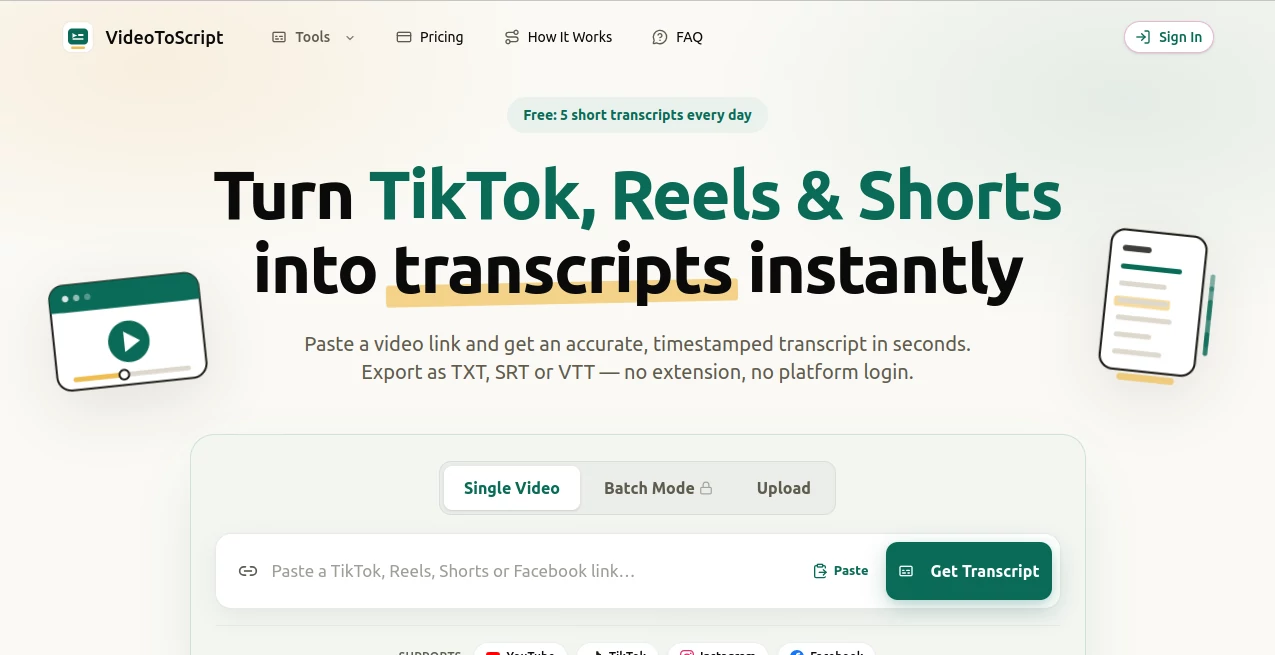
VideoToScript is a practical transcription tool built for people who work with short-form video. It turns public videos from TikTok, Instagram Reels, YouTube Shorts, and Facebook into timestamped text without requiring a browser extension, platform login, or complicated setup. For creators who regularly watch videos for research, marketers studying successful content, or students collecting information from clips, the simple link-based workflow can save a surprising amount of time.
The process is straightforward: paste a supported video link, let the speech recognition system process the audio, and download the resulting transcript in a format that fits your workflow. Instead of manually replaying a short clip several times to capture every sentence, users can get searchable text in seconds and move directly to editing, analysis, caption creation, or content research.
Key Features
- Transcription from TikTok, Instagram Reels, YouTube Shorts, and Facebook videos.
- Timestamped transcripts that make it easier to locate specific moments in a video.
- TXT, SRT, and VTT export options for different content workflows.
- Support for single-video processing as well as batch lists.
- Five free short transcripts available each day.
- No browser extension is required.
- No account on the original social platform is required for supported public links.
- Fast processing, with most short-form transcripts taking around 3–10 seconds.
- Speech recognition tuned for fast dialogue and voiceovers common in short videos.
- Pay-as-you-go credits instead of a recurring subscription.
User Interface
The interface keeps the main task front and center. A user does not need to search through multiple menus before starting a transcription. The primary workflow begins with a link field where a TikTok, Reel, Short, or Facebook video URL can be pasted. From there, the transcript can be generated and copied or exported.
This minimalist approach is particularly useful for occasional users. Someone researching ten videos for a content project, for example, can move through the workflow without installing additional software or learning a complicated dashboard. Batch mode is also useful when several videos need to be processed together.
Accuracy & Performance
The service states that its speech recognition reaches 95%+ accuracy and is tuned for the quick speech, voiceovers, and conversational delivery often found in TikTok-style content. That focus is important because short-form videos frequently contain rapid dialogue, informal phrasing, and tightly edited audio.
Processing is also designed to be quick. Most short-form transcripts are reported to be ready within roughly 3–10 seconds. In practice, the final quality can still depend on the source audio, background noise, accents, overlapping speakers, and clarity of the recording, so transcripts should be reviewed when exact wording matters.
Capabilities
The strongest part of the tool is its focus on short-form video. Rather than trying to be an all-purpose media platform, it concentrates on turning commonly shared social videos into usable text. Timestamped output is especially helpful when a transcript will be used alongside the original video.
TXT works well for plain research notes and text processing, while SRT and VTT are useful when the transcript needs to become part of a subtitle or caption workflow. The combination makes the service useful beyond simple transcription: a creator can study a competitor's hook, a marketer can examine an advertisement's messaging, and a researcher can turn spoken material into searchable notes.
Security & Privacy
Privacy is presented as an important part of the service. The website states that submitted links and files are processed securely and are not shared with third parties. This is useful for users who want a straightforward transcription workflow without sending their material through unnecessary third-party services.
As with any online transcription service, users should still consider the sensitivity of the material they submit and review the provider's current privacy and terms pages before processing confidential or restricted content.
Use Cases
Content creators: Creators can transcribe short videos to study strong hooks, understand how other creators structure their scripts, or turn spoken ideas into editable text. A transcript can also serve as the starting point for a new script rather than forcing the creator to type everything manually.
Digital marketers: Marketing teams can use transcripts to research advertisements, promotional videos, and successful social content. Having the spoken words in text form makes it easier to compare messaging, identify recurring phrases, and repurpose ideas for other channels.
Students and researchers: A transcript can make short educational or informational videos easier to review. Instead of repeatedly searching through a clip for one sentence, users can work with text, take notes, summarize sections, or pass the transcript into another research workflow.
Social media teams: Teams managing several social channels can use transcript files as source material for captions, subtitles, summaries, and content repurposing. Batch processing can be especially helpful when a campaign involves a collection of short videos.
Pros and Cons
Pros:
- Very simple link-to-transcript workflow.
- Supports several major short-form video platforms.
- Fast processing for typical short videos.
- Timestamped output is useful for content and caption workflows.
- TXT, SRT, and VTT export options provide flexibility.
- Five free short transcripts are available every day.
- No subscription is required for paid credits.
- Batch processing is available for multiple videos.
Cons:
- Accuracy can vary depending on audio quality and speech conditions.
- The service is primarily focused on supported short-form video sources.
- Users working with large volumes may need to purchase additional credits.
- Very noisy recordings or overlapping conversations may require manual correction.
Pricing Plans
The pricing model is based on credits rather than a recurring subscription. This is a convenient option for users whose transcription needs change from week to week because there is no automatic monthly renewal.
- Free: 5 short transcripts per day.
- Starter: $9.99 for 200 credits.
- Popular: $19.99 for 1,000 credits.
- Best Value: $39.00 for 3,000 credits.
One credit covers one video under five minutes. Longer videos consume an additional credit for each five-minute block. Paid credits remain valid for 12 months, and failed transcription tasks do not consume a credit. This makes the credit system relatively easy to understand for both occasional and heavier users.
How to Use the Tool
- Copy the URL of a supported TikTok, Instagram Reel, YouTube Short, or Facebook video.
- Paste the link into the transcription field.
- Start the transcription process.
- Wait while the speech recognition system processes the video.
- Review the timestamped transcript once it is ready.
- Copy the text or download it as TXT, SRT, or VTT.
- Use the resulting text for research, captions, notes, scripts, or content repurposing.
Comparison with Similar Tools
Many transcription services are designed around uploaded audio files, long recordings, meetings, or general speech-to-text work. This tool takes a more focused approach by putting short-form social videos at the center of the workflow.
That distinction can matter when the main task is extracting spoken content from a TikTok, Reel, Short, or Facebook video. The combination of direct URL processing, timestamped output, short processing times, and multiple subtitle-friendly formats makes it particularly suitable for social media research and content production.
It may not replace a full transcription platform for every professional workflow, especially when users need advanced speaker identification, extensive editing environments, or specialized enterprise features. For straightforward short-video transcription, however, the focused workflow can be more convenient than a larger platform with features that may never be used.
Conclusion
For anyone who spends significant time working with TikToks, Reels, Shorts, or similar short-form content, this tool offers a refreshingly direct way to turn spoken video into usable text. The workflow is quick, the supported platforms cover several major social networks, and the TXT, SRT, and VTT exports make the results useful for more than simple reading.
The daily free allowance also gives casual users an easy way to test the service before spending anything. For creators and marketers with larger workloads, the pay-as-you-go model avoids the commitment of a recurring subscription. Overall, it is a focused solution for people who want to move from video to searchable, editable text with as little friction as possible.
Frequently Asked Questions (FAQ)
How long does a transcript take?
Most short-form transcripts are typically processed in around 3–10 seconds, although processing time can vary depending on the video and system conditions.
Which video platforms are supported?
The service supports TikTok, Instagram Reels, YouTube Shorts, and Facebook videos.
Do I need an account on TikTok, Instagram, YouTube, or Facebook?
No platform account or browser extension is required when using a supported public video link.
What transcript formats can I download?
Transcripts can be exported as TXT, SRT, or VTT, giving users options for notes, text processing, captions, and subtitle workflows.
Is there a free option?
Yes. Users can generate up to five free short transcripts per day. Additional usage can be purchased through credit packs without a recurring subscription.
Do paid credits expire?
Paid credits are valid for 12 months. A failed transcription task does not consume a credit.
AI Transcriber , AI Transcription , AI Captions or Subtitle .
These classifications represent its core capabilities and areas of application. For related tools, explore the linked categories above.

VideoToScript Alternatives Product

Maestra

AI Subtitle …

Speech Notes

AudioScribe

Speech Text

Zeemo AI

SuperAI

VideoText

Adobe Podcast