
ViralReels
What is ViralReels?
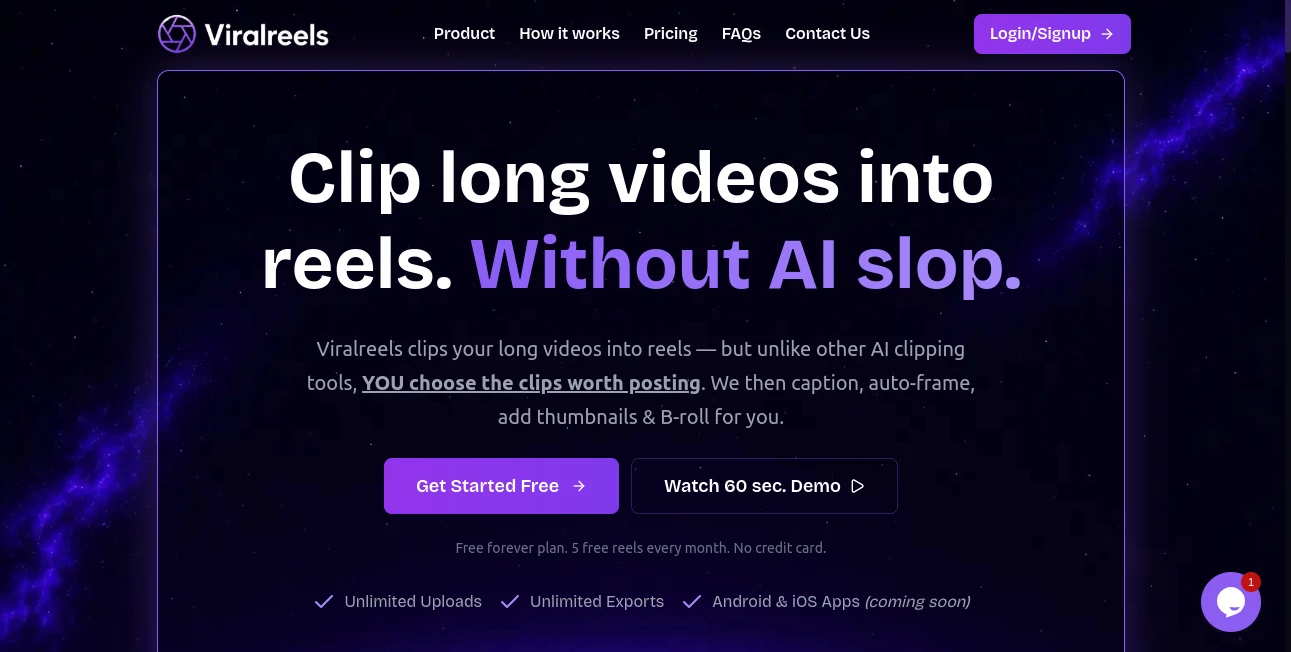
I used to spend hours cutting down a 45-minute podcast or YouTube video into something that actually works on Instagram or TikTok. The AI tools always picked the wrong moments, added weird captions, or made everything feel generic. Then I started using this platform and everything changed. You stay in control — you choose the exact clips that matter — while it handles the polish: smart captions, eye-catching thumbnails, B-roll, and framing that keeps people watching. The difference is night and day. My last reel from a long interview got way more saves and shares than anything I’d made before.
Introduction
Creating short-form content from long videos shouldn’t feel like a guessing game. This tool gives you the best of both worlds: you decide which moments have the spark, and it does all the tedious finishing work without turning your content into “AI slop.” No forced auto-clipping that misses the soul of your material. You upload once, pick your highlights, and walk away with polished, ready-to-post reels complete with professional touches. It’s built for podcasters, YouTubers, interviewers, and creators who want control without doing everything manually. The promise is simple: better reels, less time wasted, and no watermarks holding you back.
Key Features
User Interface
The workflow is refreshingly straightforward. Drop in your long video, scan through it, and simply click and drag to select the parts you want. No complicated timelines or steep learning curves. Everything feels intuitive, like editing on your phone but with way more power. The preview updates live so you can see how the final reel will look before exporting. It’s one of those tools where you spend your energy on creativity instead of fighting the software.
Accuracy & Performance
Because you choose the clips yourself, the output actually matches what you intended. The auto-generated captions are accurate and come in multiple styles you can customize. B-roll suggestions are smart without being pushy, and the framing adjusts naturally as the shot changes. Processing is fast even with longer source videos, and the final exports look clean and professional across platforms.
Capabilities
Turn podcasts, interviews, talking-head videos, or full YouTube episodes into multiple short reels. Add stylish captions in 55+ languages (including many Indian languages), generate scroll-stopping thumbnails, layer in B-roll (video, images, quotes, stats), and use auto-framing that keeps subjects perfectly placed. You can create multi-segment reels and re-export as many times as you want. It’s built for volume — unlimited uploads and exports even on the free plan.
Security & Privacy
Your videos are processed securely and not stored longer than needed. There’s no sneaky data sharing or training on your content. For creators who work with client material or sensitive interviews, that respect for privacy is a big relief.
Use Cases
A podcaster uploads a one-hour episode and pulls out five killer clips with perfect captions in under 20 minutes. A business coach turns long webinar recordings into a week’s worth of value-packed Reels without hiring an editor. An interviewer creates teaser clips from guest conversations that drive traffic back to the full episode. Content creators repurpose old videos into fresh short-form material that keeps their audience engaged. It’s perfect for anyone sitting on long content who wants to get more reach without more filming.
Pros and Cons
Pros:
- You stay in control — no AI guessing which moments matter.
- Beautiful captions, thumbnails, and B-roll that actually enhance the content.
- Unlimited uploads and exports on the free plan with no watermarks.
- Fast workflow that respects your time and creative judgment.
- Multi-language support including regional Indian languages.
Cons:
- You still need to pick the clips yourself (which some pure AI fans might not like).
- Very long source videos can take a bit longer to process initially.
Pricing Plans
The free plan is genuinely useful — 5 full reels per month with all core features and no watermarks. Paid plans remove limits, add priority processing, and unlock more advanced styling options. Many creators find the free tier enough for regular use, while heavier users love the affordable upgrade for unlimited work. It’s one of the fairest models I’ve seen in this space.
How to Use ViralReels
Upload your long video (podcast, interview, YouTube recording, etc.). Scroll through and select the moments you want to turn into reels by simply clicking and dragging. Add captions, choose a thumbnail style, layer in B-roll if desired, and hit export. You can re-export the same clip with different styles as many times as you want. The whole process stays fast and focused so you can create multiple high-performing reels from one source video.
Comparison with Similar Tools
Many AI clippers automatically choose moments for you, often missing the best parts or adding unnatural flair. This one puts you in the driver’s seat while still handling all the polishing work. It avoids the generic “AI look” that many tools push and delivers cleaner, more authentic results. For creators who value control and quality over full automation, it stands out as the smarter choice.
Conclusion
Turning long content into short, engaging reels shouldn’t be a headache. This platform makes it straightforward, enjoyable, and genuinely effective. You keep creative control, get professional polish, and spend far less time editing. If you have hours of great material sitting unused, this could be the tool that finally helps you get it seen by the right audience. Simple, powerful, and built for real creators — exactly what the space needed.
Frequently Asked Questions (FAQ)
Is the free plan really unlimited in some ways?
Yes — unlimited uploads and exports. You get 5 complete reels per month on free.
Do I have to let AI pick my clips?
No — you choose every moment yourself. That’s the whole point.
Which languages are supported for captions?
Over 55 languages, including 12+ Indian languages.
Can I remove the watermark?
Free reels have no watermarks. Paid plans remove any remaining branding.
What kind of videos work best?
Podcasts, interviews, talking-head content, YouTube videos — basically anything with clear audio and good moments.
AI Animated Video , AI Video Generator , AI Video Editor , AI Short Clips Generator .
These classifications represent its core capabilities and areas of application. For related tools, explore the linked categories above.

ViralReels Alternatives Product

kling 5.0

Quso AI

Wan AI
ds video

Sora 2 Video

seedance 2

bridger west…

ARKADS

Toon Composer