Vireels
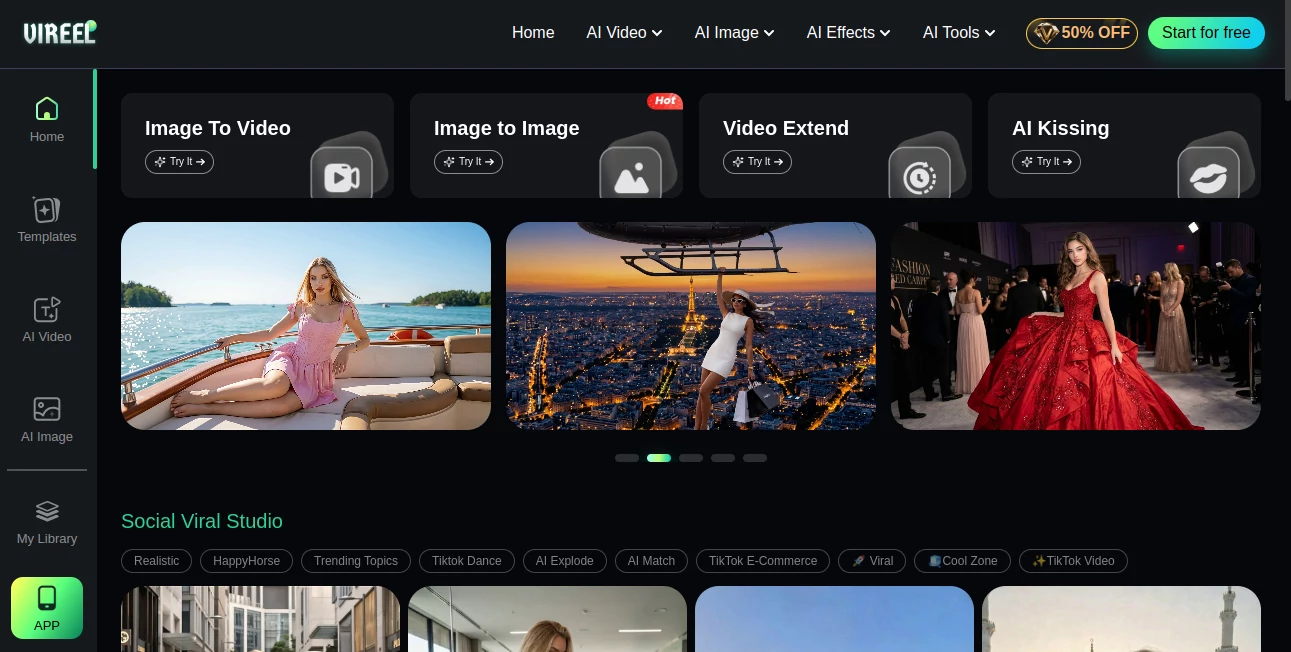
What is Vireels?
I used to spend hours filming, editing, and adding captions just to get one decent Reel out the door. Then I tried this platform and the whole game changed. You type a simple idea or upload a photo, and it turns that into polished, platform-ready short videos or eye-catching images in minutes. The results feel surprisingly professional — smooth motion, good lighting, on-trend styles — without looking like obvious AI slop. Friends who saw my first few clips asked if I suddenly hired a full-time editor. It’s that good at making content that actually stops the scroll.
Introduction
Creating consistent short-form content is exhausting for most creators and marketers. Between shooting, editing, music selection, and staying on trend, it’s easy to burn out or fall behind. This tool takes the heaviest parts off your plate while still letting you steer the creative direction. It’s built for people who want to post daily or weekly without sacrificing quality — social media managers, brand creators, TikTok hustlers, and even small businesses testing ad creatives. The speed and quality combination makes it feel like having a miniature studio in your browser, ready whenever inspiration (or a deadline) strikes.
Key Features
User Interface
The workspace is clean and motivating. You can start with a text prompt, upload an image for image-to-video, or browse ready-made templates for trending styles. Everything is one or two clicks away — no buried menus or confusing timelines. Previews load fast so you can iterate quickly, and the export options are straightforward for TikTok, Instagram, or YouTube Shorts. It’s the kind of interface that makes you want to create more instead of getting frustrated with the tool itself.
Accuracy & Performance
The motion quality stands out — characters and objects move naturally, transitions feel intentional, and the overall pacing matches what performs well on social platforms. Text-to-video and image-to-video results keep strong visual consistency, and the AI handles popular formats (vertical, square, etc.) reliably. Generation speed is impressive for the quality level, letting you test multiple variations in the time it used to take to film one clip.
Capabilities
It shines at short-form video: text-to-video, image-to-video, AI effects, trending templates, and various styles from realistic to stylized. You can create full short videos with music, captions, and smooth motion, or generate high-quality still images for posts and ads. There are dedicated sections for viral hooks, product showcases, dance templates, and more. It’s flexible enough for both faceless content and avatar-driven videos, making it useful for a wide range of creators.
Security & Privacy
Your prompts and uploaded images are handled professionally. The platform focuses on delivering fast results while respecting user content — a relief when you’re testing brand ideas or personal projects. No unnecessary data retention beyond what’s needed to generate your output.
Use Cases
A fashion creator uploads product photos and generates multiple angle videos with trending transitions in minutes. A coach turns daily motivation quotes into engaging talking-head style clips without filming every day. A small business owner creates consistent product ads for Instagram and TikTok, testing different hooks quickly. Content agencies use it to produce volume for clients while keeping a unique style. It works beautifully whether you need one perfect video or dozens of variations to test what performs best.
Pros and Cons
Pros:
- Fast, high-quality short videos that look professionally edited.
- Strong image-to-video and text-to-video capabilities with good motion.
- Trending templates and effects keep content feeling current.
- Simple enough for beginners, powerful enough for regular creators.
- Great time saver for anyone posting consistently on social media.
Cons:
- Best results still come from clear, well-written prompts.
- Longer or highly complex scenes may need multiple generations.
- Some advanced customization lives behind paid plans.
Pricing Plans
It offers a generous free tier so you can test the quality on real ideas without commitment. Paid plans unlock higher daily limits, faster generation, priority access to new models, and more advanced features. Many creators find that the time saved on filming and editing more than covers the upgrade cost, especially when posting multiple times per week.
How to Use Vireels
Start on the homepage and choose your path — text prompt, image upload, or browse templates. Write a clear description of the scene or vibe you want, add any reference image if desired, and select style or duration. Hit generate and watch the preview. Tweak the prompt or regenerate if needed, then download the final video or image. For regular use, save favorite styles and prompts to speed up future creations. The whole flow is designed to keep you creating instead of fighting the tool.
Comparison with Similar Tools
Many AI video tools still produce stiff motion or generic-looking results. This one stands out with better temporal consistency, trendy effects, and a focus on short-form formats that actually perform on social platforms. It feels more tuned for real creators who need speed and quality together, rather than just experimental outputs. The combination of image-to-video strength and easy workflow gives it an edge for daily content production.
Conclusion
Creating scroll-stopping short videos used to be a time sink. This platform turns it into something fast, fun, and genuinely effective. It respects your vision while handling the heavy technical lifting, letting you focus on ideas instead of execution details. For anyone serious about growing on social media or producing content consistently, it’s one of those tools that quickly becomes part of your daily workflow — because it simply delivers results you’re proud to post.
Frequently Asked Questions (FAQ)
How long are the generated videos?
Perfect length for TikTok, Instagram Reels, and YouTube Shorts — usually 5 to 30 seconds depending on your prompt.
Do I need to film anything myself?
Not at all — text prompts or reference images are enough to generate full videos.
Can I use my own images?
Yes — image-to-video mode is one of its strongest features.
Is there a free way to try it?
Yes, the free tier lets you test quality on real projects before upgrading.
What styles can I create?
From realistic to stylized, trending effects, product showcases, dance templates, and more.
AI Animated Video , AI Image to Video , AI Video Generator , AI Text to Video .
These classifications represent its core capabilities and areas of application. For related tools, explore the linked categories above.

Vireels Alternatives Product
seedream vid…

Sora-2.co

MiniMax H3

AI Animate I…

Seedance 2.0

Happy Horse:…

AnividAI

LTX 2.3

Paper Animat…