


















Vismint
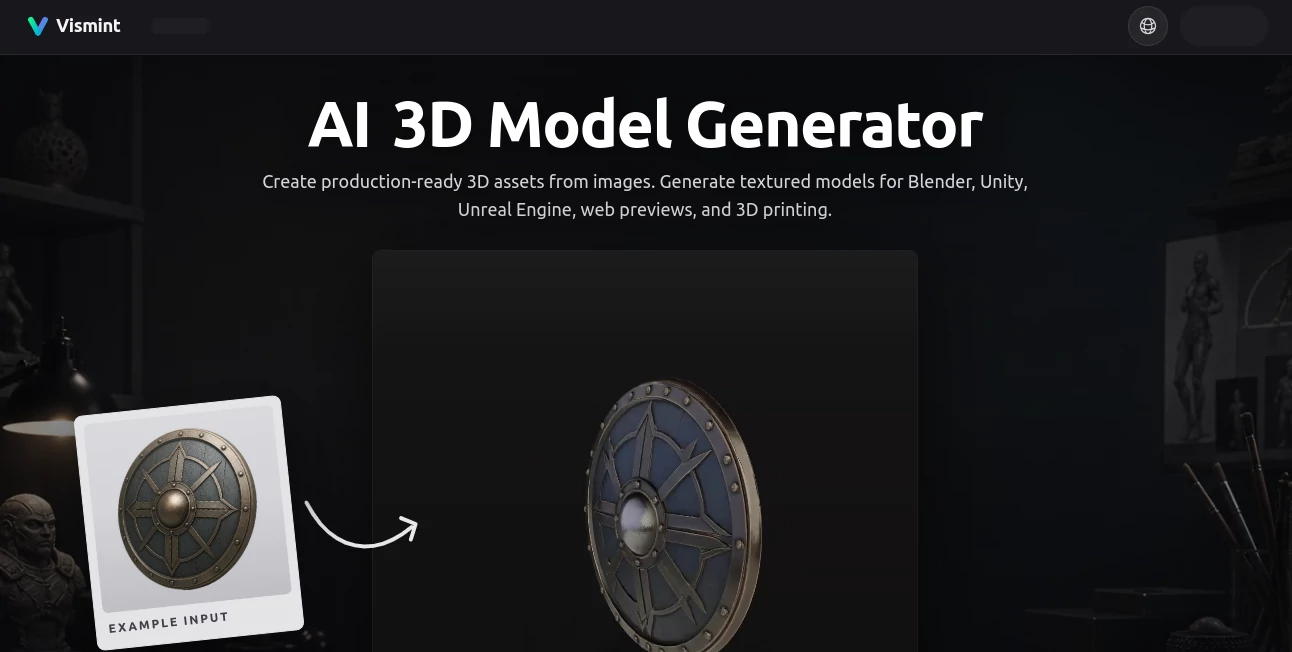
What is Vismint?
There's something incredibly satisfying about taking a flat photo or concept sketch and watching it transform into a fully textured 3D model you can spin around, edit, and actually use. No more starting from scratch in Blender or paying a modeler for every prop. This tool makes that leap feel almost effortless. Upload a clear reference image — whether it's a product shot, character concept, or game prop sketch — and it delivers geometry with smart textures ready for games, 3D printing, or web previews. I’ve seen indie creators go from rough idea to usable asset in minutes, and the quality often surprises even seasoned 3D artists.
Introduction
Creating 3D assets has traditionally been time-consuming and technical. Vismint changes that by focusing on practical results you can use right away. It works directly in the browser, turning single images into textured GLB models optimized for Blender, Unity, Unreal Engine, web viewers, and 3D printing. The emphasis is on production-friendly outputs — clean meshes, good topology, and useful PBR materials — rather than just pretty renders. Whether you're a solo game dev prototyping props, a product designer visualizing concepts, or a maker preparing files for printing, it removes the biggest bottlenecks and lets you focus on creativity instead of tedious modeling.
Key Features
User Interface
The interface is clean and purpose-built. You upload an image, choose between geometry-focused or fully textured generation, and see a preview that you can rotate and inspect immediately. Export options are clearly labeled for different use cases — GLB for interactive work, STL for printing, and others for further editing. Everything stays in one place without clutter, so you can go from upload to export in a smooth, logical flow that feels designed by someone who actually builds 3D assets.
Accuracy & Performance
It excels at understanding shape and silhouette from a single clear reference, producing meshes that are clean enough for real production work. Textured outputs include solid albedo, normal, and roughness maps that hold up under scrutiny. Generation is reasonably fast, and the models are optimized for performance in game engines and web viewers. In practice, it handles product shots, stylized concepts, and character references with impressive consistency, saving hours compared to manual modeling.
Capabilities
You get image-to-3D and text-to-3D options, with strong support for both geometry-only and fully textured results. Exports include GLB (great for previews and engines), STL for 3D printing, and standard formats like OBJ. It works well for game props, product visualization, character concepts, and printable models. The browser-based workflow means you can iterate quickly without switching tools, and the outputs are ready for further refinement in professional software when needed.
Security & Privacy
Your uploaded images are processed securely and not used for training unless you explicitly allow it. The platform focuses on delivering value to creators while respecting their intellectual property. For commercial work and client projects, that thoughtful approach gives real peace of mind.
Use Cases
An indie game developer uploads concept art for weapons and props and gets textured models ready to drop into Unity the same afternoon. A product designer turns multiple product photos into 3D previews for client presentations without waiting on a modeler. A 3D printing enthusiast creates clean STL files from reference images for custom miniatures and prototypes. A concept artist quickly validates ideas in 3D before committing to detailed sculpting. The common thread is speed and practicality — getting usable 3D assets without the usual heavy lifting.
Pros and Cons
Pros:
- Fast browser-based workflow with no software installation needed.
- Production-oriented outputs suitable for games, printing, and visualization.
- Good balance between automation and usable quality for iteration.
- Flexible export formats for different pipelines.
- Helpful for both beginners and experienced 3D creators looking to speed up early stages.
Cons:
- Best results come from clear, well-lit single-subject references.
- Complex or highly detailed scenes may still need manual cleanup in traditional tools.
- Credit-based system means heavy users will need to purchase packs.
Pricing Plans
It uses a flexible credit system so you only pay for what you generate. Starter packs are affordable for occasional use, while larger bundles offer better value for regular creators and small teams. There are no forced subscriptions, which many people appreciate. The pricing feels fair considering the time and cost it replaces in traditional modeling workflows.
How to Use Vismint
Upload a clear reference image (product photo, concept art, or sketch works best). Choose geometry or textured generation based on your needs. Preview the result and rotate to check details. Once satisfied, export in your preferred format — GLB for games and web, STL for printing, or others for further editing. Iterate by adjusting prompts or uploading better references until the asset fits your project perfectly. The whole process stays inside the browser and moves surprisingly quickly.
Comparison with Similar Tools
Many AI 3D tools produce impressive visuals but deliver messy topology or unrealistic textures that require heavy cleanup. This one prioritizes practical, production-ready results with cleaner meshes and usable materials. The browser-first experience and flexible exports make it more accessible than desktop-heavy alternatives, while still delivering quality that professionals can work with. It strikes a sweet spot between speed, usability, and output quality that many creators have been looking for.
Conclusion
3D asset creation doesn’t have to be slow and expensive anymore. This tool brings the power of AI image-to-3D generation into a practical, approachable package that actually helps real workflows. Whether you’re prototyping games, visualizing products, preparing prints, or just exploring ideas faster, it removes the biggest barriers and lets you focus on creativity. For anyone who works with 3D, it’s one of those tools that quickly becomes part of the regular toolkit.
Frequently Asked Questions (FAQ)
What kinds of images work best?
Clear, well-lit single-subject images with good contrast and visible shape tend to give the strongest results.
Can I use the models commercially?
Yes, with paid credit packs you get commercial usage rights for your generated assets.
What file formats can I export?
GLB is the default for textured models, with support for STL (printing), OBJ, and others depending on the generation path.
Do I need 3D modeling experience?
Not at all — it’s designed to help people who aren’t full-time 3D artists get usable assets quickly.
How long does generation take?
Most jobs complete in under a couple of minutes, though complex textured models may take a bit longer.
AI 3D Model Generator , Photo & Image Editor , AI Image to 3D Model , AI Design Generator .
These classifications represent its core capabilities and areas of application. For related tools, explore the linked categories above.
Vismint details
Website unavailable — View Alternatives
Pricing
- Free
Apps
- Web App
- Chrome Extensions
Categories

Vismint Alternatives Product

Z Image

Nano Banana …

NanoBanana2F…

Image Text E…

MAGIK FACE
Card Maker AI

Brat Generat…

SwapAnything

NanoEditor
