
Vorla
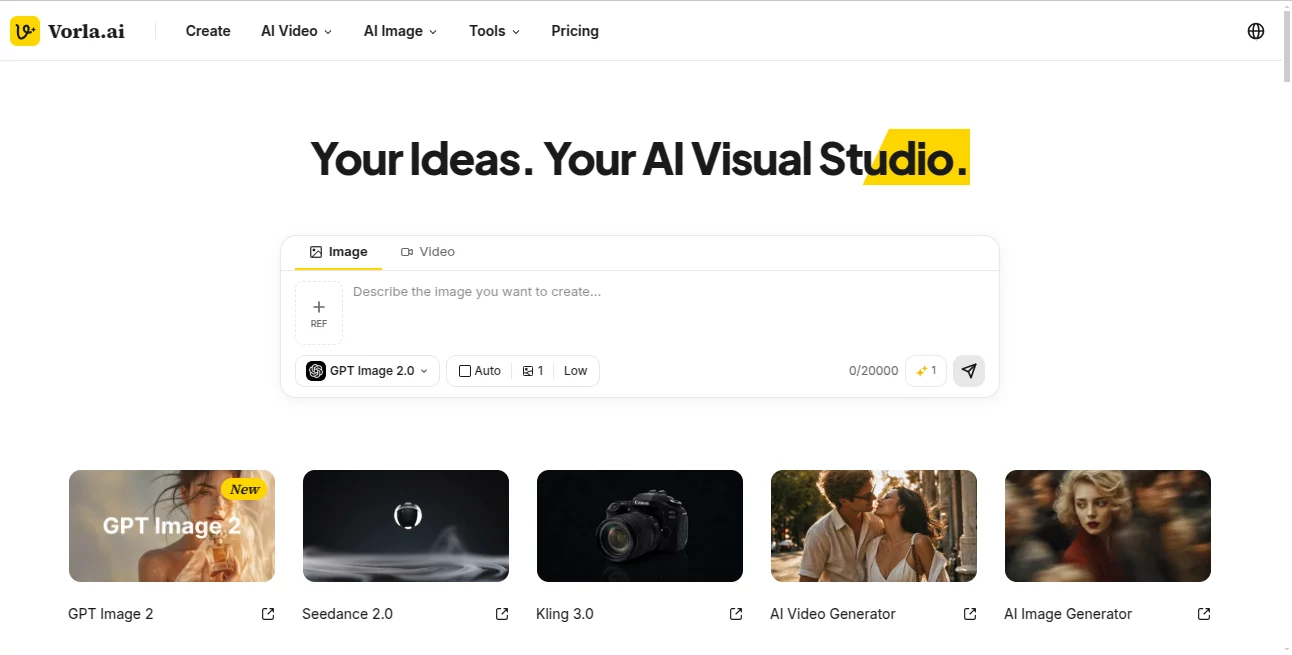
What is Vorla?
Creating professional visuals no longer requires advanced editing skills or expensive software. This platform brings image creation, video generation, and AI-powered editing together in one workspace, making it easy for creators, marketers, and businesses to transform simple ideas into polished visual content. Whether you are building product ads, social media campaigns, or creative artwork, the experience feels smooth from the first prompt to the final result.
Key Features
User Interface
The clean workspace keeps everything within easy reach. Users can switch between image generation, video creation, and editing tools without leaving the project, making the creative process faster and more enjoyable.
Accuracy & Performance
Multiple advanced AI models deliver detailed images and realistic videos in a short time. Outputs remain consistent across different creative tasks, helping users achieve professional-quality results with minimal effort.
Capabilities
- Create images from text prompts.
- Generate videos from text or existing images.
- Edit visuals through conversational AI.
- Produce product photos, marketing creatives, and social media content.
- Support multiple leading AI generation models in one platform.
Security & Privacy
User projects remain connected to personal accounts, while paid subscriptions unlock additional credits and premium features. The platform also offers free credits for new users to explore its capabilities before upgrading.
Use Cases
- Design engaging social media posts.
- Create eCommerce product images and advertisements.
- Produce promotional videos without editing experience.
- Generate creative concepts for marketing campaigns.
- Build visual assets for personal or commercial projects.
Pros and Cons
Pros
- Combines image and video generation in one place.
- Simple interface suitable for beginners.
- Supports several advanced AI models.
- Free credits available for new users.
Cons
- High-volume projects require a paid plan.
- Generation speed may vary depending on the selected model.
Pricing Plans
A free option is available with starter credits. Users who need more generations, premium models, and higher usage limits can upgrade to one of the paid subscription plans.
How to Use Vorla
Create an account, choose whether you want to generate an image or a video, enter a prompt or upload an existing image, select the preferred AI model, and generate your content. You can continue refining the result through AI-powered editing until it matches your vision.
Comparison with Similar Tools
Unlike many AI generators that focus on only images or only videos, this platform combines both workflows inside a single environment. The ability to move from creation to editing without changing tools makes it especially useful for content creators and marketing teams looking for an efficient production process.
Conclusion
This platform offers an impressive balance between simplicity and creative power. By combining image generation, video production, and intelligent editing into one workspace, it helps anyone create eye-catching visual content with less effort and greater flexibility. It is a practical choice for creators who value speed, quality, and an organized workflow.
Frequently Asked Questions (FAQ)
Is there a free version available?
Yes. New users receive free credits to explore the platform before purchasing a subscription.
Can beginners use it?
Yes. The interface is designed for users with little or no design experience.
Can I create both images and videos?
Yes. The platform supports text-to-image, image-to-image, text-to-video, and image-to-video workflows.
Is it suitable for commercial projects?
Yes. It can be used to create marketing materials, product visuals, advertisements, and social media content.
AI Photo & Image Generator , AI Image to Video , AI Video Generator , AI Ad Creative Assistant .
These classifications represent its core capabilities and areas of application. For related tools, explore the linked categories above.

Vorla Alternatives Product

LPM AI:

MuseCraft.AI

Roomagic

Wurt.app

Seedance 2.0…

Seedance 2.0…

Just Christm…
Resize Image…

images 2.0 A…