
WaiverTrail
What is WaiverTrail?
Running tours, rentals, or events means paperwork that slows everything down. Guests waiting to sign, stacks of paper to store, and the constant worry about whether everything was filled out correctly. This platform changes that experience completely. You turn any waiver into a clean, mobile-friendly digital form in under a minute, guests sign on their phones before they even arrive, and everything stays organized and instantly accessible. I've heard from operators who cut their check-in time in half and finally stopped losing signed forms. It's simple technology that solves a very real daily headache.
Introduction
Paper waivers are outdated, slow, and risky. Lost forms, illegible handwriting, and no easy way to search records when you need them. WaiverTrail was built specifically for activity businesses that need waivers to be fast, professional, and reliable. Whether you're running a zip-line tour, kayak rental, escape room, or fitness class, it takes the friction out of liability protection. The AI helps convert existing PDFs or text into beautiful digital flows, while the signing experience feels natural for guests. What used to be an annoying bottleneck becomes a smooth, almost invisible part of the customer journey.
Key Features
User Interface
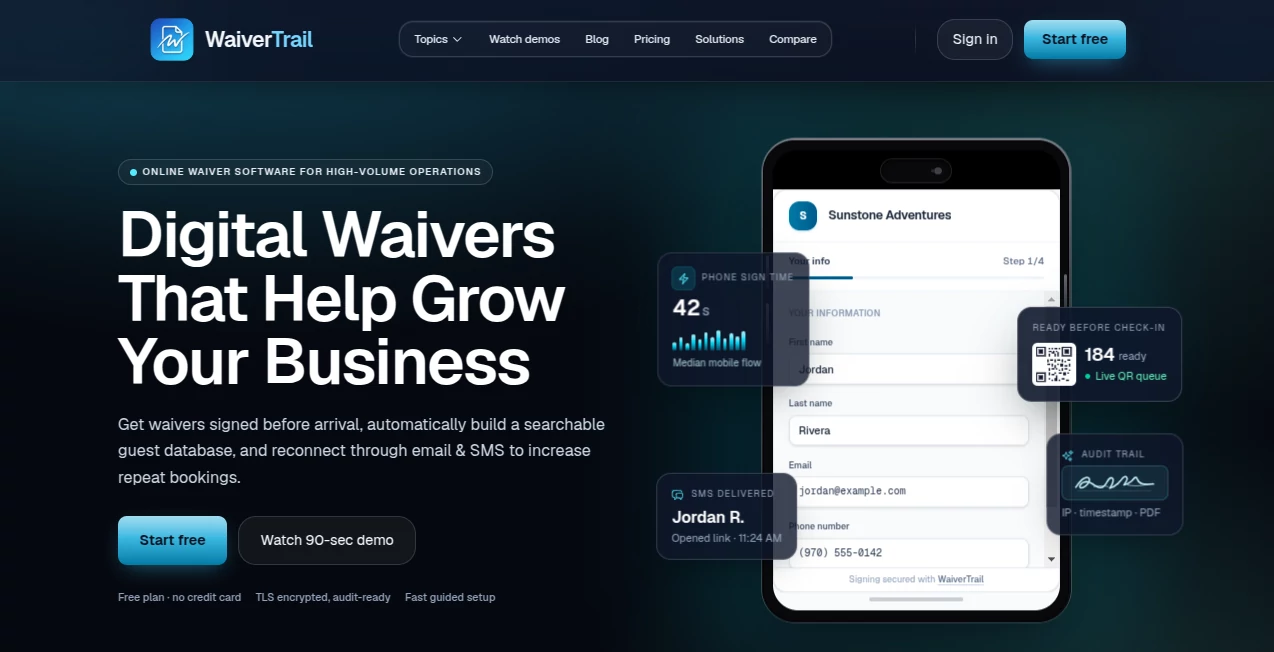
The dashboard is clean and practical—no overwhelming options or confusing menus. You can start from scratch, upload a PDF, or paste text, and the system turns it into a mobile-optimized form quickly. Guest signing screens are simple and intuitive on any phone. Everything from template management to signed document storage feels thoughtfully organized. Operators who switch from paper or other systems often mention how refreshing it is to use something that just works without a steep learning curve.
Accuracy & Performance
The AI does a remarkably good job turning traditional waivers into digital versions while preserving legal language and structure. Forms load fast, signatures are captured clearly, and the whole process is reliable even with spotty connections. Signed documents are stored securely and can be searched or exported instantly. Businesses report far fewer incomplete waivers and much faster check-in times after switching.
Capabilities
AI-powered waiver generation from PDF or text, customizable templates, electronic signatures with timestamp and IP logging, automated reminders, integration with booking systems, bulk sending, and organized storage with easy search. It supports group signings, custom fields for collecting extra information, and professional branding so the form matches your business look. Everything is designed for real-world activity businesses that need both speed and legal soundness.
Security & Privacy
Signed waivers are stored with strong encryption and audit trails. Each signature includes timestamp, IP address, and device info for solid legal standing. The system is built with compliance in mind, giving both operators and guests confidence that sensitive information is handled properly. For businesses dealing with liability, that peace of mind is invaluable.
Use Cases
A kayak rental company sends digital waivers automatically when customers book online—guests arrive already signed and ready to paddle. An escape room uses it for group bookings so entire parties can sign together on one device. A rock climbing gym collects medical info and emergency contacts digitally, reducing front-desk chaos during peak hours. A tour operator manages hundreds of daily participants without ever chasing missing paperwork again. In every case, it turns a painful process into something customers barely notice—in the best possible way.
Pros and Cons
Pros:
- Extremely fast setup—go from PDF to live digital waiver in under a minute.
- Mobile-first experience that guests actually complete without frustration.
- Strong legal features (timestamps, IP logging, audit trails).
- Integrations with booking platforms save even more time.
- Professional, branded forms that reinforce your business image.
Cons:
- Best results come from reasonably well-structured source documents.
- Advanced reporting and custom integrations are on higher plans.
Pricing Plans
It starts with a free or low-commitment option so you can test with real waivers and see the difference. Paid plans scale with your volume—unlimited signings, advanced features, priority support, and custom branding. Many businesses find it pays for itself quickly through saved staff time and reduced risk. The pricing feels fair for the operational relief it delivers.
How to Use WaiverTrail
Sign up and create your first waiver: either upload an existing PDF, paste text, or build from a template. Customize the look with your logo and colors. Set up any custom fields you need (emergency contacts, allergies, etc.). Connect your booking system if desired for automatic sending. When guests book or arrive, send the waiver link by text or email. They sign on their phone, and the completed document is instantly stored and searchable. Review reports or export records anytime. The whole flow is designed to disappear into the background so you can focus on your actual business.
Comparison with Similar Tools
Many digital waiver solutions feel clunky or overly complicated. Others are too basic and lack proper legal safeguards. This one balances ease of use with professional-grade features better than most. The AI conversion from old documents is faster, the guest experience is smoother, and the backend organization is stronger. For activity-based businesses, it feels purpose-built rather than a generic form tool.
Conclusion
Waivers are necessary but they don’t have to be painful. This platform turns a tedious legal requirement into a smooth, professional part of the customer journey. It saves time, reduces risk, improves the guest experience, and gives you peace of mind that your documentation is solid. For tours, rentals, events, and any business that needs signed agreements, it’s one of those rare tools that quietly makes everything run better. Once you switch, going back to paper (or lesser digital options) feels impossible.
Frequently Asked Questions (FAQ)
How long does it take to set up my first waiver?
Most users are live with their first digital waiver in under 10 minutes.
Do guests need to create accounts to sign?
No—simple, one-time signing experience on any phone or device.
Are the waivers legally valid?
Yes—electronic signatures with timestamp, IP, and audit trail for strong legal standing.
Can I send waivers automatically with bookings?
Yes—integrations with popular booking platforms make it automatic.
What if a guest loses their copy?
Every signed waiver is permanently stored and easily accessible or resendable.
Other .
These classifications represent its core capabilities and areas of application. For related tools, explore the linked categories above.

WaiverTrail Alternatives Product

Hunty Zombie…

Ssave App

Ask Bishop

Flyback.ai

Treeova

grow a garde…

TonesMatch

Sound Level …

Geekflare AI