


















Wallnora
What is Wallnora?
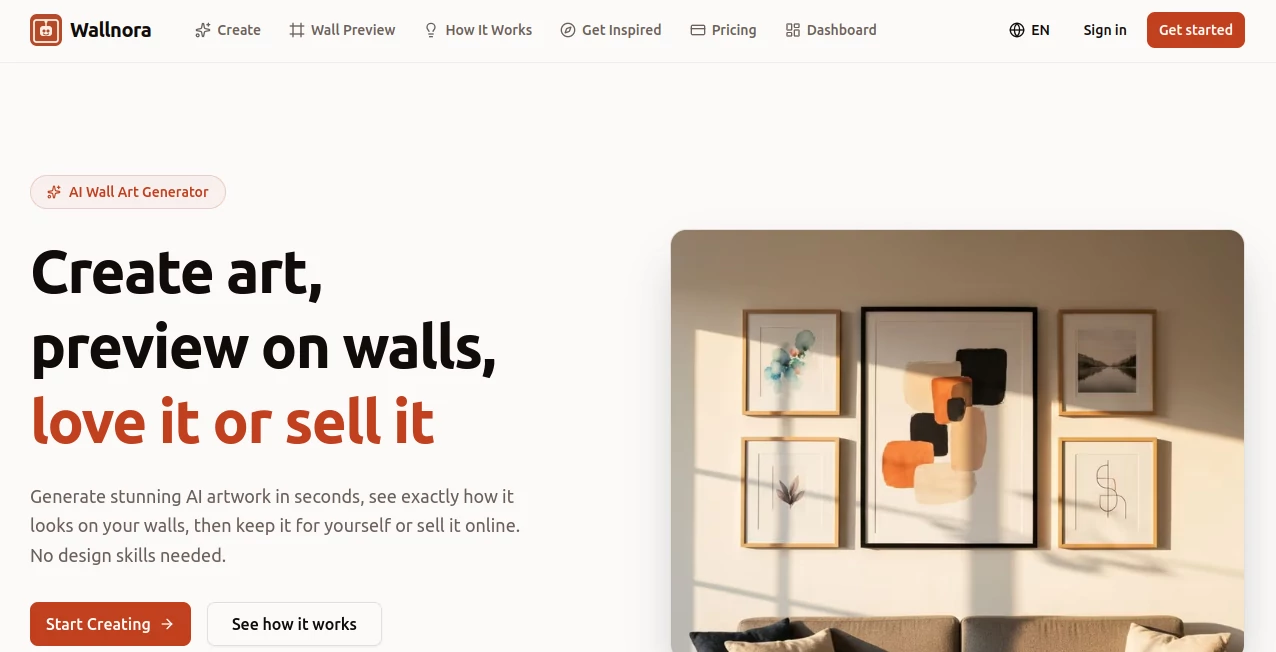
Finding wall art that genuinely fits a space can be surprisingly difficult. Most ready-made prints feel generic, while custom artwork often requires a significant budget and long waiting times. This platform offers a refreshing alternative by combining artificial intelligence with practical interior visualization tools, allowing users to generate personalized artwork and see how it looks in a real room before making any decisions.
Whether someone is decorating a living room, designing an office space, creating personalized gifts, or building a collection of printable artwork, the experience feels remarkably straightforward. The platform transforms simple text descriptions into high-resolution artwork and provides realistic wall previews, helping users visualize the final result before printing or sharing their creations.
Key Features
User Interface
The interface is designed with simplicity in mind. Users can enter a text description, select an art style, choose a preferred aspect ratio, and generate artwork within seconds. The workflow is intuitive enough for beginners while offering enough flexibility for users with specific creative goals.
Navigation remains clean throughout the creation process, making it easy to move between generation, preview, and download options without unnecessary complexity.
Accuracy & Performance
Artwork generation is fast and responsive, often producing detailed results in less than a minute. The system interprets descriptive prompts effectively, capturing themes, color palettes, moods, and artistic directions with impressive consistency.
The generated pieces maintain strong visual quality and are optimized for large-format printing, making them suitable for canvas prints, framed posters, and gallery-style displays.
Capabilities
The platform supports multiple artistic styles, including abstract art, watercolor, oil painting, minimalist compositions, pop art, Japanese-inspired artwork, photography-style visuals, and digital illustrations.
- AI-generated custom wall art
- High-resolution downloads
- Realistic room visualization
- Multiple artistic styles
- Reference image support
- Gallery wall arrangements
- Printable PNG and PDF exports
- Commercial usage options on higher plans
One particularly useful feature is the ability to preview artwork in realistic room environments. This helps users understand scale, color balance, and overall visual impact before printing.
Security & Privacy
The platform follows a cloud-based workflow that minimizes technical barriers for users. Uploaded reference images and generated content remain associated with the user's workspace, allowing projects to be managed conveniently while maintaining a streamlined creative process.
For users creating artwork for commercial purposes, licensing options provide additional confidence when using generated designs for online stores or customer projects.
Use Cases
- Creating custom wall decor for homes and apartments
- Designing artwork for office and commercial interiors
- Producing personalized gifts for special occasions
- Selling printable art through online marketplaces
- Generating gallery wall collections
- Creating unique canvas print designs
- Developing decorative artwork for client projects
- Experimenting with interior design concepts
Pros and Cons
Pros
- Simple and beginner-friendly interface
- Multiple professional art styles available
- High-resolution output suitable for printing
- Realistic room preview functionality
- Fast artwork generation process
- Commercial usage opportunities on premium plans
- Supports both personal and business use
Cons
- Advanced features require a paid subscription
- Creative results may vary depending on prompt quality
- Users seeking manual artistic control may prefer traditional design software
Pricing Plans
The platform offers a free entry point that allows users to explore the service without providing payment information. Several premium plans expand generation limits, unlock higher-resolution downloads, provide additional preview capabilities, and introduce commercial licensing options.
- Free Plan with limited generations
- Personal plans for home decoration projects
- Professional plans for creators and sellers
- Commercial-friendly options with expanded usage rights
This flexible structure makes it accessible to casual users while remaining practical for entrepreneurs and creative professionals.
How to Use Wallnora
Getting started is straightforward and requires no design experience.
- Enter a detailed description of the artwork you want to create.
- Select an artistic style that matches your vision.
- Choose an aspect ratio appropriate for your space.
- Generate the artwork and review the result.
- Preview the design in a realistic room environment.
- Download the final file for printing or distribution.
Many users achieve the best results by describing colors, mood, composition, and room style within their prompts.
Comparison with Similar Tools
Many AI image generators focus exclusively on creating artwork. What makes this platform stand out is its emphasis on interior presentation. Instead of stopping at image generation, it bridges the gap between creation and practical home decor by allowing users to visualize artwork in realistic living spaces.
Compared with general-purpose AI art generators, the experience feels more tailored to people who actually intend to display, print, gift, or sell their creations. Features such as room previews, gallery wall layouts, and print-ready exports add genuine value beyond image generation alone.
Conclusion
For anyone looking to create personalized wall art without hiring an artist or spending hours learning design software, this platform delivers a highly practical solution. The combination of AI-generated artwork, realistic wall previews, multiple art styles, and print-ready downloads creates a smooth experience from idea to finished piece.
It is equally useful for homeowners, interior decorators, gift creators, and online sellers who want unique artwork tailored to specific spaces and audiences. The ability to visualize designs before printing is especially valuable and helps reduce uncertainty during the creative process.
Frequently Asked Questions (FAQ)
Can beginners use this platform?
Yes. The workflow is designed for users with no artistic or design background.
Can I print the generated artwork?
Yes. High-resolution downloads are available and optimized for professional printing.
Does it support different art styles?
Yes. Users can choose from multiple styles including abstract, watercolor, photography, digital art, minimalist designs, and more.
Can I preview artwork before printing?
Yes. One of the standout features is the ability to view artwork in realistic room settings.
Is it suitable for commercial projects?
Premium plans provide options that support commercial usage and artwork sales.
AI Photo & Image Generator , AI Illustration Generator , AI Art Generator , AI Design Generator .
These classifications represent its core capabilities and areas of application. For related tools, explore the linked categories above.

Wallnora Alternatives Product

ImageKontext…

XIMAGIN

Artguru

Pixelied

seedream 6

String Art G…

WonderShare …

images 2.0 A…

Banana Promp…
