

















Wan 3
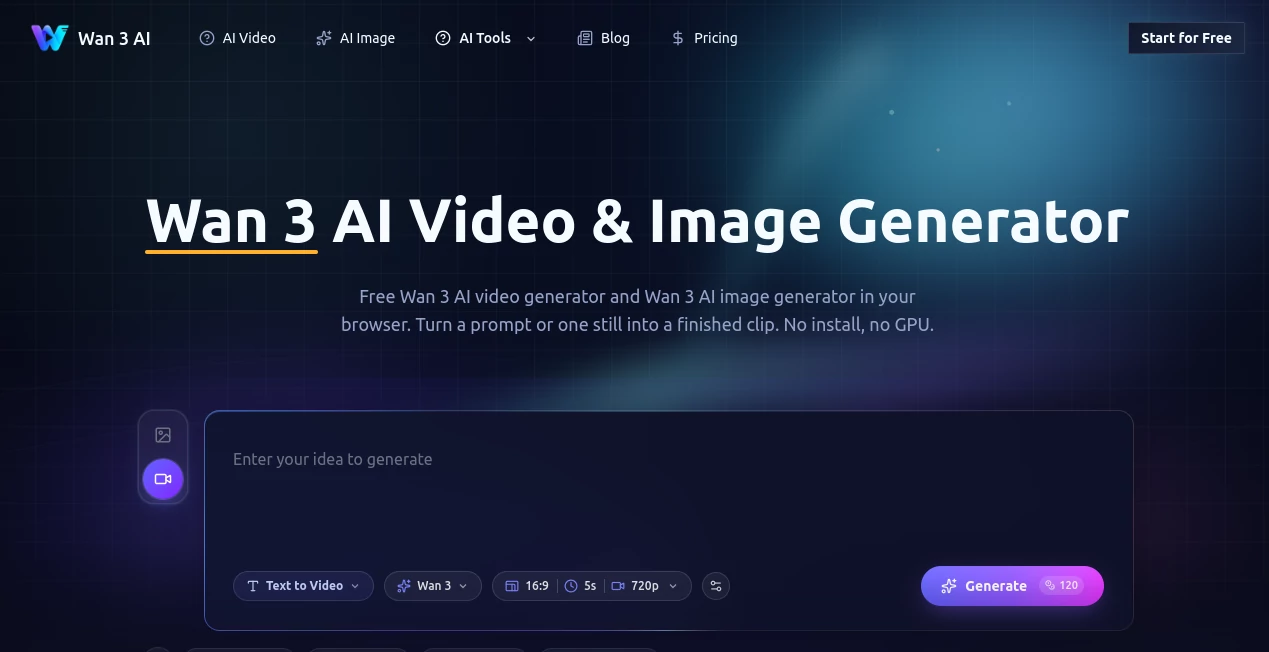
What is Wan 3?
Wan 3 AI is a browser-based creative platform designed for people who want to turn written ideas and still images into engaging video content without installing complicated software or maintaining a powerful GPU. The service brings the Wan family of generative video technology into a straightforward online workflow, making it possible to experiment with text-to-video and image-to-video creation from a regular browser.
What makes the experience appealing is its focus on practical video creation rather than requiring users to understand the technical side of generative models. A creator can start with a simple scene description, choose the desired settings, generate a short clip, review the result, and refine the prompt. This approach works particularly well for social media creators, marketers, designers, filmmakers, and anyone experimenting with AI-generated footage.
The platform also provides access to high-resolution image generation, multiple simultaneous generations on paid plans, private generation, watermark-free output, and commercial licensing. For users who want to explore AI video without setting up their own hardware, it offers a convenient starting point.
Key Features
- Text-to-video generation for creating video scenes from written descriptions.
- Image-to-video generation for animating existing images and controlling camera movement and motion.
- AI image generation with support for 2K and 4K output on supported plans.
- Multiple concurrent generations on higher-tier subscriptions.
- Private generation for projects that should not be publicly exposed.
- No-watermark output on paid plans.
- Priority processing for subscribers who need faster access to generation resources.
- Commercial licensing included with the listed paid plans.
- Credit-based generation that allows users to manage their production volume.
User Interface
The browser-based interface keeps the workflow relatively approachable. Instead of dealing with command-line tools, model installation, GPU configuration, or complicated local environments, users can work directly from an online generation interface.
The basic workflow is easy to understand: describe the desired shot, configure the available options, generate a preview, and decide whether the result is good enough or needs another attempt. This is especially useful for beginners who want to learn AI video generation through experimentation rather than technical documentation.
For more experienced creators, the simplicity can also be useful. A short prompt can be treated like a shot brief, describing the subject, action, environment, camera movement, lighting, and desired ending. This makes the process easier to repeat when producing several related clips.
Accuracy & Performance
Video generation is naturally less predictable than ordinary image generation because the system has to maintain visual consistency while introducing movement across multiple frames. The quality of the final result therefore depends heavily on the prompt, source image, selected settings, and complexity of the requested action.
A practical approach is to begin with a short and clearly defined scene rather than asking for an entire story in one generation. For example, a prompt describing a cyclist moving through a rainy city with a slow tracking camera gives the generator a much clearer visual task than a paragraph containing several locations and actions.
The platform's browser workflow removes much of the infrastructure burden. Users do not need to configure a local GPU simply to test the generation experience, which makes experimentation considerably more accessible.
Capabilities
The strongest use cases revolve around transforming an idea into a visual sequence. Text descriptions can be used as the starting point for new scenes, while images can serve as visual references for animation and camera movement.
The image-to-video workflow is particularly useful when composition matters. Instead of asking the system to invent every visual element, creators can begin with a prepared image and focus the prompt on movement, camera behavior, pacing, or environmental changes.
For creators producing several clips, a disciplined workflow can make a noticeable difference. Keeping the same character description, environment details, wardrobe, and visual language across prompts can help reduce unnecessary variation between generations.
The service also supports high-resolution image generation on eligible plans, giving users an additional way to create visual assets alongside video content.
Security & Privacy
Privacy is an important consideration when working with commercial concepts, unpublished campaigns, client material, or personal creative assets. The listed paid plans include private generation, allowing users to keep generated work away from public-facing areas of the platform.
Creators should still avoid uploading sensitive information or confidential material unless they have reviewed the current terms and privacy documentation and are comfortable with the applicable data practices. As with any cloud-based creative service, checking the latest policy before uploading client or proprietary assets is a sensible step.
Use Cases
- Social Media Content: Create short visual clips for TikTok, Instagram Reels, YouTube Shorts, and other vertical-video formats.
- Marketing Campaigns: Produce concept footage, promotional visuals, product scenes, and creative advertisements.
- Product Visualization: Turn product concepts and still images into short animated presentations.
- Storytelling: Build individual shots that can later be assembled into a larger narrative.
- Filmmaking Concepts: Test camera movements, environments, lighting ideas, and visual styles before production.
- Image Animation: Bring still artwork, illustrations, or photographs to life with controlled movement.
- Creative Experiments: Explore unusual visual concepts without investing in traditional filming equipment.
- Commercial Content: Paid plans provide commercial licensing for users creating content for business purposes.
Pros and Cons
Pros
- Works directly through a web browser.
- Useful text-to-video and image-to-video workflows.
- Supports high-resolution image generation on eligible plans.
- Paid plans include private generation and no-watermark output.
- Commercial licensing is included with the listed paid subscriptions.
- Higher plans allow multiple generations to run concurrently.
- Priority processing is available for subscribers.
Cons
- Video generation results can vary between attempts.
- Complex prompts with multiple actions can produce inconsistent scenes.
- Credits can be consumed quickly when repeatedly regenerating difficult shots.
- Advanced creators may want more granular controls than a browser-focused workflow provides.
- Users producing large volumes of video should carefully compare credit consumption against competing platforms.
Pricing Plans
The current pricing page presents several subscription options designed for different levels of production. The listed plans include Starter, Pro, and Unlimited, with annual billing information displayed alongside monthly-equivalent pricing.
- Starter: The listed annual option provides 10,000 credits per year and includes 2K/4K image generation, AI video generation, two concurrent generations, private generation, no watermark, priority processing, priority support, and commercial licensing. The displayed price is $29.99 with an $8.3 monthly equivalent shown on the pricing page.
- Pro: This tier provides 32,000 credits per year, 2K/4K image generation, AI video generation, four concurrent generations, private generation, no watermark, priority processing, priority support, and commercial licensing. The displayed price is $89.99 with a $70 monthly equivalent shown on the pricing page.
- Unlimited: The higher-tier option is listed with 67,200 credits and includes the same core generation benefits, making it more suitable for users who expect substantially higher production volume.
Pricing and available credits can change as generative video services evolve, so users planning a larger production should verify the current plan details before subscribing.
How to Use the AI Video Generator
- Open the online generator and select the type of generation you want to create.
- For text-to-video, describe one clear subject performing one primary action.
- Add useful details such as the environment, camera movement, lighting, visual style, and ending.
- For image-to-video, upload a suitable source image and focus the prompt on the movement and camera behavior rather than unnecessarily describing every detail already visible in the image.
- Select the appropriate aspect ratio and other available generation settings.
- Generate a short preview before committing to a longer or more complex production.
- Review the result and identify the specific part that needs improvement.
- Change one important variable at a time and generate another version.
- Once the result is approved, use the generated footage in your editing workflow or marketing project.
Comparison with Similar Tools
The AI video market includes several strong platforms, including Runway, Google Veo, OpenAI Sora, Kling, and other specialized generators. The main difference is often less about whether a platform can create video and more about how the workflow fits the creator's needs.
Runway is attractive for users looking for a broader creative production environment, while Veo and Sora are strong choices for creators interested in advanced generative video capabilities. Other platforms may focus heavily on character consistency, cinematic generation, avatars, or social-media production.
This platform is particularly appealing when the priority is a straightforward browser-based workflow around the Wan family, with text-to-video and image-to-video generation available alongside high-resolution image creation. Someone who wants to experiment quickly without managing local model infrastructure may find this approach more convenient than setting up an open-source video pipeline themselves.
The best comparison, however, depends on the actual project. A marketer creating short promotional clips may value speed and commercial licensing, while a filmmaker may care more about camera control and temporal consistency. Testing the same prompt across several platforms is often the fairest way to decide.
Conclusion
AI video generation is becoming much more practical, but getting useful footage still requires a thoughtful workflow. The strongest results usually come from treating each generation as a specific shot rather than asking the model to solve an entire production in one prompt.
This browser-based solution makes that process accessible by combining text-to-video, image-to-video, and high-resolution image generation in one place. Private generation, watermark-free output, priority processing, concurrent generations, and commercial licensing also make the paid plans worth considering for creators who are producing content regularly.
For someone who wants to turn visual ideas into short AI-generated clips without dealing with local hardware or complex installation, it is a practical option to explore. Start with a simple five-second concept, learn how the generator responds to your prompts, and build from there.
Frequently Asked Questions (FAQ)
Can I create videos from text?
Yes. The platform provides a text-to-video workflow that allows users to describe a scene and generate a video based on the written prompt.
Can I animate an existing image?
Yes. Image-to-video generation can be used to turn a still image into an animated sequence while the prompt controls elements such as movement and camera behavior.
Does it require a powerful computer?
The service is designed as a browser-based workflow, so users do not need to install the underlying video-generation models or configure a local GPU simply to use the online generator.
Does the output contain a watermark?
The listed paid plans include no-watermark output.
Can generated content be used commercially?
The listed paid plans include a commercial license. Businesses should still review the current licensing terms for their specific use case before publishing commercial material.
Does it support high-resolution images?
Yes. The listed paid plans include 2K and 4K image generation.
Which plan is suitable for frequent creators?
Users creating content regularly may benefit from Pro or Unlimited because these plans provide substantially more credits and greater concurrency than the Starter option.
How can I get better video results?
Keep prompts focused. Describe one main subject, one clear action, the environment, camera movement, lighting, and the desired ending. For image-to-video generation, concentrate on describing what should move instead of repeating everything already visible in the source image.
AI Video to Video , AI Image to Video , AI Video Generator , AI Text to Video .
These classifications represent its core capabilities and areas of application. For related tools, explore the linked categories above.

Wan 3 Alternatives Product

pvz fusion

Veo4

MiniMax H3 A…

GenVideo AI

Happy Horse

Seedance2 Vi…
SkyReels-V4

Fast Wan

See dance 2.…
