


















Wan 3.0
What is Wan 3.0?
Wan 3.0 is an AI video creation platform designed to turn prompts, images, and reference material into short cinematic videos. Instead of starting every project with a blank timeline, creators can describe a scene, upload an existing image, or provide reference material and let the system build motion around it.
What makes the platform particularly interesting is its focus on controlled video generation rather than simple one-click animation. Users can describe camera movement, action, pacing, lighting, and mood, while also choosing the format and resolution before rendering. This makes it useful for everything from social media clips and product concepts to visual storytelling, educational material, and early-stage creative development.
The image-to-video workflow is especially practical. A product photo, illustration, character image, or other still visual can become a moving scene with camera motion, depth, and natural-looking animation. For creators who already have visual assets but need more ways to use them, this can save a considerable amount of production time.
Key Features
- Text-to-video generation from detailed creative prompts.
- Image-to-video generation for animating existing visuals.
- Reference-based generation using images, frame pairs, or reference clips.
- Multi-shot cinematic direction from a single creative brief.
- Camera movement and pacing control through natural-language prompts.
- Character and visual style consistency across generated clips.
- Support for different aspect ratios and video resolutions.
- Visible credit estimates before generation.
- Watermark-free exports on paid plans.
- Commercial use licensing on paid plans.
- Multiple AI image and video models available through the same credit system.
- Workspace-based preview, download, and asset management.
User Interface
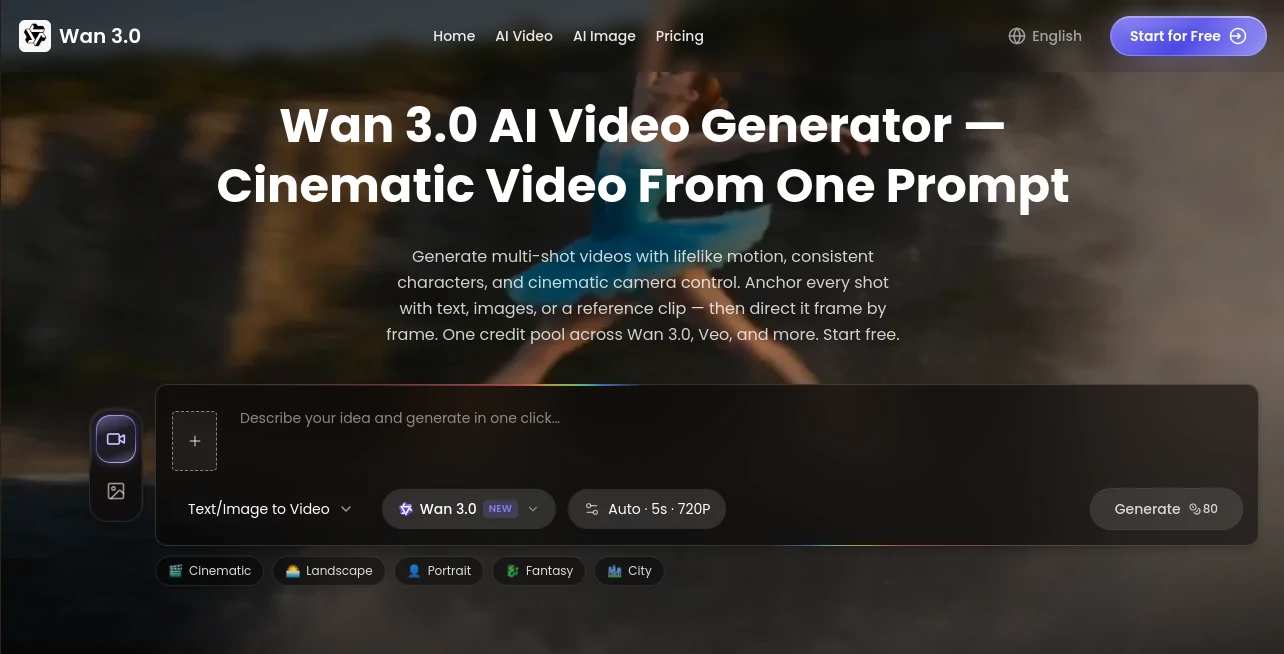
The interface is built around a straightforward generation workflow. Rather than hiding important settings behind complicated menus, users can select their input type, write a prompt, choose an aspect ratio and resolution, and review the expected credit usage before starting a generation.
This approach is helpful for people who are experimenting with video generation for the first time. Experienced creators also benefit because the important production choices remain visible. You can decide whether a text prompt, an existing image, a pair of frames, or a reference clip is the right starting point for the shot.
The workflow feels closer to a lightweight creative studio than a simple prompt box. Generate a result, inspect it, adjust the instructions, and try again until the motion matches the idea.
Accuracy & Performance
Video generation quality naturally depends on the prompt, source material, and type of scene being requested, but the platform is designed to give creators more control over those variables. Prompts can describe the subject, movement, camera behavior, lighting, mood, and pacing instead of relying on a short generic description.
Reference inputs are another strong part of the workflow. Starting from an image or reference clip gives the generation process more visual information to work with. This is particularly useful when the subject, composition, or overall visual direction matters more than simply generating a random scene.
Generation results should still be reviewed before publishing. Small details such as hands, facial features, text inside scenes, object movement, and continuity can vary between generations, so human review remains important for professional work.
Capabilities
The platform goes beyond basic text-to-video generation. Creators can animate still images, use first and last frames to help define a transition, and provide reference material when they need stronger control over the visual direction.
Its multi-shot approach is useful for projects that require more than a single isolated clip. A creator can think about a sequence in terms of camera movement, transitions, and pacing instead of treating every generation as an unrelated experiment.
Another useful feature is the shared credit pool across supported image and video models. This gives creators flexibility when working on a larger campaign. One model may be better suited to a particular shot while another may work better for a different visual, without requiring completely separate workflows.
Security & Privacy
Asset storage and generation privacy vary by plan. Paid plans include asset storage for up to 90 days, while Pro and Max plans also provide private generation. These options can be useful for creators working on commercial concepts, product campaigns, or material that should not be treated as a public showcase.
For professional projects, users should still review the platform's current terms and licensing information before uploading confidential client material or sensitive assets. As with any cloud-based creative service, understanding how uploaded files and generated content are handled is an important part of the production workflow.
Use Cases
- Social Media Content: Turn photos and ideas into short clips for platforms such as TikTok, Instagram, YouTube Shorts, and other video-focused channels.
- Product Marketing: Animate product images to create advertising concepts without arranging a complete physical shoot.
- Product Launches: Build teaser videos and visual announcements for new products or services.
- Content Creation: Produce visual hooks, B-roll concepts, intros, and short sequences for online content.
- Education: Create short visual scenes that make lessons, tutorials, and explanations more engaging.
- Story Development: Explore characters, environments, camera angles, and scene directions before committing to a final production.
- Advertising: Test different creative directions and motion concepts before investing in full production.
- Animation Concepts: Bring illustrations, artwork, and static creative concepts into motion.
- Creative Prototyping: Quickly visualize an idea before creating a detailed storyboard or final edit.
Pros and Cons
Pros
- Supports both text-based and image-based video creation.
- Reference inputs provide greater creative control.
- Useful tools for camera movement and cinematic direction.
- Strong focus on character and style consistency.
- Credit estimates are visible before generation.
- Watermark-free exports are available with paid plans.
- Paid plans include commercial use licensing.
- A shared credit pool can be used across supported AI models.
Cons
- High-quality video generation can consume credits quickly.
- Results can still require several prompt iterations.
- Generated clips are relatively short and may need editing for longer projects.
- Users should manually review generated footage before commercial publication.
- Advanced privacy features are limited to higher-tier plans.
Pricing Plans
A free starting option is available, allowing users to test the generation workflow before committing to a paid subscription. Paid plans are credit-based and include additional production capacity and commercial-use benefits.
- Basic: $19.90 per month, or $15.90 per month when billed annually. Includes 800 credits, up to 160 images or 26 videos per month, watermark-free exports, 90-day asset storage, standard processing, and a commercial use license.
- Pro: $39.90 per month, or $29.90 per month when billed annually. Includes 1,800 credits, up to 360 images or 60 videos per month, watermark-free exports, private generation, priority processing, 90-day asset storage, and a commercial use license.
- Max: $129.90 per month, or $90.90 per month when billed annually. Includes 7,500 credits, up to 1,500 images or 250 videos per month, private generation, the fastest processing, priority support, early access to new models, 90-day asset storage, and a commercial use license.
The exact amount of video that can be generated depends on the model, settings, duration, and credit consumption, so creators who produce videos regularly should compare the included credits with their expected monthly workload.
How to Use the Tool
- Choose the type of input you want to use, such as text, an image, a first and last frame pair, or a reference clip.
- Describe the scene clearly. Include the subject, action, camera movement, lighting, atmosphere, and pacing when those details matter.
- Select the desired aspect ratio and supported resolution.
- Review the estimated credit cost before submitting the generation.
- Generate the video and inspect the result in the workspace.
- If the motion or composition is not right, refine the prompt and generate another version.
- Download the finished clip when it meets your requirements and review it again before publishing.
Comparison with Similar Tools
Many AI video generators focus primarily on turning a written prompt into a short clip. This platform takes a broader approach by combining text prompts with images, frame pairs, and reference clips. That distinction matters when the creator already has a specific character, product, illustration, or visual style in mind.
It is also designed around production decisions that are useful outside of experimentation. Aspect ratio, resolution, credit usage, references, and output review are incorporated into the workflow. For a creator who wants to test several visual directions before editing a final video, that can make the process considerably more practical.
It may not replace a full professional video editor for projects that require detailed timelines, extensive sound design, complex compositing, or frame-level post-production. Its strength is earlier in the process: generating visual material, exploring concepts, creating short finished clips, and producing variations quickly.
Conclusion
For creators who want to move from a rough idea or static image to a cinematic video without building the entire production from scratch, this platform offers a compelling workflow. The combination of text-to-video, image-to-video, reference inputs, camera direction, and consistency controls gives users considerably more room to shape the final result than a basic prompt-and-generate experience.
It is particularly well suited to social content creators, marketers, artists, educators, and small teams that need a steady supply of visual material. The ability to experiment with product concepts, campaign ideas, short-form content, and visual storytelling can also make it valuable before a project reaches traditional production.
The best results still come from thoughtful prompts and careful review. When used that way, it becomes less about asking AI to make a finished movie and more about having a fast visual production partner for turning ideas into usable video concepts.
Frequently Asked Questions (FAQ)
What can the AI video generator create?
It can create short videos from text prompts, images, frame pairs, and reference clips. Users can describe subjects, actions, camera movements, lighting, and pacing to guide the generation.
Can I turn an image into a video?
Yes. An existing image can be used as the starting point for an animated video. The system can add movement, camera motion, depth, and other visual changes based on the instructions provided.
Can I use generated videos commercially?
Paid plans include a commercial use license. Users should still review the current terms and make sure that any uploaded source material is properly licensed for their intended use.
Does it support reference videos?
Yes. Reference clips can be used to help guide motion and visual direction. Images and frame pairs can also be used depending on the generation workflow.
Are generated videos watermarked?
Paid plans provide watermark-free exports, making them more suitable for professional content, advertising concepts, and commercial projects.
How much does video generation cost?
Generation uses credits, and the estimated credit cost is shown before submitting a job. The monthly plans provide different credit amounts, so the effective cost depends on the selected model, duration, and generation settings.
Is it suitable for social media videos?
Yes. Short-form content is one of the practical use cases. Creators can generate clips for social posts, hooks, B-roll, product promotions, launch teasers, and other short visual content.
Can the same character or style be maintained across clips?
The platform is designed to improve character and style consistency by using reference material and controlled generation workflows. This can be especially useful when several clips need to belong to the same campaign or visual identity.
AI Video to Video , AI Image to Video , AI Video Generator , AI Text to Video .
These classifications represent its core capabilities and areas of application. For related tools, explore the linked categories above.

Wan 3.0 Alternatives Product

VeoNano

Seedance 2.5

Sora-2.co

Sora 2 AI

Kling 3.0 – …

vio4 ai video

Veo 3

Seedance 2.0…

Kling 3.0 Vi…
