
Wan 3.0 Video
What is Wan 3.0 Video?
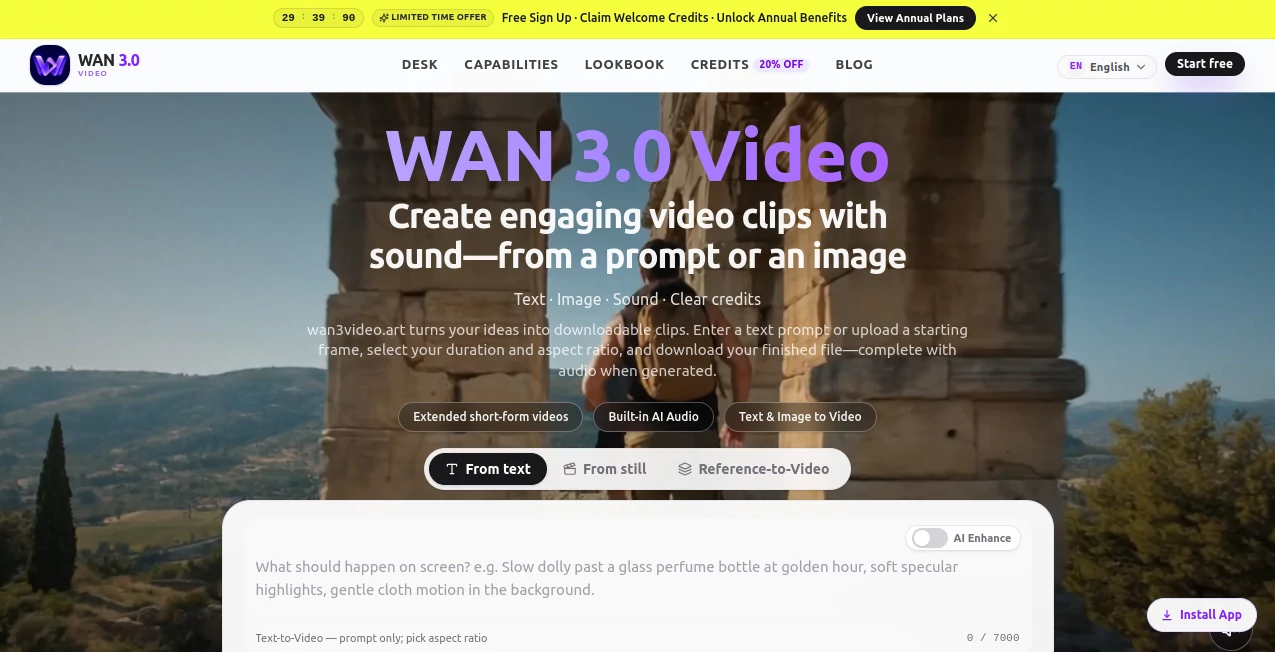
Creating a polished video no longer has to begin with a camera, a production crew, or hours inside a complicated editing application. WAN 3.0 Video is a browser-based AI video studio designed for turning written ideas and still images into downloadable video clips with sound when audio is generated.
The platform focuses on short-form video creation while keeping the workflow remarkably direct. Users can start with a text prompt or an image, choose the desired duration and aspect ratio, generate the clip, preview the result, and download it. This makes it particularly useful for creators, marketers, ecommerce teams, agencies, and anyone who needs to turn visual concepts into moving content quickly.
One of the more interesting aspects is its emphasis on complete short clips rather than simply producing silent animated images. Audio can be delivered with the generated video, while multiple reference images can help guide characters, locations, and visual style.
Key Features
- Text-to-video generation: Turn a written description into a video scene with control over subjects, camera movement, lighting, atmosphere, and mood.
- Image-to-video generation: Upload a starting image and transform a still product shot, character, artwork, or photograph into motion.
- AI-generated audio: When the underlying model returns an audio track, it is included directly in the generated video.
- Multi-reference workflows: Additional still images can be used to help maintain visual relationships between subjects and environments.
- Flexible aspect ratios: The studio supports formats such as 16:9 and 9:16, making the output suitable for landscape content as well as vertical social media placements.
- Extended short-form generation: The platform markets generation targets of up to approximately 30 seconds, although the actual limit can depend on the current API and account plan.
- Credit visibility: The estimated credit cost is shown before generation, making it easier to plan multiple renders.
- Generation history: Logged-in users can manage previous generations and access finished clips when retention is enabled.
User Interface
The interface takes a focused approach rather than trying to become a complete video editing suite. The main workflow revolves around the prompt or source image, generation settings, duration, aspect ratio, and available credits.
This simplicity is useful when the goal is experimentation. A marketer can describe a product scene, a filmmaker can test a camera movement, or a social creator can create a vertical concept without first learning a complicated timeline editor.
The workspace also keeps generation history and credit information within the same environment, which makes repeated experimentation easier to manage.
Accuracy & Performance
Video generation quality naturally depends on the underlying model, prompt, input images, generation settings, system load, and available API capacity. The platform itself notes that queue time, resolution, duration limits, and audio behavior can vary.
Its strongest practical advantage is the ability to give the model more direction through detailed prompts and reference imagery. For example, a product-focused prompt can specify the camera path, lighting conditions, background movement, and mood instead of simply asking for a generic animation.
Generation commonly takes a few minutes, although longer clips and periods of higher demand can affect turnaround time. For serious commercial work, reviewing each generated clip before publishing remains important.
Capabilities
The platform covers both text-driven and image-driven video workflows. A user can describe a scene from scratch, start with a photograph, or use multiple still references where supported. This opens the door to more controlled creative experiments than a basic text-to-video workflow.
It is particularly well suited to short advertising concepts, product reveals, fashion motion, cinematic teasers, social hooks, character tests, game-related visuals, and storyboard-style experiments.
The combination of image references, camera direction, aspect-ratio controls, and generated audio makes it possible to build a surprisingly complete first draft from a relatively small amount of input.
Security & Privacy
The service provides dedicated privacy, terms, and refund documentation covering areas such as accounts, uploads, generations, payments, and cookies. Users should still review the current policies before uploading sensitive or proprietary material.
Commercial users should also pay attention to rights associated with uploaded faces, brands, music, artwork, and reference material. The service places responsibility for those rights on the user, so having permission to use source material remains important.
Use Cases
- Social media content: Create vertical clips and visual hooks for short-form platforms without producing every concept manually.
- Product advertising: Animate product photographs into promotional scenes for paid campaigns and ecommerce content.
- Fashion and lookbooks: Add movement to fashion imagery and experiment with editorial camera directions.
- Brand campaigns: Test different visual concepts before committing to a traditional production.
- Agency work: Produce several creative directions quickly and select promising concepts for further refinement.
- Film pre-production: Explore atmosphere, camera language, and visual ideas before a larger shoot.
- Game and app promotion: Create short cinematic entrances, promotional loops, and store-page visuals.
- Storyboard development: Turn rough ideas into moving visual references that can help communicate a scene.
Pros and Cons
- Pros: Simple browser-based workflow, text-to-video and image-to-video support, optional reference images, multiple aspect ratios, downloadable results, audio when generated, and visible credit costs before rendering.
- Pros: Particularly convenient for short-form marketing content where speed and iteration matter more than building a complete edited film inside one application.
- Cons: It is not intended to replace a full non-linear editing system or multi-track production environment.
- Cons: Actual generation time, duration limits, resolution options, and audio behavior can change depending on the connected model and current service conditions.
- Cons: Generated footage can still require human review and additional editing before being used in polished commercial productions.
Pricing Plans
The service uses a credit-based approach rather than presenting video generation as an unlimited editing environment. The exact cost depends on the output duration and generation settings, with the studio showing the expected credit debit before a render is submitted.
The current site also promotes credit packs and plan-based access, with an introductory discount displayed on its pricing section. Because pricing and promotional offers can change, users should check the live credit page before purchasing.
This model can be attractive for occasional creators because they can think in terms of individual generations instead of committing to a large production workflow. For people producing videos regularly, a larger credit balance can make repeated experimentation more practical.
How to Use the Tool
- Open the browser-based video workspace and sign in to your account.
- Choose whether you want to create a video from a text prompt or begin with a still image.
- Write a specific description of the scene, including the subject, environment, camera movement, lighting, and desired mood.
- If using image-to-video, upload an appropriate starting image and add reference images when the workflow supports them.
- Select the desired duration and aspect ratio for the intended destination.
- Check the estimated credit cost before starting the generation.
- Generate the video and wait for the result to complete.
- Preview the finished clip, paying particular attention to motion, subject consistency, audio, and unwanted visual details.
- Download the result and continue editing it in another application if additional trimming, captions, color work, or sound design is required.
Comparison with Similar Tools
Compared with general-purpose AI creative platforms, this service takes a narrower approach by concentrating heavily on short-form video generation. That focus can be an advantage for users who do not want to navigate a large collection of unrelated creative tools.
Traditional video editors remain stronger for precise timeline editing, advanced compositing, detailed color correction, and multi-track audio production. On the other hand, those applications generally require much more manual work when the initial goal is simply to turn an idea or still image into a moving scene.
Other AI video generators may offer different models, effects, editing features, or pricing structures. The main reason to consider this workflow is its combination of prompt-based generation, image animation, reference inputs, aspect-ratio flexibility, and audio-enabled output in a relatively focused browser studio.
Conclusion
For creators who regularly need short promotional clips, social content, product animations, or cinematic visual experiments, this platform offers a practical way to move from an idea to a usable video without starting a traditional production process.
Its strongest appeal is the straightforward workflow. Text or an image goes in, creative direction is provided through prompts and references, and a downloadable clip comes out. The addition of generated audio can make the result feel more complete and reduce the need for separate sound work on certain projects.
It is not designed to replace professional video editing software, and generated footage should always be reviewed carefully. But for rapid concept development, advertising variations, ecommerce visuals, and short-form social content, it provides a useful creative shortcut.
Frequently Asked Questions (FAQ)
Can I create videos from text?
Yes. The platform supports text-to-video generation, allowing users to describe a scene and guide subjects, camera movement, lighting, and mood through a written prompt.
Can I animate an existing image?
Yes. Image-to-video generation allows users to upload a starting frame and turn still imagery into a moving clip.
Does the generated video include sound?
Audio is included when the connected generation model returns an audio track. The service does not guarantee that every generation will contain sound.
How long can the generated videos be?
The service markets generation targets of approximately 30 seconds per take. The actual available duration can vary according to the current API, account, and plan.
Can I use the generated videos commercially?
Commercial use is permitted subject to the applicable terms and plan entitlements. Users remain responsible for having the necessary rights to uploaded images, faces, brands, music, and other reference material.
Is it a complete video editor?
No. It is primarily an AI video generation studio. For detailed timeline editing, multi-track audio, advanced compositing, and final post-production, a dedicated video editor may still be needed.
How are generation credits calculated?
Credit usage is linked to the generated output, with duration and other generation parameters affecting the cost. The studio displays an estimated credit debit before generation.
Who can benefit most from this tool?
It is especially useful for social media creators, marketers, ecommerce teams, agencies, filmmakers, game developers, and businesses that need to test or produce short visual concepts quickly.
AI Image to Video , AI Video Generator , AI Text to Video .
These classifications represent its core capabilities and areas of application. For related tools, explore the linked categories above.
Wan 3.0 Video details
Website unavailable — View Alternatives
Pricing
- Freemium
Apps
- Web App
Categories

Wan 3.0 Video Alternatives Product

JSON to Video

AssiPilot

kling 4.0

HappyHorse A…

AISeedance2

Seedance 2.0

Veo 3

HappyHorse A…

Seedance 2.0…