
Wann AI
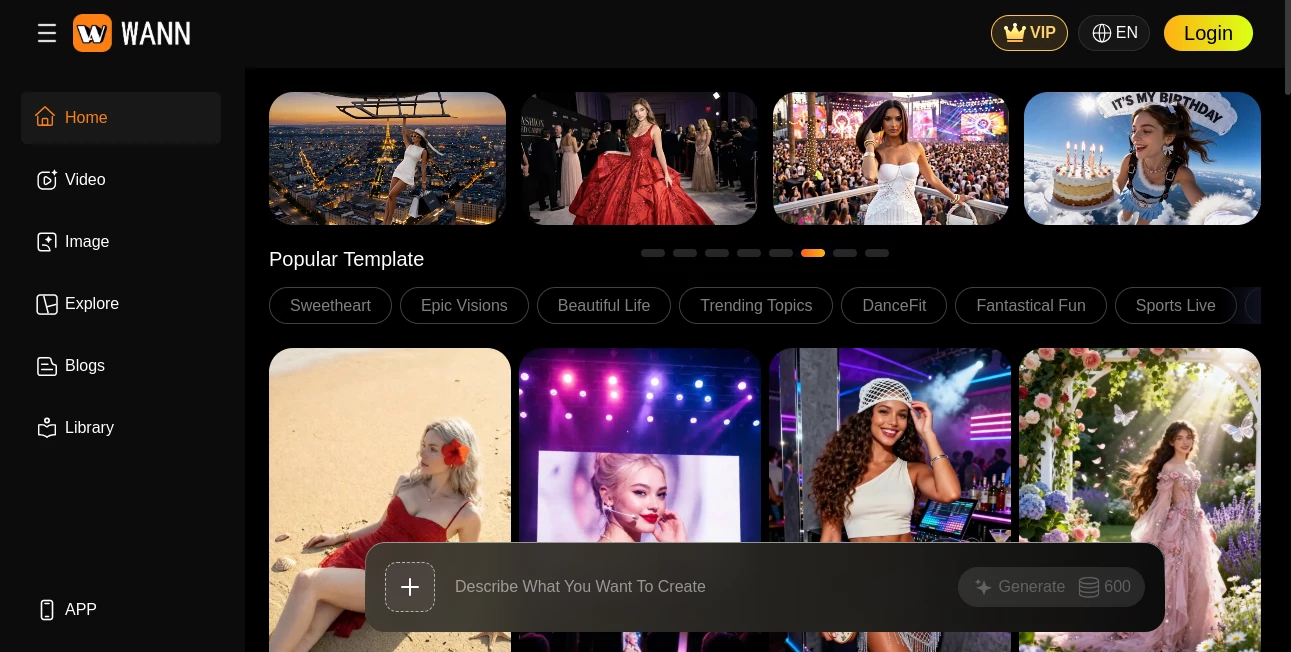
What is Wann AI?
Creating polished images and videos with AI no longer needs a complicated collection of separate tools. Wann AI brings image generation, video creation, image animation, editing, templates, and multiple AI models together in one creative workspace. It is designed for creators who want to move from an idea to a finished visual without spending hours learning traditional editing software.
The platform supports both image and video workflows, including text-to-image, image-to-image, text-to-video, and image-to-video generation. Its focus on character consistency and visual stability makes it particularly interesting for projects where the same person, outfit, or visual identity needs to remain recognizable across multiple creations.
For example, a content creator can start with a portrait, turn it into a short animated scene, experiment with different visual styles, and then create additional variations without constantly moving between different applications. There is also a large collection of ready-made templates covering social media trends, fashion, lifestyle, entertainment, and other creative formats.
Key Features
- AI text-to-image generation for creating visuals from written prompts.
- AI image-to-image generation for transforming existing visuals.
- AI text-to-video generation for turning concepts into moving scenes.
- AI image-to-video generation for animating still images.
- AI video editing and enhancement workflows.
- Character and visual consistency across generated content.
- Multiple AI models available from one creative platform.
- High-resolution image generation with options including 1K, 2K, and 4K output on supported workflows.
- Multiple aspect ratios for different content formats.
- Ready-made AI video and photo templates.
- Fashion, media, lifestyle, social media, and creative templates.
- Generation options for creating multiple variations.
User Interface
The interface is built around a straightforward creation workflow. Users can describe what they want to create, choose a generation method, select a model or template when appropriate, and start generating. This keeps the creative process relatively direct, which is useful for people who want to experiment rather than configure dozens of technical settings.
The Explore-style sections are another practical touch. Instead of starting every project from a blank prompt, users can browse popular templates, AI models, media concepts, fashion ideas, video templates, and photo templates. Someone looking for a quick TikTok concept, fashion visual, cinematic scene, or creative portrait can therefore begin with an existing idea and adapt it.
Accuracy & Performance
Visual consistency is one of the platform's main selling points. Its own product information emphasizes preserving facial, clothing, and structural details across generated frames. That matters when producing sequences rather than isolated images because inconsistent faces, outfits, or anatomy can quickly make an AI-generated video feel artificial.
The platform also provides access to a selection of contemporary image and video models. Depending on the workflow, users can work with models such as Seedance, Veo, Kling, Wan, Flux, and other available engines. This multi-model approach gives creators more room to compare visual styles and choose the result that fits a particular project.
Capabilities
The creative range goes well beyond basic prompt-to-picture generation. Image creation can be handled through text-to-image and image-to-image workflows, while video creation includes text-to-video and image-to-video options. There are also tools for motion control, video extension, video editing, background removal, image upscaling, photo retouching, clothing changes, and other specialized transformations.
Templates make the platform particularly useful for short-form content. Users can explore concepts designed around Reels, TikTok-style videos, fashion, lifestyle, sports, celebrations, and visual effects. This can save considerable time when the goal is not to invent a production workflow from scratch but to produce something attractive and ready for social publishing.
Security & Privacy
Privacy is addressed through stated compliance with international privacy standards, including GDPR and CCPA. The platform also says that users can delete their accounts and request permanent removal of their personal and creative data. These controls are important for creators working with personal photographs or original visual assets.
As with any cloud-based generative platform, users should still review the applicable privacy and usage policies before uploading sensitive material. The service provides dedicated privacy and acceptable-use documentation so creators can understand how their information and generated assets are handled.
Use Cases
- Social Media Content: Create short-form visual content for TikTok, Instagram Reels, and other social platforms.
- Marketing: Produce promotional visuals, campaign concepts, product scenes, and attention-grabbing advertisements.
- Fashion: Experiment with clothing, poses, styles, and fashion-focused visual concepts without a traditional photoshoot.
- Content Creation: Turn written ideas or static images into engaging visual content for blogs, channels, and social accounts.
- E-commerce: Create alternative product visuals and lifestyle-oriented creative concepts.
- Photography: Generate portraits, artistic variations, backgrounds, and enhanced versions of existing images.
- Video Production: Develop visual concepts, animate still images, and experiment with AI-generated scenes before investing in a full production.
- Creative Experimentation: Test different AI models and templates to discover new visual directions quickly.
Pros and Cons
- Pros: Combines image and video generation in one platform.
- Pros: Offers a broad selection of AI models and creative workflows.
- Pros: Strong focus on character and visual consistency.
- Pros: Large library of ready-made creative templates.
- Pros: Supports both beginners and users looking for more advanced generation options.
- Pros: Includes several specialized image and video editing features.
- Cons: The large number of models and templates may take some time to explore.
- Cons: Generation costs vary by workflow because credits are consumed when creating images and videos.
- Cons: Results can still depend heavily on the quality and specificity of the prompt or reference material.
Pricing Plans
The service uses a credit-based system for AI image and video generation. Credits are consumed when users create content, while membership can reduce the credit cost per creation. The pricing page currently lists Plus, Premium, and Basic membership options, alongside credit-based usage.
Premium benefits include faster generation, HD output, access to image features, and access to video features. Credits are also stated to remain valid rather than expiring, allowing users to use their available balance over time. Payment options include major credit cards, PayPal, e-wallets, and online bank transfers.
Because subscription prices and promotional offers can change, users should check the current pricing page before choosing a plan.
How to Use Wann AI
- Open the platform and choose the type of visual you want to create.
- For a new image, describe the desired scene, subject, style, lighting, and composition in the prompt.
- For an existing image, upload a suitable reference and select an image-to-image or image-to-video workflow.
- Choose an available AI model or start from one of the ready-made templates.
- Select the desired output settings, such as resolution, aspect ratio, or generation count where available.
- Start the generation process and review the resulting variations.
- Adjust the prompt or settings if the result needs refinement, then generate another version.
- Save the final visual and continue editing or transforming it if the project requires additional work.
Comparison with Similar Tools
Many AI creative platforms specialize in one part of the production process. Some concentrate mainly on image generation, while others are built around video creation or editing. This platform takes a broader approach by combining both image and video workflows with a large template library and access to multiple generation models.
That difference is most noticeable for creators who regularly move between still images and short videos. Instead of generating an image in one service and then searching for another application to animate or modify it, the workflow can remain within the same environment.
It is not necessarily the right choice for every professional production. Dedicated image, video, or editing applications may provide deeper controls for highly specialized workflows. However, for creators who value convenience, experimentation, model variety, and quick visual production, the all-in-one approach is a strong advantage.
Conclusion
For creators who want one place to experiment with AI-generated images and videos, this platform offers an appealing combination of generation tools, models, templates, and editing capabilities. Its emphasis on visual consistency is especially useful when a project involves recurring characters or recognizable subjects.
The extensive template library also gives the experience a more practical feel. Instead of staring at an empty prompt box wondering what to make next, users can browse proven creative directions and adapt them to their own ideas. Whether the goal is a social media post, fashion concept, marketing visual, animated portrait, or early video concept, the platform provides plenty of room to experiment.
Frequently Asked Questions (FAQ)
What can this AI platform create?
It can generate AI images and videos through workflows such as text-to-image, image-to-image, text-to-video, and image-to-video. It also provides additional editing and transformation features.
Can I turn an image into a video?
Yes. The platform includes an image-to-video workflow that can animate still images and create moving visual sequences.
Does it support different AI models?
Yes. Users can access a selection of image and video models, including options from several major generative AI model families.
Are there ready-made templates?
Yes. The platform offers templates for areas such as social media, fashion, lifestyle, AI video, photography, and other creative formats.
Does it offer free access?
Users can access the service with available credits, while paid memberships provide additional benefits such as faster generation and access to premium capabilities. The exact offers and prices may change over time.
Can generated content be created in high resolution?
Yes. Supported image-generation workflows provide resolution options that can include 1K, 2K, and 4K output.
Is character consistency supported?
Character and visual consistency are among the platform's stated priorities, with its technology designed to preserve important facial, clothing, and structural details across generated frames.
What aspect ratios are available?
Depending on the selected generation workflow, users can choose from multiple aspect ratios, including landscape, portrait, square, and wider cinematic formats.
AI Image to Video , AI Text to Video , AI Image to Image , AI Text to Image .
These classifications represent its core capabilities and areas of application. For related tools, explore the linked categories above.

Wann AI Alternatives Product
Maginary
Seedream 5.0

Nanosora

Seedance 2.0…

Z-Image

AnividAI

Seedance 2.5…
Kling Motion

lyric video …