

















Wisegrid
What is Wisegrid?
Wisegrid is a spreadsheet-native work management platform designed for teams that want more structure and automation without giving up the familiar grid they already use every day. Instead of forcing users to learn an entirely different way of organizing work, it builds dashboards, reports, forms, Gantt views, automations, collaboration features, and AI directly around rows, columns, and formulas.
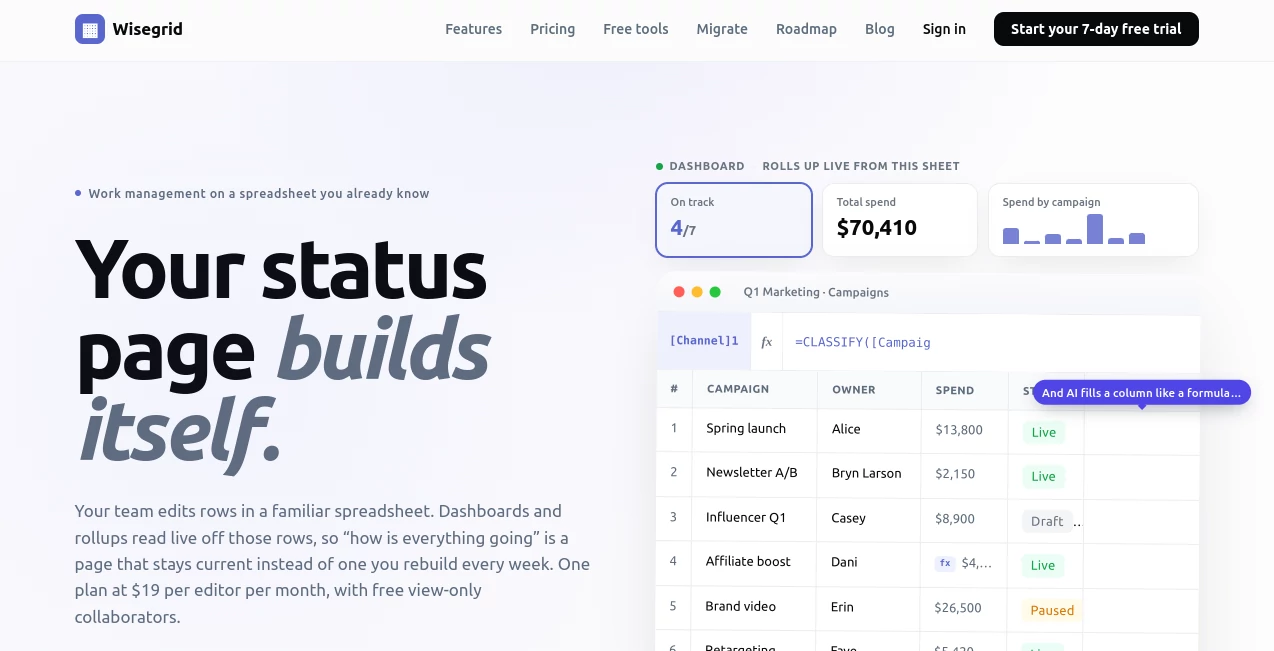
The approach is particularly appealing for teams whose projects already live in spreadsheets. A project manager can keep information in a familiar table while dashboards and reports read from that same data. There is no need to maintain a separate status document just to explain what is happening.
One of the more interesting parts is the way AI is handled. Rather than placing AI in a completely separate chat window, the platform brings AI functions into spreadsheet cells. A team can classify feedback, extract information from text, summarize conversations, or use a freeform AI formula while keeping the result alongside the original data.
For someone managing campaigns, projects, budgets, operations, or recurring workflows, that combination can make a spreadsheet feel much closer to a purpose-built business application.
Key Features
- Spreadsheet-based work management with familiar rows, columns, formulas, and editing.
- AI formulas for classification, extraction, summarization, and flexible AI-powered tasks.
- Dashboards with live KPI tiles and charts connected directly to spreadsheet data.
- Reports that group and summarize information across multiple sheets.
- Gantt, Kanban board, and calendar views for different ways of managing the same data.
- Automations triggered by rows, dates, and new records.
- Multi-step approval workflows with run history.
- Forms with conditional logic, save-and-resume functionality, and custom branding.
- Cross-sheet references and 118 Excel-compatible functions.
- Collaboration tools including comments, attachments, presence, and row-level conflict detection.
- Enterprise SSO and MFA included in the standard plan.
- Excel import and a self-service migration option for existing workspaces.
- REST API and webhooks for connecting the platform with other systems.
- Up to 1,000,000 cells and 40,000 rows per sheet.
- Export options for Excel, CSV, and complete data bundles with attachments.
User Interface
The interface is built around a spreadsheet rather than trying to hide it. That decision makes the learning curve much easier for people who already understand Excel-style tables. Users can click into cells, type formulas, paste ranges, organize rows, and work with familiar column structures.
At the same time, the surrounding application layer gives those sheets more structure. A project can be viewed as a spreadsheet, dashboard, report, board, or calendar without creating duplicate datasets. This is a practical design choice for teams that frequently move between detailed records and high-level project status.
Accuracy & Performance
Performance is supported by a large per-sheet capacity of up to 1,000,000 cells and 40,000 rows. The platform also provides capacity warnings before a sheet reaches its limit, which can be useful for teams working with increasingly large operational datasets.
AI results naturally depend on the quality and clarity of the information supplied to the formulas. The advantage here is that AI output can be placed directly beside the source information, making it easier to review, filter, and use in subsequent workflows rather than leaving the result isolated in a separate conversation.
Collaboration is another area where practical reliability matters. When two people edit the same row simultaneously, row-level conflict detection allows users to keep one version, take the other, or merge changes cell by cell instead of silently overwriting someone's work.
Capabilities
The platform goes beyond basic spreadsheet editing by turning the underlying data into a complete work environment. Dashboards can roll up information from live sheets, while reports can summarize records across multiple sheets. Gantt and calendar views provide useful alternatives for project planning, and board views make status-based workflows easier to follow.
AI functions are particularly useful when a spreadsheet contains a large amount of unstructured text. For example, customer feedback can be classified into categories, emails can be scanned for invoice numbers, and long discussion threads can be summarized directly inside the relevant rows.
Automations can also take action when certain conditions occur. Teams can configure workflows to notify people, assign records, move or copy rows, update values, and handle multi-step approvals. This makes the platform suitable for recurring operational processes rather than simply storing information.
Security & Privacy
Security features include enterprise SSO and MFA, with permissions designed around private-by-default access. Teams can share projects, individual sheets, or specific views with people, groups, or domains.
Data portability is also treated as an important part of the product. Users can export sheets to Excel or CSV and create an export bundle containing spreadsheet data and attachments. The platform also states that it maintains nightly off-site backups that are restore-tested.
For teams migrating from another spreadsheet-based work platform, the self-service importer uses a read-only access token and does not write changes back to the original workspace. Tokens can be revoked, and items that cannot be translated cleanly are flagged for review.
Use Cases
- Project management: Track tasks, owners, deadlines, budgets, and project status while using Gantt, dashboard, and calendar views.
- Marketing operations: Manage campaigns, spending, content workflows, approvals, and performance information from connected sheets.
- Customer feedback: Use AI formulas to classify comments, extract useful details, and summarize large collections of feedback.
- Operations: Automate repetitive assignments, notifications, row updates, and approval processes.
- Resource planning: Organize people, workloads, budgets, and schedules in a shared operational workspace.
- Construction management: Maintain job costing, project schedules, change orders, and status reporting in structured sheets.
- Data-heavy teams: Work with large sheets while retaining dashboards, reports, search, mobile access, and API functionality.
- Spreadsheet migration: Move existing Excel workbooks or supported workspaces into a more structured work management environment.
Pros and Cons
Pros
- Familiar spreadsheet-based interface.
- AI functionality works directly inside formulas and cells.
- Dashboards, reports, forms, Gantt views, and automations are included.
- Large capacity of up to 1,000,000 cells per sheet.
- 118 Excel-compatible functions.
- Free view-only collaborators.
- SSO and MFA are included without requiring a higher pricing tier.
- Strong data portability through Excel, CSV, and export bundles.
- Useful migration options for teams moving away from existing spreadsheet work management platforms.
Cons
- Teams looking for a traditional task-management interface may initially find the spreadsheet-first approach different.
- The AI allowance is limited to $5 of included monthly credit before additional credit is needed.
- Some integrations listed on the roadmap, including Slack, Teams, Jira, and Zapier, are not yet available.
- Google Sheets migration is not currently available as a completed importer.
- The platform may be more feature-rich than necessary for individuals who only need a simple spreadsheet.
Pricing Plans
The pricing structure is unusually straightforward: there is one paid plan at $19 per editor per month. There are no separate feature tiers, and view-only collaborators are free. This means a team can invite people who only need to inspect dashboards, reports, or sheets without turning those users into additional paid editor seats.
The plan includes unlimited sheets, up to 1,000,000 cells and 40,000 rows per sheet, 100 GB of attachment storage, Gantt views, automations, dashboards, cross-sheet references, AI formulas, SSO, MFA, and migration tools.
AI usage includes a $5 monthly credit allowance, metered against actual usage. The allowance acts as a hard ceiling rather than allowing unexpected AI charges to accumulate. Additional credit can be purchased when necessary.
A 7-day free trial is available without requiring a credit card, giving teams an opportunity to test the complete feature set before committing.
How to Use It
Getting started is relatively straightforward for anyone already comfortable with spreadsheets. After creating an account, a team can start with a new sheet or import an existing Excel workbook. Teams migrating from a supported work management platform can also use the self-service importer to bring over their existing workspace.
Once the data is in place, users can add formulas, create views, build dashboards, configure reports, and automate repetitive actions. AI functions can be added to cells when a column requires classification, extraction, summarization, or another form of text-based processing.
A practical example would be a marketing team maintaining a campaign sheet with columns for campaign name, owner, budget, status, and customer feedback. AI can classify feedback in a separate column, while formulas calculate spending and dashboards turn the same information into a management overview. The underlying data remains in one place.
Comparison with Similar Tools
Compared with traditional spreadsheet software, the platform provides considerably more built-in project management functionality. Instead of relying heavily on separate tools for dashboards, approvals, forms, automations, and project views, these capabilities are connected to the same underlying records.
Compared with dedicated work management products such as Smartsheet, Airtable, and monday.com, its strongest distinction is the spreadsheet-native approach combined with AI formulas. Teams that already think in rows and formulas may find this more natural than moving to a completely different project management interface.
The pricing model is also easy to understand. Rather than splitting features between multiple tiers, the single plan includes the full feature set and charges only for editors, while read-only collaborators remain free.
Conclusion
For teams that have outgrown ordinary spreadsheets but do not want to abandon them, this platform presents a compelling middle ground. It keeps the familiar grid at the center while adding the features normally associated with dedicated work management software.
The AI implementation is especially interesting because it fits into an existing workflow instead of demanding a separate AI workspace. Classification, extraction, and summarization can happen alongside the data that needs to be processed, which can save a surprising amount of repetitive work.
With dashboards, automations, forms, reports, project views, collaboration controls, migration tools, and a simple $19-per-editor pricing model, it is worth considering for small teams and growing organizations whose work already revolves around spreadsheets.
Frequently Asked Questions (FAQ)
What is this platform used for?
It is a spreadsheet-based work management platform for projects, operations, marketing, resource planning, reporting, automation, and other workflows that can be organized in structured tables.
Does it have AI features?
Yes. AI functions can be used directly inside spreadsheet formulas for tasks such as classification, extraction, summarization, and more flexible text-processing requests.
How much does it cost?
The standard plan costs $19 per editor per month. View-only collaborators are free, and the plan includes the full feature set rather than restricting important functionality to higher tiers.
Is there a free trial?
Yes. A 7-day free trial is available without a credit card, allowing users to test the complete product before deciding whether to continue.
Can existing Excel files be imported?
Yes. Excel workbooks can be imported, and there is also a self-service migration option for supported work management platforms.
How much AI usage is included?
The plan includes $5 of AI credit per month. Usage is metered to actual consumption, and the included allowance has a hard ceiling. Additional credit can be purchased when needed.