


















XLSX
What is XLSX?
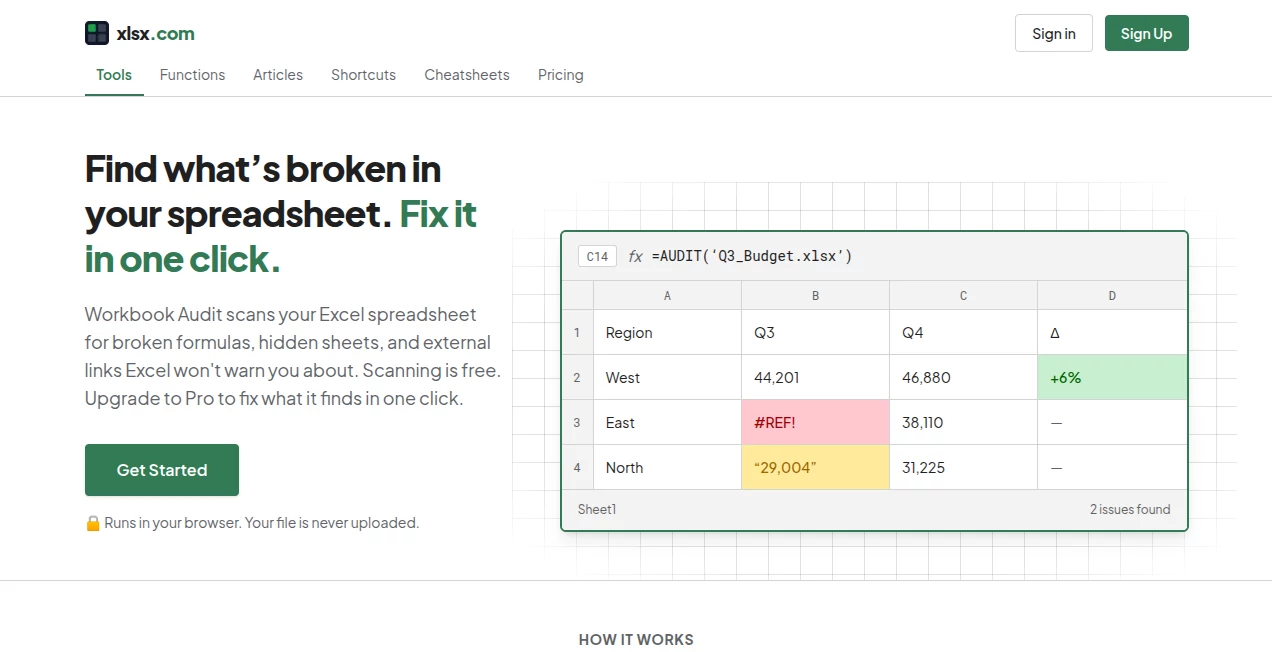
Spreadsheet problems are often easy to miss until they cause a wrong total, a broken report, or a confusing handoff. A workbook can look perfectly normal while containing hidden sheets, external references, numbers stored as text, or formulas that no longer point where they should. XLSX.com is built around finding those quiet problems before they become expensive mistakes.
The platform provides browser-based spreadsheet utilities designed for practical Excel workflows. Its main workbook audit checks files for several common issues and reports their exact locations, while additional tools handle everyday conversions such as CSV to Excel, Excel to CSV, Excel to JSON, JSON to Excel, and splitting workbooks by sheet.
One particularly useful detail is privacy. Files are processed locally in the browser rather than uploaded to a remote server, making the service a convenient choice when working with spreadsheets that contain information you would rather keep on your own device.
Key Features
- Workbook auditing: Scan Excel workbooks for broken formula references, numbers stored as text, hidden sheets, rows and columns, external links, and volatile functions.
- Exact issue locations: Problems are reported down to the relevant cell, making it much easier to investigate a large workbook.
- One-click fixes: Pro users can apply selected corrections such as unhiding content, removing external links, and converting numbers stored as text.
- Spreadsheet conversion: Convert CSV files to Excel, Excel files to CSV, Excel files to JSON, and JSON data back into Excel.
- Split workbooks by sheet: Separate a multi-sheet workbook into individual files without manually copying each worksheet.
- Browser-based processing: Spreadsheet files can be processed directly in the browser without requiring a desktop installation.
- Excel learning resources: The platform also provides explanations of Excel functions, shortcuts, and practical cheatsheets.
User Interface
The interface is deliberately focused on getting a spreadsheet task done rather than surrounding the user with unnecessary controls. The main workflow is straightforward: select a workbook, run the audit or conversion, review the result, and take the appropriate action.
For workbook auditing, the results are particularly useful because they identify where an issue exists instead of simply reporting that something is wrong. If a workbook contains hundreds of rows, knowing the exact cell can save considerably more time than manually searching through formulas.
Accuracy & Performance
The auditing workflow is designed around specific spreadsheet problems rather than vague workbook health scores. It checks for formula errors, text-formatted numbers, hidden sheets and rows or columns, external links, and volatile functions such as NOW() and INDIRECT().
That approach is valuable for practical Excel maintenance. For example, a number that visually looks correct may actually be stored as text and silently interfere with SUM, AVERAGE, or lookup formulas. Identifying the exact location gives the user a clear starting point for fixing the workbook.
Because the tools operate in the browser, there is also no desktop application to install before starting a conversion or scan. Free workbook audits currently support files up to 20MB, while the Pro plan raises the file-size limit to 50MB.
Capabilities
The platform goes beyond a single spreadsheet checker. Its collection of utilities covers several common tasks that normally require repetitive manual work. A user can convert structured CSV data into an Excel workbook, export Excel data as CSV or JSON, turn JSON into a spreadsheet, or separate a multi-sheet workbook into individual files.
The function library adds another useful layer for Excel users. It includes practical references for functions such as VLOOKUP, XLOOKUP, INDEX, MATCH, IF, SUMIF, COUNTIF, IFERROR, SUMIFS, and TEXT. These explanations can be helpful when a spreadsheet issue is not simply a file problem but a formula problem that needs to be understood.
Security & Privacy
Privacy is one of the strongest practical aspects of the service. The tools state that files are processed locally in the browser and are not uploaded. This is especially important for financial reports, internal business spreadsheets, customer lists, or other documents that should not be sent to a third-party server simply to perform a conversion or audit.
The local-processing approach also makes the workflow feel more direct: the spreadsheet stays on the user's device while the browser performs the requested operation. Users should still follow their organization's own data-handling policies when working with confidential files.
Use Cases
For finance teams, workbook auditing can help uncover formula references and numbers stored as text before a report is distributed. A hidden worksheet or external link that nobody noticed during preparation can otherwise become a problem later.
For analysts, the conversion tools are useful when data needs to move between formats. A CSV export can be turned into an Excel workbook, while structured spreadsheet information can be converted into JSON for use in another workflow.
For developers and technical teams, Excel-to-JSON and JSON-to-Excel conversions can simplify the movement of structured data between spreadsheet-based processes and applications.
For everyday Excel users, splitting a workbook by sheet can be a surprisingly useful time-saver. Instead of manually copying worksheets into separate files, the task can be handled through a dedicated browser tool.
A practical example would be a quarterly reporting workbook containing separate sheets for sales, expenses, inventory, and regional performance. Before sending it to colleagues, an audit can reveal whether a formula is broken or whether an external reference has been left behind.
Pros and Cons
Pros:
- Free workbook scanning with unlimited scans.
- Exact cell-level reporting for several spreadsheet issues.
- Files are processed locally in the browser.
- No sign-up is required for the browser-based spreadsheet tools.
- Useful conversion tools for Excel, CSV, and JSON.
- Practical Excel function guides and cheatsheets are available.
- Pro provides one-click fixes with a preview before changes are applied.
Cons:
- The main audit workflow is focused on specific spreadsheet issues rather than being a complete Excel replacement.
- The free audit has a 20MB file-size limit.
- One-click repair features require the paid Pro plan.
- Users looking for advanced spreadsheet modeling or full desktop spreadsheet software will still need a broader Excel-compatible application.
Pricing Plans
The service uses a simple free-and-Pro model. The Free plan allows unlimited workbook scans with files up to 20MB and provides exact locations for several types of detected issues. It is a good starting point for occasional spreadsheet checks.
The Pro plan costs $9 per month. It includes everything in the Free plan while adding one-click fixes, previews before changes are applied, more detailed locations for hidden rows and columns, CSV exports describing changes, and support for files up to 50MB.
For someone who regularly cleans or reviews Excel workbooks, the Pro features are more compelling than simply paying for additional scans because they reduce the amount of manual cleanup required after an issue is found.
How to Use the Tool
- Open the spreadsheet tool in a modern web browser.
- Select the workbook you want to inspect or convert.
- For an audit, choose the workbook and start the scan.
- Review the detected issues and their exact locations.
- If you have Pro access, preview and apply the available one-click fixes.
- For conversions, choose the appropriate input and output format and process the file in the browser.
- Review the resulting spreadsheet or exported data before using it in your workflow.
Comparison with Similar Tools
Traditional spreadsheet applications such as Microsoft Excel provide extensive editing, calculation, formatting, and data-analysis capabilities, but identifying certain hidden workbook problems can still require manual inspection. Dedicated spreadsheet audit tools take a narrower approach and focus on finding issues that are easy to overlook.
Online file-conversion services can also handle format changes, but a browser-based workflow that processes files locally offers a useful privacy advantage when sensitive spreadsheets are involved. The combination of auditing, conversion utilities, Excel function references, and cheatsheets also makes this platform more useful than a single-purpose file converter.
For someone who needs a complete spreadsheet editor, it should be viewed as a companion rather than a replacement. For checking, converting, cleaning, and understanding Excel files, however, its focused collection of tools can be much faster than doing every task manually.
Conclusion
Spreadsheet errors rarely announce themselves. A hidden worksheet, an old external reference, or a number stored as text can sit unnoticed until the moment a report matters most. This is where a focused auditing workflow can make a real difference.
With local browser processing, detailed issue detection, useful conversion utilities, and a straightforward Pro upgrade for automated fixes, the platform offers a practical toolkit for people who work with Excel files regularly. It is especially appealing to analysts, business users, developers, and teams that want a quicker way to inspect and prepare workbooks without sending their files to an external service.
For occasional spreadsheet checks, the free tools provide plenty of value. For users who frequently repair workbooks, the one-click Pro features can turn a tedious cleanup process into a much shorter task.
Frequently Asked Questions (FAQ)
Is the spreadsheet audit free?
Yes. The Free plan supports unlimited scans for files up to 20MB and reports several types of workbook issues with their locations.
Does the service upload my Excel file?
The platform states that its browser-based spreadsheet tools process files locally and that files are never uploaded. This makes local processing one of its key privacy advantages.
What spreadsheet problems can the audit detect?
The audit checks for broken formula references, numbers stored as text, hidden sheets, hidden rows and columns, external links, and volatile functions.
Can it fix spreadsheet problems automatically?
Yes, selected one-click fixes are available with the Pro plan. Users can preview changes before applying them, including actions such as unhiding content, removing external links, and converting numbers stored as text.
What file formats can the conversion tools handle?
The available tools support workflows involving Excel, CSV, and JSON, including CSV to Excel, Excel to CSV, Excel to JSON, JSON to Excel, and splitting an Excel workbook by sheet.
Is there a desktop application to install?
No desktop installation is required for the browser-based tools. The spreadsheet utilities are designed to run directly in a web browser.
What is the Pro file-size limit?
The Pro plan supports files up to 50MB, compared with the 20MB limit on the Free plan.
Who can benefit most from these tools?
Excel users who regularly audit, clean, convert, or prepare workbooks can benefit the most. It can be particularly useful for analysts, finance teams, developers, business users, and anyone who frequently works with structured spreadsheet data.
AI Productivity Tools , AI Spreadsheet .
These classifications represent its core capabilities and areas of application. For related tools, explore the linked categories above.

XLSX Alternatives Product

Lynote

Sourcetable

Futurwise

AfterSession

Keepmind

WhispriNote

Receipt AI

Airtable AI …

TruthSpine
