
















What is YT to Text?
YT to Text is a practical YouTube transcript tool designed for people who need to turn available video captions into readable, searchable, and downloadable text. Instead of repeatedly scrubbing through a long video to find one sentence, users can open the transcript, search for an exact word or phrase, jump to the matching timestamp, and copy the information they need.
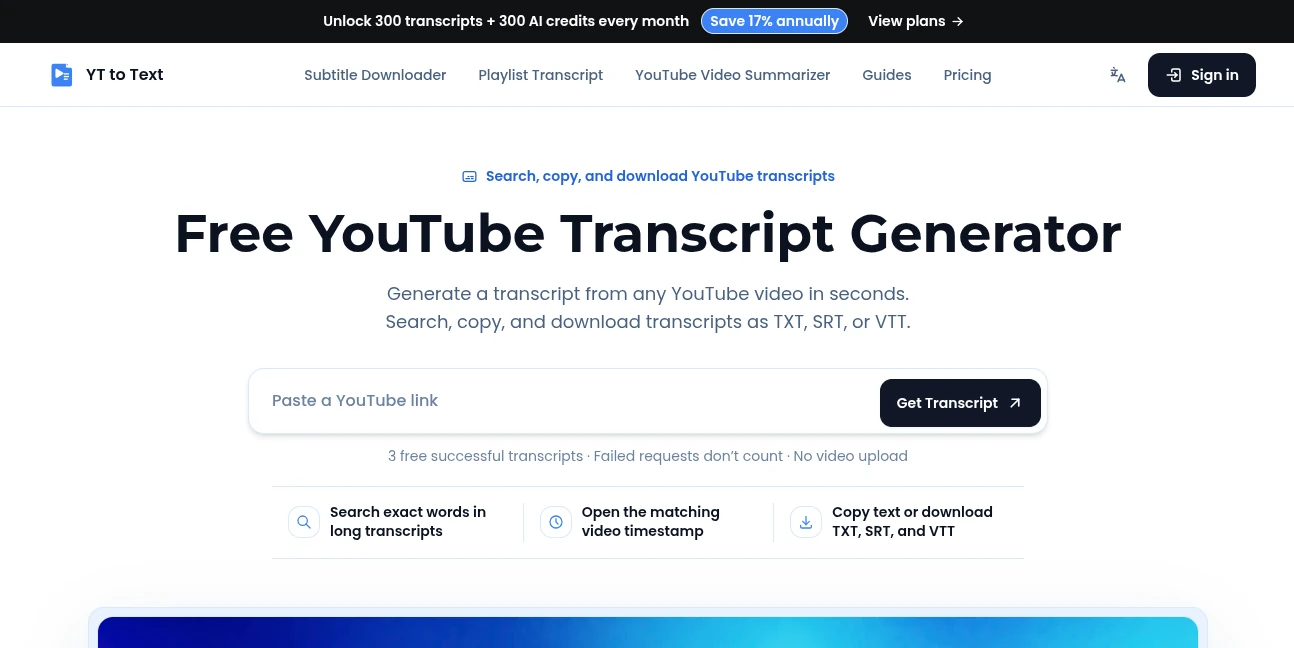
The workflow is refreshingly simple. Paste a YouTube video link, retrieve the available captions, and work with the transcript in one place. There is no need to upload the video itself, and successful transcripts can be downloaded as TXT, SRT, or VTT files.
This makes the service particularly useful for students, researchers, content creators, marketers, writers, and video editors who regularly work with spoken content. It is also a good fit when the goal is not simply to read a transcript, but to quickly locate a specific part of a long video and verify its original context.
Key Features
- Generate transcripts from YouTube videos with available captions.
- Search long transcripts for exact words and phrases.
- Jump directly to the corresponding video timestamp.
- Switch between timestamped and clean-text views.
- Copy transcript content for notes, research, or content production.
- Download transcripts as TXT files.
- Download timed subtitles in SRT format.
- Download WebVTT captions in VTT format.
- Choose from the caption languages provided by the video.
- Identify whether the selected captions are manual or automatically generated.
- Work without uploading the original video file.
User Interface
The interface focuses on the actual task rather than surrounding it with unnecessary complexity. The starting point is a YouTube URL field where users paste the video link and request the transcript.
Once the transcript is available, the workspace brings reading, searching, timestamps, copying, and downloading together. This is especially helpful with long interviews, lectures, podcasts, tutorials, and presentations where manually locating a particular sentence can take considerably longer than reading the transcript itself.
A useful detail is the ability to select a timestamp and return to the corresponding point in the video. For research work, this provides a simple way to check the surrounding context rather than relying on an isolated line of text.
Accuracy & Performance
Transcript quality depends primarily on the caption track provided by YouTube. When a video has manual captions, those captions can be retrieved directly. Automatically generated captions are also supported when YouTube makes them available.
The service does not claim to create a new transcription from a video that has no available caption track through its free caption retrieval workflow. That distinction is important because it makes the result easier to understand: the tool retrieves and organizes available captions rather than pretending that every video can automatically be transcribed regardless of its source.
Performance is also helped by the focused workflow. Users do not have to upload a large video file before working with the transcript. They simply provide the video link and begin working with the available captions.
Capabilities
The strongest part of the platform is the combination of transcript retrieval and practical post-processing. A transcript can be searched for a person's name, product, topic, quotation, or technical term. Selecting a matching timestamp makes it easier to verify exactly where the phrase appears in the video.
The same successful transcript can then be copied or downloaded without submitting the video again. TXT is suitable for reading, notes, and general text processing, while SRT and VTT are better suited to subtitle and video workflows.
The platform also extends beyond basic transcript retrieval with AI-powered features available to signed-in users with credits. These include AI Notes, Mind Maps, AI Chat, and Flashcards, allowing a transcript to become the starting point for deeper study and research.
Security & Privacy
Privacy is handled in a straightforward way. The service states that users do not need to upload the original YouTube video, which removes an unnecessary file-transfer step from the workflow.
Transcripts are kept inside a private workspace and are not published on public pages. This is useful for people working with interviews, research material, lectures, or other content that they want to keep within their own workspace.
Users should still remember that the underlying video and its captions come from YouTube. The availability and content of a transcript therefore depend on the source video's accessible caption track.
Use Cases
Study and research: Students can search lectures for specific concepts instead of watching an entire recording again. A timestamp can then be opened to verify the surrounding explanation.
Content research: Writers and creators can locate names, topics, quotes, and recurring ideas inside interviews, presentations, and educational videos.
Content repurposing: Readable transcript text can provide a starting point for notes, articles, social content, or other editorial workflows while keeping the original video available for reference.
Video editing: SRT and VTT downloads are useful when timed caption files are needed for editing or web video workflows.
Reviewing long videos: Instead of dragging the playback bar back and forth, users can search the transcript and move directly to relevant moments.
Learning from interviews and presentations: A searchable transcript makes it much easier to revisit a particular statement or section without watching the entire recording from the beginning.
Pros and Cons
Pros
- Simple URL-based workflow.
- No video upload required.
- Searchable transcripts with timestamp navigation.
- TXT, SRT, and VTT download options.
- Supports available manual and automatically generated captions.
- Free usage is available without requiring a payment method.
- AI Notes, Mind Maps, AI Chat, and Flashcards extend the transcript workflow.
- Transcript retrieval and AI credits are handled as separate allowances.
Cons
- The basic transcript workflow requires captions to be available on the YouTube video.
- The free plan is limited to three successful transcripts per device each day.
- More advanced AI functions require AI credits.
- Transcript quality can vary depending on the underlying YouTube caption source.
Pricing Plans
The platform offers a free tier as well as paid plans designed for heavier transcript and research usage.
Free: $0 per month. Users receive three successful transcripts per device each day, along with transcript search, copying, language switching, TXT/SRT/VTT downloads, seven days of account history, and 10 one-time AI credits after the first sign-in.
Pro: $15 per month when billed monthly, or $150 annually with the displayed annual equivalent of $12.50 per month. It includes 300 AI credits per month, 300 transcript retrievals per billing month, 30 days of history, and access to AI Notes, Mind Maps, AI Chat, and Flashcards.
Insider: $29 per month, or $290 annually with an annual equivalent of $24.17 per month. The plan provides 1,200 AI credits, 1,500 transcript retrievals per billing month, 90 days of history, and the same AI workspace features.
Elite: $59 per month, or $590 annually with an annual equivalent of $49.17 per month. It provides 3,000 AI credits each month, unlimited transcript retrieval, 365 days of account history, and the full set of available AI transcript tools.
One useful pricing detail is that searching, copying, changing languages, and downloading a transcript do not consume AI credits. AI generation uses a separate credit system, with costs based on the length of the source video.
How to Use
- Open the transcript generator.
- Paste a supported YouTube video URL into the input field.
- Select the option to retrieve the transcript.
- Read the available captions in the transcript workspace.
- Use search to find a specific word or phrase in a long transcript.
- Select a timestamp when you want to verify the corresponding moment in the video.
- Switch between clean text and timestamped views depending on your task.
- Copy the required text or choose TXT, SRT, or VTT as the download format.
Comparison with Similar Tools
Many YouTube transcript utilities focus mainly on extracting text from a video. This service takes a slightly broader approach by combining retrieval with searching, timestamp verification, multiple download formats, and a private workspace.
For someone who only needs a quick block of text, a basic transcript extractor may be enough. However, users who regularly research long videos may appreciate being able to search exact phrases and immediately jump to the relevant point in the source.
The additional AI layer also gives it more room for research-oriented workflows. Notes, mind maps, flashcards, and transcript-grounded chat can turn a retrieved transcript into something more useful than a static text file.
Conclusion
This is a strong choice for anyone whose work regularly begins with YouTube videos but continues in text. Its biggest advantage is not a complicated collection of features; it is the way the individual functions fit together.
Finding a phrase in a long lecture, checking its timestamp, copying the surrounding text, and downloading subtitles can all happen from the same workspace. The free tier also makes it easy to test the workflow before committing to a paid plan.
For students, researchers, creators, editors, and professionals who spend significant time working through spoken video content, having a searchable transcript can save a surprising amount of time. The addition of AI Notes, Mind Maps, Chat, and Flashcards makes the platform even more useful when a transcript needs to become part of a larger research or learning process.
Frequently Asked Questions (FAQ)
Is the YouTube transcript generator free?
Yes. The free plan currently allows three successful transcripts per device each day. Failed requests do not count toward the daily successful-transcript allowance.
Do I need to upload the YouTube video?
No. The workflow starts with a YouTube video URL, and the service retrieves available captions rather than requiring the original video file to be uploaded.
Can it transcribe a video without captions?
Not through the free caption retrieval tool. A caption track needs to be available for the transcript retrieval workflow to work.
Can automatically generated YouTube captions be used?
Yes. Automatically generated captions are supported when YouTube provides them, and the workspace identifies the selected caption source.
Can I search inside a long transcript?
Yes. Exact words and phrases can be searched, and matching results can be connected to their corresponding video timestamps.
Which download formats are available?
Successful transcripts can be downloaded as TXT, SRT, or VTT. TXT is convenient for reading and notes, while SRT and VTT are designed for timed subtitle workflows.
Do transcript downloads use AI credits?
No. Transcript retrieval, searching, copying, language switching, and TXT/SRT/VTT downloads are separate from AI credit usage.
What AI features are available?
Signed-in users with available AI credits can use AI Notes, Mind Maps, AI Chat, and Flashcards based on the transcript.
Are transcripts publicly displayed?
No. The service states that transcripts remain inside the user's private workspace rather than being published on public pages.
What happens if a transcript request fails?
Failed transcript requests do not consume the free successful-transcript allowance. AI requests that fail or are cancelled also do not charge AI credits.
Who can benefit most from this tool?
It is particularly useful for students, researchers, content creators, marketers, writers, video editors, and anyone who frequently needs to find, review, copy, or download information from YouTube videos.