
Zappiq AI
What is Zappiq AI?
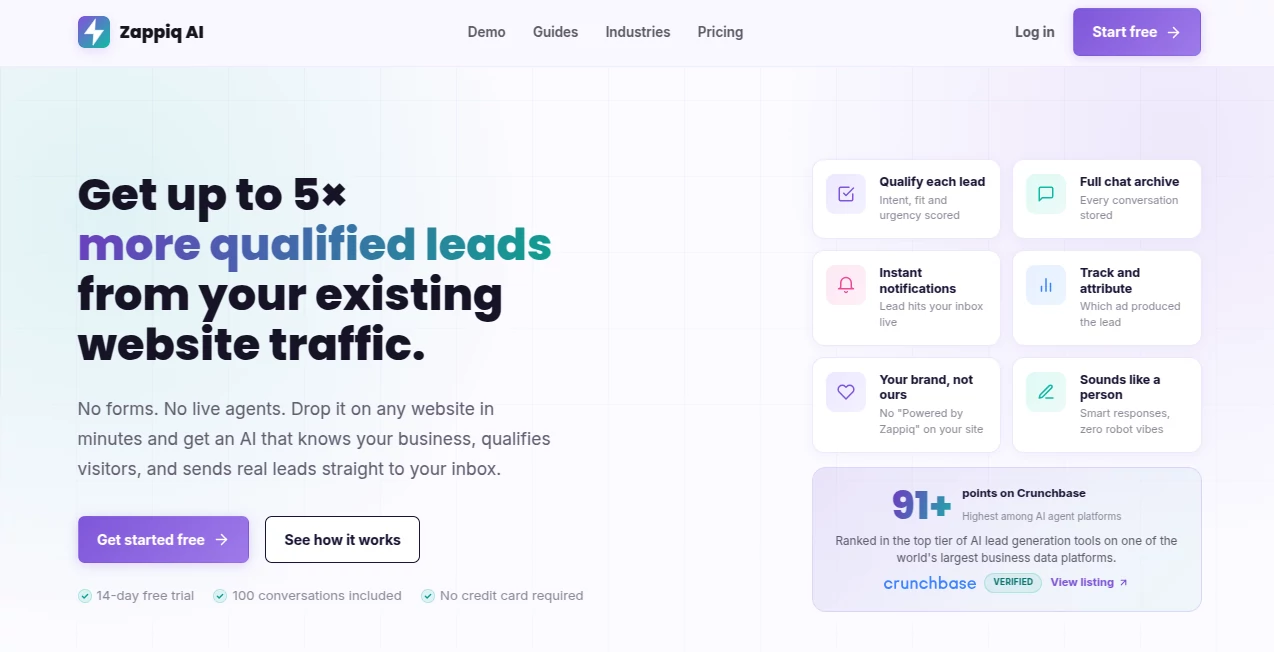
Turning website visitors into genuine enquiries is not always as simple as adding a contact form. Many people arrive with questions, need clarification, or want to know whether a service is right for them before they are willing to share their details. Zappiq AI takes a more conversational approach by placing an AI chatbot directly on a business website and using the company's existing content to help visitors.
The platform is designed around lead generation rather than casual conversation alone. It can answer common business questions, understand what a visitor needs, ask qualification questions, collect contact information, and send the resulting enquiry to the business. This makes it particularly useful for companies that rely on quote requests, consultations, appointments, or sales enquiries.
Setup is also deliberately straightforward. A business provides its website, reviews the information the assistant should use, and adds a lightweight embed script to the site. The result is a conversational lead channel that can continue working outside normal business hours.
Key Features
- AI website chatbot trained from published business content
- Automated lead qualification based on intent, fit, and urgency
- Contact information collection during relevant conversations
- Full conversation history and lead context
- Instant email notifications for captured leads
- Lead source and campaign attribution
- Conversation and lead analytics
- CSV lead export
- Custom webhook integration on the Pro plan
- Google Analytics, Google Tag Manager, and Meta tracking support on Pro
- White-label presentation without a visible powered-by badge
- Website installation through a single embed script
User Interface
The dashboard brings conversations, leads, analytics, and installation settings into one place. Instead of forcing a business owner to move between several systems, it provides a central view of what visitors are asking and which conversations have produced enquiries.
The conversation area is particularly useful for sales teams because a captured lead is not just presented as a name and email address. The surrounding conversation provides context about the visitor's request, making the eventual follow-up more informed.
The interface also separates general conversations from captured leads, which is a practical touch. A business can review unanswered questions, identify recurring requests, and see where visitors are dropping out of the conversation.
Accuracy & Performance
The chatbot uses the company's published website information as its starting point, including services, locations, policies, opening hours, and common questions. This approach gives the assistant business-specific context instead of relying solely on generic answers.
Performance is also considered at the website level. The widget is delivered through a small asynchronous script, allowing it to operate in the background without being designed as a heavy page element. For businesses that have already invested time in website speed and Core Web Vitals, this lightweight implementation is an important advantage.
As with any website-based AI assistant, businesses should review important information before going live, particularly pricing, policies, services, and limitations. Keeping the source content accurate is the best way to maintain reliable conversations.
Capabilities
The strongest part of the platform is its focus on the complete lead journey. A visitor can begin by asking a simple question and gradually provide enough information for the business to understand whether the enquiry is worth following up.
Qualification can cover the visitor's needs, urgency, and suitability before contact information is requested. This avoids treating every visitor exactly the same way and can produce enquiries with considerably more useful context than a basic form submission.
Captured leads can include the visitor's name, email address, phone number, reason for contacting the company, and relevant details from the conversation. Pro users can also route lead information through a custom webhook, making it possible to connect the data with external workflows and business systems.
Security & Privacy
The platform handles information that can include names, email addresses, phone numbers, and conversation details, so businesses should treat chatbot configuration as part of their normal website privacy process. Only information necessary for the intended sales or enquiry workflow should be requested.
Businesses should also make sure that their website privacy policy accurately explains how visitor information and conversations are handled. Sensitive or regulated enquiries may still require human involvement rather than relying entirely on automated responses.
Use Cases
Local service businesses can use the chatbot to ask about service type, location, urgency, and contact details before passing a qualified enquiry to the team. This is especially useful for industries such as roofing, HVAC, plumbing, cleaning, remodeling, and other businesses that depend on quote requests.
Real estate teams can use conversational qualification for buyers, sellers, renters, landlords, and valuation enquiries. Instead of receiving a vague message, an agent can receive a lead with more information about what the visitor is actually looking for.
Agencies and consultants can use the system to ask about project goals, existing platforms, budget, timeframe, and other details before a sales conversation begins.
Online stores can also benefit from conversational support when shoppers have questions about products, availability, delivery, or services. The chatbot can help visitors find a suitable next step while giving the business an opportunity to capture high-intent enquiries.
Paid advertising campaigns are another strong use case. By connecting lead activity with supported analytics and advertising events, businesses can gain a clearer picture of which traffic sources are producing useful enquiries rather than simply measuring clicks.
Pros and Cons
Pros
- Focused specifically on website lead generation
- Automatically uses existing website content as a knowledge source
- Built-in lead qualification reduces the need for complicated conversation trees
- Captures conversation context alongside contact details
- Provides conversation and lead analytics
- No visible platform branding on the chatbot
- Works with major website platforms and custom websites
- Pro plan adds useful attribution and webhook capabilities
- Free trial includes 100 conversations without requiring a credit card
Cons
- The free trial is limited to 14 days and 100 conversations
- Businesses with large traffic volumes may need a higher plan
- Advanced tracking and webhook functionality require the Pro plan
- Important business information should be reviewed before deployment
- Complex or sensitive enquiries may still require human support
Pricing Plans
The pricing structure is based mainly on conversation volume rather than charging separately for each captured lead. New users can start with a 14-day free trial that includes 100 conversations and does not require a credit card.
The Starter plan costs $27 per month and includes up to 1,500 conversations per month. It includes automated lead qualification, lead capture and export, email notifications, conversation history, analytics, and custom widget settings.
The Pro plan costs $69 per month and increases the allowance to 5,000 conversations per month. It adds Meta lead event tracking, Google Analytics tracking, Google Tag Manager support, campaign and lead-source context, and custom webhook integration.
Annual billing is available for both paid plans. Starter is billed at $324 annually, while Pro is billed at $828 annually. Businesses managing multiple websites or requiring higher conversation volumes can discuss a custom plan.
How to Use
Start by providing your business website and reviewing the services, locations, policies, opening hours, and other information that the chatbot should understand. The system uses this published content as the foundation for visitor conversations.
Next, install the provided embed script on your website. The script can be added to platforms such as WordPress, Shopify, Wix, Squarespace, Webflow, GoDaddy, Framer, or a custom HTML website.
Once installed, visitors can interact with the chatbot directly from the website. The assistant answers relevant questions, identifies the visitor's needs, qualifies the enquiry, and asks for contact information when appropriate.
After a lead is captured, the business receives the details and conversation context by email. From the dashboard, the team can also review conversations, examine lead sources, analyze activity, and export captured leads. Pro users can take the process further by connecting lead data to other systems through a custom webhook.
Comparison with Similar Tools
Many chatbot products are built primarily around customer support, live chat replacement, or general website assistance. This platform takes a narrower approach and places lead qualification at the center of the experience.
Compared with a traditional contact form, a conversational assistant gives visitors an opportunity to explain what they need before submitting their details. This can be valuable when a visitor is interested but is not yet sure which service, product, or option is appropriate.
Compared with a manually configured chatbot, the automatic use of existing website content reduces the amount of initial setup required. Businesses still need to review important information, but they do not have to start by writing every possible answer from scratch.
For companies running paid campaigns, the Pro plan also provides a more marketing-oriented workflow through supported Google and Meta tracking, campaign context, and webhook delivery. That makes the product particularly interesting for businesses where the quality and source of each lead matter as much as the number of conversations.
Conclusion
A good website chatbot should do more than greet visitors. It should help them get answers, understand their needs, and move naturally toward the next step. That is where this platform makes a strong impression.
Its combination of automatic website-based knowledge, lead qualification, conversation history, notifications, analytics, and optional integrations gives businesses a practical way to turn existing website traffic into more useful enquiries. The straightforward installation is another plus, especially for small teams that do not want to spend days building complicated chatbot workflows.
The free trial makes it easy to test the experience with real visitors before committing to a paid plan. For businesses that depend on enquiries, consultations, quotes, or appointments, it is a compelling addition to a website's sales and marketing toolkit.
Frequently Asked Questions (FAQ)
Does the chatbot require manually written answers?
No. It uses the business's public website content as its starting point, although important information such as services, pricing, policies, and limitations should be reviewed before launch.
What information can be collected from visitors?
The chatbot can collect details such as a visitor's name, email address, phone number, reason for contacting the business, and other qualification information gathered during the conversation.
Where are captured leads sent?
Captured leads can be sent to the business by email together with relevant conversation context. Pro users can also use a custom webhook to connect lead information with external tools and workflows.
Can businesses see conversations that do not become leads?
Yes. The dashboard keeps conversation history available separately from captured leads, allowing businesses to understand what visitors are asking and where conversations stop.
Does it work with WordPress and Shopify?
Yes. Installation uses an embed script and supports WordPress, Shopify, Wix, Squarespace, Webflow, GoDaddy, Framer, and custom HTML websites.
Is there a free plan?
There is a 14-day free trial with 100 conversations included. No credit card is required to begin testing the chatbot.
Which plan is better for paid advertising?
The Pro plan is the stronger choice for businesses running paid campaigns because it adds Meta lead event tracking, Google Analytics tracking, Google Tag Manager support, campaign context, and custom webhook integration.
Can the chatbot replace human support?
It can handle many initial enquiries and lead qualification tasks without a live agent being available. However, human involvement remains important for complex, sensitive, or highly specific conversations.
AI Lead Generation , AI Chatbot , AI CRM Assistant , AI Customer Service Assistant .
These classifications represent its core capabilities and areas of application. For related tools, explore the linked categories above.

Zappiq AI Alternatives Product

UPDF AI

Grok 4
ChatGot

gpt-plus.ai

Gemini Omni

AthenaChat

Chatbots AI

VoiceFlow Te…

Medialyst