
ZenAI
What is ZenAI?
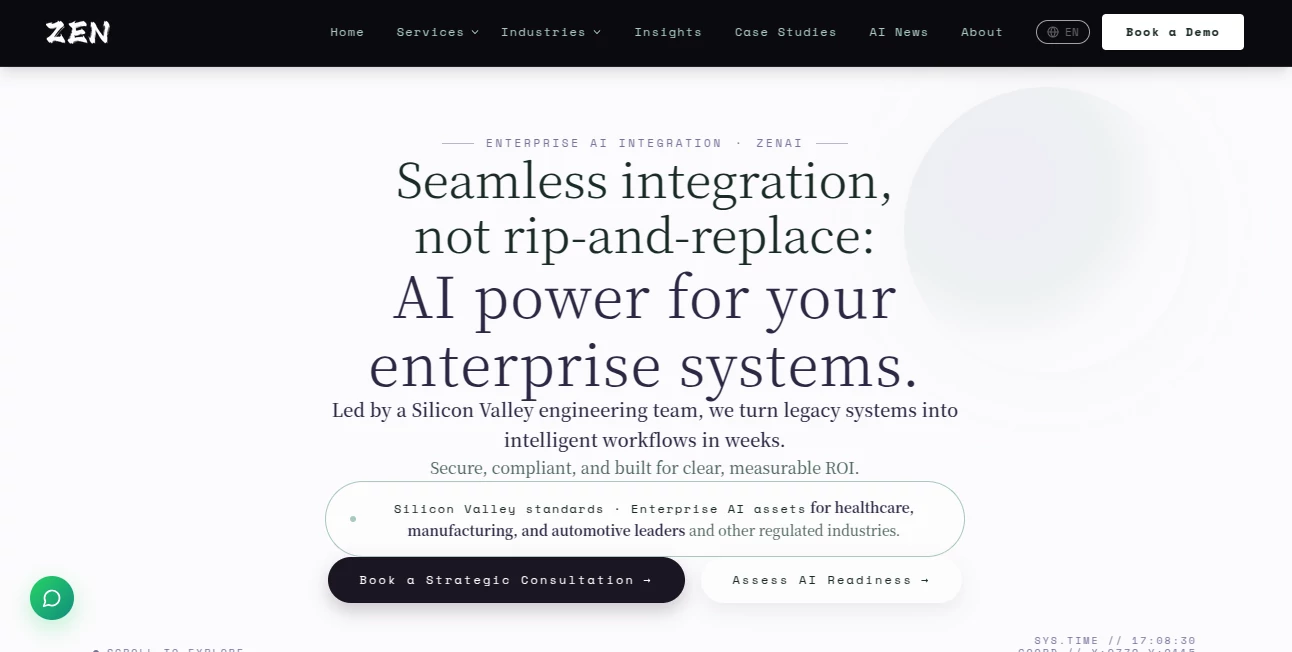
Enterprise AI becomes valuable when it works inside the systems a company already depends on. ZenAI takes this practical approach by helping organizations turn legacy software, business data, and repetitive processes into intelligent production workflows. Instead of asking companies to replace their ERP, CRM, or existing infrastructure, the service focuses on connecting AI capabilities to those systems in a controlled and measurable way.
The platform is built for complex business environments, particularly organizations working in regulated or operationally demanding industries. Its engineering approach combines AI implementation, system integration, workflow automation, modernization, and governance, giving businesses a path from an initial use case to a production-ready system.
A particularly useful aspect is the focus on solving one meaningful business problem first. The Pilot approach is designed around a 90-day cycle, while the initial Signal Sprint can demonstrate a working direction within 72 hours. This makes the process easier to evaluate before a company commits to a larger transformation.
Key Features
- Enterprise AI integration: Connect AI capabilities with existing ERP, CRM, databases, internal applications, and operational workflows.
- AI workflow automation: Automate recurring work while keeping approvals, exceptions, and important business decisions under human control.
- Voice AI agents: Build conversational agents capable of handling calls, understanding intent, scheduling appointments, qualifying customers, and transferring complex interactions to staff.
- Intelligent document processing: Extract information from business documents, compare data across files, identify exceptions, and prepare information for human review.
- AI implementation: Move from an initial use case through evaluation, integration, deployment, monitoring, and ongoing operational support.
- Legacy system modernization: Modernize older ERP and CRM environments gradually through controlled migration, integration, parallel testing, and staged cutover.
- Governance and security: Incorporate access control, audit logging, permissions, data-handling rules, and controlled AI actions directly into the architecture.
User Interface
This is not a conventional consumer AI application with a simple chat box and a collection of standalone tools. The experience is centered around business workflows, integrations, assessments, and production systems. Companies begin by identifying a high-value operational problem and then work through a structured process involving discovery, system assessment, integration, testing, governance, and deployment.
The approach is particularly suitable for teams that need AI to become part of an existing operation rather than another disconnected application. For example, an automotive business can use voice agents for customer calls and scheduling, while an insurance company can use AI to prepare claims information for authorized reviewers.
Accuracy & Performance
Performance is measured through practical business outcomes rather than generic AI benchmarks. The website presents several real-world examples that illustrate this philosophy. In one finance automation project, a monthly reconciliation process reportedly decreased from around seven days to less than one day. In a customs-document workflow, complex document processing and preparation was reduced from approximately 40–60 minutes to under two minutes.
Voice workflows are designed around multi-turn conversations, intent recognition, scheduling, sentiment analysis, and human handoff. This is important for business environments where an automated system needs to understand context while knowing when a human should take over.
Capabilities
The system covers a broad range of enterprise AI requirements. Organizations can use it for intelligent document processing, predictive analytics, multilingual business automation, voice-based customer interactions, workflow routing, data integration, CRM enrichment, ERP processes, and operational monitoring.
Its integration architecture supports technologies and systems such as Salesforce, HubSpot, SAP, NetSuite, REST APIs, GraphQL, webhooks, and message queues. AI actions can also be configured according to different levels of control, including read-only, suggestion, approval, and controlled write-back modes.
For businesses with older infrastructure, this flexibility is especially valuable. Instead of forcing a complete replacement, the technology can be introduced around the systems that already contain important business data and processes.
Security & Privacy
Security is treated as part of the system architecture rather than an additional layer added after deployment. The approach includes role-based access control, audit logging, data-handling policies, permissions, retention rules, PII masking, and data-loss prevention considerations.
Controlled AI actions are another important safeguard. Depending on the workflow, an AI system can remain read-only, suggest an action for approval, or perform a controlled write-back after the appropriate validation. Rollback mechanisms, rate limits, idempotency controls, and activity logs can help reduce the operational risks associated with automated changes.
This architecture is particularly relevant for healthcare, insurance, finance, manufacturing, automotive, retail, and other environments where sensitive information and business decisions require clear accountability.
Use Cases
- Customer service: Voice agents can answer questions, qualify callers, schedule appointments, and route conversations to the right employee.
- Finance operations: AI can connect invoices, payment information, ERP records, and transaction data to support reconciliation and exception handling.
- Customs and logistics: Business documents such as bills of lading, invoices, and packing lists can be processed and cross-checked automatically.
- Insurance: Claims, policy, billing, broker, and third-party information can be brought together into review-ready workflows.
- Manufacturing: Equipment manuals, work orders, maintenance history, ERP data, and production information can be connected to operational workflows.
- Retail: Inventory, demand, supply, purchase orders, and store information can be combined to prepare exceptions for planners and operations teams.
- Property management: Lease information, maintenance requests, vendor records, invoices, and resident information can support more organized operational workflows.
- Energy and utilities: Asset history, inspections, work orders, GIS information, and maintenance systems can be connected to field and operational processes.
Pros and Cons
Pros
- Strong focus on production-ready enterprise AI rather than experimental prototypes.
- Designed to integrate with existing business systems instead of requiring a complete replacement.
- Clear emphasis on measurable business outcomes and workflow efficiency.
- Human approval can remain part of sensitive or high-impact processes.
- Supports complex integrations involving ERP, CRM, APIs, databases, and legacy infrastructure.
- Security, permissions, and auditability are considered during system design.
- Useful for regulated and operationally complex industries.
- Real-world case studies provide concrete examples of measurable improvements.
Cons
- It is primarily designed for businesses and enterprise teams rather than individual users.
- There is no simple off-the-shelf pricing structure for smaller users.
- Implementation requires collaboration with an engineering team and an understanding of the organization's existing systems.
- Companies looking for a basic standalone AI application may find the enterprise-oriented approach more extensive than necessary.
Pricing Plans
There are no fixed public subscription plans listed for the enterprise services. Pricing depends on the organization's systems, workflow requirements, integration scope, security needs, and implementation goals.
The commercial model is described as milestone-based, giving clients visibility into what is being built and what they are paying for. Companies can begin with a strategy conversation or an AI readiness assessment before moving into a larger engagement.
The Pilot model is particularly useful for organizations that want to validate one important workflow before expanding AI across the business. A typical engagement takes around two to three months, with discovery and system assessment followed by development, training, integration, and deployment.
How to Use It
- Identify one recurring business problem where AI could produce a measurable improvement.
- Discuss the workflow with the engineering team and assess the existing systems, data, permissions, and operational requirements.
- Define the desired outcome and establish measurable success criteria.
- Run an initial assessment or Signal Sprint to validate the direction.
- Develop the selected workflow and connect it with the required ERP, CRM, database, documents, APIs, or other systems.
- Configure permissions, approval steps, exception handling, monitoring, and audit controls.
- Test the workflow and evaluate its results against the agreed success criteria.
- Deploy the solution into production and continue monitoring and maintaining it.
Comparison with Similar Tools
Many AI platforms focus on providing ready-made automation blocks, chat interfaces, or connectors for relatively straightforward workflows. That model works well when a company needs to connect a few SaaS applications or automate predictable administrative tasks.
This approach is different because the emphasis is on complex enterprise environments where AI needs to work alongside legacy applications, internal databases, approval structures, sensitive information, and existing operational responsibilities. Rather than treating AI as a separate application, the goal is to make it part of the company's existing architecture.
The distinction becomes particularly noticeable when a workflow involves multiple systems or requires controlled write-back. A customer-support workflow, for example, may need to retrieve information from a CRM, generate a response, wait for approval, update the ticket, record the action, and preserve an audit trail. That type of process requires considerably more than a simple automation recipe.
Conclusion
For organizations looking beyond AI experiments and wanting intelligent systems that actually operate inside the business, this solution presents a strong enterprise-focused approach. Its biggest advantage is the combination of AI, engineering, integration, workflow automation, and governance rather than treating each area as a separate project.
The emphasis on measurable outcomes is also refreshing. Instead of starting with a large transformation program, companies can begin with one high-leverage problem, test the direction, and expand after the results are clear.
From voice-based customer engagement to document processing, financial reconciliation, legacy modernization, and governed workflow automation, the technology is aimed at businesses where reliability, integration, and accountability matter as much as the AI itself.
Frequently Asked Questions (FAQ)
How long does an enterprise engagement usually take?
A typical engagement takes approximately two to three months from the initial conversation to a production-ready system. The first one to two weeks generally focus on discovery, system assessment, and planning, followed by development, training, and integration.
What is the Pilot approach?
The Pilot focuses on one high-value business problem and aims to take it from definition through production within a 90-day cycle. The goal is to demonstrate a measurable result rather than deliver a proof of concept that never becomes operational.
Can AI work with existing ERP and CRM systems?
Yes. The integration approach is specifically designed around existing enterprise systems. Common technologies and platforms supported by the integration architecture include Salesforce, HubSpot, SAP, NetSuite, REST, GraphQL, webhooks, and message queues.
Does the AI make important business decisions automatically?
Not necessarily. Workflows can be designed with human approval and authority controls. Sensitive decisions can remain with authorized employees while AI prepares information, identifies exceptions, recommends actions, or handles repetitive steps.
Is pricing publicly available?
No fixed off-the-shelf pricing is published. The cost depends on the systems, workflow, integration requirements, security considerations, and scope of the engagement. A strategy call is used to establish a more specific estimate.
Which industries can benefit from the solution?
The service is positioned for complex industries including healthcare, manufacturing, automotive, retail, insurance, finance, logistics, property management, energy, and other organizations with demanding operational workflows.
Can companies start with a small project?
Yes. Starting with one high-leverage workflow is a central part of the approach. This allows a company to establish a measurable baseline, validate the technology, and decide whether a broader enterprise rollout makes sense.
AI Workflow Management , AI Documents Assistant , AI Developer Tools , AI Voice Assistants .
These classifications represent its core capabilities and areas of application. For related tools, explore the linked categories above.

ZenAI Alternatives Product
BookTranslat…

AI Complianc…

git-lrc

OGimage

Read PDF Alo…
PDF Studio

tanship

bridger west…

cznull