
Zens AI
What is Zens AI?
Zens AI is an AI customer support platform built for SaaS teams that want to answer customer questions faster while turning support conversations into useful product feedback. Instead of treating support as a simple inbox, it connects conversations with customer identity, account details, pages, product events, and conversation history.
The idea is particularly useful for growing software products. A repeated question about pricing, a confusing onboarding step, or a recurring bug report can become more than another support ticket. The platform helps teams identify those patterns, prepare better responses, and pass useful evidence to product and engineering teams.
For founders and small SaaS teams, this can make a noticeable difference. Support does not have to end when a conversation is closed; the information inside that conversation can help improve the product itself.
Key Features
- AI-assisted customer support with identity-aware conversations.
- Customer identity, account, plan, page, and product context in one view.
- AI-generated reply drafts and conversation summaries.
- Human handoff with relevant customer context attached.
- Automatic clustering of recurring questions, bugs, feature requests, and UX problems.
- Product feedback briefs that can be passed to engineering workflows.
- Integrations with Slack, GitHub, Linear, Codex, and other team workflows.
- Knowledge management for creating more grounded support responses.
- Business monitoring and customer-context search.
- Security controls including role permissions, audit logs, signed identity, and a no-training approach for customer conversations.
User Interface
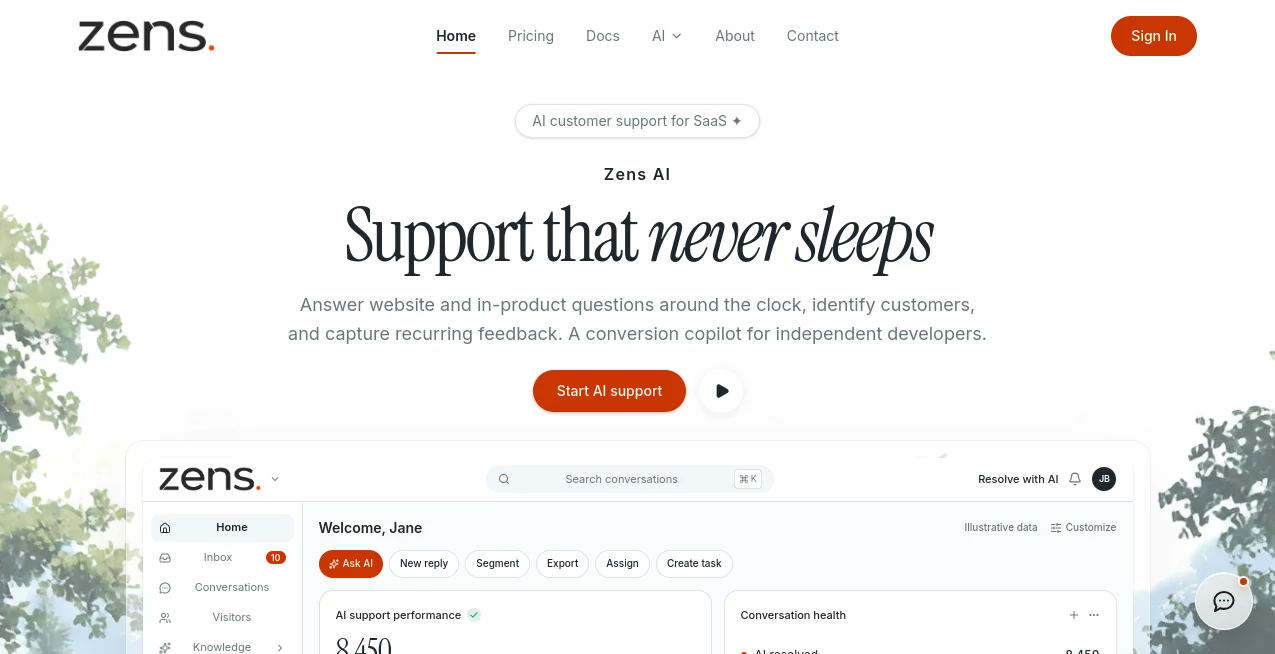
The interface is designed around the daily work of a support team rather than simply displaying a chat box. Teams can work with an inbox, conversations, visitors, knowledge, analytics, sites, workflows, notifications, and settings from the same workspace.
A useful part of the experience is the ability to search for customers, conversations, and feedback while keeping the surrounding context visible. A support lead can see what a customer is asking about, understand the account behind the conversation, and decide whether the issue should be answered, escalated, or turned into product work.
The workflow feels especially practical for SaaS products where the same customer may move between pricing, documentation, onboarding, and the application itself during a single support journey.
Accuracy & Performance
The platform focuses on giving AI more relevant information before it generates an answer. Customer identity, account traits, page context, product events, knowledge, and conversation history can all contribute to the support context.
This approach is valuable because a technically correct answer can still be unhelpful when it ignores the customer's situation. Knowing whether someone is on a trial, which page they are viewing, or what they have already asked can make a response much more useful.
AI responses are review-first by default, allowing teams to check generated replies before sending them. This gives businesses a practical balance between automation and human oversight.
Capabilities
The platform covers several stages of the customer-support cycle. Its support tools include an AI inbox, live handoffs, reply drafts, help-content drafting, and signals for delays, escalation, and account risk.
Its feedback layer can identify bug themes, feature requests, pricing objections, and UX friction. Those findings can then be turned into more actionable work for product and engineering teams.
For engineering workflows, repeated customer reports can be assembled into implementation briefs containing evidence, affected routes, reproduction details, and acceptance criteria. Connections with tools such as Codex, Linear, Slack, and GitHub help reduce the gap between a support conversation and an actual development task.
Security & Privacy
Customer information is an important part of the product, so access control is built into the platform. Features include signed identity, role-based controls, permission scoping, audit logs, and data-minimization practices.
The service states that customer conversations are not used for model training by default. Teams can also control which user fields are available within support context, helping limit unnecessary exposure of customer information.
For companies handling account and product data, these controls provide an additional layer of confidence when introducing AI into customer-facing workflows.
Use Cases
SaaS customer support: Teams can answer recurring questions, prepare response drafts, and maintain customer context throughout the support process.
Product feedback: Repeated complaints and feature requests can be grouped together instead of remaining buried across individual conversations.
Engineering: Support evidence can be transformed into implementation-ready briefs and issues, giving developers a clearer picture of what customers are experiencing.
Customer success: Account plans, user identity, product activity, and conversation history can help teams understand high-value customers more effectively.
Conversion support: Pricing objections and questions from high-intent visitors can be identified so potential customers are not left waiting for answers.
Founder-led SaaS: A small team can automate repetitive support work without losing the ability to review important conversations personally.
Pros and Cons
Pros
- Combines customer support with product feedback.
- Provides rich customer context instead of isolated conversations.
- Supports human review before AI-generated responses are sent.
- Useful connections with engineering and collaboration workflows.
- Includes identity and permission controls.
- Has a genuine free plan for testing the workflow.
Cons
- The platform is primarily aimed at SaaS companies rather than general-purpose customer service teams.
- Some advanced capabilities are reserved for higher-priced plans.
- Teams looking only for a basic live-chat widget may find the broader product workflow more than they need.
- Organizations with complex integrations may need time to configure customer identity and product context correctly.
Pricing Plans
The pricing structure starts with a free workspace and expands according to sites, seats, AI actions, knowledge pages, data history, and operational controls.
Free: $0, with 1 site, 1 full seat, 7-day data history, 20 one-time AI actions, 3 lifetime screenshot uploads, 10 knowledge pages, and 3 business monitors.
Starter: $29 per month, including 2 sites, 3 full seats, 90-day history, 300 AI actions per month, unlimited screenshots, 100 knowledge pages, and 10 business monitors.
Growth: $79 per month, with 5 sites, 8 full seats, 365-day history, 1,500 AI actions per month, unlimited screenshots, 1,000 knowledge pages, 50 business monitors, session recording, Slack, and webhooks.
Business: $199 per month, providing 20 sites, 20 full seats, 730-day history, 5,000 AI actions per month, 5,000 knowledge pages, unlimited business monitors, API and MCP access, SSO, audit logs, and additional governance features.
Annual billing is also available. The annual pricing for Starter, Growth, and Business is equivalent to paying for ten monthly billing periods, effectively providing two months at no additional charge.
How to Use Zens AI
Getting started follows a straightforward three-step process.
1. Register a site: Create a workspace, add your customer site, receive the required site credentials, and decide which user information should be available in the support context.
2. Install the snippet: Add the provided SDK to your product and synchronize relevant user, account, plan, and page information after login.
3. Connect your team: Connect your existing collaboration and development workflows so recurring questions, handoffs, and product briefs can reach the people responsible for acting on them.
Once the basic connection is working, teams can gradually build their knowledge base, review AI drafts, monitor recurring issues, and refine which customer information is available to support agents.
Comparison with Similar Tools
Traditional live-chat platforms generally focus on putting a conversation between a visitor and a support representative in one place. That approach works well for straightforward customer service, but it can leave valuable product feedback disconnected from engineering and product teams.
This platform takes a broader approach. Customer identity, account information, product activity, conversations, feedback, and team workflows can be connected so that a support issue can continue into a product task.
It is therefore a stronger fit for SaaS teams that want support to contribute directly to product development. Companies that simply need a lightweight chat widget may prefer a more focused customer-chat solution, while teams trying to close the loop between users, support, product, and engineering may benefit from the wider workflow.
Conclusion
Customer support can easily become a collection of repetitive questions, scattered bug reports, and conversations that disappear after they are resolved. This platform takes a more ambitious view by treating those interactions as useful product evidence.
The combination of identity-aware support, AI-assisted replies, feedback clustering, human handoffs, knowledge management, and engineering workflows makes it particularly interesting for SaaS businesses. The free tier also provides a practical way to test the core concept before committing to a paid plan.
For a growing software company where customer conversations are closely connected to onboarding, retention, conversion, and product development, turning support information into something the wider team can act on is a compelling proposition.
Frequently Asked Questions (FAQ)
What is this platform mainly used for?
It is designed for AI-assisted customer support for SaaS companies, while also helping teams turn support conversations into product feedback and engineering tasks.
Can AI replies be sent automatically?
AI replies are review-first by default. Teams can generate drafts and recommendations while maintaining control over which responses require human approval.
Does it support human handoffs?
Yes. Support conversations can be handed to a human together with relevant summaries and customer context, helping the next team member understand the situation without starting from scratch.
Can customer feedback become development tasks?
Yes. Repeated issues can be clustered and transformed into product briefs containing useful evidence and implementation details. These can connect with development and collaboration workflows.
Does it integrate with Slack and GitHub?
Yes. The platform supports workflows involving Slack and GitHub, along with Linear and several AI coding-agent environments.
Is there a free plan?
Yes. The free plan includes one site, one full seat, seven days of data history, 20 one-time AI actions, three lifetime screenshot uploads, and a limited knowledge base.
Who can benefit most from it?
It is particularly suited to SaaS founders, support leads, product managers, growth teams, customer-success teams, and engineering organizations that want customer feedback to influence product decisions.
Is customer data used to train AI models?
The service states that customer conversations are not used for model training by default. It also provides controls for signed identity, roles, permissions, and limiting the customer information available to agents.
AI CRM Assistant , AI Project Management , AI Customer Service Assistant , AI Developer Tools .
These classifications represent its core capabilities and areas of application. For related tools, explore the linked categories above.

Zens AI Alternatives Product

Devplan

DeepSeek V4

ChatFlowchart

DeepSeek

Claude and C…

JSON-Tools

Jujutsu Zero…

BetterAntisp…

ShipAhead