
Zread
What is Zread?
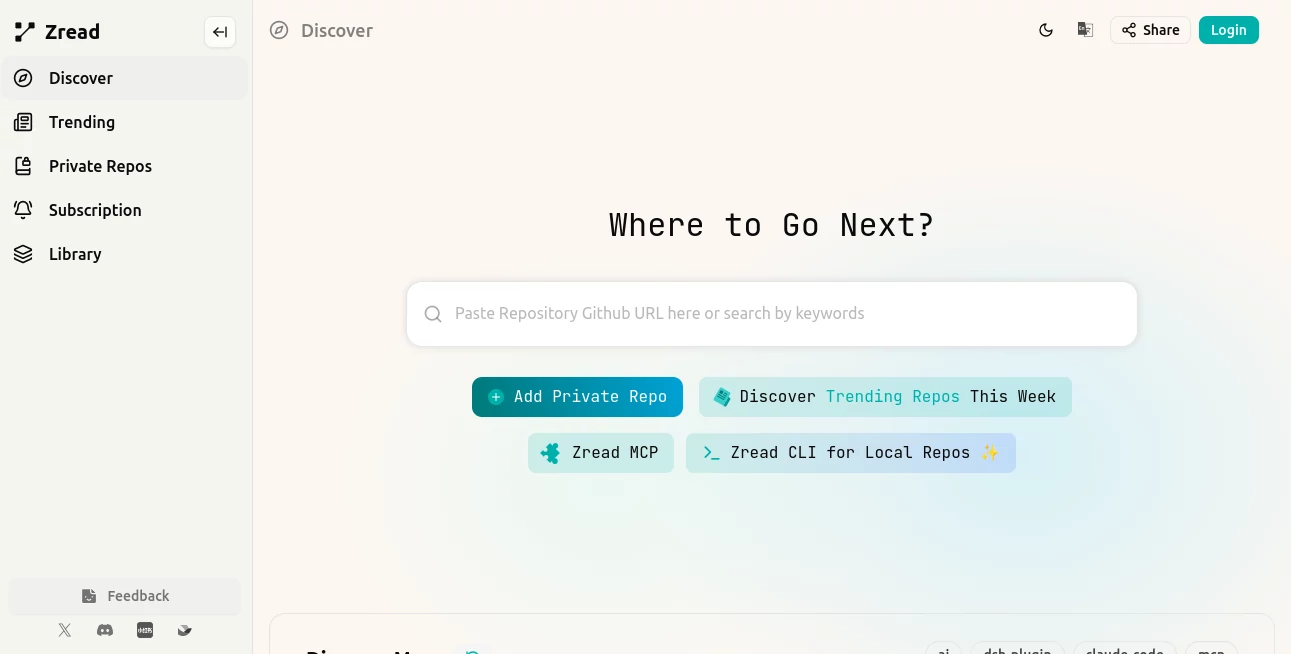
Understanding a large GitHub repository can take hours, especially when the project has dozens of folders, unfamiliar modules, and documentation that does not quite explain how everything fits together. Zread approaches that problem by turning repository code and structure into a more readable knowledge layer for developers.
You can paste a GitHub repository URL or search for a project, then explore generated documentation, project structure, important modules, and related code. Instead of jumping between README files and source folders, developers get a more organized starting point for understanding how a project works.
It is particularly useful for open-source projects, developer onboarding, code research, and situations where you need to understand an unfamiliar codebase without reading every file from beginning to end.
Key Features
- AI-generated documentation for GitHub repositories
- Repository structure exploration
- AI-powered questions about repository content
- Search across documentation, code, and comments
- Repository discovery and trending project exploration
- Support for private repositories
- MCP integration for compatible AI development clients
- CLI support for generating and browsing documentation from local projects
User Interface
The interface is built around exploration rather than overwhelming developers with raw source code. Repository pages can provide an overview, structured documentation, navigation through project sections, and an Ask AI experience for questions about the codebase.
This makes the service especially comfortable when you are investigating a project for the first time. A developer can start with the high-level architecture and gradually move toward individual files or implementation details.
Accuracy & Performance
The biggest advantage is context. Instead of asking a general-purpose chatbot about an unfamiliar repository without giving it the complete project structure, the platform is designed specifically around repository-level understanding.
Its documentation can connect explanations with source files and repository structure, making it easier to trace an answer back to the underlying project. The service itself also warns that AI-generated responses may contain mistakes, so important implementation details should still be checked against the actual source code.
For everyday exploration, however, this approach can significantly reduce the time spent manually searching through unfamiliar folders and files.
Capabilities
The platform can be used to explore what a repository does, understand its architecture, locate relevant modules, and investigate specific implementation details. Its documentation and search capabilities are designed to help developers move from a broad project overview toward focused technical questions.
For developers working with AI coding assistants, the MCP server adds another useful layer. It provides capabilities for searching repository documentation, viewing repository structures, and opening files so compatible AI clients can work with better project context.
There is also a CLI for local development workflows. Running the command inside a project can guide the developer toward generating documentation, opening existing documentation, or configuring the local setup. Generated documentation is stored inside a .zread directory, with current documentation, previous versions, and drafts kept separately.
Security & Privacy
Repository access should always be considered carefully when working with source code, particularly for proprietary projects. The service supports private repositories, while its MCP workflow requires authentication through an API token associated with the relevant coding plan.
For local projects, the CLI generates documentation within the project environment, which can be useful for teams that want a persistent documentation layer alongside their codebase. Developers should still review repository permissions and access settings before connecting sensitive projects to any external service.
Use Cases
Understanding open-source projects: When you discover a promising GitHub repository, the generated documentation can give you a faster introduction before you begin reading the source code.
Developer onboarding: New team members can start with project overviews, architecture explanations, and core modules instead of trying to decode an unfamiliar repository from scratch.
Code research: Developers investigating how a particular feature works can search documentation and repository content to locate the files and components that matter.
AI-assisted development: MCP support makes the repository's structure and documentation accessible to compatible AI development tools, giving coding assistants additional context when answering technical questions.
Local documentation: Teams can use the CLI to generate and browse documentation for projects directly from a local repository, making it easier to maintain a readable technical reference alongside the code.
Pros and Cons
- Pros: Strong focus on GitHub repository understanding, useful AI-assisted exploration, structured documentation, repository search, private repository support, MCP integration, and a local CLI workflow.
- Pros: Helpful for developers who need to understand unfamiliar codebases without manually opening every directory and source file.
- Cons: AI-generated explanations can contain inaccuracies and should not automatically be treated as authoritative documentation.
- Cons: Advanced integrations such as MCP may require additional configuration and an appropriate coding plan.
- Cons: The value of generated documentation naturally depends on the quality and complexity of the underlying repository.
Pricing Plans
The service has a subscription area and provides different capabilities depending on the account and usage configuration. Its MCP integration is currently tied to the GLM Coding Plan, with billing and quotas handled through that plan rather than as a completely separate MCP subscription.
Because pricing, quotas, and access conditions can change, developers should check the current subscription information before choosing a paid option. For teams evaluating the platform, the most sensible approach is to begin with a repository that they already know well and compare the generated documentation against their existing technical understanding.
How to Use the Tool
- Open the platform and enter a public GitHub repository URL or search for a repository.
- Allow the service to analyze the available repository information.
- Start with the generated overview to understand the project's purpose and general structure.
- Explore the project structure and documentation for important modules.
- Use the AI question feature when you need clarification about a particular part of the repository.
- Open relevant files when you need to verify implementation details.
- For local development, install the CLI and run the command from inside your project directory.
- Use the CLI to generate or browse local project documentation when needed.
Comparison with Similar Tools
Traditional GitHub browsing gives developers direct access to the source code, README files, issues, commits, and folders, but the developer is responsible for connecting all of those pieces. General-purpose AI assistants can answer coding questions, yet they often need carefully supplied repository context.
This platform sits somewhere between those two approaches. Its main strength is that repository exploration is the starting point rather than an afterthought. The generated documentation provides a structured reading path, while search and AI interaction make it possible to move from a general overview into specific technical questions.
For someone who already knows a repository extremely well, conventional GitHub browsing may be faster. For a developer approaching a large or unfamiliar project, however, an AI-generated documentation layer can save considerable time.
Conclusion
For developers, the hardest part of working with an unfamiliar repository is often not writing code but building a mental map of the project. Zread addresses that exact problem by organizing repository information into documentation, structure views, searchable content, and AI-assisted explanations.
Its combination of repository documentation, AI questions, MCP capabilities, and a local CLI makes it more than a simple code viewer. It can become a useful first stop when exploring open-source software, onboarding developers, researching implementation patterns, or preparing a codebase for AI-assisted development.
If your daily work involves GitHub repositories and you regularly find yourself asking, “Where does this feature actually live?”, this is the kind of tool worth trying.
Frequently Asked Questions (FAQ)
What is this tool mainly used for?
It is primarily designed to help developers understand GitHub repositories through AI-generated documentation, repository structure exploration, search, and question answering.
Can it analyze GitHub repositories?
Yes. Users can provide a GitHub repository URL and explore generated documentation and repository information.
Can I ask questions about a repository?
Yes. Repository pages include an AI-powered question interface that lets users ask about the repository and its contents. AI responses may contain mistakes, so important technical details should be verified against the source code.
Does it support private repositories?
Yes. The platform provides an option for adding private repositories, allowing it to be used beyond publicly available open-source projects.
Does it work with AI coding tools?
Yes. Its MCP server is designed to work with MCP-compatible clients and provides repository search, structure exploration, and file access capabilities for AI-assisted development workflows.
Is there a CLI?
Yes. The CLI is designed for local repository workflows and can generate project documentation, browse existing documentation, and help configure the local setup.
Can generated documentation be kept locally?
Yes. The CLI stores generated documentation under a .zread directory inside the project, including current documentation, previous versions, and drafts.
Should AI-generated documentation be trusted completely?
No. Generated explanations are useful for orientation and research, but developers should verify critical implementation details against the actual source files because AI-generated responses can contain errors.
Github Repos , AI Knowledge Base , AI Developer Docs , AI Developer Tools .
These classifications represent its core capabilities and areas of application. For related tools, explore the linked categories above.

Zread Alternatives Product

BootstrapKing

Jujutsu Zero…

HostFinder

AI Workflow …

Blackbox AI

Emergent

Toonifyit

Velokey

AIQualityHQ