AI Call
What is AI Call?
Picture this: you're trying to change a hotel reservation in Tokyo, and the person on the other end of the line doesn't speak a word of English. A few years ago, that would have meant a stressful round of broken sentences, awkward pauses, and probably a missed booking. Today, that same call can go through smoothly, in real time, without either side ever realizing a machine is doing the heavy lifting. That's the promise behind this AI-powered phone and video call translator, and from everything we've seen, it actually delivers on it.
What makes this tool stand out isn't just that it translates — plenty of apps claim to do that. It's that it works on an actual phone call, dialing a real number, with the other person picking up exactly as they would for any normal call. No download required on their end, no shared app, no awkward setup. You speak your language, they hear theirs, and the conversation just flows.
Key Features
User Interface
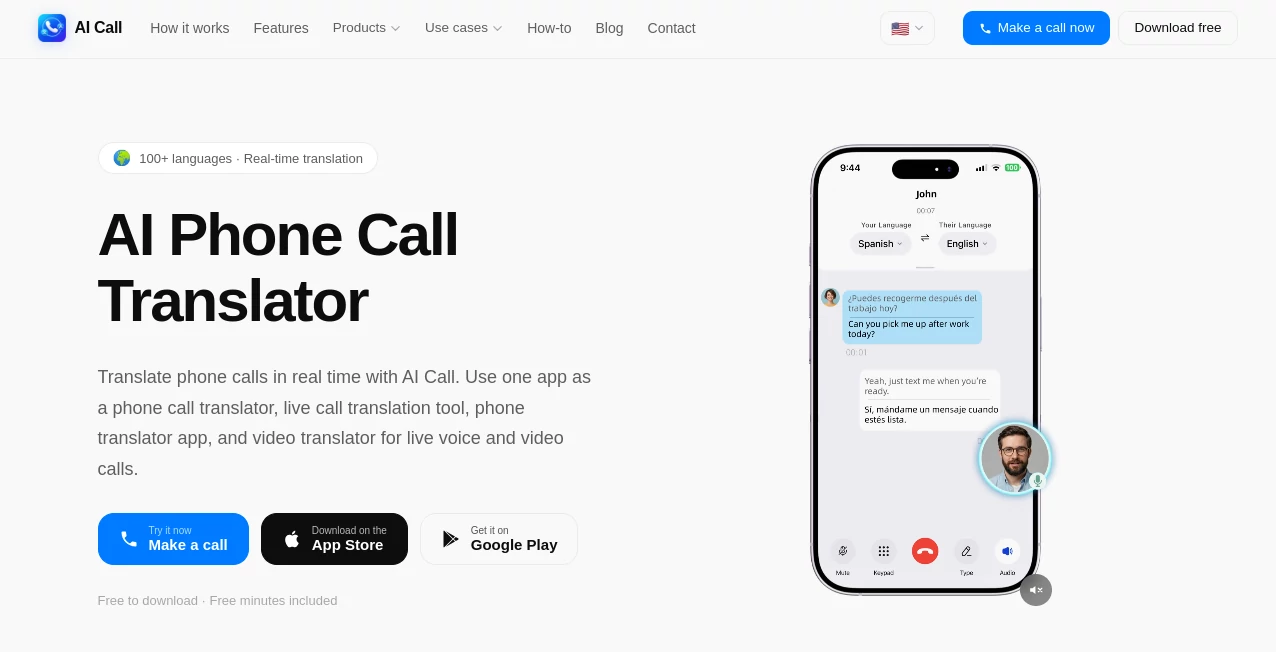
The app keeps things refreshingly simple. You open it, pick the language of the person you're calling, enter their number, and dial — the same three steps you'd take with any regular phone app. There's no learning curve, no settings menu to dig through before your first call. For something built on fairly sophisticated AI underneath, the front end feels almost deceptively ordinary, which honestly is a compliment. Nobody wants to fumble through menus when they're trying to reach a supplier in Shanghai before their lunch break.
Accuracy & Performance
Translation latency sits under half a second, which is fast enough that conversations keep their natural rhythm instead of turning into a stilted back-and-forth. Under the hood, speech recognition converts what you say into text, a neural translation engine carries it into the target language, and a text-to-speech layer delivers it as spoken audio to the other person — all happening practically instantaneously. For everyday conversational language, the accuracy holds up remarkably well; users managing international suppliers have reported it saving them real money that would otherwise go to professional interpreters.
Capabilities
Beyond the core phone call translator, the platform covers live video calls with bilingual subtitles, a face-to-face mode where two people pass one phone back and forth, an AI-powered SMS feature with a real US or Canada number, and even an AI phone agent that can place a call on your behalf and hand you back a transcript. There's also a shareable Call Link feature, so you can send a single link over WhatsApp, Telegram, or iMessage and the recipient just taps to join a translated voice or video call. It's a genuinely broad toolkit built around one central idea: removing language as a barrier in live conversation, not just in text.
Security & Privacy
Call audio is processed in real time and not stored once the call ends — there's no recording sitting on a server somewhere. Transcripts are optional and can be deleted whenever the user wants. For anyone nervous about handing sensitive business conversations to an AI tool, that's a meaningful detail, even if it's worth remembering that for anything contractually binding, following up in writing afterward is still good practice.
Use Cases
- International customer support — calling a company's support line abroad without losing nuance in the explanation
- Travel and reservations — booking restaurants, hotels, or transportation in countries where you don't speak the language
- Family connections — talking to relatives who only speak another language, sometimes for the first time in years
- Cross-border business — reaching suppliers, partners, or manufacturers directly instead of routing everything through an agency
- Everyday errands — doctor's appointments, bank calls, delivery follow-ups while traveling or living abroad
Pros and Cons
- Pro: The other party needs zero setup — it works with any standard phone number, mobile or landline
- Pro: Sub-half-second latency keeps conversations feeling close to natural
- Pro: Voice cloning means the translated voice still sounds like you, not a robotic stand-in
- Pro: Supports over 100 languages, covering most of the world's major spoken languages
- Con: Some advanced features sit behind an optional subscription
- Con: Highly technical or legal conversations still benefit from a written follow-up, since nuance can occasionally get lost
Pricing Plans
The app is free to download on both iOS and Android, and new users get free minutes included right away, so you can try it before committing to anything. Core calling and translation functionality is accessible without a subscription. For users who want extras — likely things like extended minutes or premium features — there's an optional paid tier, though the free experience alone is enough for most casual or occasional use.
How to Use AI Call
- Download the app from the App Store or Google Play, or open it directly in your browser
- Select the language spoken by the person you're calling
- Enter their phone number, including the country code
- Tap to dial — speak naturally in your own language
- Listen as their replies are translated back to you in real time
Comparison with Similar Tools
Generic translation apps like Google Translate or built-in phone translators tend to handle short phrases well but struggle with the back-and-forth flow of a live phone call. Text-based AI assistants, meanwhile, can hold a conversation but can't actually place or translate an ongoing phone call the way this tool does. What sets this platform apart is that it was built specifically around live, two-way voice translation over a real phone connection — not adapted from a chatbot or a static translation engine. Combined with voice cloning and the AI phone agent option, it lands in a category of its own rather than directly competing with text translators.
Conclusion
For anyone who regularly deals with international calls — whether that's a business owner juggling overseas suppliers, a traveler booking things on the fly, or someone just trying to talk to family across a language gap — this tool solves a problem that's been genuinely annoying for a long time. It's not flawless, and for anything legally sensitive you'll still want a paper trail. But for the vast majority of everyday conversations, it removes a barrier that used to require hiring a human interpreter or muddling through with hand gestures and patience. That alone makes it worth a try.
Frequently Asked Questions (FAQ)
- Does the other person need to install anything? No. They receive a normal phone call and can speak naturally in their own language.
- How many languages are supported? Over 100, including major languages like Chinese, Japanese, Korean, Spanish, French, German, Arabic, and Hindi.
- Is it free to use? Yes, the app is free to download with free minutes included; some advanced features are available through an optional subscription.
- Can it translate landline calls? Yes, it works with mobile, landline, or VoIP numbers — no smartphone needed on the other end.
- Is the call audio recorded or stored? No, audio is processed live and discarded immediately after the call ends.
AI Customer Service Assistant , AI Speech Recognition , AI Speech to Text , AI Voice Assistants .
These classifications represent its core capabilities and areas of application. For related tools, explore the linked categories above.
AI Call details
Website unavailable — View Alternatives
Pricing
- Free
Apps
- Web App
- iOS App
- Android App
Categories

AI Call Alternatives Product
vo4 ai

Reloq

SuperAI

Zeemo AI

Fine Voice

Vapi

LeadCanvas

livetalktran…

Gpt Realtime