
Adapt
What is Adapt?
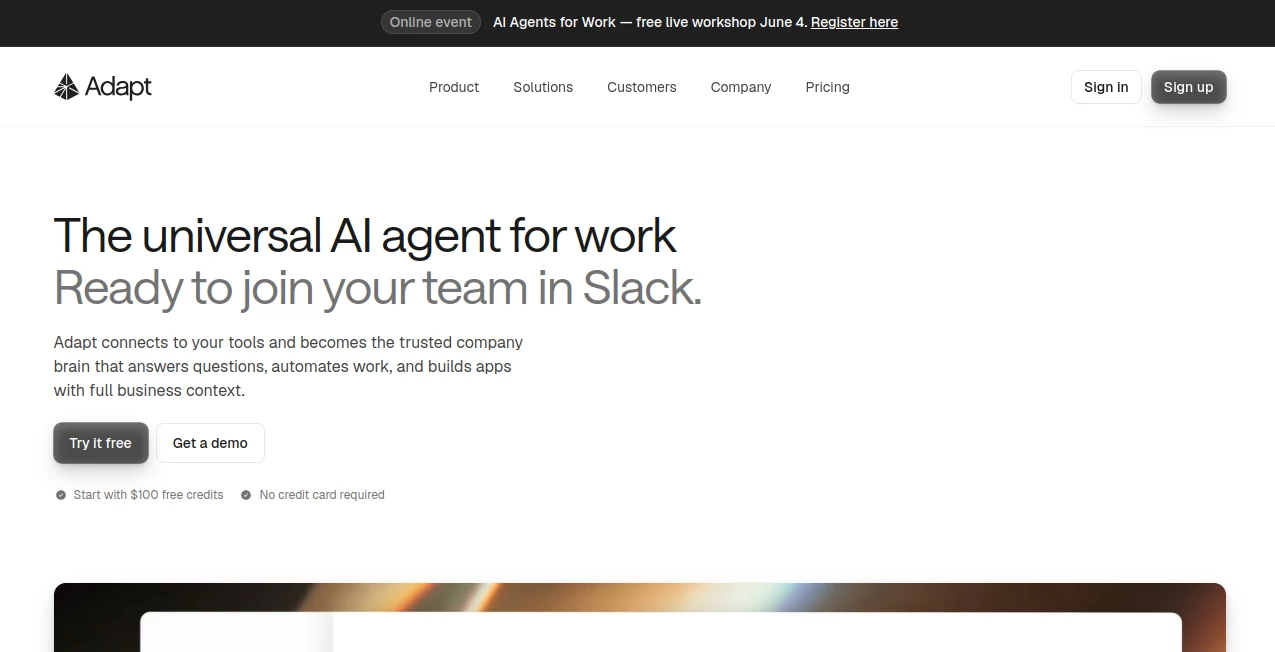
I remember the moment it clicked for me. I was in Slack, tagged our internal AI, asked a messy question about last quarter’s pipeline mixed with some customer support data, and within seconds it pulled everything together, gave a clear answer, and even suggested the next three actions with live links. No switching tabs, no digging through dashboards, no asking three different people. It just worked. That’s the kind of relief Adapt brings to teams tired of fragmented tools and scattered knowledge.
Introduction
Modern companies have more data and tools than ever, but turning that into useful action still feels painfully slow. Adapt changes the game by becoming your company’s shared AI brain. Set it up once, connect your tools, and suddenly anyone on the team can ask natural questions and get trusted answers with full context. It doesn’t just chat — it gathers information across systems, reasons through it, and takes real action. Whether you’re in sales, support, operations, or leadership, it feels like having an incredibly capable teammate who never sleeps and remembers everything. The best part? You stay inside the tools you already use, especially Slack, so it becomes part of your flow instead of another thing to check.
Key Features
User Interface
The beauty is in how invisible it becomes. You tag @Adapt in Slack just like you’d tag a colleague, or open the clean web app when you want a bigger view. Conversations feel natural — you ask the way you think, not in perfect robot language. Responses come with clear sources, suggested next steps, and the ability to act directly. No steep learning curve, no complex commands. It’s the rare AI tool that actually reduces cognitive load instead of adding to it.
Accuracy & Performance
Because it pulls live context from all your connected tools, the answers are grounded in real company data rather than generic knowledge. It routes questions to the best model for the task, which shows in the quality and relevance of responses. Teams report dramatically faster decision-making because they’re no longer hunting for information across five different platforms. The accuracy builds trust quickly — people start relying on it for important things once they see it consistently gets the details right.
Capabilities
It goes far beyond answering questions. You can ask it to automate repetitive tasks, generate reports, build simple internal apps with live data, surface at-risk deals, draft follow-up emails, and much more. It works across sales, marketing, support, finance, and operations. The more tools you connect, the smarter and more useful it becomes. It truly feels like giving your entire team a powerful AI teammate that understands your business context deeply.
Security & Privacy
Enterprise-grade security is built in from the start. Data stays within your permission boundaries, with clear controls over what Adapt can access. It’s designed for companies that care about compliance and privacy, so you can confidently use it for sensitive workflows without constant worry. That peace of mind lets teams actually adopt it widely instead of keeping it limited to a few people.
Use Cases
A sales leader asks for a quick summary of every deal at risk this quarter and gets an instant report with suggested actions. A support agent pulls customer history and past tickets while chatting with a user, resolving issues faster. Marketing pulls campaign performance across platforms without opening five tabs. Operations teams automate status checks and alerts that used to eat up hours every week. The common thread is turning “I don’t know, let me check” into instant, actionable insight.
Pros and Cons
Pros:
- Feels like a real teammate who knows your company inside out.
- Works where you already work — especially strong in Slack.
- Goes beyond answers to actually taking action and building things.
- Security and controls that enterprise teams can trust.
- Rapidly becomes more valuable the more you use and connect it.
Cons:
- Initial setup and connecting tools takes some time (but it’s a one-time investment).
- Best results come after connecting several key systems.
- Still evolving — some advanced automations are more powerful than others.
Pricing Plans
It offers a sensible structure that grows with your team. Starting plans give meaningful access for smaller groups, while higher tiers unlock more connections, advanced actions, higher usage limits, and dedicated support. Many teams find the return on investment comes quickly through time saved and better decisions made faster. The pricing reflects real enterprise value without the sticker shock that scares away growing companies.
How to Use Adapt
Sign up, connect the tools your team already uses (CRM, support platform, spreadsheets, etc.), and invite your colleagues. Start simple — tag @Adapt with a real question you’d normally ask a teammate. Watch how it gathers context and responds. As trust builds, try more complex requests like generating reports or automating small tasks. The more you use it and the more systems you connect, the more powerful it becomes. Most teams see real adoption within the first couple of weeks.
Comparison with Similar Tools
Many AI assistants are either too generic (no company context) or too narrow (only work in one app). Adapt stands out by connecting deeply across your entire tool stack and taking meaningful action, not just chatting. It feels less like a chatbot and more like an actual AI teammate who understands your business. For companies serious about becoming AI-native without massive complexity, it’s one of the most practical options available right now.
Conclusion
The future of work isn’t about replacing people with AI — it’s about giving every person a powerful, trusted AI partner. Adapt delivers exactly that in a way that feels natural and immediately useful. When your whole team can ask questions, get answers, and take action without switching tools or waiting for replies, everything moves faster. If you’re tired of context switching and hunting for information, this is one of those tools that quietly transforms how your company gets work done.
Frequently Asked Questions (FAQ)
How long does setup take?
Most teams are up and running with core tools connected in under an hour.
Do I need to use Slack?
It works best in Slack for most teams, but there’s also a full web app.
Is my data secure?
Yes — enterprise-grade security with strict permission controls.
Can non-technical people use it?
Absolutely. That’s one of its biggest strengths — anyone can ask natural questions.
How quickly does it learn our business?
It becomes useful immediately and gets smarter the more you use it and connect systems.
AI Workflow Management , AI Productivity Tools , AI Research Tool , AI Team Collaboration .
These classifications represent its core capabilities and areas of application. For related tools, explore the linked categories above.

Adapt Alternatives Product

Vibebot.gg
Kimi K2.5

Jujutsu Zero…

Discord Time…

Flitz AI

Motion

Alai
Thinkesta

Mentor