AgentKit
What is AgentKit?
Modern software development is moving quickly, and AI coding assistants have become part of everyday workflows. The challenge is no longer getting access to AI, but organizing prompts, workflows, project context, and specialized assistants in a way that consistently delivers production-quality results. This platform addresses exactly that challenge by giving developers and technical teams a centralized workspace for managing AI-powered development and marketing workflows.
Instead of relying on scattered prompts, disconnected scripts, or repetitive manual setup, it introduces ready-to-use AI agents, reusable workflows, and hundreds of specialized skills that integrate directly with popular coding assistants. Whether building a startup MVP, maintaining enterprise software, or scaling a SaaS product, it helps teams reduce repetitive work while improving consistency throughout the development lifecycle.
One of its strongest advantages is the balance between simplicity and flexibility. Beginners can start with prebuilt workflows in minutes, while experienced developers can customize skills, commands, and integrations to match their own engineering standards. The desktop application also provides a convenient control center for licenses, installed kits, configuration management, and project organization, making daily development significantly more efficient.
Key Features
User Interface
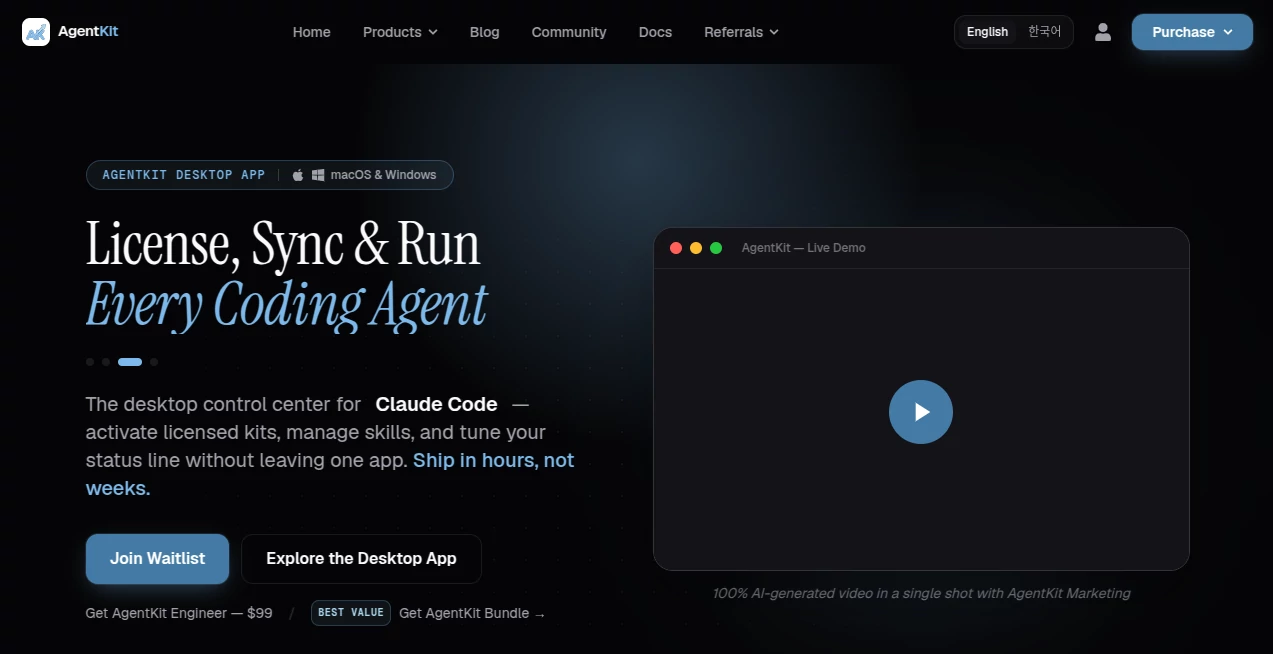
The desktop application offers a clean and organized experience where developers can manage AI skills, activate licensed kits, edit configurations, monitor installed components, and customize workflow settings without jumping between multiple terminals or configuration files. Navigation feels practical and focused on productivity rather than unnecessary complexity.
Accuracy & Performance
Rather than depending on generic prompts, the platform provides production-tested skills, specialized AI agents, and structured workflows that improve consistency across coding sessions. This approach helps reduce repetitive mistakes, preserves project context, and enables faster feature delivery while maintaining higher code quality.
Capabilities
- Production-ready AI engineering workflows.
- Dedicated AI marketing workflows for research, outreach, and growth.
- More than one hundred reusable AI skills.
- Specialized AI agents for development and marketing tasks.
- Slash commands covering planning, coding, debugging, reviewing, and automation.
- Desktop management for licenses, kits, and configurations.
- Cross-platform support for Windows, macOS, and Linux.
- Integration with modern AI coding assistants.
- CLI for installation, updates, authentication, and workflow management.
- Quick setup that allows developers to start within minutes.
Security & Privacy
The platform includes verification mechanisms during installation, secure authentication options, device management, and license activation. Installation packages are verified before use, helping developers maintain a trustworthy development environment. Local workflow management and controlled access to licensed resources further improve operational security.
Use Cases
- Building full-stack web applications faster.
- Managing large software projects with AI-assisted planning.
- Automating debugging and code reviews.
- Generating structured implementation plans.
- Supporting DevOps and deployment workflows.
- Automating research and marketing campaigns.
- Helping startup founders launch products with fewer manual tasks.
- Improving collaboration across engineering teams.
Pros and Cons
Pros
- Large collection of specialized AI skills.
- Supports both software engineering and marketing workflows.
- Simple installation with desktop and CLI management.
- Designed for real production environments.
- Works across multiple operating systems.
- Suitable for both solo developers and teams.
Cons
- Many advanced capabilities require a paid license.
- Most value is realized by developers already using AI coding assistants.
- Some desktop features are released through early-access programs.
Pricing Plans
The service offers several commercial options depending on user needs. Individual engineering and marketing kits are available as separate purchases, while bundled packages combine multiple capabilities at a discounted price. A desktop application subscription with early-access options is also available. Pricing may change over time, so users should review the official pricing page before purchasing.
How to Use AgentKit
- Create an account and obtain the required license or access.
- Install the desktop application or command-line tool.
- Authenticate using your account credentials.
- Choose the engineering, marketing, or bundled workflow kit.
- Install the desired skills and AI agents.
- Connect the workflow with your preferred coding assistant.
- Begin using planning, coding, debugging, research, and automation commands inside your development projects.
Comparison with Similar Tools
Unlike many prompt libraries that simply provide collections of reusable prompts, this solution combines structured workflows, specialized AI agents, desktop management, command-line utilities, and integrated development capabilities in a single ecosystem. It focuses on helping developers establish repeatable engineering processes rather than generating isolated responses. This makes it particularly attractive for teams seeking long-term productivity improvements instead of one-off AI interactions.
Conclusion
For developers looking to streamline both software engineering and technical marketing workflows, this platform delivers a thoughtfully designed ecosystem rather than a standalone AI assistant. Its combination of reusable skills, specialized agents, desktop management, and workflow automation creates a practical environment for building software more efficiently. Teams that value consistency, faster delivery, and organized AI-assisted development will likely find it to be a worthwhile addition to their toolkit.
Frequently Asked Questions (FAQ)
Who is this platform designed for?
It is primarily intended for software developers, engineering teams, indie makers, and technical professionals who use AI during development.
Does it support multiple operating systems?
Yes. Desktop and CLI tools are available for Windows, macOS, and Linux.
Can it help with marketing tasks?
Yes. Dedicated marketing workflows include research, lead generation, outreach, and content-related automation.
Is programming experience required?
Basic software development knowledge is recommended to take full advantage of the engineering workflows and AI agents.
Can existing projects be used?
Yes. The platform is designed to integrate with ongoing software projects rather than requiring developers to start from scratch.
AI Workflow Management , AI Code Assistant , AI Developer Tools , AI DevOps Assistant .
These classifications represent its core capabilities and areas of application. For related tools, explore the linked categories above.

AgentKit Alternatives Product

Empiriolabs …

Tate-A-Tate

Prelight
DiRe-RAPIDS

AI Workflow …

Simple Dev T…

Lime Social

Geekflare AI

Nifty