AgentSpace
What is AgentSpace?
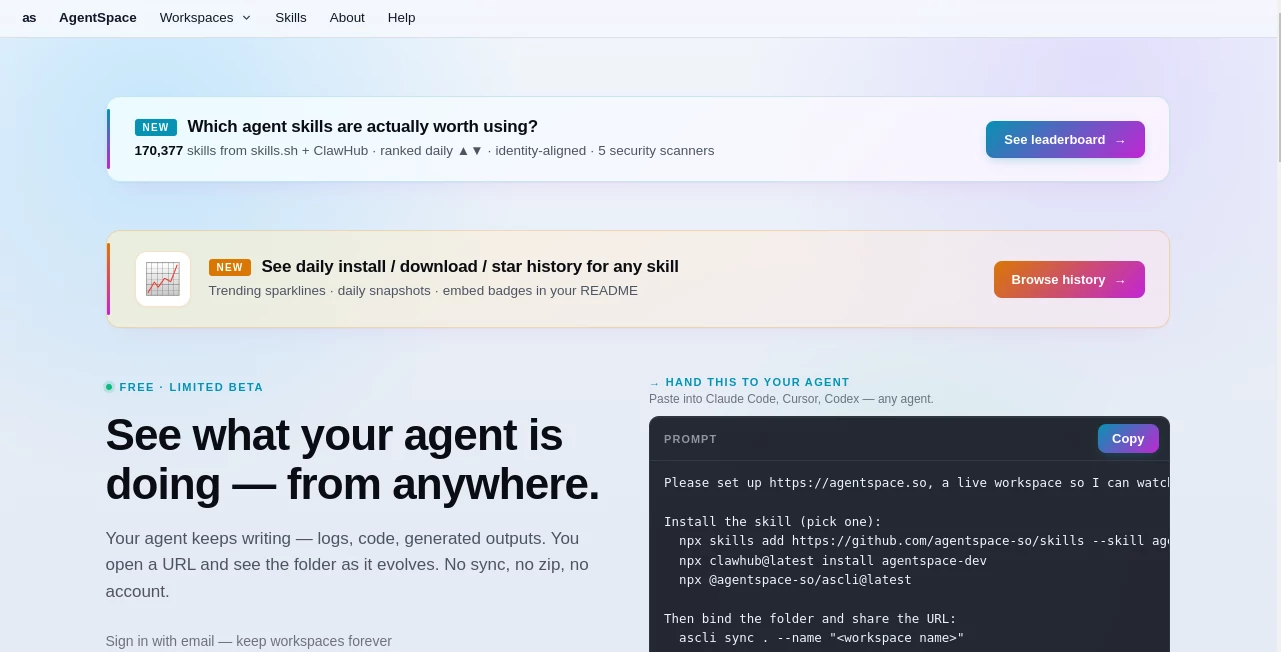
There’s a special kind of excitement when you realize you can build your own AI teammate that actually understands your workflow and gets things done. This platform makes that possible without forcing you to become a coding expert or spend weeks on setup. You describe what you need, connect a few tools, and suddenly you have an agent that can research, summarize, automate tasks, or even coordinate with other agents. I’ve seen small teams use it to handle customer inquiries, analyze reports, and manage projects in ways that used to eat up entire afternoons. It feels less like “another AI tool” and more like finally having reliable digital colleagues who show up ready to work.
Introduction
Most companies now have more data and tools than they know what to do with, but turning that into real productivity still feels hard. Agent Space bridges that gap by letting anyone design, test, and run intelligent agents that connect to the apps and data they already use. Whether you’re a founder trying to automate lead follow-ups or a manager who wants to summarize meeting notes automatically, it gives you a practical way to put AI to work without the usual headaches. The best part? It’s built with real-world use in mind—focused on reliability, collaboration, and getting results fast rather than chasing hype.
Key Features
User Interface
The workspace feels thoughtful and approachable. You build agents using a visual flow that’s intuitive but powerful enough for complex logic. Connecting tools is straightforward, and testing happens right inside the platform so you can see how the agent behaves before going live. Everything from prompt design to monitoring runs in one clean environment. It’s the kind of interface that makes non-technical users feel capable while still giving developers the depth they need.
Accuracy & Performance
The agents stay remarkably on-task and consistent. They remember context across steps, handle follow-up questions intelligently, and deliver results with fewer hallucinations than many standalone models. Performance is solid even when juggling multiple tools or large amounts of data. Users often mention how reliable the outputs feel compared to simpler chat-based systems—less “maybe this will work” and more “this just works.”
Capabilities
You can create single-purpose agents for research, content creation, data analysis, or customer support, as well as multi-agent teams that hand off tasks to each other. Integration with popular tools is smooth, and the platform supports custom instructions, memory, and structured outputs. It shines when you need repeatable processes that involve multiple steps or data sources. Whether you’re automating a weekly report or building a support assistant that can look up account details, it gives you the building blocks without unnecessary complexity.
Security & Privacy
Your agents and data stay within controlled environments with clear permission settings. The platform emphasizes secure connections to your tools and gives you visibility into what each agent can access. For teams handling sensitive information, that transparency and control make a real difference in confidence levels.
Use Cases
A sales team builds an agent that researches prospects, drafts personalized outreach, and logs everything in their CRM. A content team uses one agent to gather research and another to turn it into draft articles. Support staff deploy helpers that pull customer history and suggest solutions based on past tickets. Solo founders create personal assistants that handle scheduling, summarize meetings, and track project progress. The flexibility means almost any repetitive or information-heavy task can benefit.
Pros and Cons
Pros:
- Visual builder makes agent creation accessible to non-developers.
- Strong multi-agent coordination for complex workflows.
- Reliable performance with good context handling.
- Practical integrations with tools people already use daily.
- Focus on real productivity rather than flashy demos.
Cons:
- Building truly sophisticated agents still benefits from some prompt engineering practice.
- Advanced features and higher usage volumes require paid plans.
- Some niche tool integrations may need custom work.
Pricing Plans
It starts with a free tier generous enough to build and test several agents, making it easy to see the value before committing. Paid plans scale with usage, offering more agents, higher execution limits, priority support, and advanced capabilities. The pricing feels aligned with the time and efficiency gains most teams experience once their agents are running smoothly.
How to Use Agent Space
Start by creating a new agent and describing its purpose in plain language. Connect the tools or data sources it needs access to. Add steps or logic using the visual builder, then test with real examples. Once it behaves as expected, deploy it and share with your team. Monitor performance from the dashboard and refine as you learn what works best. Many users begin with simple single-task agents and gradually build more sophisticated ones as they gain confidence.
Comparison with Similar Tools
Some agent platforms feel overly technical or require significant coding knowledge. Others are simple but lack depth and reliability for real work. This one finds a sweet spot—powerful enough for serious use cases while remaining approachable for teams that aren’t full of developers. The emphasis on practical workflow integration and multi-agent collaboration sets it apart from more experimental or narrowly focused alternatives.
Conclusion
The future of work isn’t just about faster tools—it’s about smarter ones that understand your processes and actually lighten the load. Agent Space delivers that promise in a way that feels grounded and useful rather than futuristic hype. It helps teams move from reactive busywork to proactive progress by handling the repeatable parts intelligently. If you’ve ever wished you had extra capable hands on your team, this might be the closest thing yet. The best part? You don’t need to wait for the future—it’s ready to start working for you today.
Frequently Asked Questions (FAQ)
How technical do I need to be to build agents?
Not very—the visual builder and natural language instructions make it accessible for most team members.
Can agents work together?
Yes, you can create teams of agents that hand off tasks and collaborate on complex goals.
Is there a free way to try it?
Yes, the free tier lets you build and run agents to evaluate the platform.
What kind of tools can agents connect to?
Popular productivity, communication, and business apps—check the integration list for specifics.
Can I deploy agents for my whole team?
Absolutely—paid plans include team sharing, permissions, and centralized management.
AI Workflow Management , AI Project Management , AI Productivity Tools , AI Team Collaboration .
These classifications represent its core capabilities and areas of application. For related tools, explore the linked categories above.

AgentSpace Alternatives Product

VisualGPT

Enji

KronoPrompt

vivgrid

GPT Image 2 …

Treeova

ApplyBtn

Grow Creator
Gemini Omni