


















AI Couple Photo
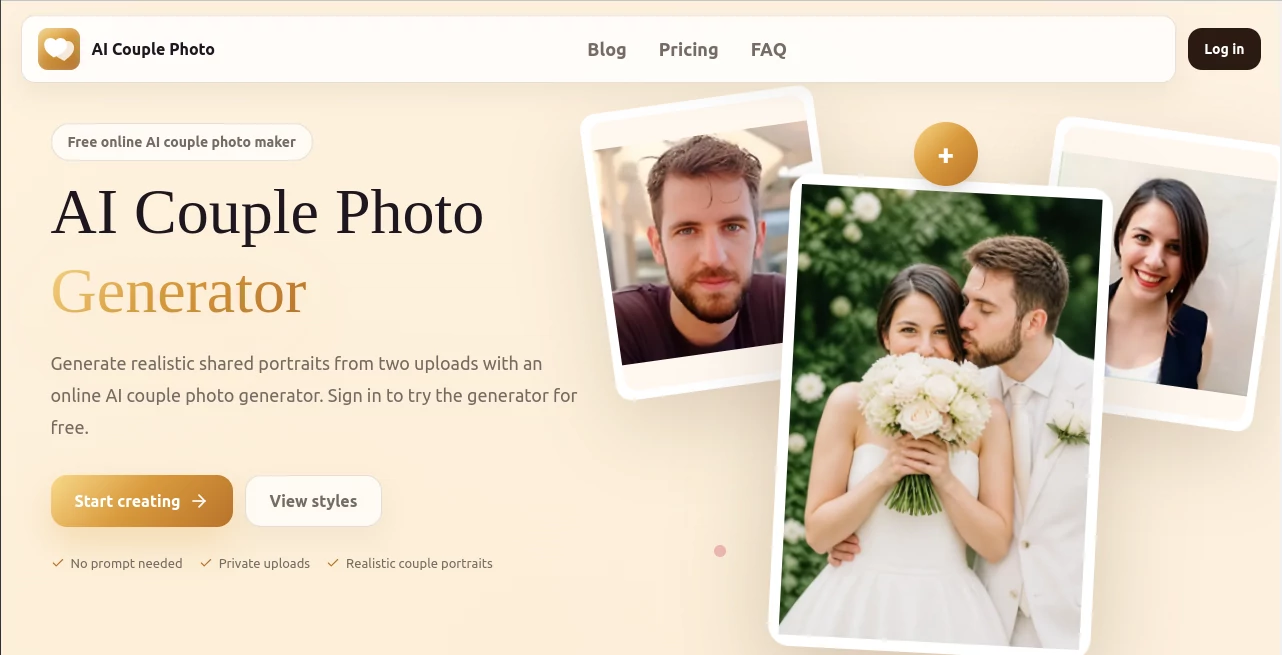
What is AI Couple Photo?
There's a particular kind of frustration in long-distance relationships, or even just busy ones: you and your partner rarely end up in the same photo at the same time. Maybe you've never even taken a proper couple portrait together. This tool was built around that gap. It takes two separate solo photos and blends them into one believable shared scene — not a side-by-side collage, not an obvious cutout job, but something that looks like you actually stood next to each other for a photographer. No prompt writing required, no design skills needed, just two portraits and a style choice.
Key Features
User Interface
The process is laid out as three simple steps right on the homepage: upload, pick a style, generate. You drop in one clear photo of each person, scroll through a gallery of templates — wedding, date night, studio, retro, winter, and more — or write your own scene description if you'd rather customize it yourself. From there you choose resolution and model quality, hit generate, and wait roughly one to two minutes. It's refreshingly free of clutter; there's no learning curve standing between you and the result.
Accuracy & Performance
What stands out browsing through the example gallery is how consistent the lighting and posing look across wildly different settings — garden weddings, snowy forests, rooftop sunsets, even a Van Gogh-style winter scene in Paris. The system pays attention to matching light direction, shadow, and body posture between the two uploaded faces so the final image reads as one continuous photograph rather than two people pasted together. Clearer, more recent portraits with visible faces tend to produce the most recognizable likeness, which only makes sense — the AI has more to work with.
Capabilities
Beyond the headline wedding and date categories, the style library stretches into studio portraits, retro and vintage looks, fashion editorial shots, anime-inspired art, motorcycle scenes, and everyday candid moments like a kitchen flour fight or a quiet morning reading cuddle. Each template comes with a prewritten prompt you can use as-is or tweak, and there's an option to write a fully custom scene description if none of the presets match what you're picturing. You can also choose between 2K and 4K output and different aspect ratios depending on where the final image is headed — a printed card, a social post, or a phone wallpaper.
Security & Privacy
Uploaded photos are described as private and used solely to generate your result — they don't appear in any public gallery or get reused elsewhere on the site. For anyone hesitant about uploading personal photos to a new platform, that's a meaningful reassurance, especially since these are intimate, identifiable images of real people.
Use Cases
- Couples who live apart and want a shared photo for an anniversary or a quiet surprise message
- Engaged couples who want a wedding-style portrait without booking a full photoshoot
- Holiday cards and Christmas greetings that need a warm, seasonal couple image
- Profile pictures or social posts that look more composed than a casual selfie
- Gifts and keepsakes built around a playful retro or fashion-inspired theme
Pros and Cons
Pros:
- No prompt-writing skill required — templates handle the creative direction for you
- Wide style range, from classic wedding portraits to anime and vintage aesthetics
- Generation typically completes in one to two minutes
- Failed generations restore your credit balance automatically
- A free first generation lets you test the quality before paying anything
Cons:
- Photo storage for non-subscribers is limited to 14 days, so downloading promptly matters
- Results depend heavily on the quality of the two uploaded portraits — blurry or obstructed faces won't work as well
- Heavier use requires a paid plan or credit pack rather than unlimited free generation
Pricing Plans
After a free trial generation, three monthly subscription tiers are available, each renewing credits monthly and offering longer photo storage than the free tier:
- Silver — $19.90/month: 250 credits, up to 125 generations, and 1GB of saved photo storage.
- Golden — $39.90/month: 500 credits, up to 250 generations, and 3GB of saved photo storage.
- Diamond — $79.90/month (most popular): 1,000 credits, up to 500 generations, and 10GB of saved photo storage.
An annual billing option is also available with a noticeable discount, and one-time credit packs exist for people who'd rather not commit to a subscription.
How to Use AI Couple Photo Generator
- Upload one clear solo portrait for each person, ideally a recent photo with the face fully visible
- Choose a template style — wedding, date, studio, retro, winter, and others — or write your own custom scene prompt
- Select your preferred model, resolution, and aspect ratio
- Click generate and wait about one to two minutes for the result
- Download your finished couple portrait, or save it to your account if you're on a paid plan
Comparison with Similar Tools
Plenty of general-purpose AI image editors can technically merge two photos, but most leave you wrestling with prompts, masking, or inconsistent lighting between the two subjects. What sets this kind of dedicated couple-photo tool apart is the curated template library built specifically around relationship moments — weddings, anniversaries, long-distance gifts — paired with a generation pipeline tuned to keep both faces recognizable while still blending the scene naturally. It trades the flexibility of a blank-canvas AI editor for a faster, more reliable path to a specific kind of result: a couple photo that actually looks like a couple photo.
Conclusion
For anyone who's ever wished they had just one good photo together — across the distance, the missed photoshoot, or simply two camera rolls that never overlap — this generator fills a surprisingly specific and surprisingly common need. The template variety means it's just as useful for a playful holiday card as it is for something closer to a wedding keepsake, and the privacy-first approach to uploads makes it easier to trust with personal photos. It won't replace an actual photographer for your real wedding day, but for everything else — the long-distance moments, the spontaneous gift ideas, the "we never got a photo together" problem — it's a genuinely clever shortcut.
Frequently Asked Questions (FAQ)
Is it free to try?
Yes, signing in gets you a free first generation before any payment is needed.
Do I need to write a prompt?
No. You can simply choose a template style and upload two photos — the system handles the scene composition for you.
Are my uploaded photos kept private?
Yes, uploads are used only to create your result and are not displayed in any public gallery.
How long are generated photos stored?
Non-subscribers get up to 14 days of storage; subscribers receive longer-term storage based on their plan.
Why might a photo fail to process?
Common reasons include an unclear face, more than one person in a single upload, an oversized file, or an unsupported format.
AI Photo & Image Generator , Photo & Image Editor , AI Selfie & Portrait , AI Image to Image .
These classifications represent its core capabilities and areas of application. For related tools, explore the linked categories above.
AI Couple Photo details
Website unavailable — View Alternatives
Pricing
- Free
Apps
- Web App
Categories

AI Couple Photo Alternatives Product

SeeDream 4.5

ZeroEdit

Denoisr
Seedream 5.0

Gamelabs Stu…
onstyle
Color-Analys…

Image Unblur

Text Behind …
