
AI Toolbox
What is AI Toolbox?
Working with videos, audio files, images, PDFs, and archives often means jumping between several websites just to complete a few simple tasks. One site may handle video conversion, another may extract audio, and a third may be needed for image or PDF work. AI Toolbox brings many of these everyday file operations together in one browser-based workspace.
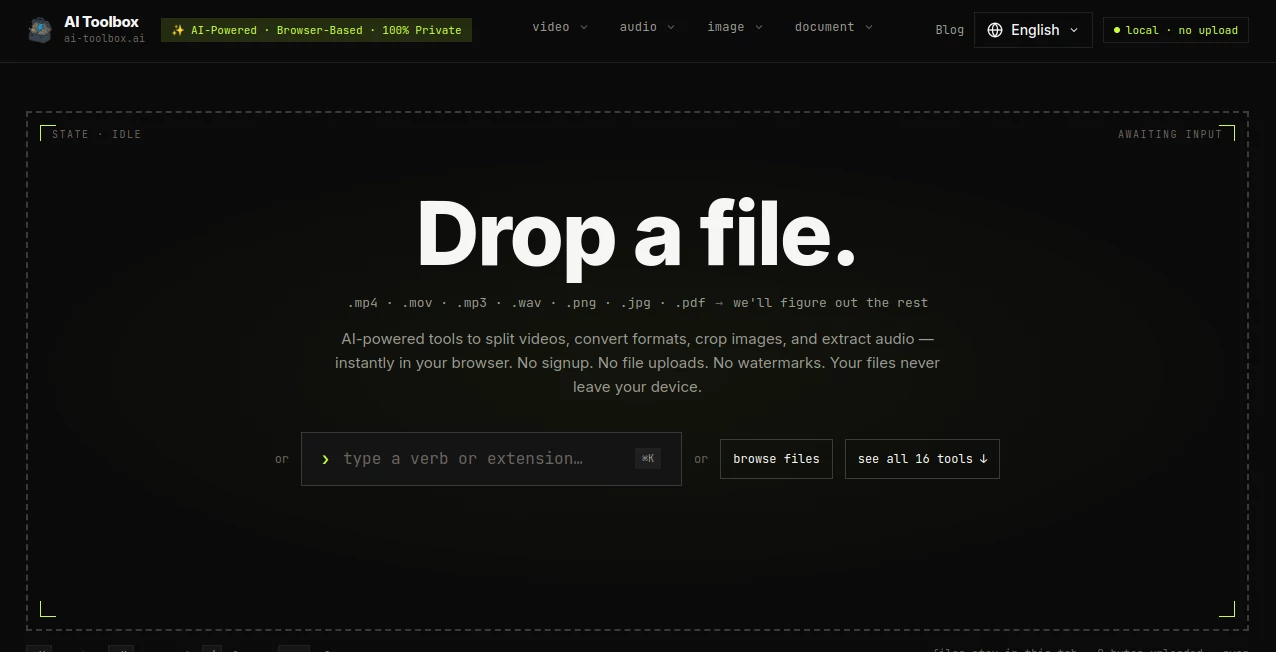
What makes the platform particularly appealing is its approach to privacy. Files are processed directly inside the browser rather than being uploaded to a remote server. There is no account to create, no watermark added to the output, and no complicated setup before getting started. You simply drop a file into the interface, choose the appropriate operation, and download the result.
The collection covers video, audio, image, and document tasks, including video splitting, format conversion, compression, audio extraction, transcription, image cropping, OCR, PDF merging, and archive handling. For someone who regularly needs quick file conversions without installing desktop software, this can be a surprisingly practical addition to their workflow.
Key Features
- Browser-based processing with files kept on the user's device.
- No account or signup required for normal use.
- Free access without a traditional paywall or usage-based credit system.
- Video splitting, trimming, merging, compression, rotation, and conversion.
- Audio extraction and audio splitting tools.
- Browser-based speech-to-text transcription using Whisper Tiny.
- Image cropping and conversion between common modern formats.
- OCR for extracting text from images.
- PDF merging without sending documents to an external server.
- RAR and ZIP utilities for common archive tasks.
- File type detection based on a file's actual signature or magic bytes.
- WebAssembly-powered processing for local file operations.
User Interface
The interface is designed around a simple idea: start with the file rather than searching through a long list of complicated menus. A user can drag a video, audio recording, image, or document into the browser and receive suggestions for tools that can work with that file.
This approach is especially useful when the required operation is obvious but the user does not know which specific utility to choose. The platform can detect the file type and highlight suitable actions, reducing the amount of clicking needed to get started.
The overall experience feels more like a lightweight desktop utility than a traditional upload-based online converter. There is no lengthy registration process standing between the user and the actual task.
Accuracy & Performance
Performance depends on the device and browser because processing happens locally. That trade-off is important: there is no server queue or upload/download round trip, but demanding operations can use the computer's own CPU and GPU resources.
Video processing supports professional codecs such as H.264, H.265, AV1, and VP9, while the image tools support formats including WebP and AVIF. Video splitting is designed for frame-level precision, which is useful when a clip needs to be divided at a specific point rather than approximately trimmed.
The speech-to-text tool uses Whisper Tiny through WebAssembly. It supports more than 40 languages and can create plain text as well as SRT and VTT subtitle files with timestamps. Once the model has been cached by the browser, transcription can continue without requiring an active network connection.
Capabilities
The range of utilities is one of the platform's strongest points. Video users can split long recordings, trim unwanted sections, merge clips, compress files, rotate or flip footage, convert formats, and create GIFs from short videos.
For audio, users can extract soundtracks from videos, split recordings, and convert spoken content into editable text. The transcription workflow is useful for interviews, meetings, voice notes, lectures, and other recordings where manually typing everything would be unnecessarily time-consuming.
Image-related tools cover cropping and format conversion, while OCR makes it possible to turn text contained inside an image into editable content. Document utilities include PDF merging and archive tools for formats such as ZIP and RAR.
The result is not a single-purpose converter but a compact collection of practical file utilities that can cover many small tasks during a typical workday.
Security & Privacy
Privacy is arguably the most distinctive part of the experience. The processing architecture is designed so that files remain inside the browser. According to the platform, operations run locally through WebAssembly and files are not uploaded to its servers.
That can be particularly valuable when handling private recordings, work documents, source code, personal photographs, or other files that users would rather not send to an unknown third-party server.
The archive utilities also include safeguards for potentially unsafe file paths. For example, ZIP extraction skips entries using absolute paths or directory traversal patterns such as "../", reducing the risk associated with malicious archive structures.
Of course, local processing does not automatically make every file or workflow risk-free. Users should still keep their browser and operating system updated and use appropriate caution with files received from unknown sources.
Use Cases
There are many situations where these tools can save time. A content creator might split a long recording into several clips, compress the finished video, and extract an audio track without opening a full desktop editing suite.
A student could convert a lecture recording into text, extract text from a scanned page, or combine several PDFs into a single document before submitting an assignment.
Marketers and social media managers can crop images to common aspect ratios, convert modern image formats, create GIFs from short clips, and prepare smaller media files for sharing.
Developers can also benefit from browser-based archive and file inspection utilities. Opening a ZIP package, checking its contents, extracting selected files, or identifying a file's actual type can all be handled without installing another application.
The privacy-focused design is another useful scenario. Someone working with confidential meeting recordings or internal documents may prefer a local browser workflow over a service that requires uploading every file to its infrastructure.
Pros and Cons
- Pros: No signup, no file uploads, free access, no watermarks, broad file-format support, local browser processing, and a useful collection of video, audio, image, and document utilities.
- Pros: The file-first interface makes it quick to discover which operation is appropriate for a particular file.
- Pros: Speech-to-text can run locally using Whisper Tiny and can export subtitle formats with timestamps.
- Cons: Performance depends on the user's device and browser because processing is performed locally.
- Cons: Very large files may be more demanding than they would be on a powerful server-based conversion platform.
- Cons: Some advanced archive features, such as handling encrypted or multi-part archives, are better suited to dedicated desktop applications.
Pricing Plans
The service is available for free for both personal and commercial use. There is no signup requirement, account subscription, credit system, or traditional usage limit. The browser-based architecture also means users can process files without paying for server-side processing.
For people who only need occasional conversions, this is particularly attractive because there is no need to purchase a subscription for a task that might take only a few minutes. The same model also makes the tools useful for frequent users who want a collection of utilities without a recurring software bill.
How to Use It
Getting started is straightforward. First, open the browser-based workspace and drop a supported file into the interface, or use the file selection option. Supported inputs include common video, audio, image, and document formats.
Next, choose the operation you need. The interface can identify the file type and suggest tools that can work with it. For example, a video can lead to options for trimming, splitting, merging, conversion, compression, rotation, or audio extraction.
Configure the available options for the selected operation and start processing. Because the work happens inside the browser, there is no waiting for a file to finish uploading to a remote service.
When processing is complete, download the resulting file directly to your device. For repeated work, keeping the browser open can make the process even faster, particularly for tools that rely on locally cached resources.
Comparison with Similar Tools
Many popular online file utilities rely on the same basic workflow: upload a file, wait for server-side processing, and download the finished result. That model can be convenient, especially for demanding operations, but it also means the user's files must travel to an external server.
This platform takes a different route by putting browser-based processing at the center of the experience. There is no upload queue, and files can remain on the user's device throughout the operation. That gives it a strong advantage for privacy-sensitive tasks and quick conversions.
Desktop applications still have an important place, particularly for professional video production, very large archives, encrypted files, batch processing, and advanced editing. The browser approach is better viewed as a fast, accessible alternative for everyday file operations rather than a replacement for every professional desktop utility.
The combination of local processing, no account requirement, and a broad collection of small tools makes the service especially compelling when speed and privacy matter more than advanced project-management features or a full professional editing environment.
Conclusion
For anyone who regularly deals with media and documents, having a dependable collection of small file utilities can remove a surprising amount of friction from everyday work. The platform brings video, audio, image, PDF, and archive operations into one accessible browser-based environment.
Its biggest advantage is the decision to process files locally. Users do not have to upload private recordings, photographs, documents, or code simply to perform a basic conversion. Combined with free access, no signup, and no watermarks, that creates an unusually low-friction experience.
It is not intended to replace a professional video editor or a full desktop archive manager. Instead, it excels at the quick jobs that often do not justify installing dedicated software. When the task is to convert, split, crop, extract, transcribe, merge, or inspect a file, having these capabilities available directly in the browser can be genuinely useful.
Frequently Asked Questions (FAQ)
Is the service free to use?
Yes. The platform states that its tools are free for personal and commercial use, without requiring an account or subscription.
Are files uploaded to a server?
No. File operations are designed to run locally in the browser using WebAssembly, so the files do not need to be uploaded to a remote processing server.
Can audio be converted into text?
Yes. The audio-to-text utility supports formats such as MP3, WAV, M4A, OGG, WebM, and MP4. It uses Whisper Tiny locally and supports more than 40 languages.
Can video files be edited?
The available tools handle several common editing and processing tasks, including trimming, splitting, merging, compression, rotation, flipping, format conversion, and video-to-GIF conversion.
Can images be converted between formats?
Yes. The image conversion utility supports common formats including PNG, JPG, WebP, and AVIF, while the image cropper supports formats such as JPEG, PNG, WebP, BMP, and AVIF.
Can PDFs be combined?
Yes. A PDF merger is available for combining multiple PDF documents into a single file while keeping processing inside the browser.
Does it require an account?
No. The tools can be used without creating an account or signing up.
Does it add watermarks?
No. The platform states that its tools do not add watermarks to processed files.
AI PDF , AI Video Editor , AI Transcription , AI Speech to Text .
These classifications represent its core capabilities and areas of application. For related tools, explore the linked categories above.

AI Toolbox Alternatives Product

RemoveVideoBG

TikoTranscri…

Adobe Podcast

CursiveKit

EasyVC

Zeemo AI

UPDF AI

ekstrakt

Create Filla…