AI Art Create
What is AI Art Create?
AI Art Create brings image and video generation into one practical workspace, giving creators access to a broad selection of leading AI models without having to maintain a separate account for every provider. Instead of jumping between different platforms, users can write a prompt once, choose the model that fits the project, and generate visual content from the same interface.
The platform currently brings together models such as Seedance, Kling, Veo, Nano Banana Pro, GPT Image, Flux, Ideogram, Recraft, Wan, PixVerse, LTX Video, and Haiper. This variety is one of its strongest advantages. A product photographer may want one model for clean commercial images, while a social media creator may prefer another for short video clips. Having both options available through one credit balance makes experimentation considerably easier.
There is also a free first generation without requiring a credit card, making it easy to test the experience before committing to a paid plan.
Key Features
- Access to a wide catalog of AI image and video models
- Text-to-image generation for artwork, products, concepts, and social content
- Text-to-video generation for short-form visual content
- Image-to-video generation for animating existing images
- Side-by-side comparison of multiple AI models
- One shared credit balance across the model catalog
- Personal generation gallery for previous creations
- Optional public sharing and remixing of generated work
- Responsive experience for desktop and mobile browsers
- Commercial usage rights on paid plans
User Interface
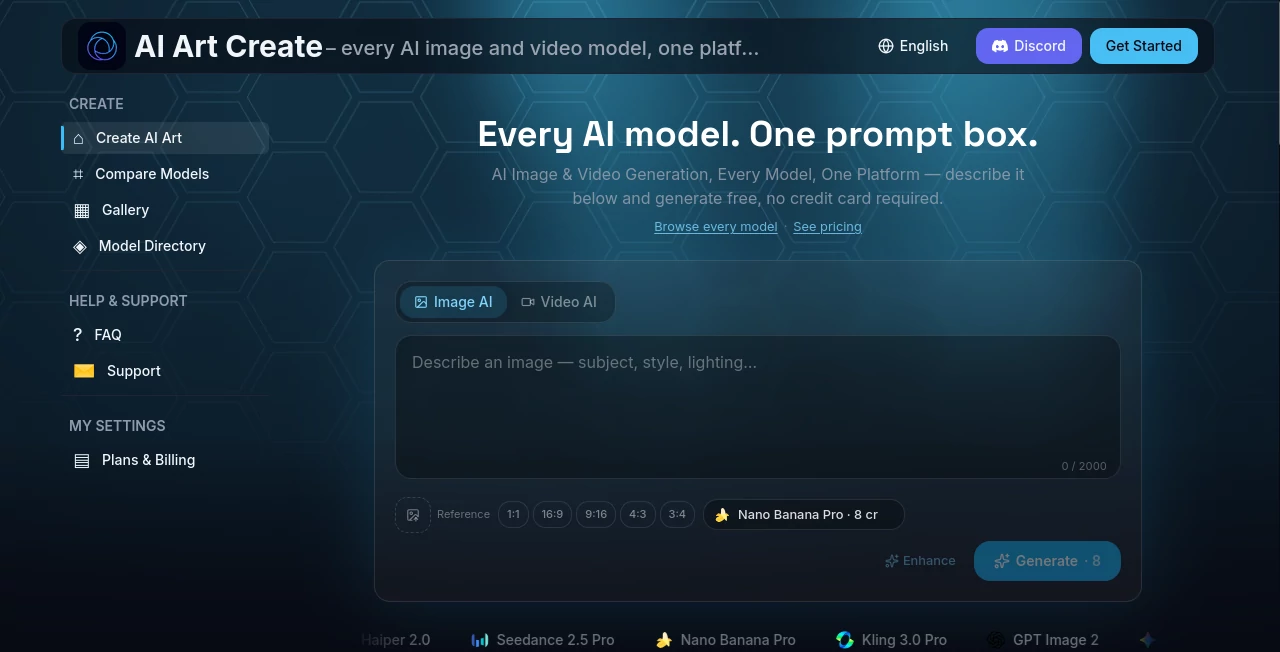
The interface is built around a straightforward prompt box rather than a complicated collection of separate tools. Users can switch between image and video generation, select a model, enter their instructions, and begin creating. That simplicity is particularly useful when testing several models because there is no need to learn a completely different workflow every time.
The side-by-side comparison feature is another thoughtful addition. Users can select up to four models and send the same prompt to each one, making it much easier to judge the differences in composition, motion, typography, realism, or overall style.
Accuracy & Performance
Output quality naturally depends on the model selected and the type of prompt being used. Rather than presenting one model as the answer to every creative task, the platform gives users access to several options and encourages direct comparison.
This is useful in real projects. A prompt for a product advertisement might perform differently from an anime illustration or a cinematic video scene. Running the same idea through several models lets creators evaluate the actual results instead of relying solely on model descriptions or benchmark claims.
Capabilities
The platform covers a wide range of visual workflows. Users can create product photography, social media reels, advertising concepts, anime artwork, professional headshots, logo concepts, thumbnails, and general creative imagery. Video generation can also be used for short promotional clips, social content, and visual storytelling.
For creators who already have a still image, image-to-video generation provides a convenient way to add movement without rebuilding the scene from scratch. The broad model selection also makes the platform suitable for experimenting with different visual styles and production approaches.
Security & Privacy
Generated content is private by default unless the user chooses to share it through the public gallery. Users can also delete their generation history. The service states that it does not sell prompts or generated content to third parties, giving creators more control over how their work is handled.
Use Cases
One of the strongest aspects of this platform is the number of different creative tasks it can support. A small online store, for example, can experiment with product images without arranging a traditional photo shoot. A social media manager can create vertical visuals and short clips for Reels, TikTok, or Shorts.
It can also be useful for advertising teams that need several creative variations, designers developing early concepts, creators producing anime artwork, and individuals looking for polished headshots or visual ideas.
For a creator who frequently switches between different types of projects, having image and video generation under one account can save considerable time.
Pros and Cons
- Pros: Large selection of image and video models, unified credit balance, useful model comparison feature, free initial generation, image-to-video support, personal gallery, and commercial usage on paid plans.
- Cons: Results can vary considerably between models, and users may need to experiment with several models before finding the right option for a particular creative task. Generation costs also vary depending on the model and output.
Pricing Plans
A free trial is available, allowing new users to make an initial generation without entering credit card details. Paid options include Starter, Creator, and Studio plans, with pricing starting at $9.99 per month. Paid plans provide larger credit allocations, priority generation, and commercial usage rights.
The credit-based approach is especially useful for users who want access to multiple models without paying for separate subscriptions to each provider. Actual credit consumption depends on the model and generation being used, so creators should check the current plan details before starting a larger production workflow.
How to Use AI Art Create
- Create a free account and start with the available trial generation.
- Choose whether you want to create an image or video.
- Select an AI model that matches the type of result you want.
- Write a clear prompt describing the subject, style, composition, or motion.
- Generate the result and review the output.
- Try the same prompt with another model when you want to compare results.
- Save useful creations in your personal gallery or share selected work publicly.
Comparison with Similar Tools
Many popular creative AI platforms focus on a particular model or a more limited selection of generation systems. The main difference here is the multi-model approach. Instead of committing to one provider, creators can access models from different ecosystems through a shared workspace and credit balance.
This becomes particularly valuable when a project has changing requirements. One model may produce a stronger product image, while another may handle typography or motion more effectively. The built-in comparison workflow makes those differences easier to evaluate.
For users who already have a preferred single-model platform, there may be little reason to change for every project. However, for creators who regularly test new models or want to avoid maintaining several subscriptions, the multi-model approach offers a compelling alternative.
Conclusion
AI Art Create takes a sensible approach to modern AI image and video generation: instead of asking creators to choose one model and stay there, it puts a growing collection of models behind a single prompt-driven workspace. That makes experimentation less frustrating and gives users more freedom when the first generation is not quite right.
The side-by-side comparison feature is particularly useful because it turns model selection into something creators can judge visually rather than guess. Combined with image generation, video generation, image-to-video workflows, a personal gallery, and a free starting option, the platform is a strong choice for creators who want flexibility without maintaining a collection of separate AI subscriptions.
Frequently Asked Questions (FAQ)
Can I generate both images and videos?
Yes. The platform supports both AI image and AI video generation from the same account and shared credit balance.
Can I compare different AI models?
Yes. You can select multiple models and run the same prompt across them side by side. Up to four models can be compared in a single comparison run.
Is there a free option?
Yes. New users can make an initial generation without providing a credit card. Continued usage requires credits from a paid plan or top-up option.
Can I use the generated content commercially?
Paid plans include commercial usage rights according to the platform's current pricing and terms.
Are my generated images and videos private?
Generations are private by default. Users can choose to share creations publicly through the gallery, and the platform states that users can delete their generation history.
AI Photo & Image Generator , AI Image to Video , AI Video Generator , AI Text to Image .
These classifications represent its core capabilities and areas of application. For related tools, explore the linked categories above.

AI Art Create Alternatives Product
BulkPicTools
Wurt.app

Genmi AI
Seedance 2.0…
Wan 2.7

AI Image Edi…

Flux.2 AI

Nano Banana 2

AI Polaroid …