AI Cartoon Generator
What is AI Cartoon Generator?
AI Cartoon Generator makes it surprisingly simple to turn an ordinary photo, a short idea, or a carefully written prompt into polished cartoon artwork. Instead of opening a complicated illustration program and working through layers, brushes, and settings, creators can start with what they already have and shape it into a new visual style.
The platform is particularly interesting because it goes beyond the usual photo-to-cartoon effect. A finished image can become the starting point for a reusable character, an animated scene, or even an illustrated storybook. That makes it useful for someone who simply wants a fun profile picture as well as creators who are building a small cast of characters for ongoing content.
There is also plenty of room for experimentation. A portrait can take on a colorful anime appearance, a pet can become a playful cartoon character, or a completely fictional scene can be created from text. The result feels more like a creative workspace than a single-purpose filter.
Key Features
- Photo to cartoon: Transform portraits and other images into expressive cartoon artwork.
- Text to cartoon: Describe a character, setting, mood, or scene and generate artwork from the idea.
- Multiple visual styles: The style library includes options such as 3D cartoon, anime, chibi, comic, watercolor, clay, pixel art, and other illustrated looks.
- Reusable characters: Create a character once and use the saved character reference in later images, videos, and story scenes.
- Cartoon video creation: Turn an image or written scene into a short animated clip with movement and background sound.
- Storybook creation: Develop an idea into illustrated pages with recurring characters, narration, and a shareable story video.
- High-resolution output: Depending on the selected plan and creation type, outputs can reach up to 4K resolution.
- Batch generation: Paid plans support batch creation, making repeated image production more practical.
User Interface
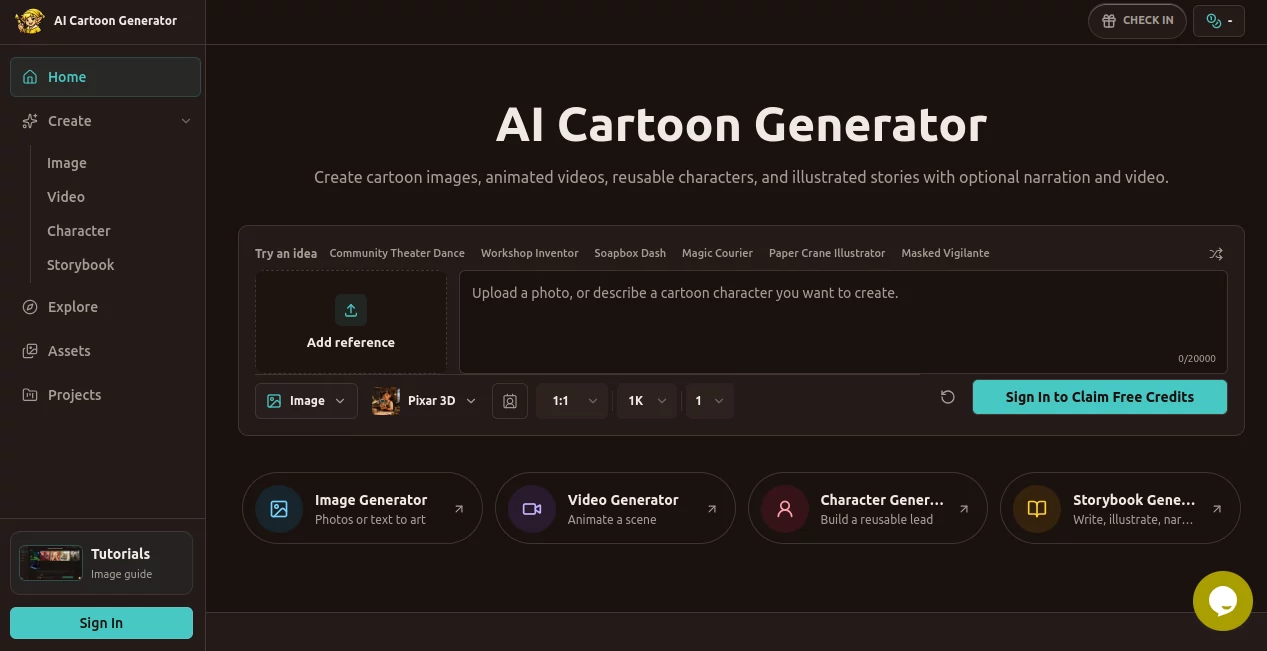
The interface is built around the actual creative task rather than technical image-generation terminology. Users can choose whether they want to work with an image, video, character, or storybook and then provide the appropriate input.
For a first-time user, this is a useful approach. You do not need to understand complicated model settings before getting started. A clear photograph or a simple description is enough to begin experimenting, while more experienced creators can add details about composition, lighting, character appearance, action, and atmosphere.
The style selection is another strong part of the experience. Instead of relying on one generic cartoon treatment, creators can explore noticeably different directions depending on the mood and purpose of the project.
Accuracy & Performance
Image quality naturally depends on the source material and the prompt, but the workflow gives users several ways to guide the result. A clear portrait is helpful when facial likeness matters, while a detailed prompt works well when creating something completely new.
Character references are especially useful for projects where visual continuity matters. Rather than describing the same character from scratch every time, creators can save a character and bring that identity into later scenes. This does not eliminate every variation that can occur with generative artwork, but it provides a much more practical foundation for repeated creative work.
Video generation is designed around short, focused moments. The current video workflow creates 8-second clips and lets users guide the action, camera movement, mood, and sound. Resolution options include 720P, 1080P, and 4K, depending on the available plan and generation settings.
Capabilities
The range of creation options is one of the platform's biggest advantages. Someone looking for a quick cartoon avatar can stop after generating an image, while a storyteller can take the same creative idea much further.
For example, imagine creating a young explorer character with a distinctive jacket and hairstyle. That character can first be developed as a still image, saved as a reusable character, placed into a new scene, animated for a short clip, and eventually used in an illustrated story. The workflow makes those steps feel connected instead of treating every new asset as a separate project.
The style collection also gives creators considerable freedom. Anime and manga-inspired looks, comic artwork, 3D cartoon aesthetics, pixel art, watercolor, clay-like visuals, and several other directions can be explored depending on the intended result.
Security & Privacy
When working with personal photographs, creators should always consider what information they are uploading to an online AI service and review the platform's current privacy and account policies before submitting sensitive material.
For ordinary creative projects, it is sensible to use images that you have permission to process, particularly when creating portraits of other people. Commercial users should also check the applicable usage terms for their chosen plan before publishing generated material as part of a paid project.
Use Cases
- Social media avatars: Turn a normal portrait into a distinctive cartoon profile image.
- Creator branding: Develop recognizable characters for channels, communities, thumbnails, and promotional artwork.
- Children's stories: Build recurring characters and use them across illustrated story scenes.
- Character development: Experiment with appearances, outfits, poses, and visual styles before committing to a larger project.
- Short animated content: Turn a finished illustration into a focused animated scene for social media or creative presentations.
- Pet artwork: Transform photographs of pets into playful illustrated characters.
- Marketing visuals: Produce campaign artwork, thumbnails, blog illustrations, and other attention-grabbing graphics.
- Personal gifts: Create stylized portraits and character artwork from photographs of friends, couples, families, or pets.
Pros and Cons
Pros
- Supports both image uploads and text-based creation.
- Offers a broad selection of cartoon and anime-inspired styles.
- Reusable character references make recurring projects easier.
- Images can be extended into short animated videos.
- Storybook creation adds another useful format for storytellers.
- Paid plans include commercial use.
- Higher-tier plans support high-resolution output and concurrent tasks.
Cons
- Some advanced creation features consume credits quickly.
- Generated characters can still show variations between different scenes.
- Users looking only for a basic one-click cartoon filter may find the broader creative workflow more than they need.
- Getting consistently strong results from text prompts can require a little experimentation.
Pricing Plans
The pricing structure is based on credits, with monthly and annual options as well as a pay-as-you-go choice. The Starter annual plan is listed at $9.99 per month when billed annually, providing 960 credits per year. It supports all styles, batch generation, up to five character references, unbranded storybook PDF export, commercial use, and up to 2K images and 1080P cartoon videos.
The Standard annual plan is listed at $19.99 per month, billed annually at $192, and includes 2,400 credits per year. It increases image and video output to up to 4K and allows five concurrent tasks.
The Premium annual plan is listed at $39.99 per month, billed annually at $384, and provides 7,200 credits per year with up to ten concurrent tasks. All three plans include commercial use, batch generation, multiple character references, storybook PDF export, and access to the available styles.
Prices and included credits can change, so checking the live pricing page before purchasing is recommended.
How to Use the Platform
- Choose your creation type: Start with an image, video, reusable character, or storybook depending on what you want to produce.
- Add your source: Upload a suitable photo or reference image, or begin with a written description.
- Describe the idea: Mention the subject, appearance, setting, action, mood, and important visual details.
- Select a style: Pick the cartoon, anime, comic, 3D, watercolor, pixel, or other visual direction that fits the project.
- Generate: Create the first version and review the result.
- Refine: Adjust the prompt, reference material, or style when the first result does not match your idea.
- Continue the project: Save a strong character for later scenes, animate an image, or develop the concept into a storybook.
Comparison with Similar Tools
Many cartoon-focused services are designed around one primary action: upload a photo, apply a style, and download the result. That approach is convenient when the goal is a single image, but it becomes limiting when a creator wants to build something larger.
This platform takes a broader approach by connecting cartoon images with reusable characters, short animation, and storybook creation. General-purpose design platforms may offer stronger layout and graphic-design features, while advanced image-generation systems can provide deeper control over models and prompting. For creators specifically interested in building cartoon-oriented content across several formats, the connected workflow is a meaningful advantage.
The best choice ultimately depends on the project. Someone looking for a quick portrait effect may not need every available feature, while a content creator or storyteller can benefit considerably from being able to carry a character from one creation into another.
Conclusion
For anyone who wants to turn photographs and ideas into cartoon artwork without learning traditional illustration software, this platform offers an approachable starting point with plenty of room to grow. The combination of image generation, style selection, reusable characters, animation, and storybooks makes it more versatile than a simple cartoon filter.
What stands out most is the continuity between different types of content. A character does not have to disappear after one image. It can become part of a video, a story scene, or a larger collection of creative assets. That makes the service particularly appealing to creators who want to develop a recognizable visual world rather than generate isolated pictures.
If your goal is a playful avatar, a memorable mascot, a short animated scene, or the beginning of a complete illustrated story, it provides a practical set of tools for turning that idea into something you can actually see and share.
Frequently Asked Questions (FAQ)
Can I turn a photo into a cartoon?
Yes. You can use a suitable photo as the starting point and select a cartoon or illustrated style to create a new version of the image.
Can I create cartoons from text?
Yes. You can describe the subject, appearance, setting, mood, action, and visual style in a prompt and generate artwork from the written idea.
Can I create anime-style artwork?
Yes. The available style collection includes several anime and manga-inspired directions, along with other cartoon, comic, 3D, pixel, watercolor, and illustration styles.
Can I create a reusable cartoon character?
Yes. A character can be created and saved as a reusable reference, allowing the same visual identity to be carried into new poses, scenes, videos, and storybook projects.
Can I animate a cartoon image?
Yes. A finished cartoon image can be used as a reference for a short animated video. The video workflow supports focused 8-second scenes with options for action, camera movement, atmosphere, and background sound.
Can I use the generated content commercially?
Commercial use is included with the listed paid plans. Creators should still review the current terms and any applicable restrictions before using generated material in commercial projects.
Does it offer high-resolution images?
Yes. Higher-tier plans support image generation up to 4K, while the exact resolution available depends on the selected plan and creation type.
Is it useful for creating children's storybooks?
Yes. The storybook workflow can combine recurring characters, illustrated pages, narration, and a shareable story video, making it suitable for simple children's stories and other illustrated narratives.
AI Photo & Image Generator , AI Animated Video , AI Selfie & Portrait , AI Anime & Cartoon Generator .
These classifications represent its core capabilities and areas of application. For related tools, explore the linked categories above.
AI Cartoon Generator details
Website unavailable — View Alternatives
Pricing
- Freemium
Apps
- Web App
Categories

AI Cartoon Generator Alternatives Product

AIGAZOU
videodance
AI Face Anal…

GPT Image Pr…

free ai face…
Photo Grid C…
Seedance 2.0…
Seedance 3.0…
NanoAI