


















AI Email Generator
What is AI Email Generator?
Writing the perfect email often takes more time than expected. Whether you are reaching out to a client, following up after a meeting, sending a thank-you note, or preparing a resignation letter, choosing the right words can be challenging. This intelligent email writing platform removes that frustration by generating polished emails from just a few details, allowing users to focus on communication instead of drafting.
The platform is designed for professionals, freelancers, students, job seekers, and business owners who want to produce natural, well-structured emails quickly. Instead of relying on generic templates, it creates customized messages based on the selected email type, recipient, tone, and context. The result feels personal, clear, and ready to send with minimal editing.
One feature that stands out is its anonymous experience. Users can generate emails without creating an account, making the service fast and convenient. Combined with multiple writing tones and practical templates, it offers an efficient solution for everyday communication.
Key Features
User Interface
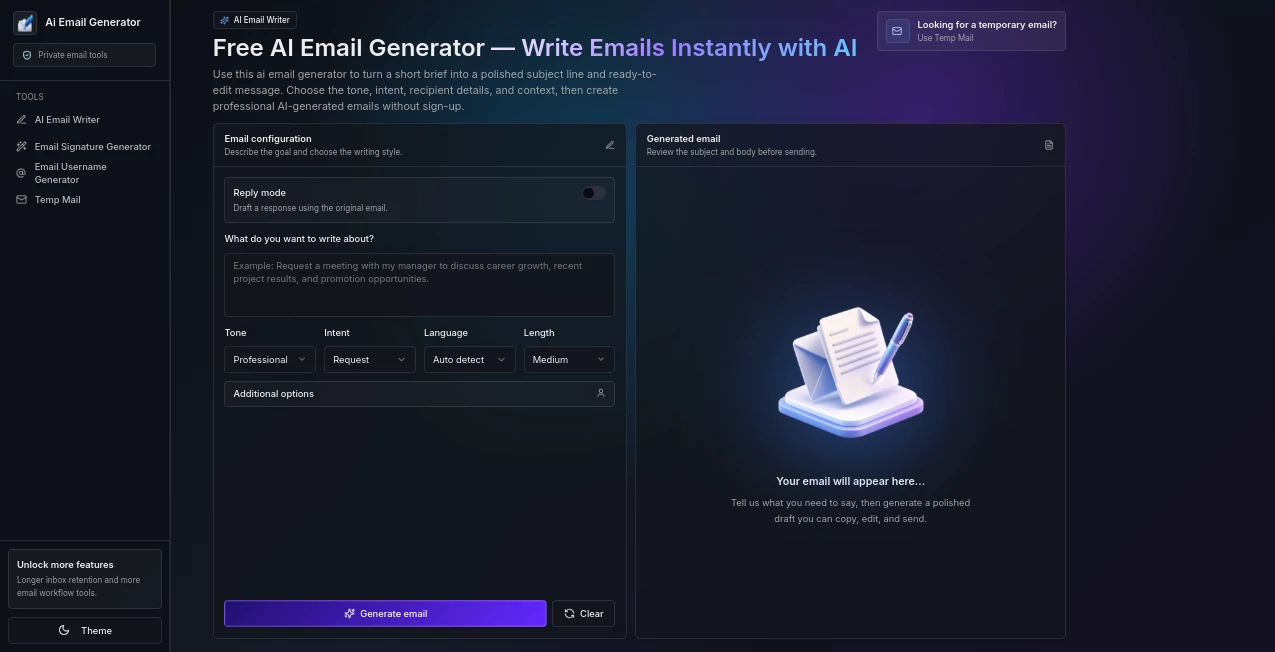
The interface is clean, beginner-friendly, and requires almost no learning curve. Users simply choose an email category, describe the situation, select the preferred tone and length, and receive a complete email within moments. Every option is presented clearly, making the writing process straightforward even for first-time visitors.
Accuracy & Performance
The platform uses modern language models to generate grammatically correct and context-aware emails. It adapts wording according to the selected tone, producing professional, friendly, formal, persuasive, or casual messages that read naturally. The generated content usually requires only minor adjustments before being sent.
Capabilities
- Create professional business emails.
- Generate thank-you messages.
- Write follow-up emails.
- Create introduction emails.
- Draft apology letters.
- Prepare invitation emails.
- Generate request emails.
- Create resignation letters.
- Write cover letters.
- Support multiple writing tones.
- Customize email length.
- Generate content instantly without registration.
Security & Privacy
Privacy is treated as a priority. Users can generate emails without creating an account, reducing unnecessary personal data collection. Generated emails are automatically removed after a limited period, and payment processing for premium subscriptions is handled through secure third-party services. This approach makes the platform suitable for users who value convenience without sacrificing privacy.
Use Cases
- Business communication with clients and partners.
- Sales outreach and follow-up messages.
- Customer support responses.
- Job applications and cover letters.
- Professional networking.
- Academic communication with teachers or universities.
- Thank-you and appreciation emails.
- Meeting invitations and scheduling.
- Personal correspondence that requires polished writing.
Pros and Cons
Pros
- Simple and intuitive interface.
- No account required.
- Multiple email categories.
- Several writing tones available.
- Fast content generation.
- Suitable for both personal and professional use.
- Affordable premium subscription.
- Privacy-focused workflow.
Cons
- Free plan has daily generation limits.
- Some advanced templates require a premium subscription.
- Generated emails should always be reviewed before sending.
Pricing Plans
A free plan allows users to generate a limited number of emails each day with access to selected templates and tones. The premium subscription removes usage limits, unlocks all available email types and writing styles, eliminates watermarks, and provides unlimited email generation. Monthly and annual subscription options are available for users who need frequent access.
How to Use AI Email Generator
Start by selecting the type of email you want to create. Enter the subject, recipient information, and a brief description of the situation. Choose the desired tone and preferred email length, then generate the content. Review the draft, make any personal adjustments if needed, and copy it into your preferred email client before sending.
Comparison with Similar Tools
Unlike many traditional email template libraries that require heavy editing, this platform produces personalized drafts based on user input. It also offers anonymous usage without mandatory registration, making the experience considerably faster. The combination of multiple email categories, adjustable writing tones, and quick generation makes it a practical solution for everyday communication instead of a simple template repository.
Conclusion
For anyone who spends time writing emails every day, this platform offers an efficient balance between speed and quality. It reduces the effort required to draft professional messages while keeping the process simple enough for casual users. Whether you need business correspondence, job application emails, customer communication, or personal messages, it provides reliable assistance that saves time without compromising readability or professionalism.
Frequently Asked Questions (FAQ)
Is the free version enough for occasional users?
Yes. The free plan is suitable for users who only need a few professional emails each day.
Do I need to create an account?
No. Email generation is available without user registration.
Can I edit the generated email?
Absolutely. Every generated email can be modified before sending.
Does it support different writing styles?
Yes. Users can choose from several tones including professional, friendly, formal, casual, and persuasive.
Is my generated content stored permanently?
No. Generated emails are automatically removed after a limited retention period to improve user privacy.
AI Productivity Tools , AI Email Assistant , AI Email Generator , AI Writing Assistants .
These classifications represent its core capabilities and areas of application. For related tools, explore the linked categories above.
AI Email Generator details
Website unavailable — View Alternatives
Pricing
- Free
Apps
- Web App
Categories

AI Email Generator Alternatives Product

HTMLSlides

Wild and Fre…

PromptFix

Trimless for…

Black Screen

BetterAntisp…

FLINT AI

Luffy

AI Business …
