

















AI Motion Transfer
What is AI Motion Transfer?
Creating animated content once required expensive software, advanced editing skills, or motion capture equipment. Today, that process has become dramatically simpler thanks to modern AI-powered motion transfer technology. This platform allows creators to animate a single image by applying natural movement from a reference video, producing smooth and visually impressive results in just a few steps.
Whether you're producing social media content, marketing videos, digital art, or virtual characters, the platform offers an accessible workflow that minimizes technical complexity while maintaining impressive visual quality. Instead of manually animating every frame, users simply upload an image and a motion reference, allowing the AI to recreate realistic body movements, facial expressions, and dynamic actions automatically.
The result is an enjoyable creative experience that helps designers, marketers, educators, influencers, and content creators generate engaging videos without the traditional production costs. Its intuitive approach makes advanced animation available to beginners while still providing enough flexibility for experienced creators.
Key Features
User Interface
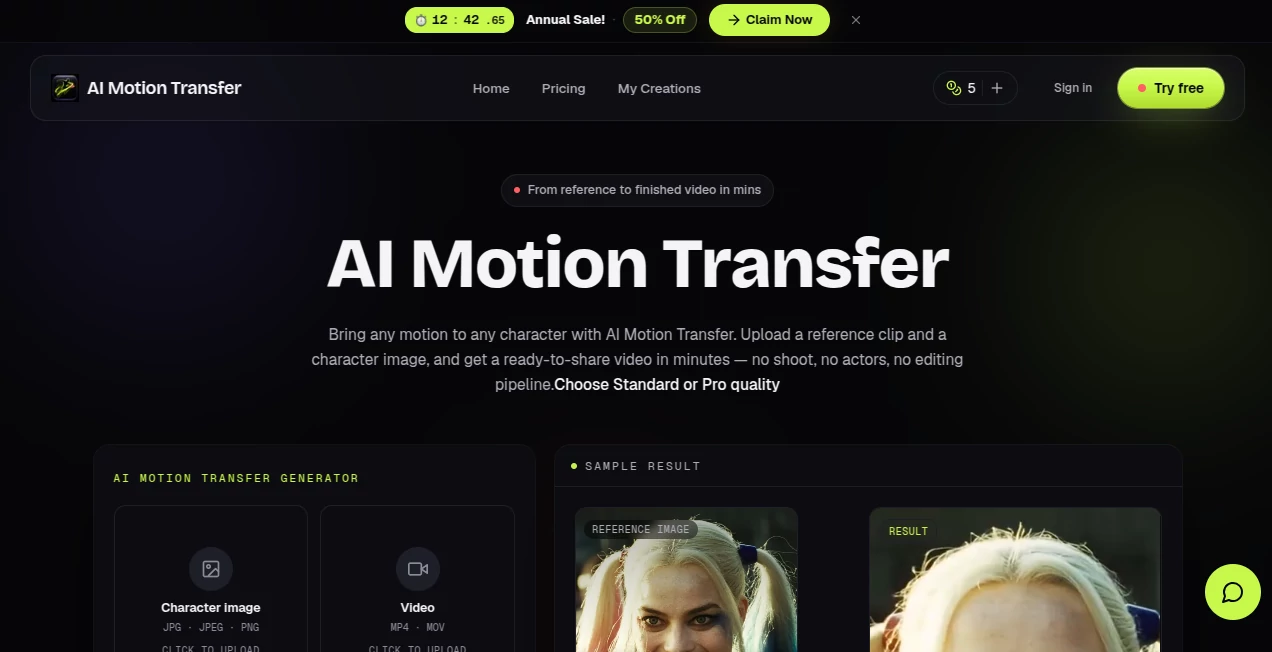
The interface is designed around simplicity. Users upload a target image and a reference motion video, choose several optional generation settings, and let the AI handle the complex animation process. Clear navigation and straightforward controls make the workflow easy to understand, even for someone using motion transfer technology for the first time.
Accuracy & Performance
The AI analyzes body poses, movement patterns, and facial expressions from the reference footage before transferring them onto the uploaded character. The generated animations remain fluid while preserving the appearance of the original image. Processing typically takes only a short time depending on video length and selected generation settings. The platform also supports high-quality video output suitable for online publishing and creative projects. :contentReference[oaicite:0]{index=0}
Capabilities
- Transfer motion from reference videos to static images.
- Create animated human characters, illustrations, or digital avatars.
- Support dance moves, sports actions, gestures, and facial expressions.
- Generate videos suitable for social media and marketing campaigns.
- Produce engaging content without traditional animation software.
- Preserve character identity while applying natural movement.
- Allow optional generation settings for improved output control.
Security & Privacy
Users upload only the files required for video generation, making the workflow straightforward while reducing unnecessary data collection. As with any cloud-based AI service, creators should avoid uploading confidential or sensitive media unless they have reviewed the platform's privacy practices.
Use Cases
- Create engaging social media videos from a single photo.
- Animate digital mascots for branding.
- Produce marketing campaigns with animated characters.
- Create educational demonstrations and presentations.
- Generate entertaining dance or performance videos.
- Build virtual influencers and online personalities.
- Prototype animation concepts before full production.
- Enhance storytelling for creative projects.
Pros and Cons
- Pros
- Simple workflow suitable for beginners.
- High-quality AI motion transfer.
- No animation experience required.
- Supports multiple creative applications.
- Produces professional-looking videos quickly.
- Helps reduce production costs.
- Cons
- Output quality depends on the uploaded source materials.
- Very complex motions may require experimentation.
- Cloud processing means generation is not instantaneous.
- Some advanced features may require paid credits or subscriptions.
Pricing Plans
The service offers free access for exploring the platform, while video generation is available through credit-based paid plans and subscription options for creators who require larger production volumes. Different pricing tiers are designed for casual users as well as professionals with ongoing content needs. :contentReference[oaicite:1]{index=1}
How to Use AIMotionTransfer
Start by uploading a clear image of your subject or character. Next, upload a reference video containing the desired movement. Adjust any available generation settings if needed, then launch the animation process. After processing is complete, preview the generated video and download it for publishing or further editing.
Comparison with Similar Tools
Compared with many AI animation platforms, this solution focuses on making motion transfer approachable without sacrificing quality. Instead of requiring complicated rigging or manual keyframe animation, it relies on AI to reproduce realistic movement from existing videos. This significantly reduces production time while allowing creators to experiment with different styles and motions quickly. It is especially valuable for marketers, content creators, and artists who want polished animated content without investing in traditional animation software.
Conclusion
Modern AI animation has transformed how creators produce engaging video content, and this platform demonstrates how accessible that technology has become. By combining an intuitive workflow with impressive motion transfer capabilities, it enables users to turn ordinary images into lively animations suitable for marketing, entertainment, education, and digital storytelling. For anyone looking to save time while creating visually compelling videos, it offers an excellent balance of simplicity, speed, and creative flexibility.
Frequently Asked Questions (FAQ)
Can I animate a single image?
Yes. The platform is specifically designed to convert a static image into an animated video using motion from a reference clip.
Do I need animation experience?
No. The workflow is beginner-friendly and requires only uploading an image and a reference video.
Can I use the generated videos commercially?
Commercial usage depends on the selected plan and the platform's licensing terms.
What types of images work best?
Clear, high-quality images with visible body features generally produce the best animation results.
Who is this platform best suited for?
It is ideal for content creators, marketers, educators, designers, digital artists, agencies, and anyone interested in producing AI-generated animated videos.
AI Animated Video , AI Image to Video , AI Video Editor , AI Video Generator .
These classifications represent its core capabilities and areas of application. For related tools, explore the linked categories above.
AI Motion Transfer details
Website unavailable — View Alternatives
Pricing
- Free
Apps
- Web App
Categories

AI Motion Transfer Alternatives Product

Veo 3.2
Seedance AI …
animearc

Seedance 2
kling 5.0

Viewra

ViewMax Stud…

Fast Wan

ai seedance …
