

















AI PhotoPrompt
What is AI PhotoPrompt?
AI PhotoPrompt is a practical destination for discovering ready-to-use AI image prompts based on the visual result you want to create. Instead of starting with a blank prompt box and guessing which words might produce a good image, users can browse examples, study the prompt behind each result, and adapt it for their own projects.
The platform focuses on visual prompting for models such as Gemini, GPT Image, and Seedream 5. Its library covers everything from portraits and product advertising to photo editing, illustration, posters, and photography scenes. Users can copy, save, or remix prompts, making the experience particularly useful for creators who want to experiment without spending hours writing prompts from scratch.
Key Features
- Large collection of visual AI prompts organized by the type of result they produce.
- Support for Gemini, GPT Image, and Seedream 5 prompts.
- Categories covering portraits, products and advertising, photo editing, posters and graphic design, illustration and art, and photography scenes.
- Separate tools for Image to Prompt, Prompt Generator, and Prompt Enhancer.
- Prompt examples designed for both text-to-image and image-to-image workflows.
- Options to copy, save, and remix useful prompts.
- An AI Image Studio for users who want to move from prompt discovery to image creation.
User Interface
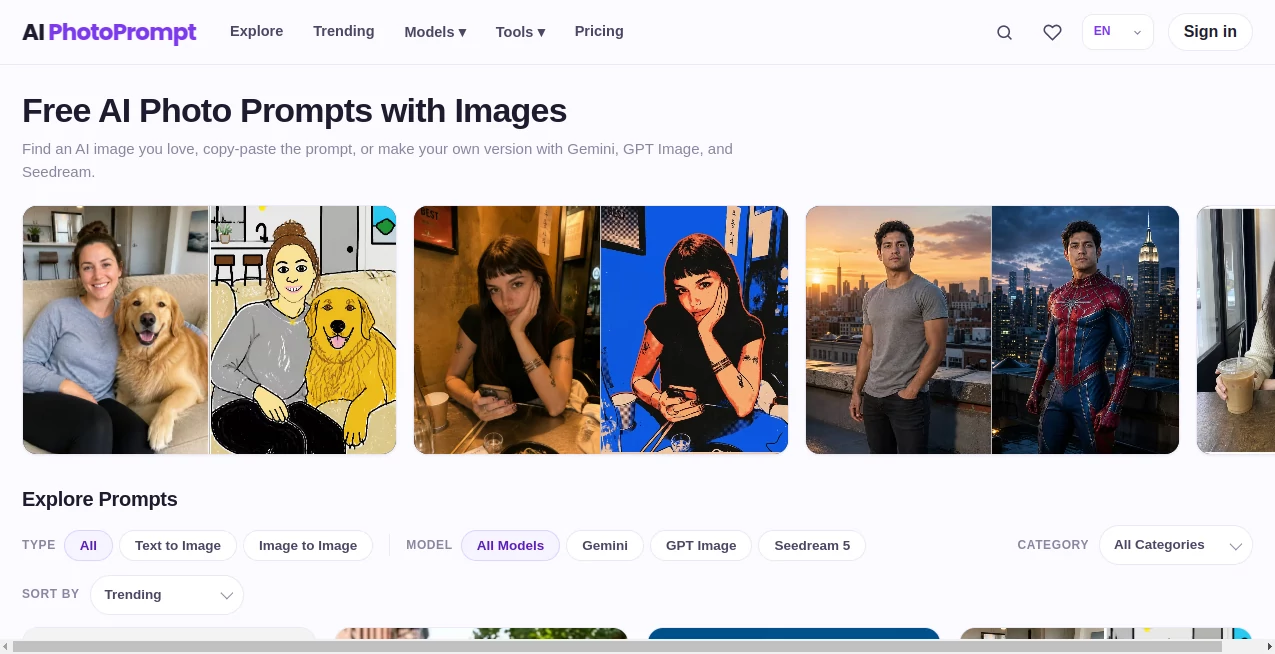
The interface is built around discovery rather than complicated settings. Visitors can browse prompts and narrow the results by model, category, and image-generation type. This makes it easy to move from inspiration to a usable prompt without navigating through an unnecessarily technical workflow.
A particularly useful detail is the visual-first approach. You can see the kind of result a prompt is intended to create before deciding whether it is worth adapting. For someone who has ever written a long image prompt only to receive a disappointing result, that simple workflow can save a surprising amount of time.
Accuracy & Performance
The quality of an image prompt depends heavily on how clearly it describes composition, lighting, materials, subjects, camera characteristics, and visual style. The examples available on the platform reflect this approach, with prompts often containing detailed instructions for preserving identities, controlling composition, defining lighting, and avoiding unwanted elements.
The prompt library also distinguishes between different image models, which is helpful because a prompt that works well with one model may need adjustments for another. Users can therefore compare approaches rather than relying on a single generic prompting formula.
Capabilities
The platform goes beyond a basic prompt gallery. Its Image to Prompt tool can be used to turn an existing visual reference into a prompt, while the Prompt Generator helps create new instructions and the Prompt Enhancer is designed to improve an existing prompt.
The image-generation side also supports several current models, with generation costs depending on the selected model and resolution. The service currently lists GPT Image 2, Seedream 5.0 Pro, Nano Banana 2, Nano Banana Lite, and FLUX.2 Pro among its generation options.
This combination makes the platform useful at different stages of a creative workflow. A designer might discover a visual style in the prompt library, adapt the wording with the enhancer, and then generate an image through the available studio tools.
Security & Privacy
The service provides dedicated Terms of Service and Privacy Policy pages and identifies support through its official support email. Its pricing system also separates usage credits from subscriptions, with paid credits remaining available while an account stays active.
Users should still review the platform's current privacy and acceptable-use policies before uploading sensitive or confidential images. As with any online image-generation service, checking how uploaded references are handled is a sensible step when working with private material.
Use Cases
- Social media creators: Find prompts for portraits, lifestyle photography, posters, and eye-catching visual concepts.
- Designers: Explore graphic design, product advertising, illustration, and art directions before developing a final concept.
- Photographers: Experiment with lighting, composition, film looks, seasonal transformations, and other photographic styles.
- Marketing teams: Develop product campaigns, advertising concepts, promotional imagery, and social media creatives.
- AI image beginners: Learn how effective prompts are structured by studying real examples instead of starting from theory alone.
- Experienced AI creators: Remix existing prompts and adapt them to different models, subjects, and visual styles.
Pros and Cons
Pros:
- Free daily usage is available without requiring an account.
- Clear organization around visual outcomes and creative categories.
- Supports multiple popular image-generation models.
- Useful prompt tools for generating, enhancing, and extracting prompts.
- One-time credit purchases are available instead of mandatory subscriptions.
- Prompts contain practical details rather than relying only on short keyword combinations.
Cons:
- The large number of prompts can make choosing the right starting point take some experimentation.
- Results can still vary between image models even when the same prompt is used.
- More advanced image-generation features consume credits after the included free usage.
Pricing Plans
The platform uses a one-time credit system rather than a recurring subscription. Visitors receive free daily usage without an account, while users who need additional usage can purchase credit packages.
- Starter: $9.90 for 1,500 credits.
- Creator: $19 for 3,300 credits, including a 15% bonus.
- Pro: $35 for 6,500 credits, including a 23% bonus.
- Studio: $59 for 12,000 credits, including a 34% bonus.
Prompt tools include daily free quotas. Image to Prompt, Prompt Generator, and Prompt Enhancer each provide 15 free uses per day, after which credit usage applies. Image generation has separate credit costs depending on the model and resolution. Paid credits do not expire while the account remains active, and failed generations are automatically refunded when they do not produce a usable result.
How to Use AI PhotoPrompt
- Open the prompt library and browse the available visual categories.
- Choose a prompt based on the type of image you want to create.
- Check which image model the prompt was designed for.
- Copy the prompt and adapt details such as the subject, setting, lighting, clothing, composition, or artistic direction.
- Use the Prompt Enhancer if the wording needs more structure or detail.
- For an existing image, use Image to Prompt to create a starting point from the reference.
- Generate the final image using the available image-generation tools or the model of your choice.
Comparison with Similar Tools
Many AI image prompt websites focus primarily on collections of text prompts. This platform takes a more visual approach by organizing prompts around the results they create and connecting them with specific image models. That makes it particularly useful for users who prefer to see an example before deciding which prompt to try.
Another difference is the combination of a prompt library with practical creation tools. Instead of using one website to find prompts and another to improve them, users can move between prompt discovery, image-to-prompt conversion, prompt generation, enhancement, and image creation within the same ecosystem.
For someone who already knows exactly how to write prompts, a simple text editor may be enough. But for creators who want inspiration, examples, and a faster route from visual idea to usable prompt, this approach is considerably more convenient.
Conclusion
AI PhotoPrompt stands out as a useful resource for anyone who works with AI-generated imagery and wants more than a random collection of prompt templates. Its visual browsing system makes experimentation easier, while support for multiple image models gives creators room to compare different approaches.
The strongest part of the experience is the connection between inspiration and execution. You can discover a style, inspect the prompt behind it, modify the instructions, and continue toward image creation without having to build the entire workflow yourself. For marketers, designers, photographers, social media creators, and AI enthusiasts, it is a practical place to find ideas and turn them into usable image prompts.
Frequently Asked Questions (FAQ)
What is AI PhotoPrompt used for?
It is used to discover, copy, save, and remix AI image prompts, as well as generate or improve prompts and create images with supported AI models.
Which AI models are supported?
The platform provides prompts for Gemini, GPT Image, and Seedream 5, while its image-generation tools currently list additional models including GPT Image 2, Seedream 5.0 Pro, Nano Banana 2, Nano Banana Lite, and FLUX.2 Pro.
Can I use the prompts for free?
Yes. The platform provides free daily usage for visitors. Additional usage can require credits depending on the tool or image-generation model being used.
Does it require a subscription?
No. The current pricing model uses one-time credit top-ups rather than recurring subscriptions or automatic renewals.
Can I turn an image into an AI prompt?
Yes. The Image to Prompt tool is designed to analyze an existing image and provide a prompt that can be used as a starting point for AI image creation.
Can I improve an existing prompt?
Yes. The Prompt Enhancer can be used to refine and expand an existing prompt after the included free daily quota has been used.
What types of images can I create?
The prompt library covers portraits and people, products and advertising, photo editing, posters and graphic design, illustration and art, and photography and scenes. This gives users a broad range of starting points for both realistic and artistic projects.
Do paid credits expire?
According to the current pricing information, paid credits do not expire while the user's account remains active.
AI Photo & Image Generator , Prompt , AI Photography .
These classifications represent its core capabilities and areas of application. For related tools, explore the linked categories above.
AI PhotoPrompt details
Website unavailable — View Alternatives
Pricing
- Freemium
Apps
- Web App
Categories

AI PhotoPrompt Alternatives Product

Yodayo AI

StyleCut
Resize Image…

Banana AI

NanoBnana-Im…

BulkPicTools

Image Unblur

GPT Image 2

AI Family Ph…
