
Ai Picture Editor
What is Ai Picture Editor?
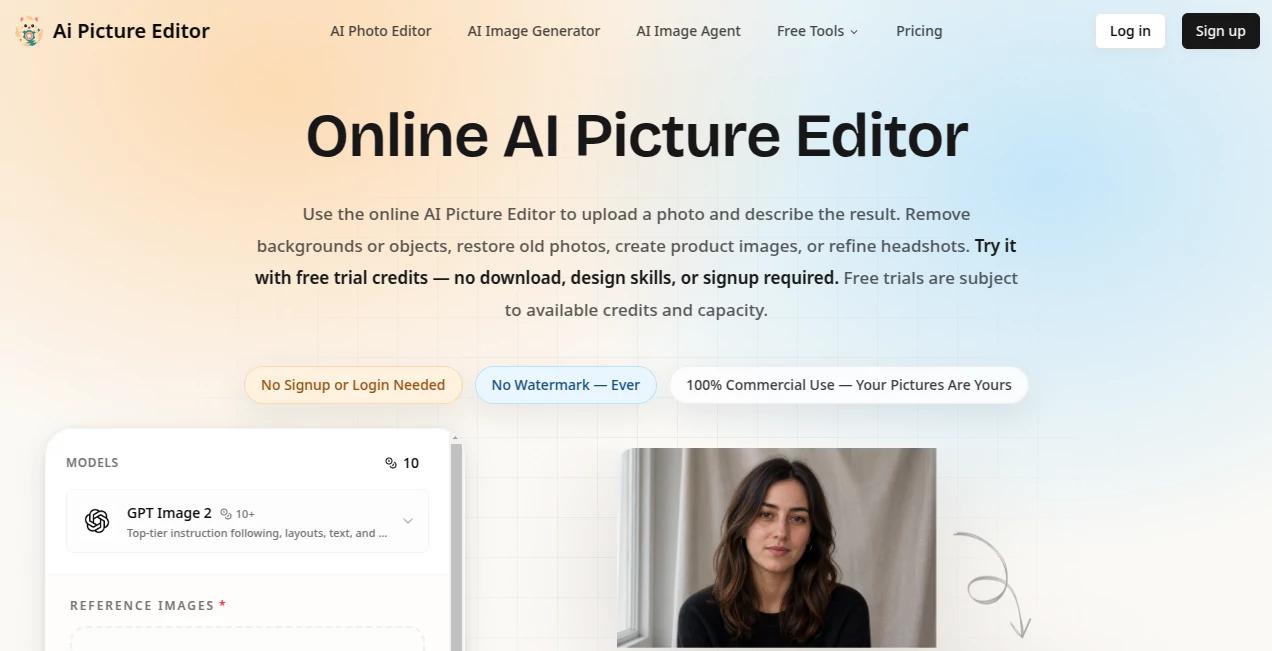
AI Picture Editor is an online photo editing platform that makes image editing feel less like working with complicated design software and more like describing what you want. Instead of spending time with layers, masks, and manual selections, users can upload an image and explain the desired change in plain English.
The editor is designed for everything from quick background changes and object removal to portrait retouching, old photo restoration, product photography, and creative style transformations. It works directly in the browser, so there is no desktop software to install before getting started.
One particularly useful aspect is the prompt-based workflow. A user can write something as simple as “remove the background” or give a more specific instruction such as placing a product in a clean lifestyle setting while keeping the product itself unchanged. This makes the tool approachable for people who need polished images but do not want to learn a traditional editing suite.
Key Features
- Text-prompt based photo editing
- AI background removal and replacement
- Unwanted object removal
- Old photo restoration
- Portrait retouching and enhancement
- Image quality improvement and upscaling
- Creative style transformation
- Product photo editing
- Support for JPG, PNG, and WEBP uploads
- Multiple aspect ratios and resolution options
- Watermark-free exports
- Commercial usage rights on paid plans
User Interface
The interface follows a straightforward upload-and-prompt concept. Users can drag and drop an image, paste one from the clipboard, or browse for a file. After uploading, the main task is simply to describe the desired result.
The available controls also make the workflow more flexible. Users can choose aspect ratios such as 1:1, 9:16, 16:9, 4:3, and 3:4, while resolution options include 1K, 2K, and 4K. Up to 16 reference images can also be uploaded for image-to-image generation, giving experienced users more control over the creative direction.
For someone who only needs a quick edit, this simplicity is a real advantage. There is little unnecessary interface clutter between the original photo and the finished result.
Accuracy & Performance
Performance depends on the selected model, resolution, and type of edit, but the platform is built around relatively direct AI image workflows. Background changes, object removal, restoration, portrait improvements, and style transformations can all be requested through natural-language instructions.
The quality of a result also benefits from a clear prompt. For example, instead of simply asking to change a background, a user can specify the environment, lighting, perspective, and which parts of the original image should remain untouched. This gives the system more useful context and can reduce unnecessary changes to the subject.
The ability to compare the generated result with the original before downloading is another practical touch. It encourages users to review the output rather than accepting the first generation automatically.
Capabilities
The editor covers a surprisingly broad range of everyday image-editing tasks. Background removal can create clean transparent images for ecommerce listings, while background replacement can turn a basic product shot into a more polished lifestyle scene.
Object editing is useful when an unwanted person, distraction, logo, or other element needs to disappear from a photograph. The AI can rebuild the area after removal, saving considerable manual editing time.
Portrait editing is another strong use case. Users can request natural retouching, improved eyes, cleaner skin, hair changes, or more professional-looking headshots while still asking the system to preserve important characteristics of the original person.
For older photographs, restoration tools can help repair scratches, improve clarity, reduce noise, sharpen details, and recover faded colors. Creative users can also transform ordinary images into anime, watercolor, pencil-sketch, or cinematic styles through text instructions.
Security & Privacy
The service is accessed through a secure browser connection and is designed as an online editing platform, meaning users do not need to install unknown desktop software or plugins. Users should still review the service's current privacy terms before uploading confidential, private, or commercially sensitive photographs.
For professional workflows, it is also worth checking the current account and model-specific limits before processing large collections of images. File limits and available capabilities can vary depending on whether the user is working as a guest or through an account.
Use Cases
E-commerce: Online sellers can remove backgrounds, create cleaner product listings, and place products into attractive scenes without arranging a new photoshoot for every variation.
Social Media: Creators can clean up photographs, remove distractions, change environments, create profile images, and experiment with artistic styles before publishing content.
Photography: Photographers can use prompt-based editing for routine cleanup, portrait improvements, background adjustments, and restoration work that would otherwise require repetitive manual editing.
Small Businesses: A business owner can prepare promotional visuals without becoming an expert in Photoshop-style editing software. Describing the desired result is often enough to get started.
Family Photos: Old and damaged photographs can be refreshed by reducing scratches and noise, sharpening important details, and restoring faded colors.
Marketing: Marketing teams can quickly produce variations of product imagery, campaign visuals, advertisements, and social content from existing photographs.
Pros and Cons
Pros:
- Simple prompt-based editing workflow
- No software download required
- Useful range of everyday photo editing features
- Background and object editing are easy to request
- Supports creative style transformations
- Useful for ecommerce and product photography
- JPG, PNG, and WEBP uploads are supported
- Watermark-free exports
- Commercial use rights are included with paid plans
Cons:
- AI results can vary depending on the prompt and source image
- Credit usage depends on the selected model and resolution
- Batch editing is not currently available
- Large production workflows may require a higher credit plan
Pricing Plans
The service uses a credit-based subscription model. The Basic plan costs $15.90 per month and includes 600 monthly credits, with up to 120 standard image edits. It is positioned toward users working on product photos, social content, and occasional retouching.
The Pro plan costs $29.90 per month and provides 1,500 credits, equivalent to up to 300 standard edits. It is aimed more at creators, ecommerce users, advertising work, and people who need to iterate frequently.
The Max plan costs $69.90 per month and includes 4,000 credits, or up to 800 standard edits. It is intended for teams and higher-volume production workflows.
There is also a one-time 300-credit package priced at $9.90, with the credits valid for 30 days. The site also offers free trial credits, allowing users to test the service before committing to a paid option. Pricing and credit consumption can vary according to the selected model and resolution.
How to Use the Editor
Using the editor is a short three-step process.
- Upload a JPG, PNG, or WEBP image by dragging it into the editor, pasting it, or selecting it from your device.
- Describe the desired change using a natural-language prompt. Be specific about what should change and what should remain untouched.
- Review the generated result and download it if it meets your expectations. If something needs adjustment, refine the prompt and generate another version.
A useful prompt might be: “Remove the background, keep the product exactly the same, and place it on a clean white studio background with soft natural shadows.” Specific instructions generally give the editor more context to work with.
Comparison with Similar Tools
Traditional photo editors offer extremely precise manual control, but that flexibility often comes with a steeper learning curve. Prompt-based editing takes a different approach: instead of manually selecting every area, users explain the desired change and let the AI handle much of the technical work.
Compared with simple one-purpose background removal tools, this platform covers a broader range of tasks. A user can remove a background, edit an object, restore an old image, retouch a portrait, or apply a creative style without switching between several separate services.
It is particularly appealing for users who value speed and experimentation. Professional designers who require pixel-level control may still prefer a traditional editor, while marketers, ecommerce sellers, creators, and everyday users can benefit from the faster prompt-driven workflow.
Conclusion
AI Picture Editor brings a practical idea to everyday photo editing: explain the change instead of manually constructing it. Its combination of background editing, object removal, restoration, portrait enhancement, creative styles, and image quality improvements makes it useful for both casual projects and commercial visual work.
The credit-based plans also provide a clear path from occasional editing to higher-volume production. Whether the goal is cleaning up a family photograph, preparing an ecommerce product image, creating a better social media picture, or experimenting with a completely different visual style, the browser-based workflow keeps the process refreshingly simple.
Frequently Asked Questions (FAQ)
What can the editor do?
It can remove or replace backgrounds, erase unwanted objects, restore old photographs, retouch portraits, improve image quality, apply artistic styles, and create or refine product imagery.
Do I need to install software?
No. The service works through a web browser, so users can upload and edit images without installing a desktop application or plugin.
Which image formats are supported?
JPG, PNG, and WEBP images can be uploaded. Guest uploads support files up to 10MB per image, while limits for signed-in users can vary depending on the selected model.
Can I remove an unwanted object?
Yes. Users can describe the unwanted element they want removed, and the AI can reconstruct the area so the edited image looks more natural.
Can I change an image background?
Yes. Backgrounds can be removed or replaced with a scene described in the prompt. Users can request environments such as studios, offices, beaches, or other settings.
Can it restore old photographs?
Yes. The restoration workflow can help reduce scratches and noise, sharpen details, recover faded colors, and improve the appearance of older photographs.
Are exported images watermarked?
No. The service provides watermark-free image exports.
Can the images be used commercially?
Paid plans include full commercial use rights according to the service's pricing information.
Is there a free trial?
Yes. Users can try the service with free trial credits. The available free usage is subject to current credit availability and system capacity.
Does it support batch editing?
Not currently. Each edit processes one picture at a time, and the required credits depend on the selected model and resolution.
How can I get better results?
Use clear prompts that identify the subject, describe the requested change, and specify important elements that should remain unchanged. More precise instructions are especially helpful for product photos and portraits.
AI Background Remover , Photo & Image Editor , AI Photo Restoration , AI Image to Image .
These classifications represent its core capabilities and areas of application. For related tools, explore the linked categories above.
Ai Picture Editor details
Website unavailable — View Alternatives
Pricing
- Freemium
Apps
- Web App
Categories

Ai Picture Editor Alternatives Product

WatermarkZero

MuseArt AI

CapCut

insMind

Photo Locati…

Beardless Fi…
RenderQuill

Transform An…

Reztune