
















What is ProfileLoom?
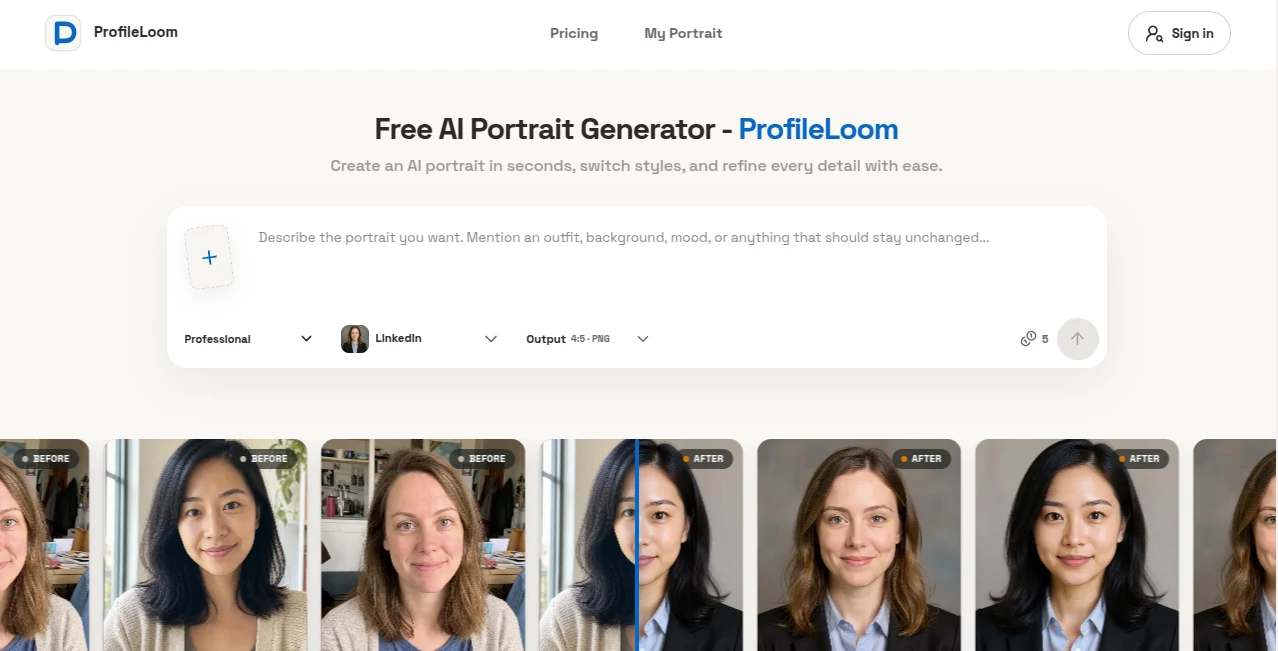
ProfileLoom is an AI portrait generator designed for people who need a polished profile photo without arranging a professional photo shoot. Upload a clear photo, select a visual direction, and generate a new portrait in seconds. The service is particularly useful for professional headshots, resumes, social profiles, creator pages, and personal branding.
What makes the experience appealing is the amount of control available after uploading a photo. Users can choose professional looks or more creative styles, adjust the image ratio, select PNG or JPG output, and continue refining the result instead of starting over every time. The service also allows several reference photos of the same person, which can be useful when a single image does not provide enough detail.
Key Features
- AI-generated professional portraits for LinkedIn, resumes, company pages, speaker profiles, and other professional uses.
- Multiple creative styles including cinematic, anime, fantasy, sketch, pixel art, pop art, medieval, 3D, tattoo, boho, and WPAP.
- Support for up to four reference images in PNG, JPG, or WebP format, with files up to 25 MB each.
- Portrait Series generation that can create 13 coordinated portraits from one source image.
- Platform Pack generation for creating portraits suited to different online platforms.
- Portrait Style Pack for exploring six different visual directions from one photo.
- Built-in tools for clothing changes, background replacement, image enhancement, pose editing, unblurring, object removal, and photo restoration.
- Square, portrait, and wide output ratios, with both PNG and JPG formats available.
User Interface
The interface is straightforward and built around the actual portrait-making process rather than a complicated collection of settings. Users upload their references, select a style, optionally describe what they want, choose the output format and ratio, and generate the image.
This simple workflow is especially useful for someone creating a profile picture for the first time. There is no need to understand complicated image-generation prompts before getting started. More experienced users can still add instructions when they want to influence the final result.
Accuracy & Performance
The service uses the uploaded photo as an identity reference, aiming to keep recognizable facial characteristics while changing the presentation, clothing, environment, pose, or artistic style. The result can vary depending on the quality of the source image and the selected style, so a clear and well-lit reference is the best starting point.
Generation is designed to be quick, with portraits appearing within seconds according to the site's workflow. Users can then download the result or continue refining it rather than accepting the first version automatically.
Capabilities
The professional portrait options cover practical situations such as LinkedIn profiles, resumes, company pages, speaker bios, and business profiles. For more creative projects, the style collection ranges from black-and-white photography to anime, fantasy, pixel art, typography, 3D, and other distinctive treatments.
The editing tools make the platform more useful than a simple portrait generator. A user can change clothing, replace a background, modify a pose, extend an image, improve photographic detail, remove unwanted objects, reduce blur, or restore an older photograph. This makes it possible to work on the same portrait through several stages instead of exporting the image to another editor for every small adjustment.
Security & Privacy
Privacy is an important consideration when uploading personal photographs. Generated portraits and uploaded images are stored in private account-based storage and are served through authenticated URLs. The service states that its storage bucket does not provide a public CDN address, while links supplied to AI processing services are temporary.
The site also explains that uploaded photos can be processed by its storage and AI service providers and may be retained for generation, creation history, and downloads. Users should therefore review the privacy policy before uploading particularly sensitive images.
Use Cases
A major use case is professional personal branding. Someone updating a LinkedIn profile or resume can start with an ordinary photograph and create a cleaner, more polished portrait without booking a studio session.
Creators can use the artistic styles for social profiles, channel artwork, personal websites, and online communities. The platform is also useful for people who want several consistent portraits instead of repeatedly generating unrelated images.
The 13-image Portrait Series is particularly interesting for personal branding. Starting with one reference photo, users can create a coordinated collection with different poses, angles, and framing while maintaining a consistent visual identity.
For example, a freelancer could use one professional portrait for a resume, another for a business profile, and several additional variations for social platforms. The same source image can also be explored through creative styles when a more distinctive profile is needed.
Pros and Cons
Pros:
- Easy workflow suitable for beginners.
- Professional and artistic portrait styles in the same platform.
- Multiple reference photos can be uploaded for better identity guidance.
- Useful editing tools are available after generation.
- Supports full-resolution downloads.
- Offers a coordinated 13-portrait series.
- Free credits are available without requiring a payment card.
- Credit packs are purchased once and do not require a subscription.
- No watermark is advertised for generated portraits.
Cons:
- The quality of identity preservation can vary depending on the source photograph and selected style.
- More advanced editing functions require credits.
- Users looking for complete manual photo editing may still need a traditional image editor.
- Highly artistic styles may produce results that are less suitable for formal professional profiles.
Pricing Plans
The platform follows a credit-based model rather than forcing users into a recurring subscription. New users receive five welcome credits, and five additional free credits can be claimed each day. Since one portrait requires five credits, users can create a portrait without paying first.
For people who need more generations, one-time credit packs are available. The listed options include 200 credits for $19.99, 400 credits for $29.99, and 1,000 credits for $49.99. The larger package offers the lowest listed cost per portrait. Credits do not expire, and the purchases do not automatically renew.
This approach is useful for occasional users because they do not have to maintain a monthly subscription simply to keep access to the service.
How to Use It
- Sign in and open the portrait generator.
- Upload a clear photo of the person you want to transform. Up to four reference images can be used.
- Select a professional portrait style or choose one of the artistic directions.
- Add optional instructions if you want to influence the appearance of the final portrait.
- Select the desired image ratio and output format.
- Generate the portrait and wait for the result to appear.
- Review the generated image carefully and use the available editing or enhancement tools if necessary.
- Download the finished portrait when it meets your requirements.
Comparison with Similar Tools
Many AI portrait services focus primarily on generating a large collection of headshots at once. This platform takes a more flexible approach by allowing users to generate an individual portrait, review it, and decide whether to create another version.
That difference can matter when you already know the kind of image you want. Instead of paying for a large batch and sorting through dozens of variations, you can test a style first and adjust the direction based on the result.
The combination of professional templates, artistic styles, portrait series, and focused editing tools also gives it a broader workflow than a basic headshot generator. It is not limited to creating one polished face image; it can be used to develop a collection of consistent portraits and refine existing photographs.
Conclusion
ProfileLoom is a practical choice for anyone who wants to turn an ordinary photograph into a more polished or creative portrait. Its strongest advantage is the balance between simplicity and control. A beginner can upload a photo and generate a professional result quickly, while more demanding users can experiment with different styles, reference images, poses, backgrounds, and enhancement tools.
The free credits make it easy to test the experience before spending money, while the one-time credit system is convenient for users who do not want another monthly subscription. Whether the goal is a better professional profile, a collection of creator images, or something more artistic, the platform offers enough flexibility to make the process worth exploring.
Frequently Asked Questions (FAQ)
What is an AI portrait generator?
An AI portrait generator uses artificial intelligence to create a new portrait based on a reference photo or other instructions. It can change elements such as clothing, lighting, background, pose, and artistic style while attempting to preserve the person's recognizable appearance.
Can I create a professional headshot?
Yes. The professional options include looks designed for LinkedIn profiles, resumes, company pages, speaker bios, and other business-oriented uses.
How many photos can I upload?
You can upload up to four reference photos of the same person. Supported formats include PNG, JPG, and WebP, with a maximum size of 25 MB per image.
Can I create different artistic portraits?
Yes. Available styles include black and white, cinematic, fantasy, anime, sketch, pixel art, pop art, medieval, faceless, typography, 3D, tattoo, boho, and WPAP.
Can I edit a generated portrait?
Yes. The available tools can change clothing or backgrounds, improve realism, extend the image, modify poses, reduce blur, remove unwanted objects, and restore older photographs.
Is it free to use?
You can start for free with five welcome credits and claim five additional credits each day. One portrait uses five credits. Additional one-time credit packs are available when you need more generations.
Is there a monthly subscription?
No. The paid credit packs are one-time purchases and do not automatically renew. Credits also do not expire.
Can I create multiple consistent portraits?
Yes. The Portrait Series feature can create 13 coordinated portraits from one source image while keeping the visual identity, look, and setting consistent across different poses and framing.
Can the portraits be used commercially?
The site's terms allow commercial profile-picture uses such as business profiles, company bios, and creator channels. Users should have the necessary rights to the photographs they upload and should review the generated image before publishing it.
What happens to uploaded photos?
Uploaded photos may be processed by storage and AI service providers and can be stored to complete generation, maintain creation history, and provide downloads. Users should review the site's privacy policy for detailed information about storage and deletion.