AI Texture
What is AI Texture?
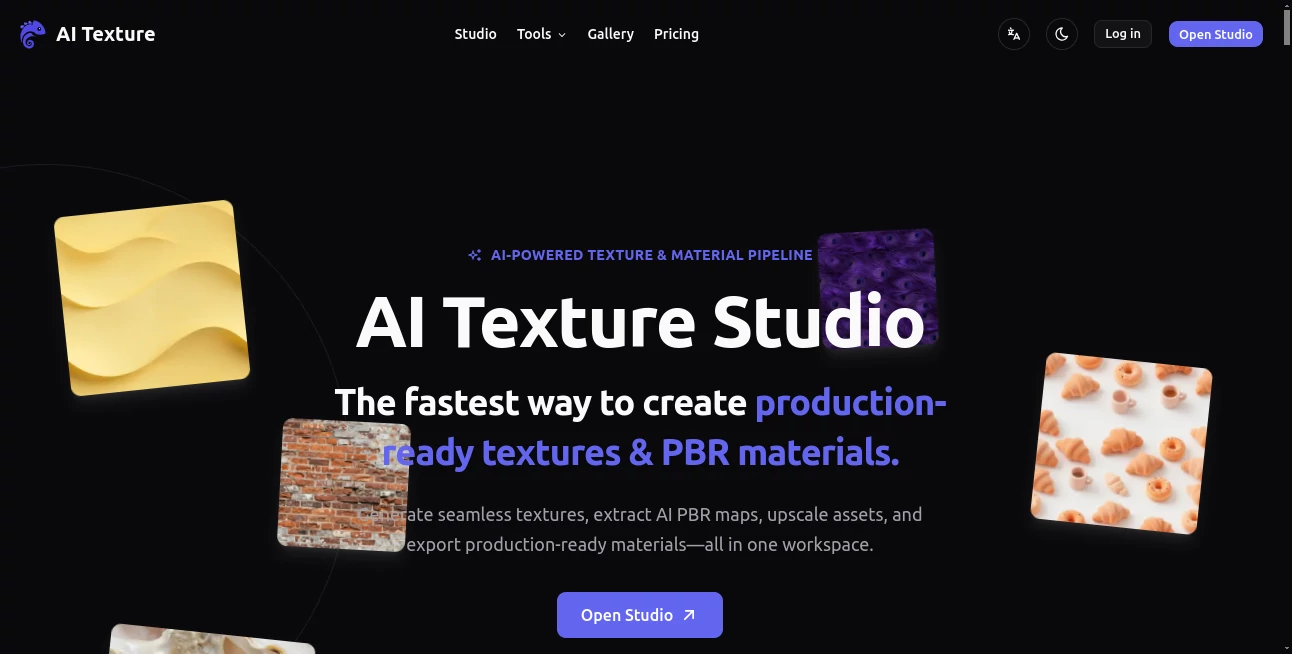
AI Texture Studio is built for a very specific problem in 3D production: creating useful, repeatable surface materials without spending hours searching through asset libraries, fixing seams, baking maps, or assembling channels by hand. It turns a written material idea, reference image, or existing texture into a production-ready surface workflow that can fit naturally into game development, architectural visualization, product design, and other 3D projects.
The main attraction is its focus on materials rather than ordinary image generation. A simple description such as weathered brick, brushed titanium, walnut wood, or moss-covered stone can become a seamless texture and, when needed, a coordinated PBR material. For artists who regularly need surface variations, this can remove a surprisingly large amount of repetitive work.
Key Features
- Generate seamless textures directly from text prompts.
- Create tileable surfaces across both X and Y axes.
- Generate coordinated PBR maps including Base Color, Normal, Roughness, Metalness, and Height.
- Turn an uploaded image or reference into PBR material maps.
- Preview materials on a 3D surface before exporting.
- Upscale textures by 2× or 4×, with higher-resolution workflows reaching 8K.
- Prepare material outputs for Unreal Engine, Unity, Blender, and Godot workflows.
- Check how textures repeat before using them in a larger scene.
User Interface
The interface is organized around a workflow rather than a collection of disconnected generators. Users can start with a prompt, an image, or an existing texture and move through the material creation process step by step. This makes the experience particularly approachable for artists who want to get from an idea to a usable material without jumping between several applications.
The material preview is another useful touch. Instead of judging a flat texture alone, users can inspect how the generated maps behave together on a 3D surface. For someone working on a game prop or an architectural scene, that extra preview can make it easier to spot issues before exporting the asset.
Accuracy & Performance
The workflow is designed to produce its first material result quickly, with the website describing typical generation as taking roughly 10 seconds. The actual time can vary depending on the selected workflow, output size, and generation settings, but the overall process is clearly designed for rapid iteration.
Consistency between material maps is one of its strongest practical points. Instead of treating color, surface depth, reflection, and material response as unrelated images, the system generates coordinated maps. That matters when a surface needs to look convincing under different lighting conditions rather than simply attractive as a standalone picture.
Capabilities
The strongest capability is prompt-to-seamless-texture generation. A surface can be described in ordinary material terms, and the resulting texture is designed to repeat without obvious seams. This is especially useful for large walls, floors, fabrics, terrain, metal panels, wood surfaces, and other assets where a small texture needs to cover a much larger area.
The PBR workflow goes further by producing five coordinated maps: Base Color, Normal, Roughness, Metalness, and Height. The platform also supports image-to-PBR workflows, allowing an existing photograph or texture reference to become the starting point for a material instead of requiring everything to begin with a text prompt.
For production work, export options are equally important. Engine-oriented workflows are available for Unreal Engine, Unity, Blender, and Godot, including structures such as ORM and Mask Map outputs. This reduces the need for manual channel packing when moving a material into the target application.
Security & Privacy
For commercial projects, licensing and asset usage are important considerations. The website states that textures and materials generated on paid tiers are intended for commercial games, films, ArchViz projects, and merchandise without royalties. As with any production asset service, users should still review the current terms and licensing conditions that apply to their particular plan before using generated materials in a commercial pipeline.
Use Cases
Game developers can use the platform to create surfaces for environments, props, buildings, weapons, terrain, and fictional worlds. A single prompt can be used as a starting point for materials such as aged stone, volcanic rock, painted metal, wood, leather, or fantasy surfaces.
Architectural visualization is another strong fit. Designers can quickly explore materials for walls, floors, facades, stone surfaces, tiles, and decorative elements without first building a large custom texture library.
Product designers can also use it during early exploration. Instead of committing to one finish, a designer can experiment with several surface directions and compare materials such as wood, metal, fabric, ceramic, or organic finishes.
It is also useful for independent artists who do not want a complicated material-authoring pipeline. For example, an indie developer building a fantasy environment could generate a tileable basalt surface, inspect its PBR response, upscale it, and prepare it for the chosen engine without creating every map manually.
Pros and Cons
Pros
- Focused specifically on textures and PBR materials.
- Seamless generation works across both horizontal and vertical axes.
- Produces coordinated PBR maps instead of only a flat image.
- Supports text prompts as well as image and texture references.
- Includes a 3D material preview.
- Supports workflows for popular 3D tools and game engines.
- Offers higher-resolution upscaling for demanding assets.
- New accounts receive 10 starter credits and can try the service without a credit card.
Cons
- Credit usage varies depending on workflow, resolution, map count, and upscale settings.
- It is specialized for materials and textures, so it is not a replacement for a general 3D modeling application.
- Artists who need highly controlled, hand-authored materials may still prefer traditional material tools for final refinement.
Pricing Plans
The service uses a credit-based approach rather than presenting every generation as an unlimited operation. The number of credits consumed depends on factors such as the selected workflow, output resolution, number of maps, and upscaling settings. New accounts receive 10 starter credits, and the exact credit cost is shown before generation.
This approach is particularly useful for people who want to test the workflow before committing to regular usage. Occasional users can experiment with a few materials, while production users can choose a workflow and resolution based on the amount of material work they actually need.
How to Use AI Texture Studio
Start by deciding whether you want to create a new surface or work from something you already have. A text prompt is suitable when you have a clear material idea, while an uploaded image or existing texture can be used when you already have a visual reference.
- Describe the desired surface using clear material details such as type, condition, pattern, age, and finish.
- Choose the texture or material workflow that matches the project.
- Generate a seamless texture when the surface needs to repeat across a larger area.
- Generate the coordinated PBR maps when the material needs realistic surface response.
- Inspect the result in the 3D material preview.
- Use the available upscale option when a larger texture is required.
- Export the material in a format suited to the target workflow or engine.
Comparison with Similar Tools
Many AI image generators are designed to create visually impressive pictures, but that is not necessarily enough for a 3D production pipeline. A material needs more than attractive color: it also needs information about surface direction, roughness, metallic response, and depth.
This is where the platform takes a more specialized approach. Instead of stopping at a generated image, it focuses on seamless surfaces and coordinated PBR information. It also combines generation, preview, upscaling, and engine-oriented export in one workflow.
That does not make traditional tools obsolete. Experienced artists may still want dedicated applications for detailed manual editing, physically precise material authoring, or advanced node-based workflows. The advantage here is speed: it provides a strong starting material without requiring every repetitive preparation step to be completed manually.
Conclusion
For 3D artists, game developers, ArchViz creators, and designers who frequently need new surface materials, AI Texture Studio offers a practical shortcut from concept to usable asset. Its biggest strength is not simply generating attractive textures; it is connecting seamless texture creation with PBR maps, material preview, upscaling, and engine-ready export.
The result is a workflow that feels much closer to material production than ordinary AI image generation. If creating tileable surfaces or preparing PBR maps has become one of the slower parts of a project, this approach can make experimentation considerably faster while still leaving room for artists to refine the final result in their preferred 3D environment.
Frequently Asked Questions (FAQ)
Can the generated textures be used commercially?
The website states that generated textures and materials on paid tiers are intended for commercial games, films, ArchViz renderings, and merchandise without royalties. Users should check the current terms for the specific plan they use.
Are the generated textures seamless?
Yes. The texture workflow is designed for tileability across both X and Y axes, making the generated surfaces suitable for repeating over larger areas.
Which PBR maps can be generated?
The material workflow provides Base Color, Normal, Roughness, Metalness, and Height maps as a coordinated set.
Can I use an existing image?
Yes. An image or photo can be uploaded as a reference for the Image to PBR workflow, allowing an existing surface reference to be converted into material maps.
Does it work with Blender and Unreal Engine?
Yes. The available workflows include Blender, Unreal Engine, Unity, and Godot, with engine-oriented material and channel-packing structures.
Does it provide an upscaling option?
Yes. The workflow includes optional 2× and 4× upscaling, with supported outputs reaching up to 8K depending on the selected workflow and credits.
Is there a free option?
New accounts receive 10 starter credits, and the website states that users can try the service without a credit card.
AI Photo & Image Generator , AI 3D Model Generator , 3D .
These classifications represent its core capabilities and areas of application. For related tools, explore the linked categories above.

AI Texture Alternatives Product

Photo Retouch
GPT Image 1.5

Nano Banana …

4o Image Gen
Action Figur…

Image3

NanoBananaPro

insMind

GPT Image 2