


















AIto3D.ai
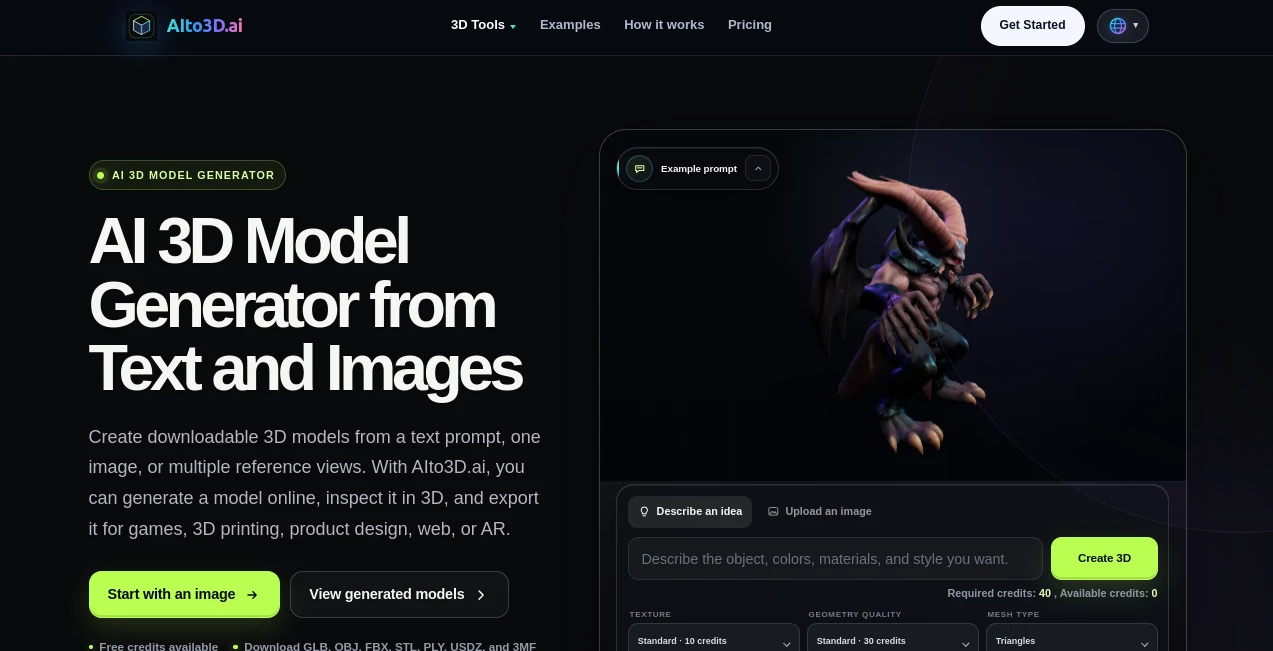
What is AIto3D.ai?
Creating high-quality 3D assets has traditionally required advanced modeling skills, specialized software, and many hours of manual work. This platform changes that experience by allowing users to transform ordinary images into detailed 3D models through an intelligent AI-powered workflow. Whether the goal is game development, product visualization, digital art, or 3D printing, the process becomes dramatically faster without sacrificing quality.
Instead of producing rough concepts that require extensive cleanup, the system focuses on generating structured meshes with realistic textures and practical geometry suitable for real production environments. Hidden surfaces are intelligently reconstructed, textures are refined for physically based rendering, and exported assets are compatible with many professional creative applications. This makes the platform attractive for beginners looking for an easy entry point as well as experienced designers who want to speed up repetitive modeling tasks.
Its streamlined workflow allows creators to spend less time building base models and more time refining ideas, experimenting with designs, and delivering finished projects.
Key Features
User Interface
The interface is designed with simplicity in mind. Uploading a reference image takes only a few clicks, and the generation process is clearly presented from start to finish. Even users without previous 3D modeling experience can quickly understand how to create, preview, and export their assets.
- Simple image upload workflow
- Beginner-friendly dashboard
- Fast generation process
- Easy export management
- Minimal learning curve
Accuracy & Performance
The AI emphasizes generating clean geometry with sharp details instead of producing low-quality meshes. It predicts hidden surfaces that are not visible in the source image and creates models with balanced topology suitable for editing, rendering, or printing. The generated textures are optimized by reducing unwanted lighting information while preserving realistic material appearance.
- Detailed geometry reconstruction
- Hidden surface completion
- Sharp mesh generation
- High-quality texture creation
- Optimized for production workflows
Capabilities
The platform supports a wide range of creative applications. Models can be exported in popular industry formats, making them compatible with major 3D software, game engines, and printing workflows. It also includes AI-assisted texture generation, relief creation, and multi-color model segmentation for advanced production needs.
- Image-to-3D conversion
- AI texture generation
- Relief model creation
- Multi-color model segmentation
- Multiple export formats including GLB, OBJ, FBX, STL, and USDZ
Security & Privacy
Generated projects are designed to remain private by default, making the platform suitable for commercial work and confidential product development. Teams can manage creative assets without exposing unfinished concepts publicly, helping maintain greater control over intellectual property.
- Private project management
- Commercial-friendly workflow
- Secure asset handling
- Controlled collaboration options
Use Cases
- Creating assets for video games
- Rapid concept visualization
- Preparing models for 3D printing
- Product prototyping
- Character and figurine design
- AR and VR experiences
- Educational demonstrations
- Digital art production
- Marketing visualizations
- Creative design workflows
Pros and Cons
Pros
- Very easy for beginners to use
- High-quality production-ready meshes
- Excellent support for image-to-3D generation
- Realistic texture creation
- Supports many professional export formats
- Useful for both creative and commercial projects
Cons
- Complex projects may still benefit from manual editing after generation.
- Final print optimization may require additional adjustments depending on the project.
- Advanced professional workflows may require premium features.
Pricing Plans
The service offers a free option for users who want to explore its core capabilities before upgrading. Premium plans unlock higher-quality generation, additional processing power, and expanded features for professional creators and commercial workflows.
How to Use AIto3D
- Upload a photo or reference image.
- Allow the AI to generate the 3D model.
- Preview the generated asset.
- Refine textures or other available settings if needed.
- Export the model in the desired format.
- Import it into your preferred 3D software, game engine, or printing workflow.
Comparison with Similar Tools
Many AI-powered 3D generators focus primarily on quickly creating preview meshes. This platform stands out by placing greater emphasis on production-quality geometry, hidden surface reconstruction, cleaner topology, and practical export options. The inclusion of AI texture generation, private project management, multiple export formats, and workflows designed for printing, game development, and professional asset creation makes it particularly attractive for creators who need more than simple concept models.
Conclusion
For creators looking to reduce the time spent modeling while maintaining professional-quality output, this solution offers an impressive balance of speed, usability, and practical functionality. It transforms ordinary reference images into detailed 3D assets that can move directly into real production pipelines. Whether building game environments, preparing printable models, creating product prototypes, or experimenting with digital art, it provides an efficient workflow that saves countless hours while producing results that are ready for further creative refinement.
Frequently Asked Questions (FAQ)
Can beginners use this platform?
Yes. The workflow is designed for users with little or no previous 3D modeling experience.
Which export formats are supported?
Models can be exported in common formats including GLB, OBJ, FBX, STL, and USDZ.
Can the generated models be used for 3D printing?
Yes. The generated assets are suitable for printing workflows, although final print preparation may require small adjustments depending on the project.
Does it support commercial work?
Yes. Private project management and production-oriented workflows make it suitable for commercial asset creation.
Who benefits most from this platform?
Game developers, designers, artists, product creators, educators, engineers, and anyone who needs high-quality 3D assets with significantly less manual effort.
Design & Art , AI 3D Model Generator , AI Text to 3D , AI Image to 3D Model .
These classifications represent its core capabilities and areas of application. For related tools, explore the linked categories above.

AIto3D.ai Alternatives Product

Image to Thr…

3D AI Maker

SAM 3D

ImageToSTL

Alloy

SAM 3D

Tripo 3D

The CAD Hub

Seed3D 2.0
