


















AI Upscaler
What is AI Upscaler?
Bringing new life to low-resolution images no longer requires expensive software or advanced editing skills. This online AI-powered image enhancement platform makes it remarkably simple to transform blurry, pixelated, or aging photos into crisp, high-quality visuals with only a few clicks. Whether you're preparing images for social media, e-commerce listings, marketing campaigns, presentations, or large-format printing, the platform delivers noticeably sharper results while preserving natural details.
Designed with both beginners and professionals in mind, the service offers multiple enhancement modes for different scenarios, including image upscaling, face enhancement, old photo restoration, text enhancement, and blur reduction. Users can enlarge images up to 4× while maintaining impressive clarity, making it an excellent solution for photographers, designers, marketers, online sellers, and content creators who frequently work with visual assets.
Another standout advantage is the streamlined workflow. Images can be uploaded directly from a browser without installing any software, and the enhancement process typically finishes within seconds. The before-and-after comparison slider also makes it easy to evaluate improvements before downloading the final result.
Key Features
User Interface
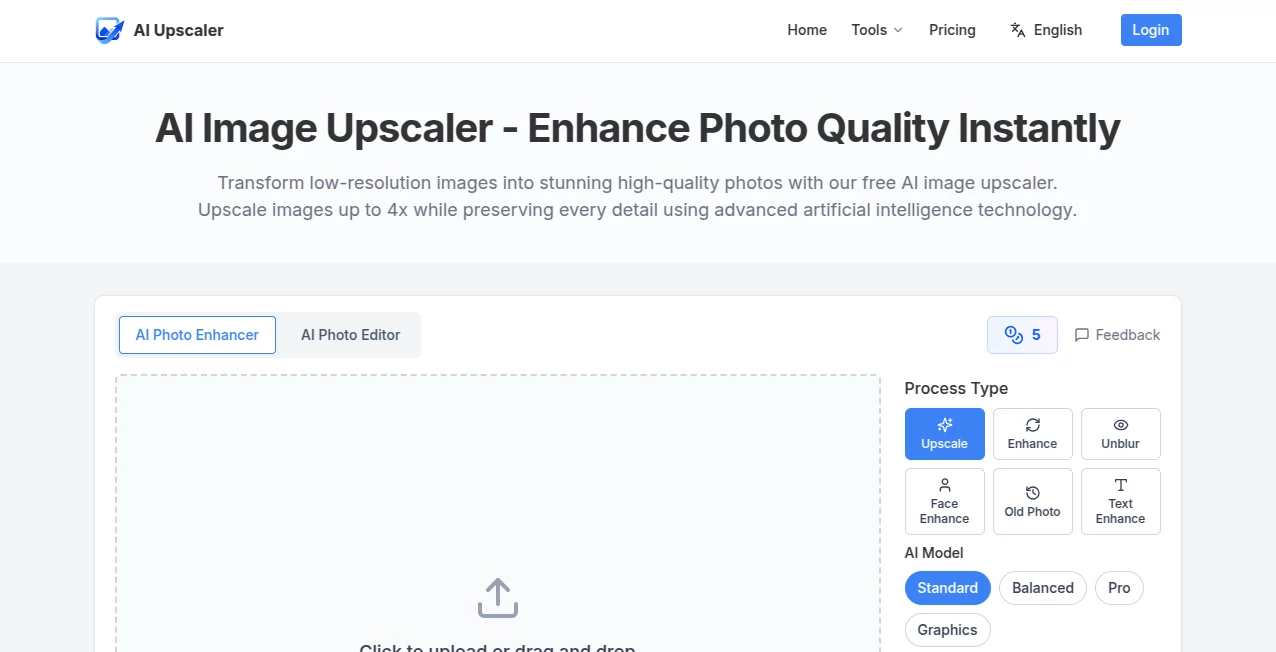
The interface is refreshingly simple. Uploading an image takes only a moment through drag-and-drop or file selection, while supported formats include JPG, PNG, and WebP. Users can choose between several AI models, select different enhancement modes, enable optional face enhancement, and pick an upscaling factor before generating the final image. The clean layout keeps every important option within easy reach, making the entire editing experience intuitive.
Accuracy & Performance
The enhancement engine preserves textures, edges, and fine details significantly better than traditional resizing methods. Portraits retain realistic facial features, product images appear sharper, printed materials gain additional clarity, and vintage photographs recover much of their original detail. Processing is fast enough for everyday workflows while maintaining consistent visual quality across different image types.
Capabilities
- AI image upscaling up to 4× resolution.
- Face enhancement for portraits and selfies.
- Blur reduction for soft or unfocused images.
- Old photo restoration.
- Text enhancement for screenshots and scanned documents.
- Multiple AI processing models for different image styles.
- Interactive before-and-after comparison.
- High-resolution downloads.
Security & Privacy
Privacy is treated seriously throughout the image processing workflow. Uploaded files are transmitted using encrypted connections, images are automatically deleted after processing, and uploaded content is not used to train AI models. The platform also states compliance with modern privacy standards, providing additional confidence for both personal and commercial users.
Use Cases
- Improving product images for e-commerce stores.
- Enhancing photographs for websites and blogs.
- Preparing high-resolution marketing materials.
- Restoring treasured family photographs.
- Sharpening social media content before publishing.
- Improving screenshots and presentation graphics.
- Creating print-ready posters, brochures, and banners.
- Enhancing digital artwork and illustrations.
Pros and Cons
Pros
- Simple browser-based workflow.
- No software installation required.
- Multiple AI enhancement modes.
- Fast processing speed.
- Supports common image formats.
- Secure image handling with automatic deletion.
- Free credits available for new users.
Cons
- Higher usage requires purchasing credits.
- Maximum upload size is limited.
- Very low-quality images still have practical enhancement limits.
Pricing Plans
The platform follows a credit-based pricing model instead of recurring subscriptions, giving users flexibility to pay only when needed. New users can try the service with free credits before upgrading. Paid plans include Starter, Pro, and Business credit packages, with larger bundles offering better value per credit. Credits never expire, making the pricing especially attractive for occasional users as well as businesses with ongoing image enhancement needs.
How to Use AI Image Upscaler
- Upload a JPG, PNG, or WebP image.
- Select the desired enhancement mode.
- Choose an AI model and scaling factor.
- Enable optional face enhancement if appropriate.
- Start the enhancement process.
- Compare the original and enhanced versions.
- Download the high-resolution result.
Comparison with Similar Tools
Compared with many online image enhancement services, this platform combines several useful AI-powered editing features within a single workflow instead of focusing solely on resolution enlargement. The availability of dedicated processing modes, flexible AI models, privacy-focused handling of uploaded files, and one-time credit purchases make it particularly appealing for creators who need occasional yet professional-quality enhancements. Its fast browser-based experience also removes the learning curve associated with traditional desktop photo editing software.
Conclusion
For anyone looking to improve image quality without spending hours editing photographs manually, this solution offers an impressive balance of speed, simplicity, and visual quality. The combination of intelligent upscaling, restoration, sharpening, and enhancement tools makes it suitable for creators, photographers, marketers, online retailers, and businesses alike. Whether preparing professional product images or preserving old family memories, the platform delivers reliable results through an intuitive workflow that is accessible to users of every experience level.
Frequently Asked Questions (FAQ)
Is the service free to use?
Yes. New users receive free credits to test the platform before purchasing additional credits.
Which image formats are supported?
The platform supports JPG, PNG, and WebP image formats.
Can images be enlarged without losing quality?
The AI enhancement engine is designed to preserve details while increasing image resolution up to 4×.
Are uploaded images stored permanently?
No. Uploaded images are automatically removed after processing, helping protect user privacy.
Who benefits most from this platform?
Photographers, designers, online sellers, marketers, content creators, and anyone needing higher-quality images can benefit from its AI-powered enhancement features.
AI Photo & Image Generator , Photo & Image Editor , AI Photo Enhancer , AI Image to Image .
These classifications represent its core capabilities and areas of application. For related tools, explore the linked categories above.

AI Upscaler Alternatives Product

StyleCut

WatermarkZero

ColorChanger

Fahhh Meme

Caricature A…

Artguru

Picavo

ai banana

remover.work
