


















AnimeGen AI
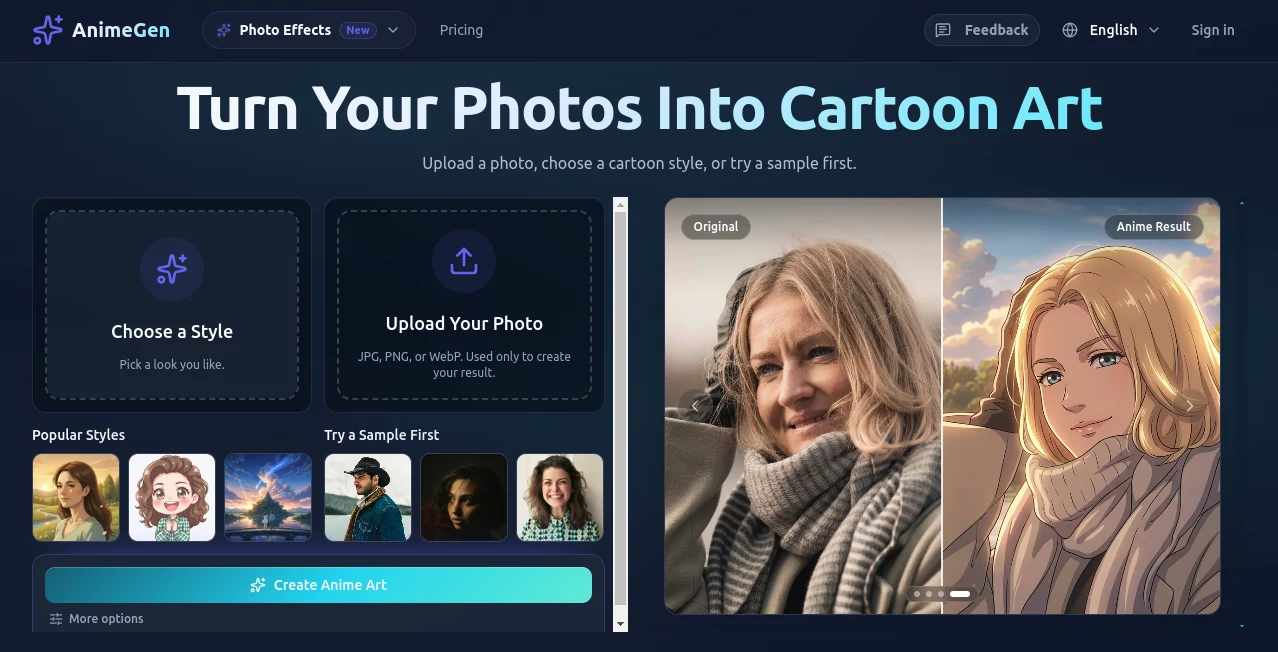
What is AnimeGen AI?
There’s something special about seeing your imagination come to life in that classic anime style — the expressive eyes, flowing hair, dramatic lighting, and vibrant colors that make the scene feel alive. This tool makes that happen almost instantly. You type a description, and it delivers high-quality anime artwork that actually feels like it came from a skilled artist’s hand. I’ve watched friends go from “I wish I could draw like that” to sharing professional-looking character designs and scenes they’re genuinely proud of. It’s the kind of tool that turns casual ideas into something you want to show everyone.
Introduction
Anime art has a unique magic, but creating it traditionally takes years of practice and countless hours. AnimeGen removes those barriers while keeping the soul of the style intact. Whether you’re a complete beginner, a hobbyist, or someone working on a story or game, it lets you generate consistent, beautiful anime illustrations from simple text prompts. The results have that signature anime aesthetic — clean lines, rich colors, and emotional depth — without the generic plastic look you sometimes see in other generators. It’s fast, approachable, and surprisingly good at understanding exactly what you want.
Key Features
User Interface
The interface is clean and welcoming. You’re greeted with a big prompt box and a few helpful examples to get you started. Style selectors and quality options are easy to find but don’t overwhelm the screen. Generation is quick, and you can see multiple variations side by side so you can pick the best one or refine from there. It feels designed for flow — you spend your time being creative instead of fighting the tool.
Accuracy & Performance
It understands anime conventions remarkably well — character proportions, dynamic poses, lighting, and mood all come through naturally. Prompt adherence is strong, meaning what you describe usually appears as you imagined it. Generation speed is impressive, often delivering several high-quality options in under 30 seconds. The consistency across multiple generations of the same character is better than most tools I’ve tried, which makes it great for building visual stories or series.
Capabilities
You can create single characters, full scenes, concept art, and even multi-panel sequences. It supports detailed styles (studio Ghibli-inspired, modern shonen, soft shoujo, cyberpunk, etc.) and lets you guide the output with references or specific artistic directions. The tool handles both safe and more artistic expressions well, and the output resolution is high enough for social media, prints, or even using as reference for further work.
Security & Privacy
Your prompts and generated images stay private by default. There’s no unnecessary data collection or forced account linking for basic use. For creators working on personal projects or original characters, that respect for privacy is genuinely appreciated.
Use Cases
A writer generates consistent character designs for their web novel so readers can visualize the cast. An indie game developer quickly prototypes character sprites and concept art without hiring an artist right away. A cosplayer creates reference sheets for their next costume. Fans make personalized artwork of their favorite characters or original OCs to share with friends. It’s flexible enough for serious creative work and fun enough for casual daily use.
Pros and Cons
Pros:
- Strong understanding of anime aesthetics and character consistency.
- Fast generation with multiple quality variations.
- Intuitive interface that doesn’t intimidate beginners.
- Great value for the quality you receive.
- Helpful for both one-off fun and ongoing creative projects.
Cons:
- Very complex or extremely specific scenes can sometimes need prompt refinement.
- Free daily limits exist (though they’re reasonable for most users).
Pricing Plans
The free tier gives you a good number of generations per day so you can test the quality and have fun without spending anything. Paid plans unlock significantly higher limits, faster generation, priority access during busy times, and more advanced features. The pricing feels fair — especially when you consider how much time and money it saves compared to commissioning artists or learning to draw from scratch.
How to Use AnimeGen
Go to the generator page, type a detailed description of what you want (include character appearance, clothing, pose, background, art style, and mood for best results). Choose your preferred quality level and aspect ratio. Hit generate and review the options. Pick your favorite, download it, or use it as a base for further refinements. With a bit of practice writing good prompts, you’ll be creating impressive anime art consistently in no time.
Comparison with Similar Tools
Many AI image generators can do anime-style art, but few match the combination of speed, consistency, and genuine anime aesthetic that this one delivers. Where others produce generic or overly Westernized results, AnimeGen stays true to the style while still giving you creative freedom. It strikes an excellent balance between ease of use and output quality that makes it stand out in a crowded field.
Conclusion
AnimeGen brings the joy of anime creation to everyone, not just those with years of drawing experience. It respects the style, delivers fast and beautiful results, and makes the whole process feel exciting rather than technical. Whether you’re building a visual novel, creating fan art, designing characters, or just having fun, it’s a tool that consistently delivers that “wow” moment when you see your idea come to life. If you’ve ever wanted to create anime art, this is one of the most enjoyable and effective ways to do it right now.
Frequently Asked Questions (FAQ)
How detailed should my prompt be?
The more specific you are about character features, clothing, lighting, and mood, the better the results — but it also works well with shorter prompts.
Can I generate consistent characters across multiple images?
Yes — using the same detailed description or uploading a reference image helps maintain character consistency.
Is there a free way to try it?
Yes, the free tier gives you daily generations so you can test the quality yourself.
What styles does it support?
It excels at a wide range of anime styles — from classic to modern, shonen, shoujo, studio Ghibli-inspired, and more.
Are the images commercially usable?
Check the current terms on paid plans for commercial rights, as they are generally more permissive.
AI Text to Image , AI Photo & Image Generator , AI Art Generator , AI Anime Art .
These classifications represent its core capabilities and areas of application. For related tools, explore the linked categories above.

AnimeGen AI Alternatives Product

Imgezy

GPT Image 1.5
Wan 2.7 Image

Uni-1

GEMPIX2

SellerPic

ChatGPT Imag…
UNi-1 AI

AI Picture G…
