AnimePhotoGen
What is AnimePhotoGen?
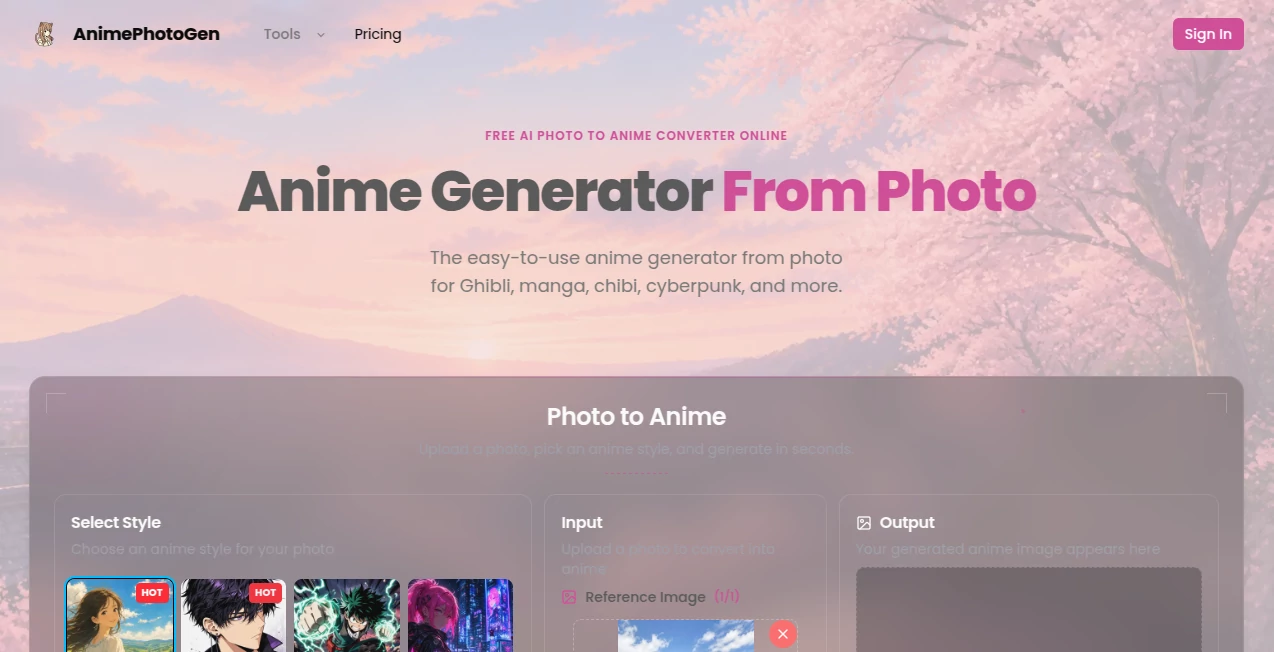
Turning an ordinary photo into an anime-style portrait can sound like something that would require editing skills, complicated prompts, or expensive software. AnimePhotoGen takes a much simpler approach: upload a photo, choose a visual style, and let the AI redraw it as anime artwork.
The service is built around quick photo-to-anime creation, making it particularly appealing to people who want a fresh profile picture, a creative portrait, a personalized gift, or simply a fun way to experiment with their own photos. It works directly in a browser, so there is no application to install before getting started.
One of the most useful aspects is the choice of visual directions. Users can explore manga, Ghibli-inspired, shonen, cyberpunk, classic 90s anime, chibi, watercolor, pixel, and neon-glow aesthetics. The site also provides additional preset styles inspired by recognizable anime aesthetics, giving users plenty of room to experiment.
Key Features
The platform keeps the workflow focused on image creation rather than making users learn an advanced editing interface. A photo is supplied as the reference, a style is selected, and the generation process does the rest.
- Photo-to-anime image generation
- Multiple anime-inspired visual styles
- Optional text prompts for additional customization
- Several aspect ratios, including 1:1, 4:3, 3:4, 16:9, and 9:16
- High-resolution generated images
- Free daily credits for trying the service
- Browser-based access on desktop and mobile devices
- Support for portraits, selfies, couples, and pet photos
User Interface
The interface is designed around a straightforward generation flow. Users first upload a reference image, then select a style and optionally provide a short instruction before generating the result. The available aspect-ratio controls are useful when the final image is intended for a particular social platform or screen format.
There is also an art gallery showing different examples, which makes choosing a style easier. Instead of trying to imagine what a particular preset might produce, users can look at examples and decide which direction fits their photo.
Accuracy & Performance
The service is designed to redraw the supplied image rather than simply place an anime-colored filter over the original. According to the website, its AI analyzes the reference photo and recreates it according to the selected artistic direction.
Generation is intended to happen within seconds, keeping the experience suitable for quick experimentation. Clear portraits generally provide stronger source material, while the optional prompt field gives users another way to guide details such as mood, clothing, or background.
Results can also be generated in different proportions, which is particularly helpful when the same creative idea needs to work as a square profile image, a portrait composition, or a landscape post.
Capabilities
The main strength is the combination of a reference photo with a broad range of anime-inspired aesthetics. A single selfie can be explored through a softer watercolor look, a colorful chibi treatment, a classic anime appearance, a pixel-inspired style, or a more futuristic cyberpunk direction.
The tool is not limited to conventional portraits either. The website specifically highlights couples and pets as suitable subjects, opening up more practical uses beyond profile pictures. A pet photo, for example, can become a playful anime portrait that works well as a personal keepsake or printable artwork.
For users who want more control, text prompts can be added instead of relying entirely on the selected preset. This makes the generator useful for people who want to make small creative adjustments without dealing with a traditional image editor.
Security & Privacy
The service has a published privacy policy explaining that it may collect account information, usage details, uploaded photos and generation inputs, device information, cookies, and payment or billing information where applicable. The stated purposes include operating the generation service, improving the experience, supporting accounts, and processing payments.
The privacy policy also states that personal information is not sold or traded to outside parties, while noting that trusted third-party partners may process information when necessary to operate the service. The site says it uses security measures such as encryption and access controls, although it also acknowledges that no online transmission or electronic storage method can be guaranteed to be completely secure.
Use Cases
There are plenty of situations where a photo-to-anime generator can be more useful than it first appears.
- Social media profiles: Create an anime-style profile picture for platforms such as Instagram, TikTok, Discord, or other social accounts.
- Couple portraits: Turn a favorite photo of two people into a personalized anime artwork for anniversaries, trips, or shared posts.
- Pet portraits: Transform photos of dogs, cats, and other pets into colorful anime-style illustrations.
- Cosplay planning: Experiment with manga, shonen, or cyberpunk-inspired looks before committing to costumes or accessories.
- Personal gifts: Create a customized portrait that can be shared digitally or turned into a personal print.
- Creative experimentation: Test several visual directions from the same reference image and compare the results.
Pros and Cons
Pros
- Very simple three-step workflow
- Free daily credits make it easy to try before paying
- Wide selection of anime-inspired styles
- Optional prompts provide extra creative control
- Multiple aspect ratios are available
- Works directly from a web browser
- Useful for portraits, couples, and pets
- High-resolution output is available
Cons
- The number of free generations is limited by daily credits
- An account is needed for certain features such as original downloads and additional purchased credits
- Results can vary depending on the quality and composition of the source photo
- Users looking for detailed professional image editing controls may find the focused interface limiting
Pricing Plans
The service offers a free way to start through daily credits. The website currently displays 20 daily credits for users, allowing people to experiment with the generator without immediately committing to a paid option.
Guests and signed-in users can access free daily generations, while creating an account becomes useful when users want original downloads, additional generations, or purchased credits. The public pages reviewed do not provide a fixed list of paid plan prices, so it is better to check the current generation and credit options directly before making a purchase.
The terms of service state that purchases are generally final and non-refundable unless a refund is required by applicable law, and that prices can change with notice.
How to Use It
Getting started requires only a few steps.
- Upload the photo you want to transform. Clear portraits, selfies, couple photos, and pet images are suitable starting points.
- Choose the anime style that best matches the result you have in mind.
- Select an aspect ratio if you need a particular composition, such as a square or vertical image.
- Add an optional text prompt if you want to guide aspects of the final artwork.
- Click Generate and wait for the AI to create the anime version.
- Preview the result and generate another version or download it when the desired result is ready.
A useful approach is to begin with a clear, well-lit photo and try several styles before adding detailed instructions. This makes it easier to see what each preset does and helps avoid unnecessary trial and error.
Comparison with Similar Tools
Many AI image generators are built around text prompts, which can be powerful but sometimes require users to understand how to describe a desired image. This service takes a more image-first approach: the original photo provides the foundation, while the selected style determines the artistic direction.
That makes it particularly attractive for someone who already has a photo and wants to transform that specific image rather than create an entirely new character from scratch. The combination of preset styles, optional prompts, and aspect-ratio controls also gives it more flexibility than a basic one-click photo filter.
Compared with traditional photo-editing software, the advantage is convenience. There is no need to manually redraw facial features, adjust outlines, or build an anime effect layer by layer. The trade-off is that users have less pixel-level control over the final artwork.
Conclusion
AnimePhotoGen is a focused solution for anyone who wants to turn existing photos into anime-style artwork without learning complicated image-editing techniques. Its biggest appeal is the uncomplicated workflow: choose a photo, select a style, and generate.
The range of visual presets gives users plenty of opportunities to experiment, while optional prompts and aspect-ratio controls add useful flexibility when a simple preset is not quite enough. Free daily credits also make the service approachable for casual users who simply want to see what their photos might look like in different anime styles.
For social avatars, couple artwork, pet portraits, creative gifts, or casual anime experimentation, it offers a practical and enjoyable way to transform familiar photos into something noticeably different.
Frequently Asked Questions (FAQ)
Is it free to use?
Yes. The website provides free daily credits, with 20 daily credits displayed for users. Additional credits can be available for users who need more generations.
Do I need an account?
You can start with free daily generations without creating an account. An account is useful for features such as original downloads, purchased credits, and higher-volume use.
What photo should I use?
Most photos can be used, but clear images generally produce better results. Selfies, portraits, couple photos, and pet pictures are specifically suitable for the service.
Can I choose an anime style?
Yes. The generator offers a range of anime-inspired presets, including manga, Ghibli-inspired, shonen, cyberpunk, classic 90s anime, chibi, watercolor, pixel, and neon-glow styles, along with additional themed presets.
Can I add my own instructions?
Yes. An optional text prompt can be added when you want to influence elements such as the mood, outfit, or background rather than relying only on the selected preset.
Can I change the image ratio?
Yes. Available options include Auto, 1:1, 4:3, 3:4, 16:9, and 9:16, making it easier to prepare artwork for different uses.
Does it work on mobile?
Yes. The generator runs in a web browser and can be used from both mobile devices and desktop computers without installing a separate application.
Is the result just an anime filter?
The service describes its process as an AI redraw rather than a simple color overlay. The system analyzes the reference image and recreates it according to the selected anime-inspired style.
Can I use photos of pets?
Yes. The website specifically highlights dogs and cats as suitable subjects, making the generator useful for creating personalized anime-style pet portraits.
Are the generated images high resolution?
The service states that it provides high-resolution outputs suitable for social media, avatars, and personal printing.
AI Photo & Image Generator , AI Anime & Cartoon Generator .
These classifications represent its core capabilities and areas of application. For related tools, explore the linked categories above.
AnimePhotoGen details
Website unavailable — View Alternatives
Pricing
- Freemium
Apps
- Web App
Categories

AnimePhotoGen Alternatives Product
AI Face Anal…

Klyra AI

Nano Banana 2
img2img.net
GPT Image 2
image2ai.art

Banana Promp…

Nano Banana 2

Nano Banana …