
Omni One
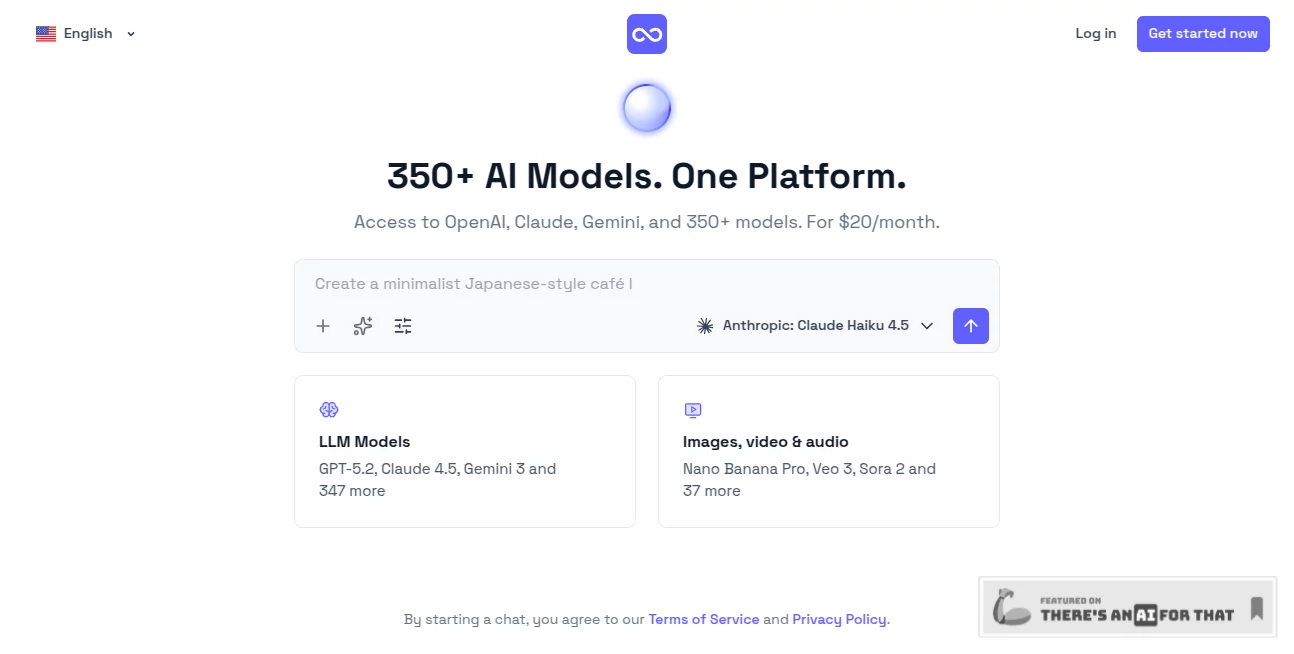
What is Omni One?
Managing multiple AI subscriptions can quickly become expensive, confusing, and inefficient. Many professionals switch between different platforms every day just to access the right model for a specific task. This platform solves that problem by bringing hundreds of leading AI models into a single workspace, creating a smoother and more productive experience.
Whether you are writing content, analyzing data, generating code, researching information, or organizing projects, everything happens in one place. Instead of constantly opening separate tools and managing different accounts, users gain access to a unified environment built for speed, flexibility, and convenience.
One of the most impressive aspects is how naturally the platform adapts to different workflows. A marketer can move from content generation to research in seconds, while a developer can switch from reasoning models to coding assistants without interrupting the conversation. It feels less like using software and more like having a complete AI workspace available whenever needed.
Key Features
User Interface
The dashboard is clean, modern, and designed to reduce clutter. Conversations, projects, files, and model selection are organized in a way that feels intuitive even for first-time users.
Users can create separate projects, pin important conversations, and keep different workflows organized without losing context. This project-based structure is especially useful for freelancers, agencies, and remote teams handling multiple clients simultaneously.
Accuracy & Performance
Instead of relying on a single AI engine, the platform provides access to hundreds of models from major providers. This allows users to choose the most suitable model for each task.
For example, one model may excel at logical reasoning, another may perform better in long-form writing, while a different option may be stronger in research or coding. The ability to switch models mid-conversation creates a workflow that feels remarkably efficient.
The automatic model selection feature also helps users get better results without spending time comparing technical specifications.
Capabilities
The platform includes a wide range of built-in capabilities that extend beyond simple chat interactions.
- Access to more than 300 AI models
- Automatic model selection based on task type
- Image understanding and visual analysis
- Document processing and file uploads
- Code generation and programming assistance
- Web search integration
- Project organization tools
- Prompt enhancement technology
- Conversation management across multiple projects
A particularly useful feature is prompt enhancement. Even vague or casual requests are automatically improved before being processed, helping users receive more complete and useful outputs.
Security & Privacy
Privacy remains a major concern for anyone using AI in business environments. The platform addresses this by emphasizing encrypted conversations and secure data handling practices.
User data is kept private, conversations are protected, and information is not used to train external models. For professionals handling sensitive documents or client information, this level of privacy provides valuable peace of mind.
Use Cases
The platform is flexible enough to support a wide range of industries and workflows.
- Content creation and copywriting
- Software development and debugging
- Market research and competitive analysis
- Academic research and knowledge management
- Project planning and documentation
- Email drafting and communication
- Customer support assistance
- Data interpretation and reporting
- Team collaboration and workflow management
A startup founder could use one workspace for investor communications, product planning, and market analysis while switching between specialized models whenever necessary. That level of flexibility is difficult to find in traditional AI subscriptions.
Pros and Cons
Pros
- Access to hundreds of leading AI models from one account
- Reduces the need for multiple subscriptions
- Easy project organization and conversation management
- Model switching without losing conversation context
- Built-in prompt optimization
- Supports files, images, and documents
- Strong focus on privacy and security
Cons
- Advanced users may initially spend time exploring model options
- Some export features are still under development
- Higher usage plans may be necessary for heavy enterprise workloads
Pricing Plans
The platform offers multiple pricing options designed for different user types.
- Free Plan: Includes limited usage and access to selected models for evaluation purposes.
- Pro Plan: Provides access to more than 300 models, unlimited projects, and standard usage limits.
- Max Plan: Designed for teams with higher limits, collaboration features, shared workspaces, and team management capabilities.
The pricing structure is particularly attractive for users who would otherwise pay for several separate AI subscriptions every month.
How to Use Omni One
Getting started is straightforward.
- Create an account and access the workspace.
- Select a model manually or allow automatic model selection.
- Create projects to organize conversations and files.
- Upload documents, images, or audio files when needed.
- Ask questions, generate content, analyze data, or write code.
- Switch between models without losing conversation history.
- Monitor usage through the built-in dashboard.
Most users can begin working productively within minutes, even without prior experience using advanced AI tools.
Comparison with Similar Tools
Many AI platforms focus on a single provider, forcing users to choose between different ecosystems. This platform takes a different approach by combining major AI providers into one environment.
While standalone subscriptions limit users to one family of models, this solution offers flexibility across writing, coding, research, and analysis tasks. The ability to compare outputs, switch models instantly, and manage projects from a single dashboard creates a workflow that feels significantly more streamlined.
For users who regularly alternate between multiple AI services, the convenience alone can justify the switch.
Conclusion
This platform delivers a practical solution for one of the biggest challenges in the AI space: fragmentation. Instead of maintaining separate subscriptions, learning different interfaces, and managing disconnected workflows, users gain access to a centralized environment that combines leading AI technologies under one roof.
The combination of model variety, project organization, prompt enhancement, and collaboration features makes it appealing for creators, developers, marketers, researchers, and teams alike. It is not simply another AI chatbot; it functions as a complete productivity hub designed for modern AI-powered work.
Frequently Asked Questions (FAQ)
Can users access multiple AI providers from one account?
Yes. The platform brings together hundreds of AI models from leading providers within a single workspace.
Can conversations continue after switching models?
Yes. Users can change models during a conversation while maintaining context and chat history.
Does it support file uploads?
Yes. Documents, images, and audio files can be uploaded and processed depending on model compatibility.
Is there a free version available?
Yes. A free plan is available for users who want to evaluate the platform before upgrading.
Is user data protected?
The platform emphasizes encrypted conversations, private data handling, and user-controlled information management.
AI Productivity Tools , Large Language Models (LLMs) , AI Team Collaboration , AI Chatbot .
These classifications represent its core capabilities and areas of application. For related tools, explore the linked categories above.

Omni One Alternatives Product

Lensgo

Speechara

Play Queens …

ModelsLab

Odysseus AI

Standard Com…

GameClick.io

Sourcetable

Khuram Youraj